

Stay ahead of complex compliance challenges with Dynatrace Compliance Assistant. Powered by observability and security insights, Compliance Assistant helps organizations track, manage, and automate compliance across their IT and business landscape. It uniquely maps compliance-relevant IT assets to critical business processes for cross-functional collaboration. Proactively mitigate risks with real-time visibility into compliance health, automate incident classification, and simplify regulatory reporting—all in one unified app.
Compliance is only getting more complex, as organizations seek to proactively manage compliance risks and maintain trust with stakeholders. Traditional compliance tools often operate in silos, leaving critical compliance risks undetected. This fragmented approach makes it difficult to connect compliance risks to business impact, collaborate across teams, or respond quickly to incidents. Complex alignment between IT, legal, and business teams often results in inefficiencies, miscommunication, and critical compliance gaps. Furthermore, manual processes for managing compliance tasks are not only time-consuming but also insufficient in keeping pace with growing regulatory pressures.
From static checklists to continuous framework-specific visibility
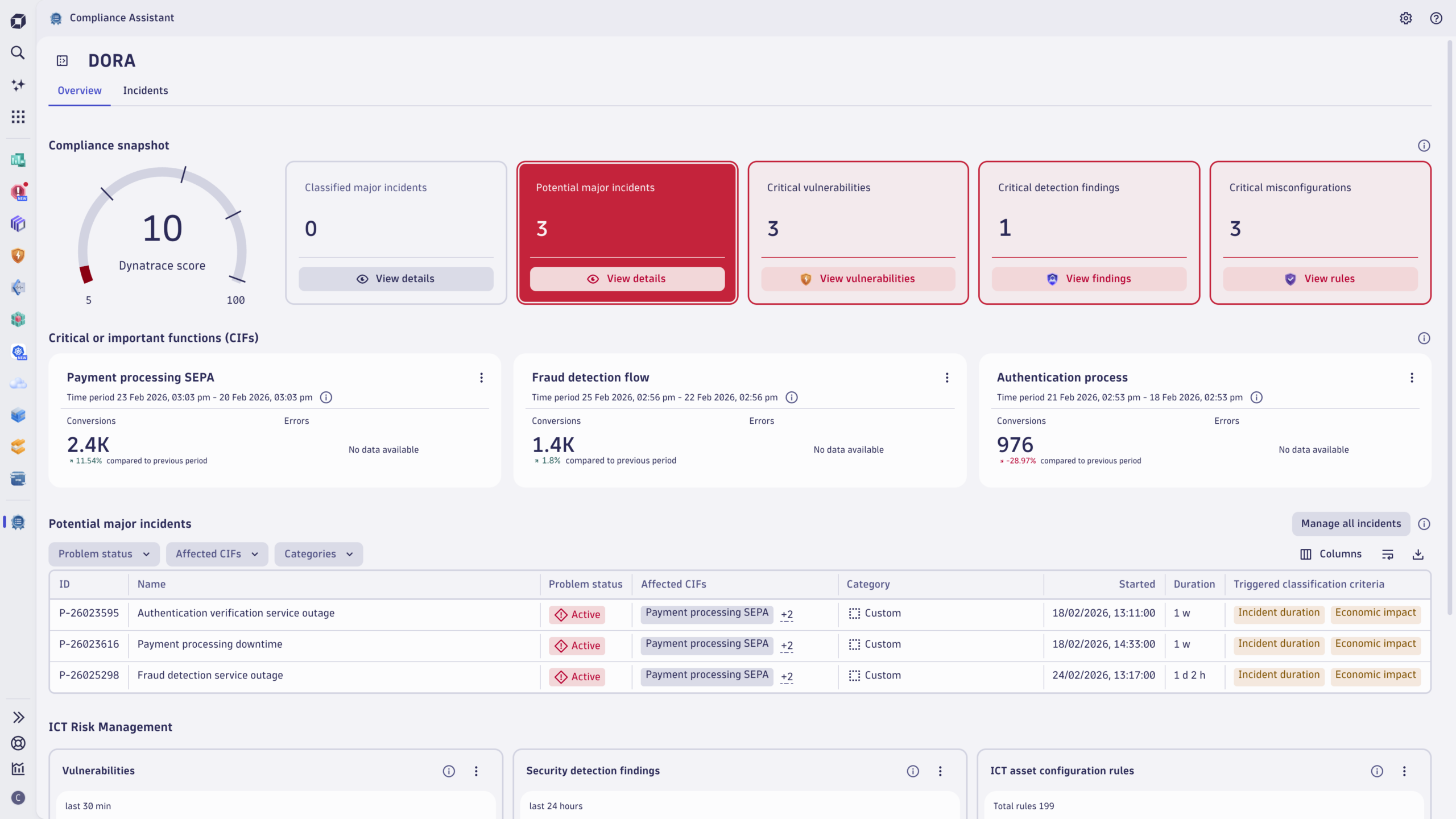
With Compliance Assistant, Dynatrace provides compliance-critical observability and security insights streamlined into a single pane of glass. You can now track compliance health across IT and business landscapes with ease, with real-time insights mapped directly to a compliance framework.
Compliance Assistant provides an out-of-the-box, tiered score that reflects the current compliance risk posture across Information and Communication Technology (ICT) incidents, vulnerabilities, security detection findings, and misconfigurations. Designed to meet the demands of frameworks like EU DORA (Digital Operational Resilience Act), this score provides a quantifiable snapshot of ICT risks at a glance, enabling cross-functional collaboration and empowering teams to stay ahead of risks and maintain confidence in their compliance efforts.
Map IT assets to end-to-end compliance-critical business processes
Under EU DORA, organizations are required to identify and monitor critical or important functions (CIFs). This includes business operations that could significantly disrupt financial performance, service continuity, or compliance with regulatory obligations.
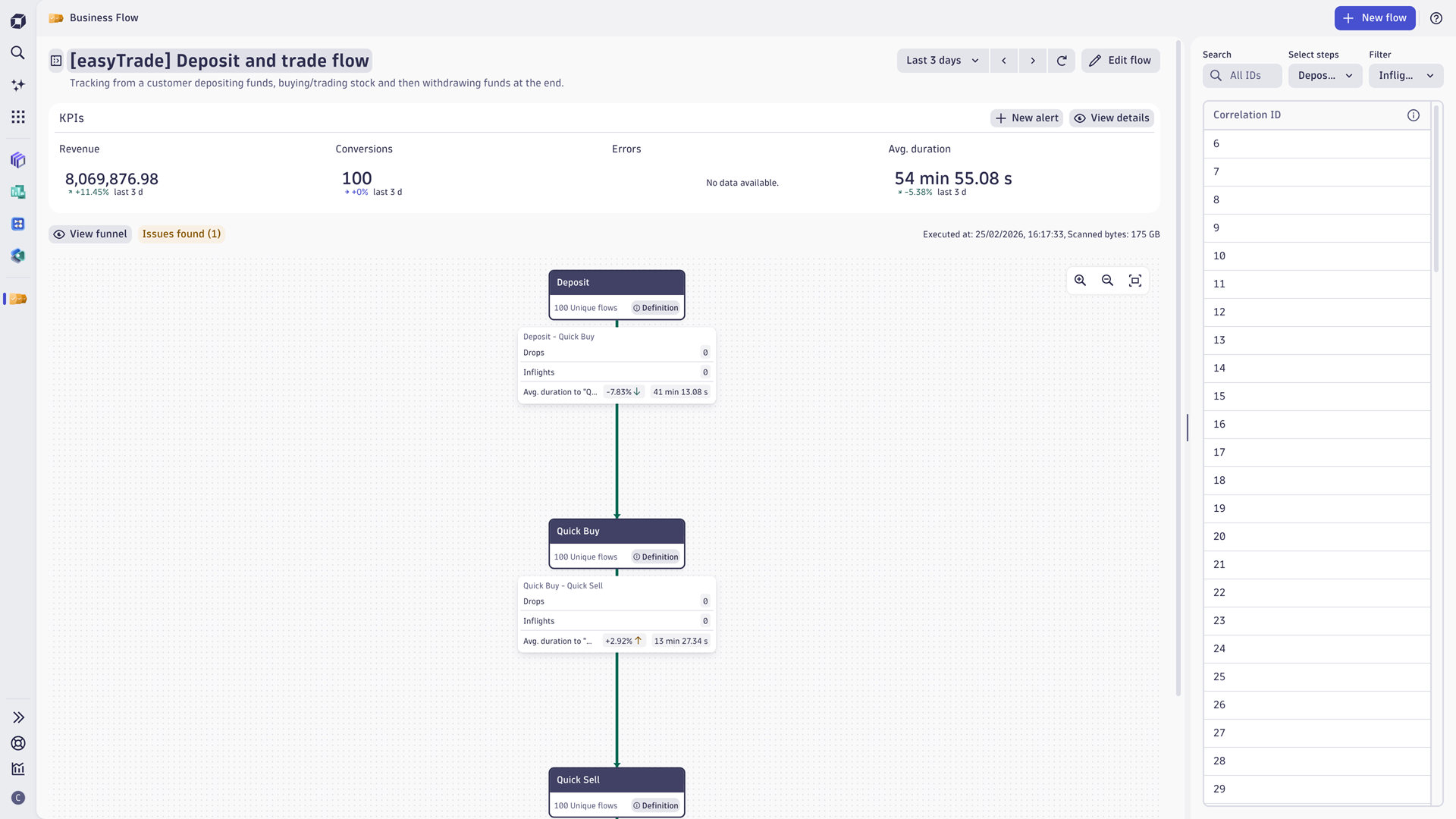
Identifying critical or important functions (CIFs), such as payment processing or fraud detection, requires in-depth business process monitoring and a clear understanding of how IT systems support them. Compliance Assistant transforms this traditionally complex task by leveraging Business Flow, powered by Dynatrace, to break down the steps of a critical or important function (CIF) directly connected to specific business milestones in real-time. With Smartscape on Grail, Dynatrace offers end-to-end visibility by linking compliance-critical business processes to specific IT components, hosts, or applications. For example, a payment approval process in Business Flow can be linked to a payment gateway service, a transaction database, and a fraud analytics engine — enabling Compliance Assistant to show how a single critical or important function (CIF) depends on multiple IT components.
With this business-centric approach, Compliance Assistant empowers teams to automatically track critical metrics such as conversions and errors, proactively addressing any potential disruptions to underlying services. The integration with Business Flow doesn’t just enhance visibility; it fosters collaboration by bridging IT performance data with tangible compliance-critical business outcomes.
Confidently manage compliance risk
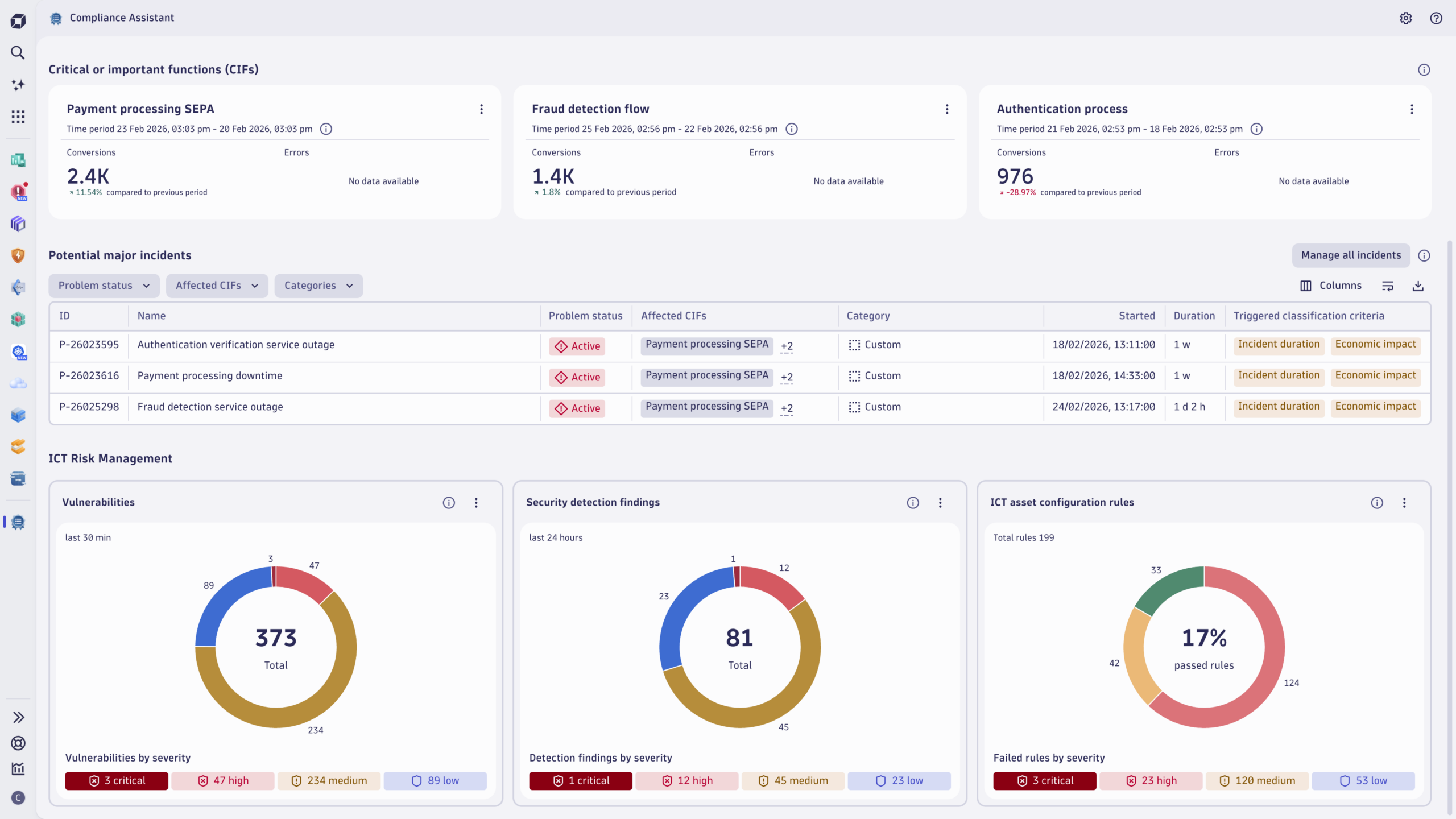
Managing ICT risks is a cornerstone of compliance with resilience frameworks, and Compliance Assistant helps you leverage Dynatrace Application Security capabilities with insights mapped to regulatory requirements.
Compliance Assistant consolidates:
- Vulnerabilities with a breakdown of findings by severity and real runtime exposure, enabling security champions to prioritize risks through a compliance lens.
- Security detection findings offer visibility into suspicious activities across the digital landscape.
- Compliance results for evaluating configuration data against the relevant compliance standard. The built-in tile in ICT asset configuration rules summarizes assessment results by the percentage of passed and failed rules, powered by Dynatrace Security Posture Management.
Compliance teams must demonstrate regulatory readiness across security, infrastructure, and operations teams, often speaking different languages about configurations, vulnerabilities, and compliance gaps. The unified compliance-health view bridges domain gaps, reducing back‑and‑forth between teams and enabling efficient alignment. Compliance Assistant goes beyond ticking boxes next to regulatory requirements by translating abstract rules into concrete workflows, so you can close the cross-functional operational loop and confidently track progress towards compliance readiness.
AI-powered incident classification
Complying with regulations like EU DORA also requires organizations to identify, classify against thresholds, and report major incidents impacting compliance-critical business processes. This requirement poses significant challenges, especially in complex IT environments with high volumes of data.
Dynatrace Compliance Assistant simplifies this process with an AI-powered incident classification workflow. It automatically identifies potential incidents affecting critical or important functions (CIFs) and, based on the calculated impact against EU DORA classification criteria, categorizes them into unclassified, potential major incidents, and classified major incidents.
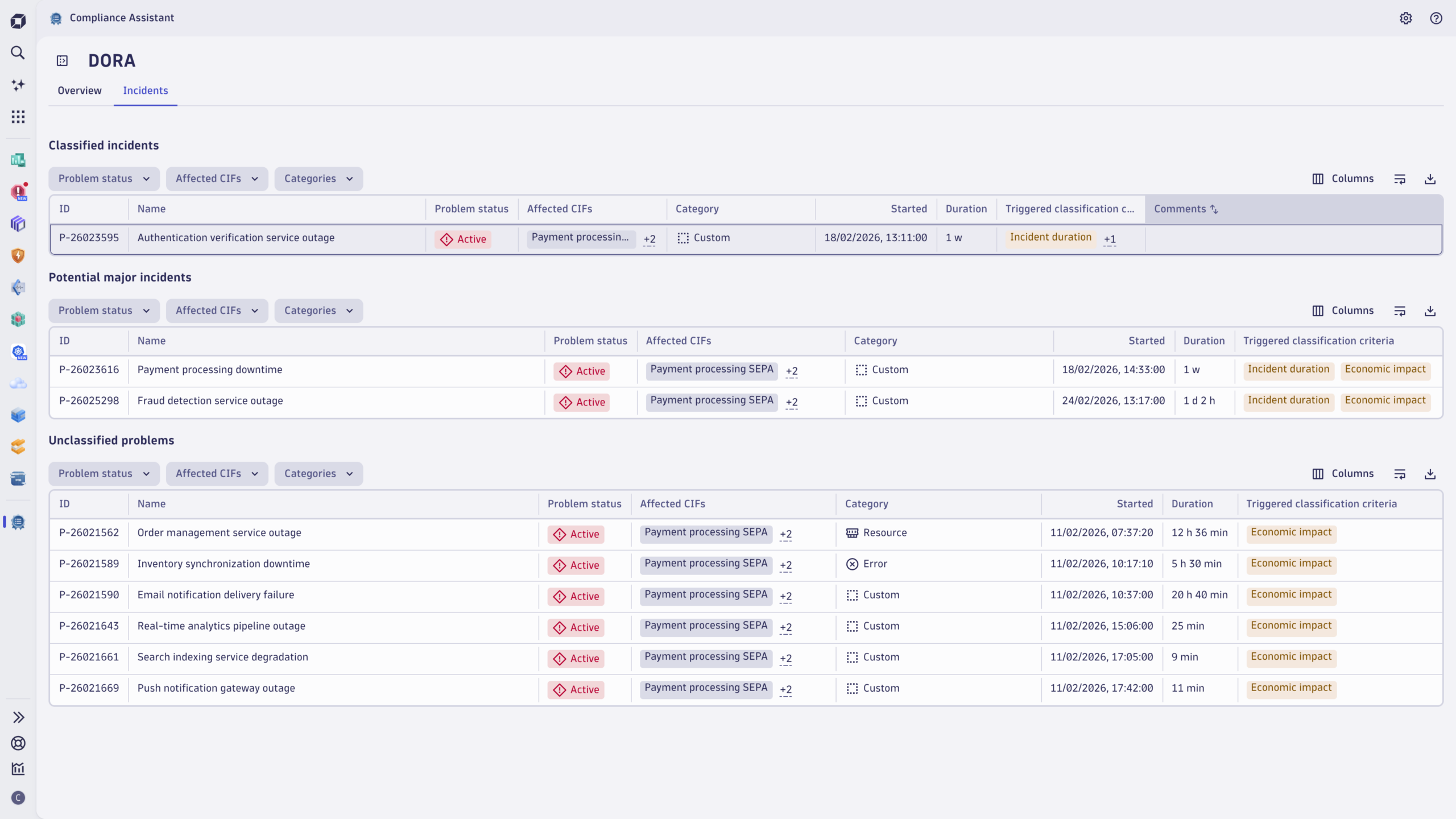
For each potential incident, you can access detailed insights into the triggered materiality thresholds, which signal the potential need to escalate an incident for classification as major:
- Critical or important functions affected: Assesses the blast radius of the incident and its impact on compliance-critical business processes.
- Incident duration: Monitors the 24-hour materiality threshold of the criterion for incident classification, according to EU DORA.
- Economic impact: Indicates whether the impact surpasses the classification threshold of €100,000. The impact is calculated based on the estimated incurred cost per minute of the relevant CIFs and the duration of an incident.
For example, if payment processing is down for 30 minutes and the estimated economic impact exceeds €100k, the incident meets one of EU DORA’s materiality thresholds and Compliance Assistant flags it accordingly.
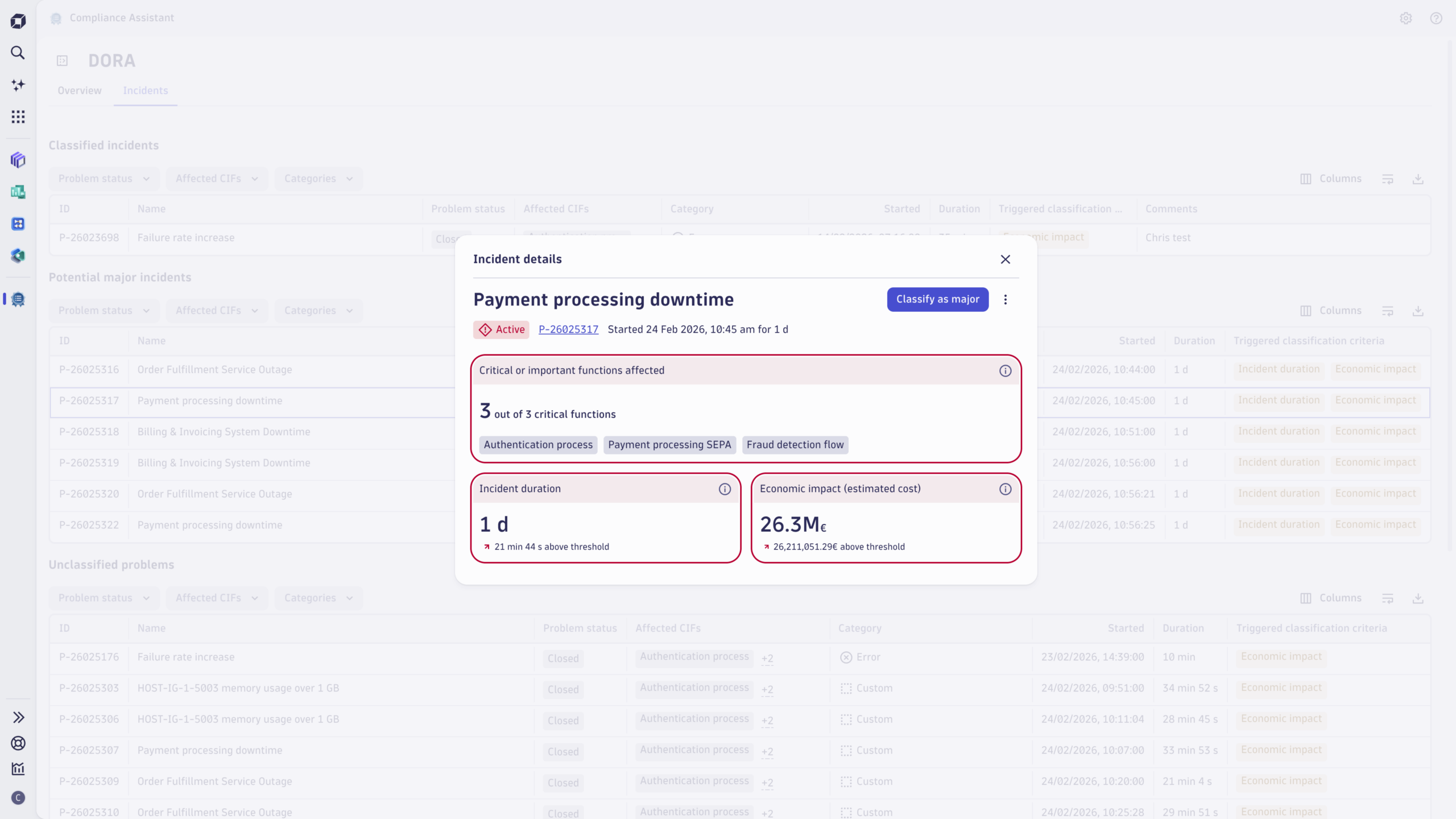
Under EU DORA, an incident must be classified as major if two or more materiality thresholds are breached. Dynatrace streamlines this process by automatically identifying threshold breaches and allowing users to manually classify incidents directly from the incident details page. Users can also add comments to document their reasoning, ensuring transparency and traceability. This end-to-end functionality ensures organizations can confidently manage incidents, align workflows, and accelerate regulatory reporting.
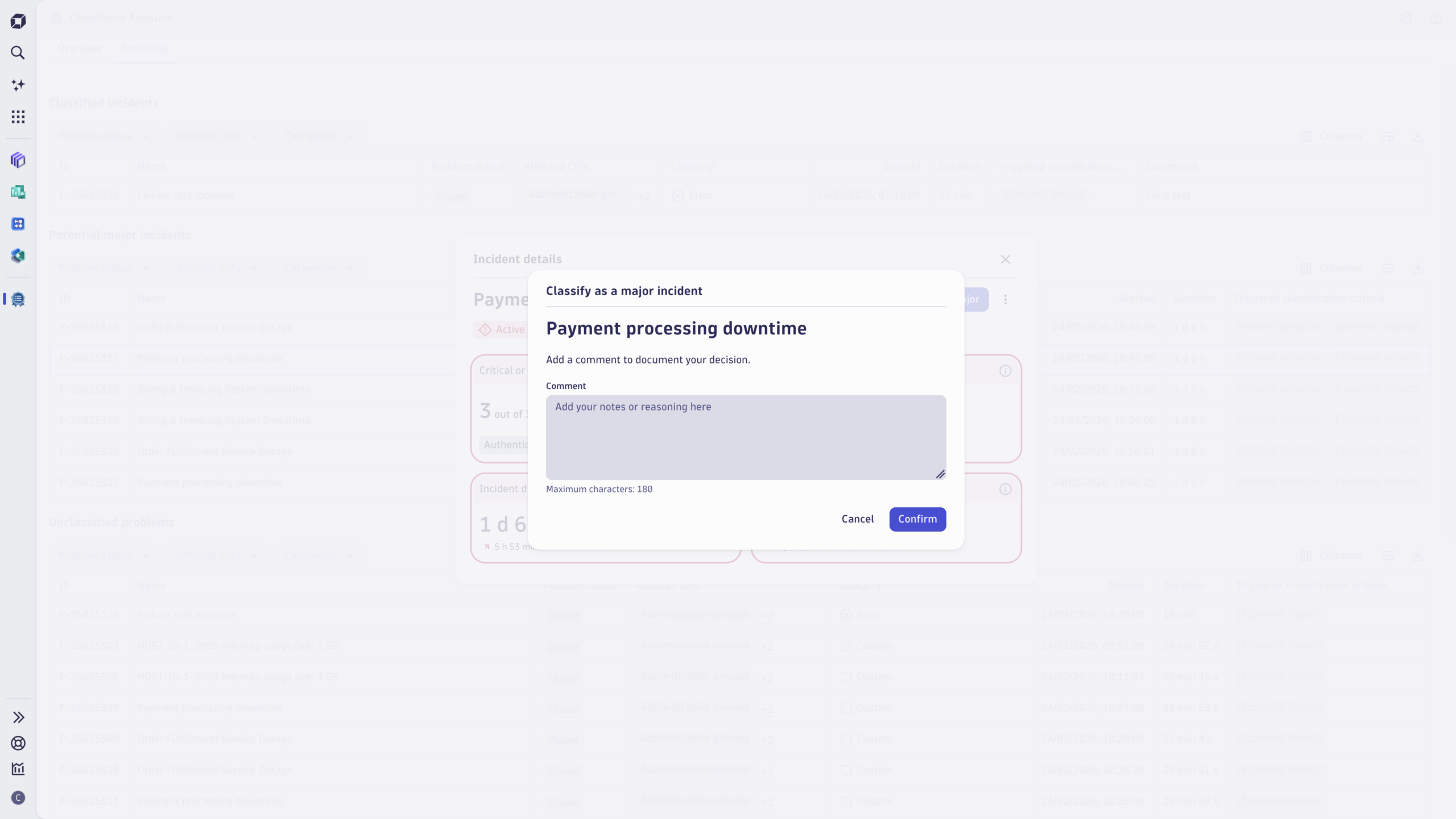
Classification of an incident in Compliance Assistant generates a snapshot of the compliance incident as a business event, enabling integration with your incident management ecosystem. Automations with Dynatrace Workflows can then be triggered by this classification event to bridge gaps between observability, compliance, and incident management teams. For example, you can use workflow actions to create incidents in your ServiceNow environment or to create a Jira ticket enriched with details of the incident’s compliance impact.
Ready to transform your compliance strategy?
Install and activate the Compliance Assistant app from Dynatrace Hub and take the first step toward streamlined, real-time compliance management. With Compliance Assistant, you can simplify compliance workflows while aligning IT operations with broader business objectives, ensuring more efficient compliance strategies.
- To learn more about setting up Compliance Assistant, check out the documentation.
- Share your feedback, suggestions, and ideas with us in the Dynatrace Community.
- New to Dynatrace? Try Compliance Assistant in the Dynatrace Playground or start a free trial to see Dynatrace in action
What’s next for compliance intelligence
We’re committed to continuously evolving Compliance Assistant to meet your ever-changing compliance needs. Upcoming enhancements include support for additional regulatory frameworks and expanded automation capabilities, allowing for even broader compliance coverage across industries. Stay tuned as we continue to empower organizations to simplify compliance, reduce risk, and stay ahead in a complex regulatory landscape.
Start proactively managing your compliance with Dynatrace


Looking for answers?
Start a new discussion or ask for help in our Q&A forum.
Go to forum