


A new ready-made dashboard surfaces AI service vulnerabilities detected at runtime.
AI services are becoming a fast-growing attack surface in production environments. The processes that run your models, agents, and inference pipelines tend to rely on open-source dependencies, ranging from AI-specific frameworks like LangChain and Hugging Face to more traditional libraries you may be running in other parts of your stack. Any exploitable vulnerabilities in your environment can find their way into production. The problem is visibility and context: teams rarely have a focused view of what vulnerable code is running specifically inside their AI workloads.
Today we’re introducing a ready-made dashboard that makes vulnerability findings in AI services easier to find and act on. It brings the findings from Runtime Vulnerability Analytics (RVA) together with AI Observability to provide a single place to assess your AI security posture.
See runtime vulnerabilities in your AI services
The new dashboard focuses only on GenAI entities in Dynatrace, highlighting the vulnerabilities RVA detects in the processes behind your AI services.
AI processes are identified from GenAI Smartscape entities and checked for any vulnerability scan event. Only covered processes contribute to the vulnerability counts.
For a current posture snapshot, set the timeframe to roughly the last 30 minutes; the view then reflects what is running right now rather than a historical rollup.
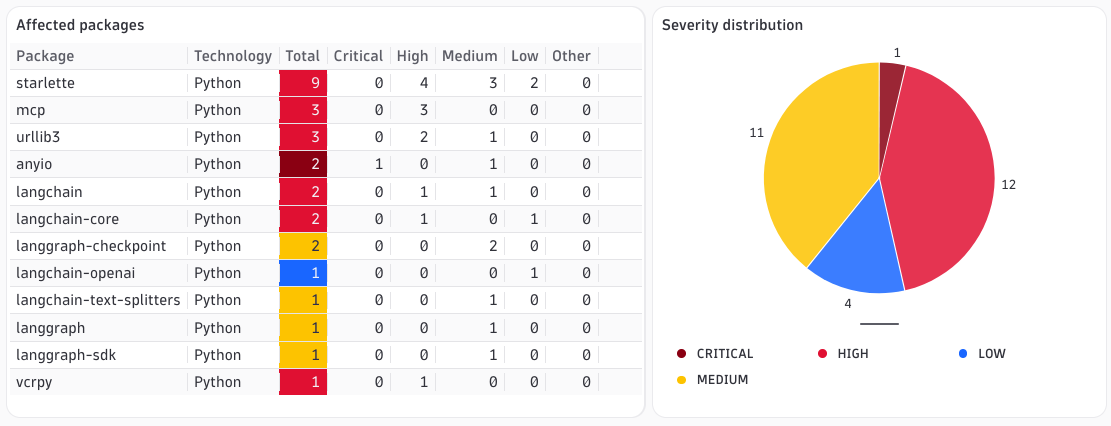
Vulnerabilities by severity and process impact
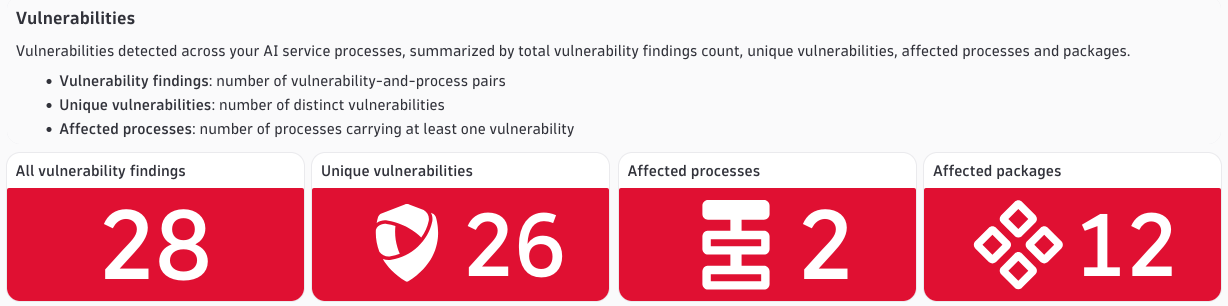
Vulnerability findings are shown in four summary tiles that give you an immediate read on your AI security posture:
- Vulnerability findings: the number of vulnerability-and-process pairs — higher than the unique count when the same vulnerability shows up across multiple processes.
- Unique vulnerabilities: the number of distinct vulnerabilities detected.
- Affected processes: the number of processes carrying at least one vulnerability.
- Affected packages: the number of distinct packages with at least one vulnerability.
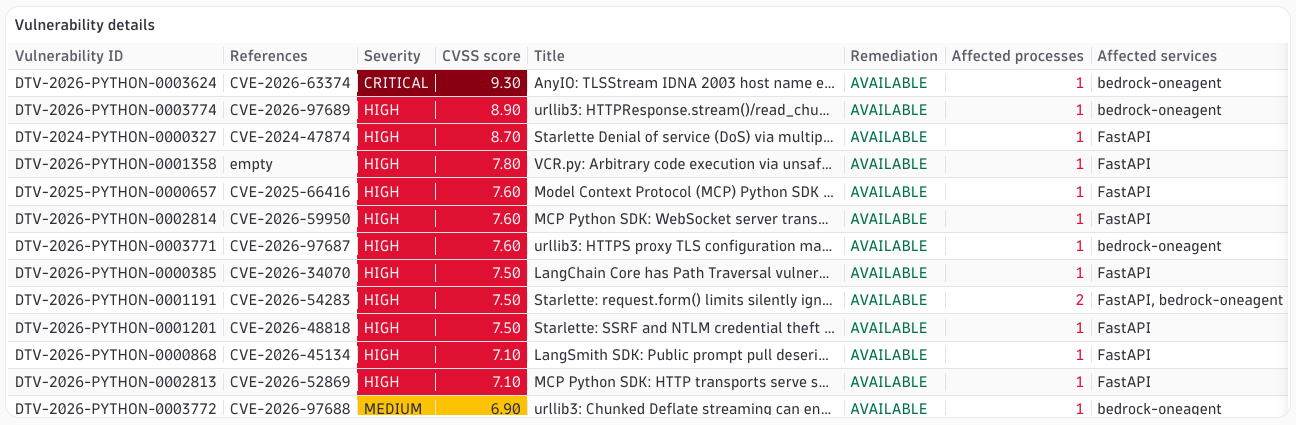
Beneath the summary, tables list each vulnerability with its severity, CVSS score, affected process count, alongside the affected packages that provide context to triage and route work without leaving the dashboard.
See what’s actually being scanned
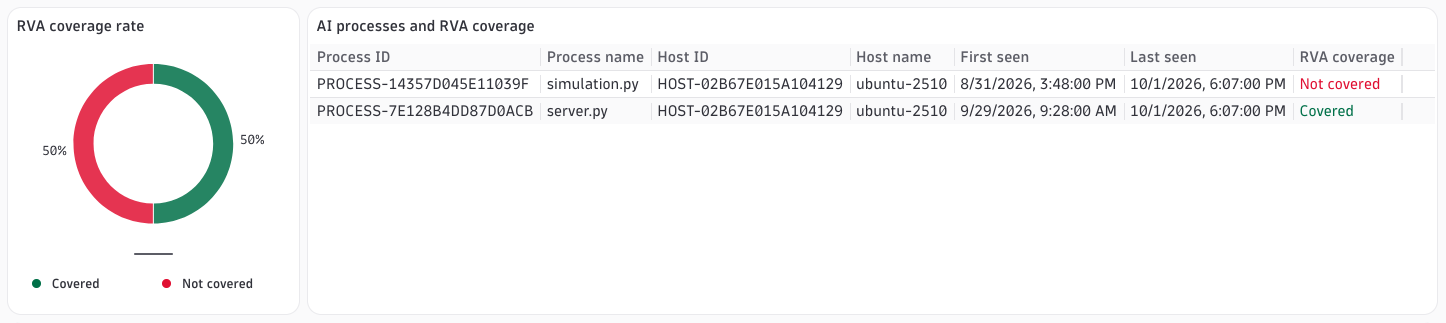
A zero count is only reassuring if you know it’s complete. That’s why the dashboard includes a dedicated Coverage section.
The coverage table lists every AI process and whether RVA is scanning it. If a process shows “Not covered,” RVA isn’t scanning it yet and its findings won’t appear; this is a prompt to adjust your monitoring rules. If no rows appear at all, there are either no running AI service processes or AI Observability isn’t instrumented. The dashboard tells you what’s vulnerable and how much of your AI estate it can actually analyze.
Why runtime context matters
Because RVA works at runtime, the dashboard reflects vulnerabilities in code that is genuinely loaded and executing instead of a static inventory of everything that might be installed. That keeps the noise down and helps security and platform teams find real and reachable vulnerabilities in production AI workloads. Pairing those findings with clear coverage visibility gives you confidence in the numbers and in the actions you take.
Getting started
The dashboard is available now. You don’t need to write new queries to populate it — make sure your AI services are instrumented and RVA is enabled for the processes running them:
- Set up AI Observability so Dynatrace discovers your GenAI entities (We recommend instrumenting with OpenInference).
- Set up Runtime Vulnerability Analytics and configure monitoring rules so RVA scans those processes.
- Open the dashboard, set the timeframe to the last 30 minutes, and review the Coverage section first if the view looks empty.
Once coverage is complete, you’ll have a single, continuously updated view of the runtime vulnerabilities detected in your AI services, ready to share with the teams who need to act on them.




Looking for answers?
Start a new discussion or ask for help in our Q&A forum.
Go to forum