


Dynatrace introduced a new entity in Smartscape® that connects your IT topology with your critical business processes. Monitoring a business process as an entity via Business Flow establishes a direct link between your IT issues and business operations. This connection helps you prioritize problem resolution by showing which issues impact your business.
Group IT services by business purpose
Your business runs on processes that matter: purchase orders, loan approvals, employee onboarding, and more. But these business processes often span multiple IT systems, making it hard to see the full picture. When something breaks, it becomes nearly impossible to quickly understand which IT issues threaten critical business outcomes.
With Dynatrace Real User Monitoring, organizations can understand the impact of IT problems by seeing how many users are actively using an application, which users are affected, and how failures degrade user experience. Dynatrace also allows telemetry to be scoped and analyzed by business dimensions such as region, team, or customer-facing application, using segments.
This business context provides strong value, but it stops short of showing how individual IT services come together to support an end‑to‑end business process. One way to bridge that gap is tagging, but in practice, that approach is manual and difficult to keep up to date. It rarely reflects the current, real-time reality of dynamic environments, and many legacy systems can’t be tagged at all. Instead of relying on static tags, the integration of business flows within the new Smartscape captures these relationships directly, showing how services collectively support a business process as it actually runs. By showing which IT services underpin a critical business process and how disruptions propagate across them, teams can respond immediately and decisively when issues arise.
The new Smartscape: making business outcomes a part of your topology
Dynatrace models business flow configurations as entities in the new Smartscape, making business processes a first-class part of the topology. Representing critical business processes as entities creates a single source of truth across the enterprise, aligning IT and business priorities. This allows teams to:
- Understand business purpose across IT and OT, eliminating guesswork about what matters most.
- Prioritize security risks by business impact by linking vulnerabilities to revenue-critical systems.
- See business impact during problem resolution by connecting IT problems to the processes that drive growth in the Problems app.
- Align cost and sustainability with business outcomes by mapping spend or carbon emissions to specific business processes.
Connect your Business Flow configurations to Smartscape
Business events are the cornerstone of any business process monitoring initiative. Each event is automatically enriched with important topology and application context.
Business process milestones (or steps) are defined in Business Flow, where specific types of business events are grouped. By analyzing business-event groups, Dynatrace identifies the topological entities involved in each milestone.
Example
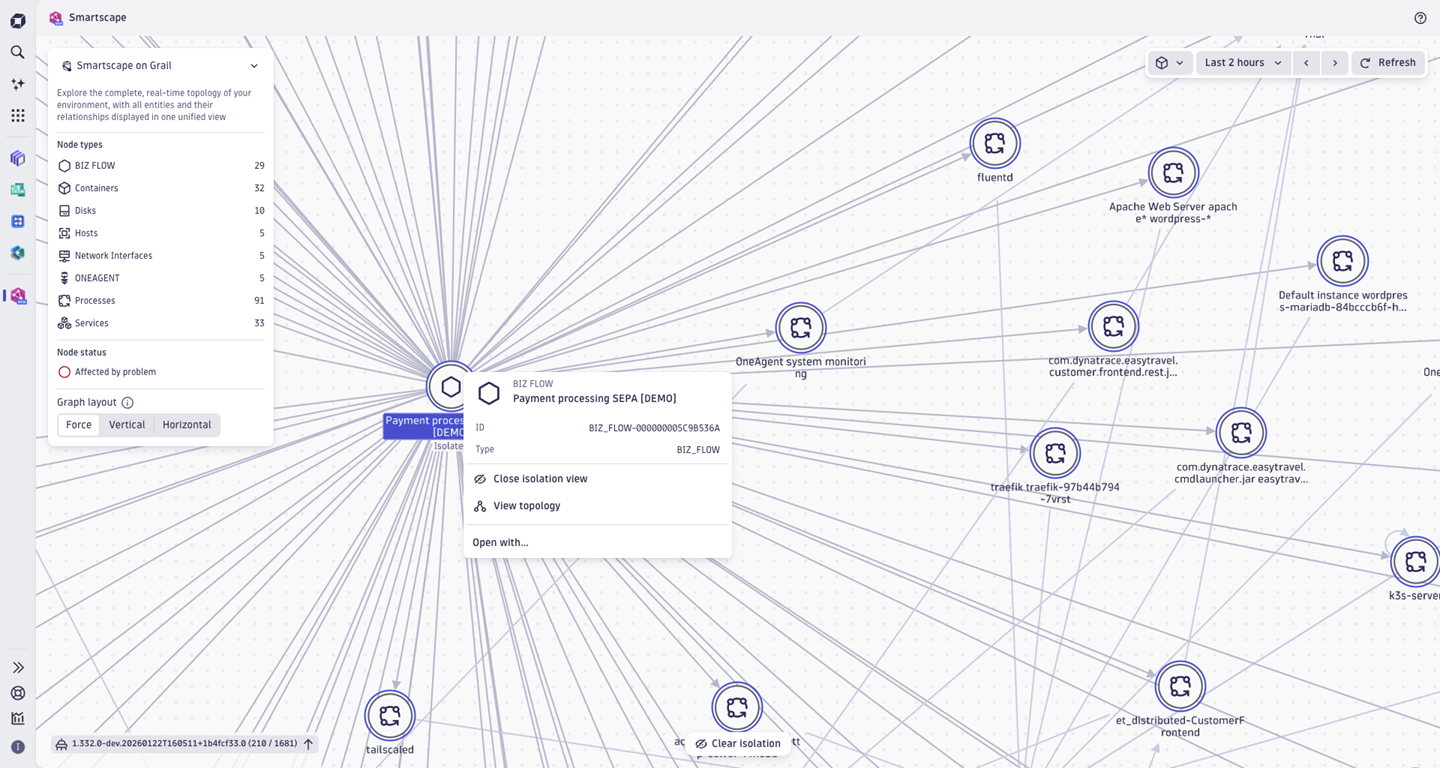
If a business event is collected by a specific process (software component) and a host, and that event corresponds to a step such as “Payment approval”, the business process entity will be linked to that host and process in Business Flow. These links are refreshed every two hours to reflect changes in the environment.
Once connected, business flow entities and their dependencies can instantly be visually explored in the Smartscape app. They can be viewed alongside applications, services, and infrastructure, or isolated to show all IT relationships supporting a specific business process.
Turning business flows into real-time business metrics
When your business flow configuration becomes an entity in Smartscape, it doesn’t just give you visibility; it becomes a continuous engine of business insight. Dynatrace automatically transforms each monitored business process into a powerful stream of business metrics, generating and storing new business events that are enriched with the KPIs that matter most to your organization. This means you’re not just observing how your IT impacts your business; you’re measuring how your business performs in real time.
With this new capability, you’re in complete control:
- Choose how often metrics are generated, from high-frequency snapshots for fast-moving operations to broader intervals for strategic monitoring of longer business processes.
- Define the timeframe of analysis, enabling a moving window of business performance that updates continuously.
- Track every business KPI with precision, from conversion rates to fulfillment times, total revenue, value of approved loans, business exceptions, and more.
These automatically-generated business metrics give you a dynamic, always-on view of how your business processes evolve over time. The result is a smarter, data-driven way to detect trends, anticipate issues, and optimize performance long before it impacts your customers or your bottom line.
Business impact of an IT problem
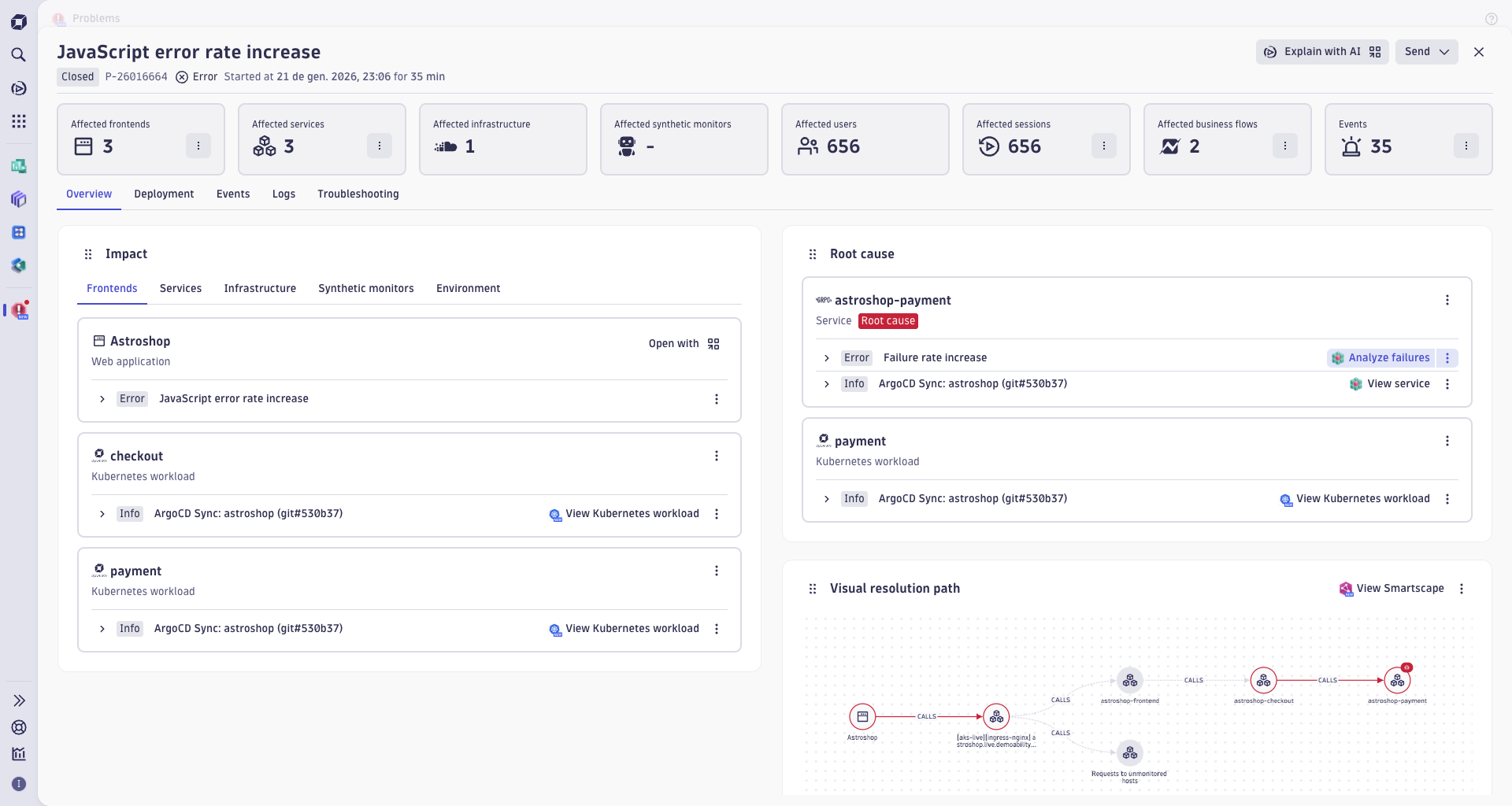
Modeling business flows as entities allows Dynatrace to show when IT problems impact critical business processes directly in Problems.
Here’s how the analysis works:
- Root-cause analysis identifies all IT entities impacted by the problem.
- When exploring a specific problem, the Business Impact Analyzer checks whether affected entities are connected to any business flow entities.
- Problems displays this connection in a new single-value tile, showing whether one or more business flows are impacted.
From this tile, you can navigate to Business Flow for detailed exploration.
Problem investigation mode in Business Flow
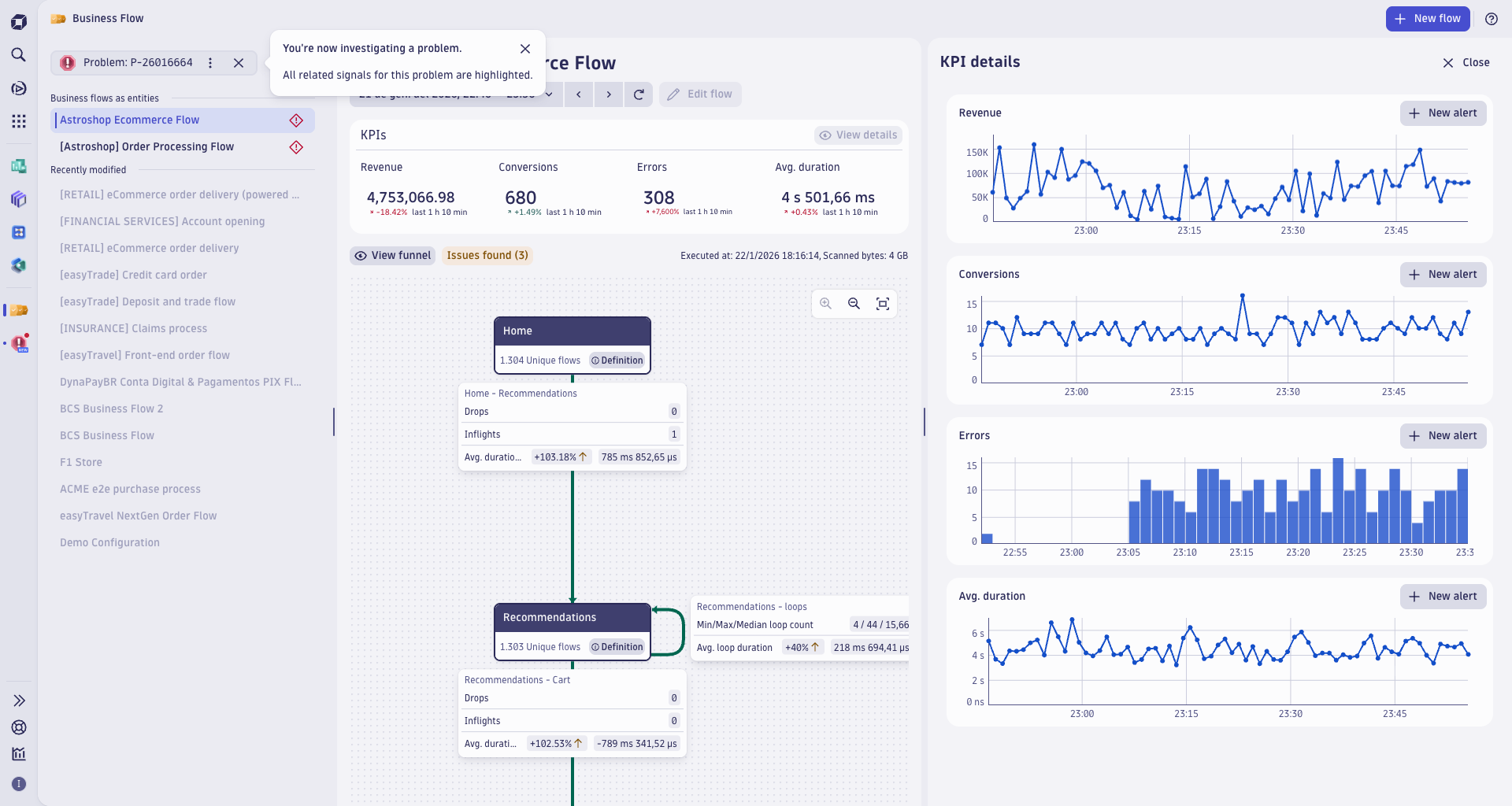
From Problems, you can drill down into the Business Flow app for affected business flows. This opens in problem investigation mode, which highlights:
- The impacted business flows from the list of entities.
- A timeframe aligned with the IT problem.
- A detailed view of all the business KPIs over time.
Exploring the different parts of the business flow tree or checking the business KPIs over time allows you to discover the direct impact of an IT problem on a business process.
Currently, the analysis focuses on business processes that are connected to affected IT entities. Soon, this will extend to step-level impact analysis—identifying fulfillment drops and enabling navigation to the exact step affected.
Take the next step into business observability
Dynatrace continues to enhance IT problem contextualization with the Business Impact Analyzer, connecting technical issues to critical business processes mapped in Business Flow.
Discover how to create your first business flow configuration and activate it as an entity in Smartscape.
Ready to bring together your business operations and observability teams?




Looking for answers?
Start a new discussion or ask for help in our Q&A forum.
Go to forum