

The Model Context Protocol (MCP) server for Dynatrace Managed exposes data to any authorized MCP-compatible client. Security and audit teams can now use the MCP server to access retained history in natural language. Users of Claude Desktop, GitHub Copilot, Kiro, and other AI assistants can now get Dynatrace answers to questions about their infrastructure problems and logs, just as they already can with Dynatrace SaaS. Organizations running several Managed instances can query all the instances at once, and can help keep historical Managed data accessible during SaaS migration scenarios.
Dynatrace Managed is the self hosted deployment model of the Dynatrace observability platform. Managed environments hold a wealth of operational data: problems, events, logs, and the entities behind them, both current and historical. Accessing this data traditionally meant switching to the Dynatrace Managed web UI or working from exports, both more cumbersome than the AI-assisted workflows teams increasingly rely on for everyday investigation. The Managed MCP Server closes that gap by making Managed data directly accessible in the tools your teams already use.
What is the Managed MCP Server?
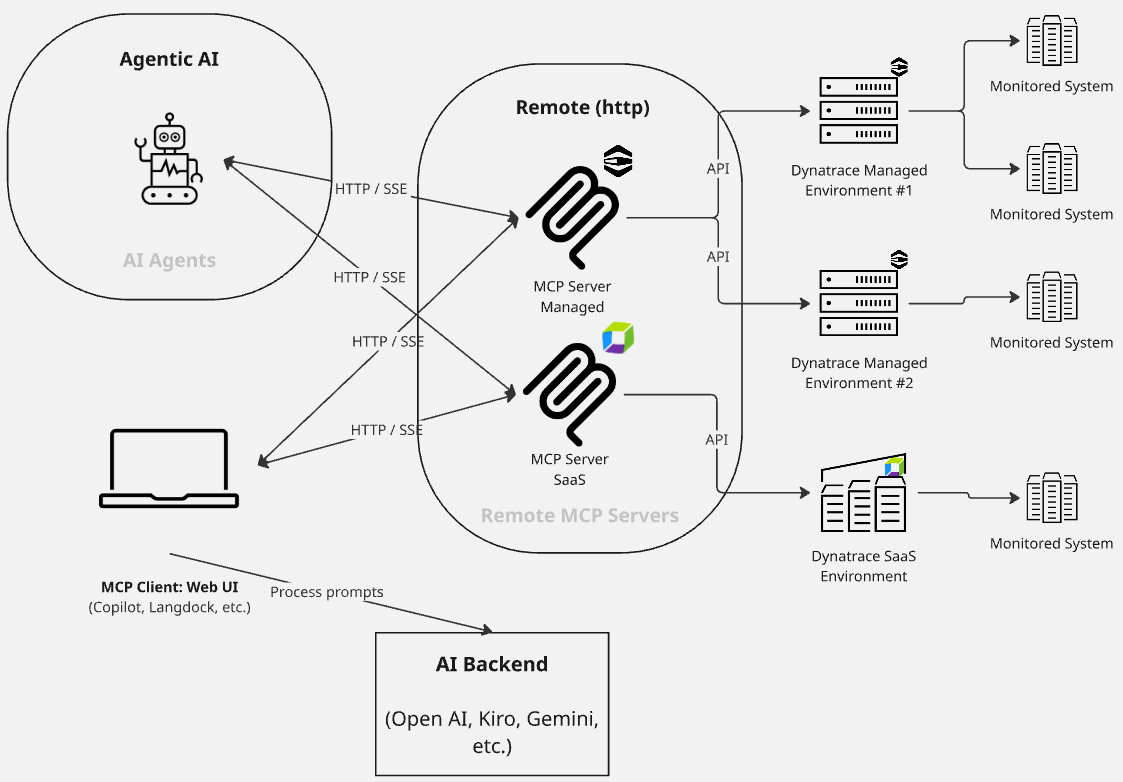
The Dynatrace Managed MCP Server is a thin protocol adapter that exposes existing Dynatrace Managed REST APIs to any MCP-compatible client. It’s scoped to self-hosted Dynatrace Managed environments and runs outside the Dynatrace platform itself, on your own host. Clients such as Claude Desktop, GitHub Copilot, and Kiro can connect to it directly.
The processing takes place on the client side: the AI assistant decides what to investigate and how to interpret the results. The server carries the domain expertise. Its tools encode how to efficiently query Managed data, so when the assistant translates a natural-language question into a request, the server applies the appropriate query patterns to the Managed APIs rather than leaving the client to guess them. The same server that answers a question about an incident last quarter also answers same-day audit questions. The client drives the investigation; while the server translates those requests into API queries to retrieve data.
The Managed MCP Server can query multiple Managed instances in a single call, unlike single instance adapters. Subsidiaries on separate clusters, managed service providers running one instance per customer, and regulated environments keeping Managed for data residency all face the same problem: how to reach every environment that holds relevant history without running the same prompt repeatedly, cluster by cluster, and stitching the answers together by hand.
The Managed MCP Server runs entirely outside the Dynatrace platform, so it does not consume resources within your Managed cluster.. It runs locally or on a controlled host, authenticates with Managed environment API tokens, and reads its configuration from YAML or JSON files and environment variables. It is read only, so it doesn’t modify or persist data on Managed systems it queries. Setup is typically limited to connecting a token and pointing the server at your environments.
Where does the Managed MCP Server fit today?
Engineers query Managed problems, events, logs, and entities in natural language, inside the same tools they use for everything else. Here are the three most common use cases:
AI-assisted investigation for teams running Dynatrace Managed
Many organizations run Managed as their observability platform and will continue to do so for the foreseeable future. Their engineers troubleshoot live problems and dig through past events, like any other team, and increasingly want to do so via their AI assistants. Connecting the Managed MCP Server gives an SRE team, whether on Claude Desktop or Kiro, a standardized natural-language query experience against Managed problems, logs, and entities, just as is available with Dynatrace SaaS.
Audits across a fleet of managed instances
Audit and compliance work requires historical data that’s spread across multiple Managed clusters: exposure windows, remediation timelines, and what was running when. Querying that evidence via the MCP Server’s multi-instance support means a single prompt can query multiple configured environments that contain relevant data, rather than a separate login and export per cluster.
Bridging migration to Dynatrace SaaS
While both systems run side by side, the Managed MCP Server can provide access to historical Managed data, so an engineer investigating a regression can ask “have we seen this before?” and query Managed directly, without switching tools or digging through an export.
Run the Managed MCP Server alongside the SaaS MCP Server
When a team runs both Dynatrace Managed and SaaS, the setup is two MCP endpoints side by side: the Dynatrace SaaS MCP Server for SaaS observability data and the Dynatrace Managed MCP Server for Managed. In this arrangement, AI assistants query the server that holds the answer, so engineers can ask their questions without having to decide which system to query.
From the client side, the difference between the Managed and SaaS MCP servers is mostly configuration. From a governance standpoint, the separation is explicit, which is exactly what an auditor or a platform owner wants to see. Each server authenticates independently, and access boundaries stay distinct. During a migration, this doubles as a clean split of responsibility: SaaS is authoritative for new data while Managed serves the history.
Try it and share your feedback
Connect the Managed MCP Server to your Managed environment and run your next investigation through it, whether the question is about a regression, an audit, or simply having your assistant know as much about your Managed environment as it already knows details about your SaaS environment.
For the Managed-to-SaaS pattern, check out the BrightTALK webinar on running Managed and SaaS MCP servers in parallel.
We’re actively building this solution, so we’d love to hear what you think. Feel free to submit enhancement requests through the community channel.




Looking for answers?
Start a new discussion or ask for help in our Q&A forum.
Go to forum