


Dynatrace is the first AWS Partner to integrate as an MCP target for Amazon Bedrock AgentCore Gateway, marking a significant milestone in how AI agents interact with enterprise observability systems. This integration demonstrates how the model context protocol (MCP) allows AI agents to securely access real-time system intelligence, unlocking new automation and decision-making capabilities. For developers building agentic AI workflows, this integration opens new possibilities, from querying live observability data and detecting anomalies to empowering agents that proactively respond to system issues with comprehensive monitoring insights.
As organizations adopt agentic AI to automate complex workflows, AI agents increasingly need real-time context to make reliable, safe, and efficient decisions. Amazon Bedrock AgentCore provides powerful capabilities for building and orchestrating agents. The new integration with Dynatrace MCP Server gives agents direct access to the deep, real-time observability signals they need to understand system health, anomalies, dependencies, and performance trends.
Dynatrace unifies metrics, logs, traces, problems, topology, and causal context into a single, real-time source of truth for human operators. With our new Amazon Bedrock AgentCore Gateway + Dynatrace MCP Server integration, your agents can now access these same high‑quality signals programmatically through the MCP.
This gives Bedrock agents continuous visibility into system behavior, allowing them to reason with real production data, detect issues early, validate assumptions, and act intelligently within automated workflows, all through a simple, lightweight integration that includes a Dynatrace environment, a Bedrock account, and a few configuration steps in AgentCore Gateway.
Give your Bedrock agents real-time system awareness
With this integration, agents access high‑quality, causal, real‑time signals that they can query directly through the AgentCore Gateway, enabling them to operate with full environmental awareness. Your agents can access:
- Real‑time service metrics (latency, error rates, throughput, resource consumption)
- Live problem and anomaly feeds (issues detected by Dynatrace Intelligence with full causal context)
- Distributed traces and end‑to‑end execution paths (span data, timing, dependencies)
- Dependency and topology information (Smartscape® entities, relationships, and service maps)
- Logs and event streams (structured logs, events, audit information)
- Entity metadata and health states (services, processes, hosts, cloud resources, statuses)
These signals allow agents to ground their reasoning in real production conditions, allowing for faster diagnostics, proactive adaptation, and more intelligent workflow automation.
What this looks like in practice
Once connected through MCP, your Bedrock agents can request Dynatrace insights using simple natural‑language instructions. For example:
- “Show me any active problems in my environment.”
- “Retrieve the latency for my checkout service over the last hour.”
Use the Dynatrace MCP Server to access insights from Dynatrace Intelligence directly within your agent workflows.
Bringing it all together: the integration architecture
The integration architecture consists of four primary components working together:
- AI agent: Your AI agent running on Amazon Bedrock, equipped with access to tools and knowledge bases. When the agent needs observability data to make decisions, it invokes the AgentCore Gateway.
- Bedrock AgentCore Gateway: The AgentCore Gateway acts as the orchestration layer that manages connections to multiple MCP servers. It manages the complexity of MCP protocol handling, request routing, and response aggregation, allowing your Bedrock agents to focus on decision-making logic by receiving requests from Bedrock agents and routing the requests to the appropriate targets—including your Dynatrace MCP server.
- Dynatrace MCP Server: A specialized MCP server that exposes Dynatrace observability capabilities through standardized MCP protocols. It provides secure, real‑time access to Dynatrace Intelligence and returns structured observability data to the agent.
- Dynatrace environment: Your organization’s Dynatrace environment, providing root cause analysis, optimization recommendations, and comprehensive observability data across your infrastructure, applications, and services.
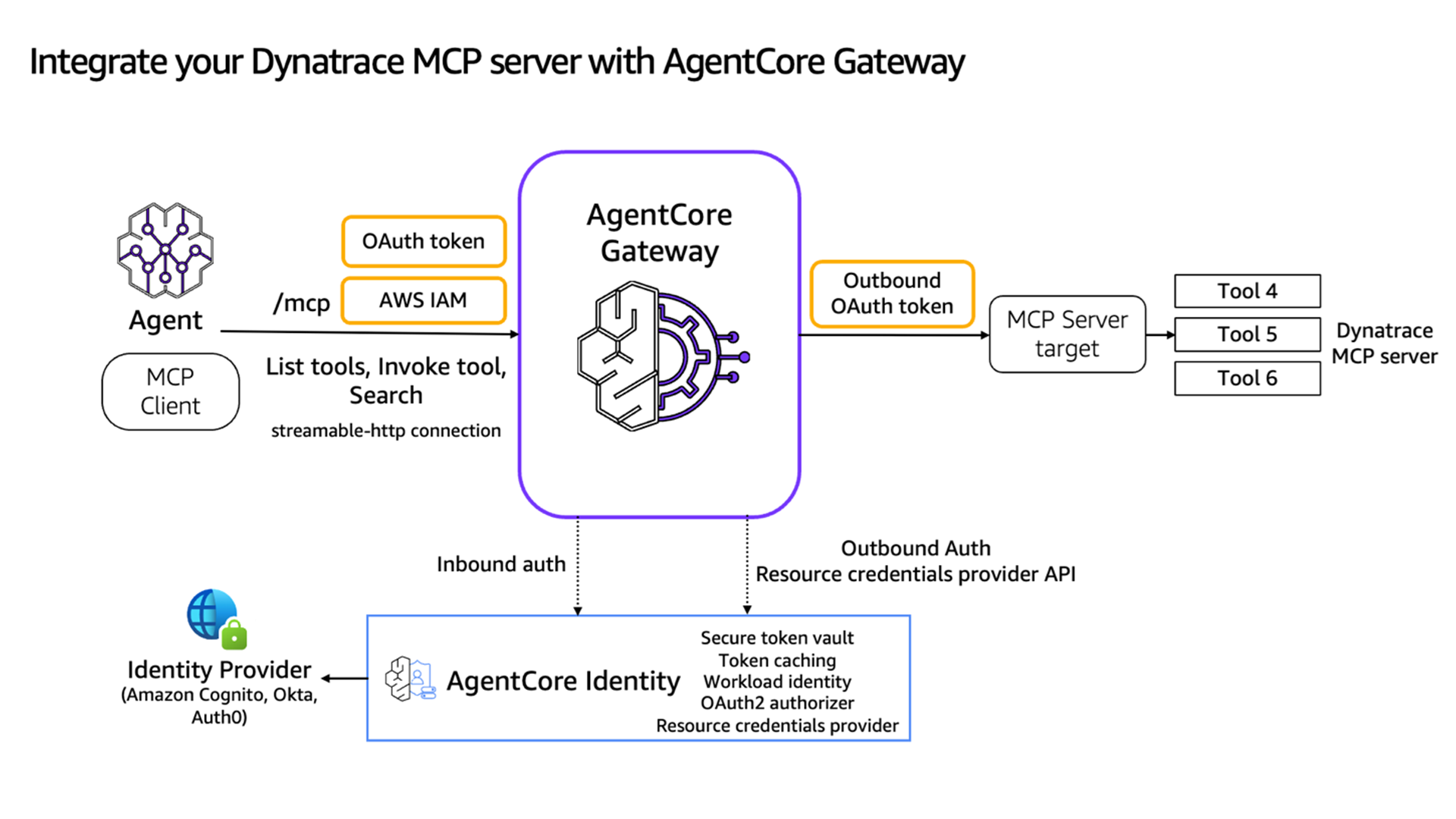
How to connect Amazon Bedrock AgentCore to Dynatrace via MCP
This integration is intentionally lightweight and can be set up in minutes. You only need:
- A Dynatrace environment (SaaS)
- An Amazon Bedrock account with AgentCore access
- A few configuration steps in AgentCore Gateway
- (Optional but recommended) A deployed Dynatrace MCP Server
Here’s the high-level setup flow:
- Set up the Dynatrace MCP Server: Configure your MCP Server endpoint and OAuth 2.0 credentials for secure agent access.
- Create an AgentCore Gateway: Use the AgentCore starter toolkit, AWS CLI, AWS Console, or SDK to create a gateway with MCP turned on and configure inbound authentication (Amazon Cognito or another OAuth provider).
- Add Dynatrace as a gateway target: Register your MCP server as a target and map appropriate OAuth credentials and scopes.
- Connect your Bedrock agent: Connect your agent to the Gateway and verify available MCP tools via listTools.
- Start querying Dynatrace via MCP: Your agent can now retrieve problems, metrics, traces, logs, and topology directly from Dynatrace.
This integration gives your Bedrock agents direct access to Dynatrace real‑time observability and topology insights, allowing more informed reasoning, safer decisions, and autonomous, context‑aware workflows.
Give your agents direct access to Dynatrace real‑time observability insights. Get started today by exploring the Bedrock AgentCore reference implementation.

Looking for answers?
Start a new discussion or ask for help in our Q&A forum.
Go to forum