


Dynatrace Fleet Management gives administrators a single app to monitor, manage, and install OneAgent and ActiveGate components across large environments.
Modern infrastructure doesn’t sit still. Services scale across thousands of hosts and Kubernetes clusters expand across regions. And the admins responsible for keeping it all running are challenged to answer a key question: is everything actually running the way it should be?
Fleet Management is built to help simplify management of your telemetry collectors at scale.
What it takes to run a fleet at scale
Managing OneAgent and ActiveGate deployments at scale comes with a few standing requirements:
- A single source of truth. Deployment, version, and connectivity details for every component need to live in one place, not scattered across tools.
- Health visibility that doesn’t wait for an incident. Issues need to surface on their own, before they degrade monitoring coverage.
- Configuration that scales with the fleet. Rolling out a change across hundreds or thousands of hosts shouldn’t mean doing the same task by hand, over and over.
Fleet Management is built around exactly these requirements.
One app to see, fix, and control your fleet
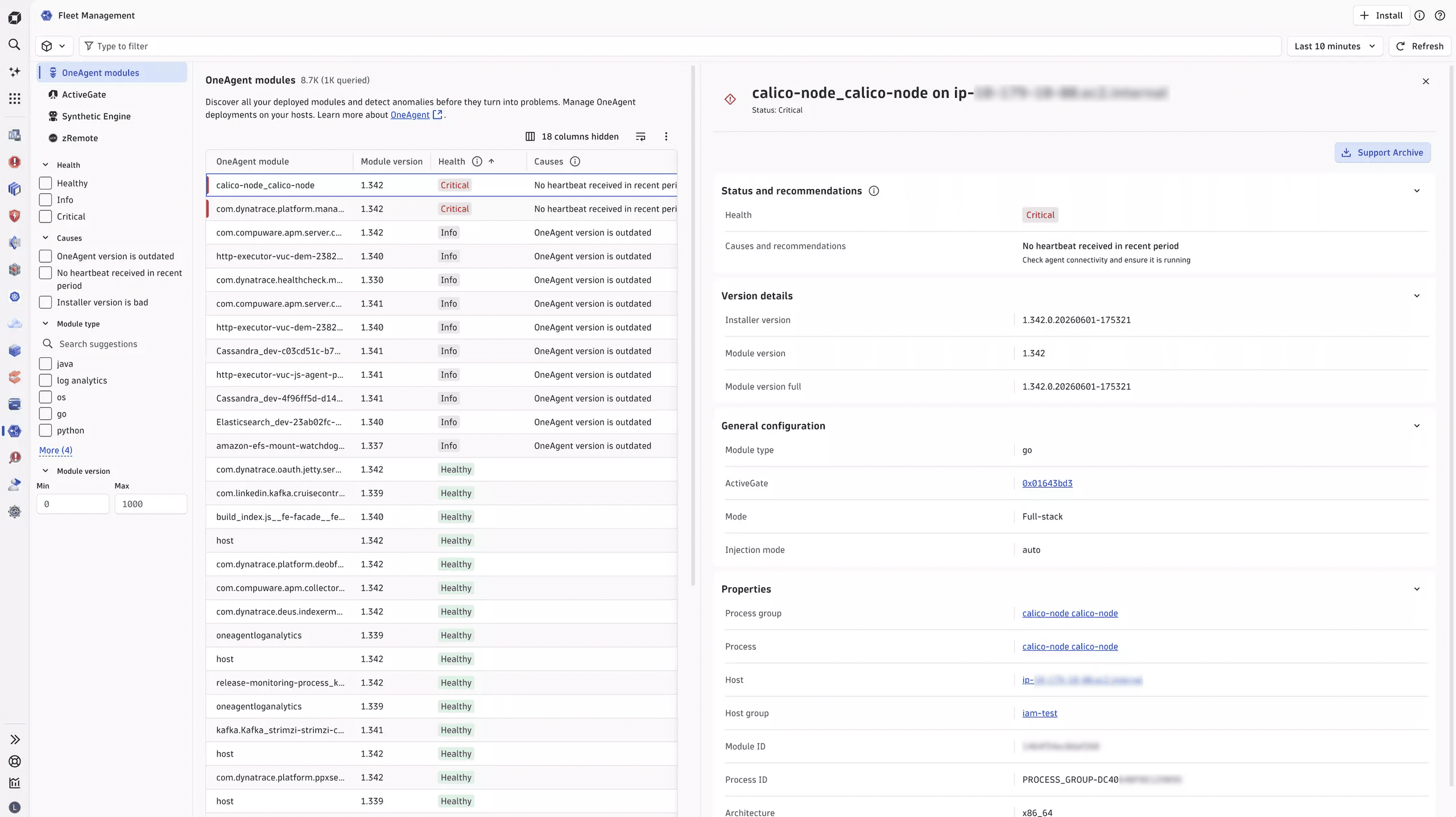
Fleet Management is the new home for monitoring, managing, and installing the components that collect your telemetry, starting with OneAgent and ActiveGate, with more on the way (see below). From one app, you can:
- See your whole fleet at a glance. An instant inventory of every OneAgent and ActiveGate in your environment, with deployment, version, and connectivity details in one place.
- Know what to fix first. Components are grouped by health state: Critical, Warning, Info, Healthy, with contextual recommendations attached. The issues assessed as most impactful are surfaced first.
- Control your own upgrade cadence. Define a rolling policy to stay a set number of versions behind the latest versions, or pin a specific version. Set update windows so changes happen only when you want them to.
- Install without leaving the app. Spin up new OneAgents and ActiveGates directly from Fleet Management, with a guided flow.
- Manage network zones and permissions centrally. Configure routing behavior and apply attribute-based access control (ABAC) so the right people can act on the right components.
- Pull a support archive in a couple of clicks. Collect and download diagnostic logs for a specific OneAgent or ActiveGate without SSHing into the host, whether you’re self-serving a fix or handing it to Dynatrace Support.
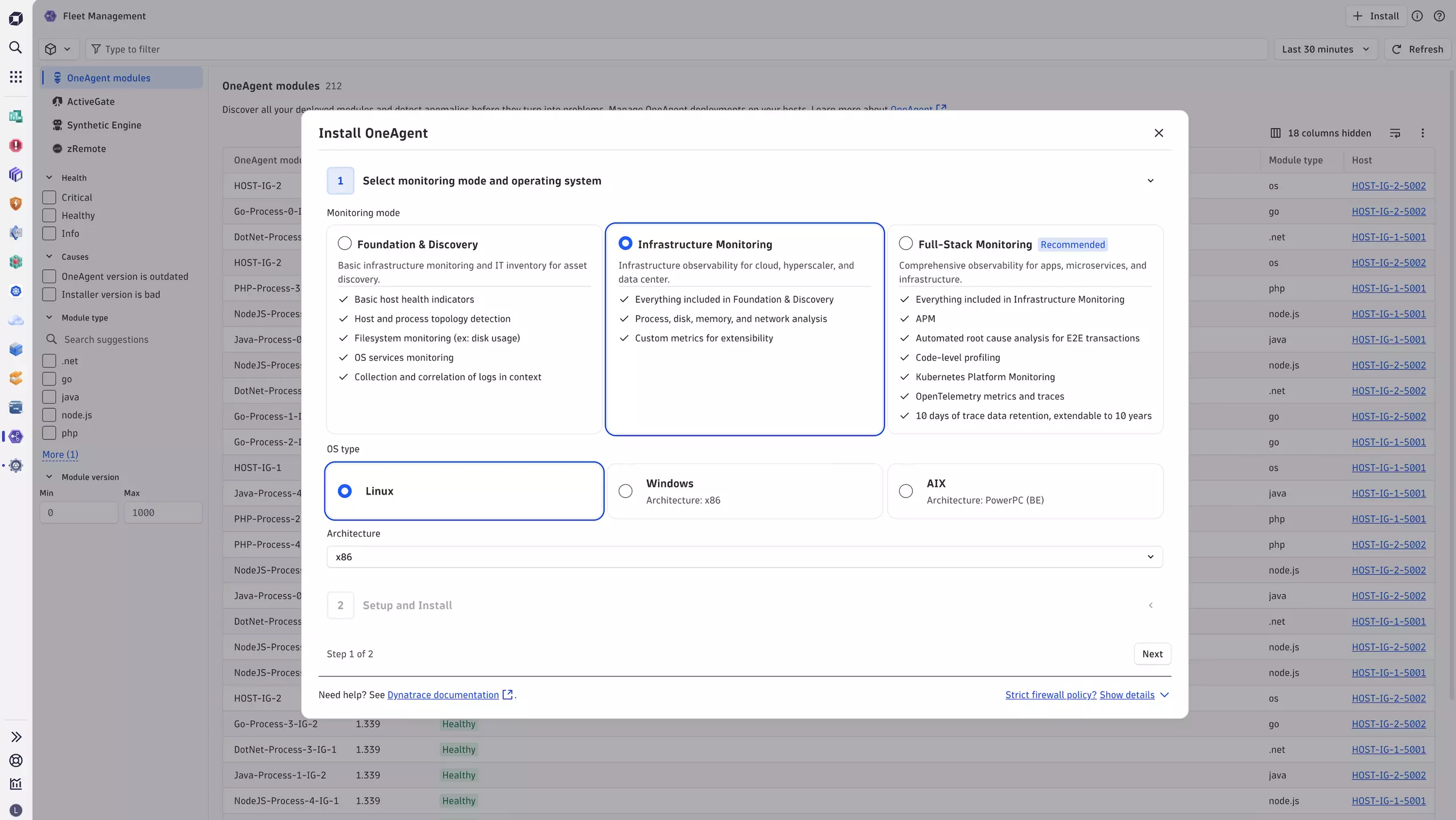
Connect fleet health with observability data in Fleet Management
Fleet Management is built on top of Grail, Dynatrace’s unified data lakehouse, which means fleet data is part of your observability data, not something you have to check separately. It’s queryable with Dynatrace Query Language (DQL), the same language you already use for problems, logs, and traces, and it shows up in the same dashboards and notebooks. If you want to correlate a spike in problem cards with an ActiveGate that just fell out of connectivity, that’s one query, not two tools and a spreadsheet.
That matters more as your fleet gets bigger and more complex. The health-state model works the same way: Fleet Management can tell you what’s critical, what’s a warning, and what to do about each one, prioritized by impact, to save you time interpreting raw metrics on your own.
What’s next
The initial release, which went live with SaaS version 343, establishes the foundation with OneAgent and ActiveGate. From here, we’re deepening the management experience for these components while progressively extending Fleet Management to encompass additional ones (e.g.: OTel Collector, Kubernetes Operator) so that your entire observability fleet is visible and manageable in one place, no matter how your environment is instrumented.
Longer term, Fleet Management provides a foundation for future autonomous operations capabilities, including anomaly detection, remediation recommendations, and deployment-drift detection.
Get started with Fleet Management
Fleet Management is available to all Dynatrace SaaS customers and pre-installed on all environments. Use Fleet Management when you need a centralized view of OneAgent and ActiveGate health, versions, connectivity, update policies, installation flows, support archives, network zones, and permissions. Head to the docs to learn more about how to get started and further details on the capabilities mentioned above.
Put it in front of your actual fleet and tell us what you think. What’s working, what’s missing, what you wish it could do: head over to the Dynatrace Community and share your feedback, which directly shapes where we go next.
The road to autonomous operations starts with a single step. Let’s take it together.



Looking for answers?
Start a new discussion or ask for help in our Q&A forum.
Go to forum