


The whole industry is using and adopting agentic AI. In fact, AI agents are only as effective as the data that powers them. Whether supporting developers through code assistants, accelerating ITSM workflows, automating cloud operations, or enhancing threat detection, you need high-quality data with full context awareness. Only this allows AI to be a trusted and effective partner, delivering reliable recommendations based on a deterministic foundation. The Dynatrace MCP Server, as part of Dynatrace Intelligence, allows AI assistants to interact with Dynatrace and access live, context-rich observability data and reliable AI-insights for smarter, autonomous operations.
Get real-time insights from your digital systems right inside your processes
In traditional IT monitoring, fragmented data and manual tagging were inconvenient. In an AI-native world, they’re a fundamental flaw. AI systems built on incomplete or disconnected data can’t make informed decisions, leading to unreliable recommendations or, even worse, unreliable autonomous action—a scenario that keeps executives on edge.
Dynatrace Intelligence, the agentic operations system built into the Dynatrace platform, solves this with a real-time, deterministic, and context-rich understanding of your entire digital systems.
The Dynatrace MCP Server, as part of Dynatrace Intelligence, provides a secure and governed interface that allows your AI ecosystem to interact with the Dynatrace platform and access data and findings powered by Dynatrace Intelligence. It uses the Model Context Protocol (MCP), an open standard that defines and handles safe interactions between agents, external data sources, and tools.
Together, Grail and Smartscape provide the technical foundation for Dynatrace Intelligence to let agentic AI act on facts, not guesses, ensuring that AI-powered decisions are accurate, scalable, and actionable, a prerequisite for reliable autonomous operations.
By exposing Dynatrace’s unique capabilities, the MCP Server delivers trustworthy, real-time knowledge directly into agentic workflows. This includes:
- Contextualized signals with a holistic understanding of every data point within its full operational and business context, provided by Grail, Dynatrace’s AI-optimized, unified data lakehouse.
- Real‑time topology and causal dependencies, powered by Smartscape, a real-time dependency graph that reveals how systems, services, and cloud components relate and influence one another.
- Deterministic, causal‑AI‑driven root‑cause analysis with correlation to real business impact.
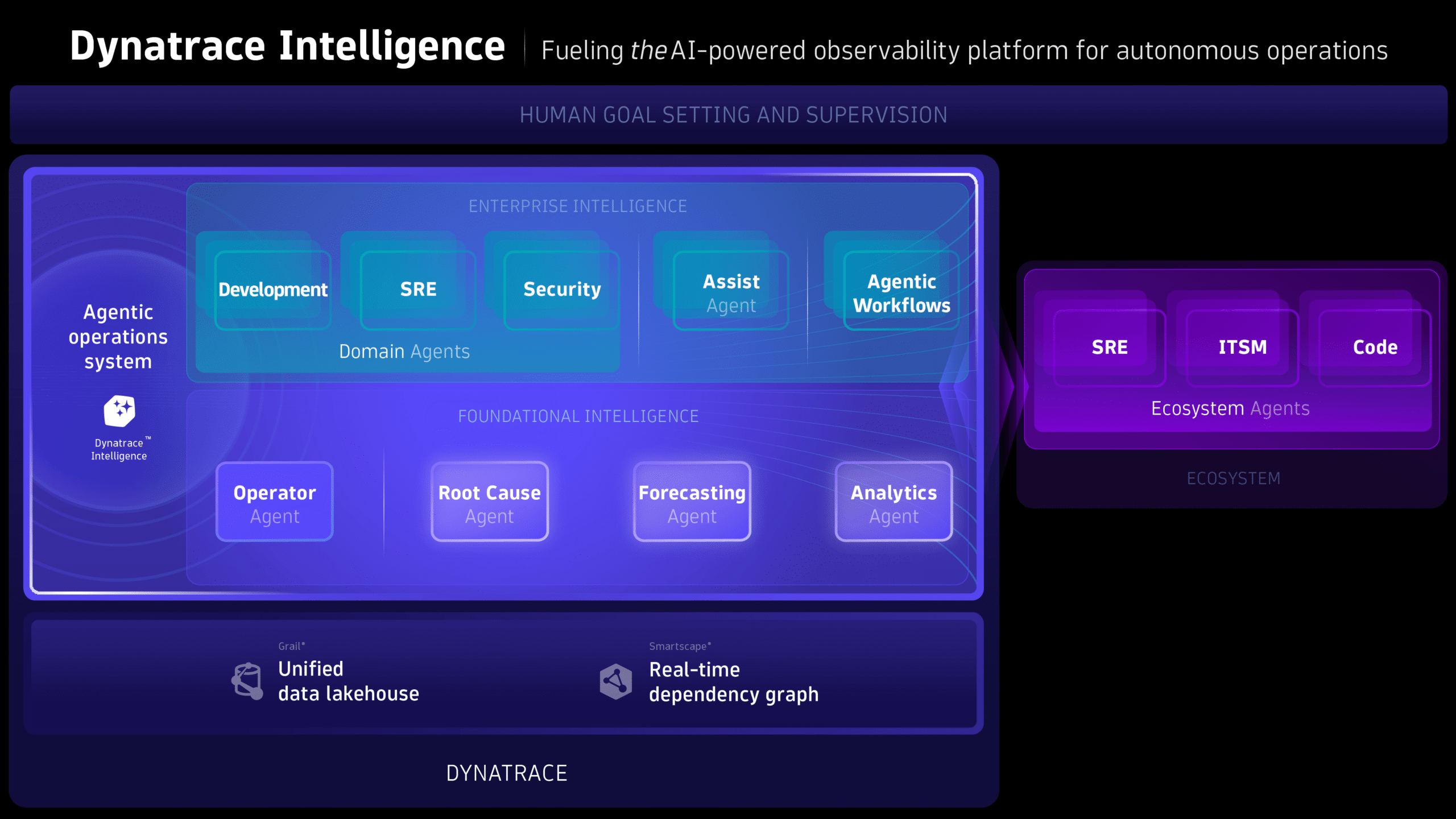
Empower your AI agents to deliver greater value through live production data
You can connect Dynatrace to any MCP client in minutes: no server to deploy, install, host, or maintain. Use the Dynatrace MCP Server to accelerate integration and ensure a smooth transition from pilot to enterprise-scale adoption.
Through the tools hosted on the Dynatrace MCP Server, you can use natural language to query all your data on Grail, check system health, and get problem analyses and remediation recommendations. This allows seamless access to production insights across the applications you already use, including your IDE, Microsoft Copilot, Slack, and automation platforms like n8n. The MCP Server powers numerous more integrations: Azure SRE, AWS DevOps, GitHub Copilot, Atlassian Rovo Ops, AWS DevOps Agent, Kiro, and Amazon Q, to name just a few.
For customers exploring their own tailored solutions, the community-driven local MCP Server is also available. It already sees wide adoption as a flexible way to experiment with new use cases, adapting the MCP to specific needs, and prototyping ideas before moving them into production.
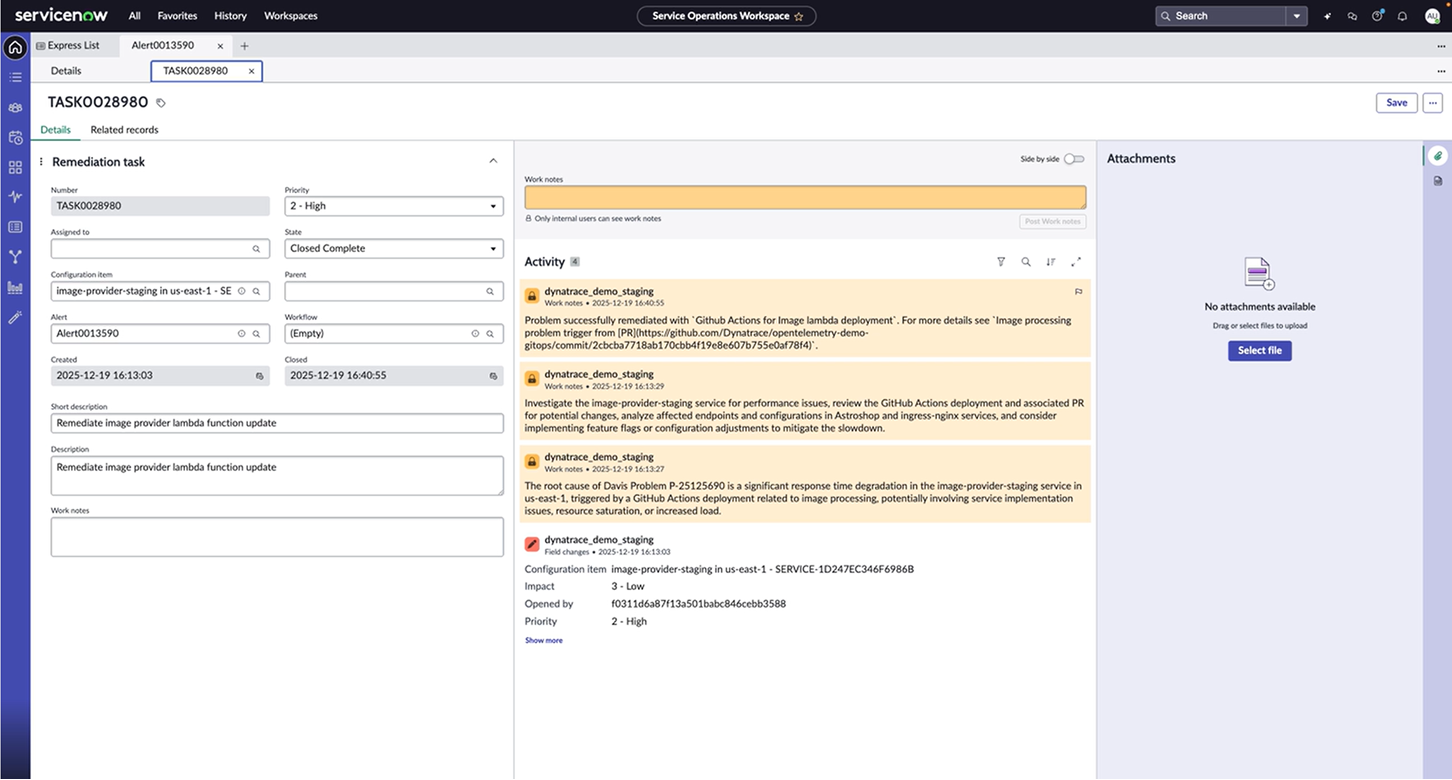
Where the MCP Server delivers value
The Dynatrace MCP Server brings production truth directly into development, operations, ITSM, and business workflows, allowing AI assistants to reason, decide, and act with full contextual awareness. Examples include:
- Development workflows: In-IDE access to live production signals, root causes, exceptions, impacts, and even code-level stack traces, for example, GitHub Copilot querying Dynatrace data in natural language to validate changes and accelerate fixes, with no tool switching required.
- Operations & SRE: Real-time context for accelerated triage, proactive remediation, and evidence-rich postmortems, for example, the Azure SRE Agent integrates with the MCP Server to diagnose anomalies and trigger automated responses.
- ITSM & Incident Management: Enriched tickets with topology, dependencies, business impact, and AI-driven recommendations, for example, Atlassian Rovo Ops delivers end-to-end, context-aware incident management.
- Business Intelligence: Live production insights for product, sales, support, and process teams to link system behavior to customer and business outcomes, provided through MCP clients like Slack, Microsoft Copilot, or ChatGPT.
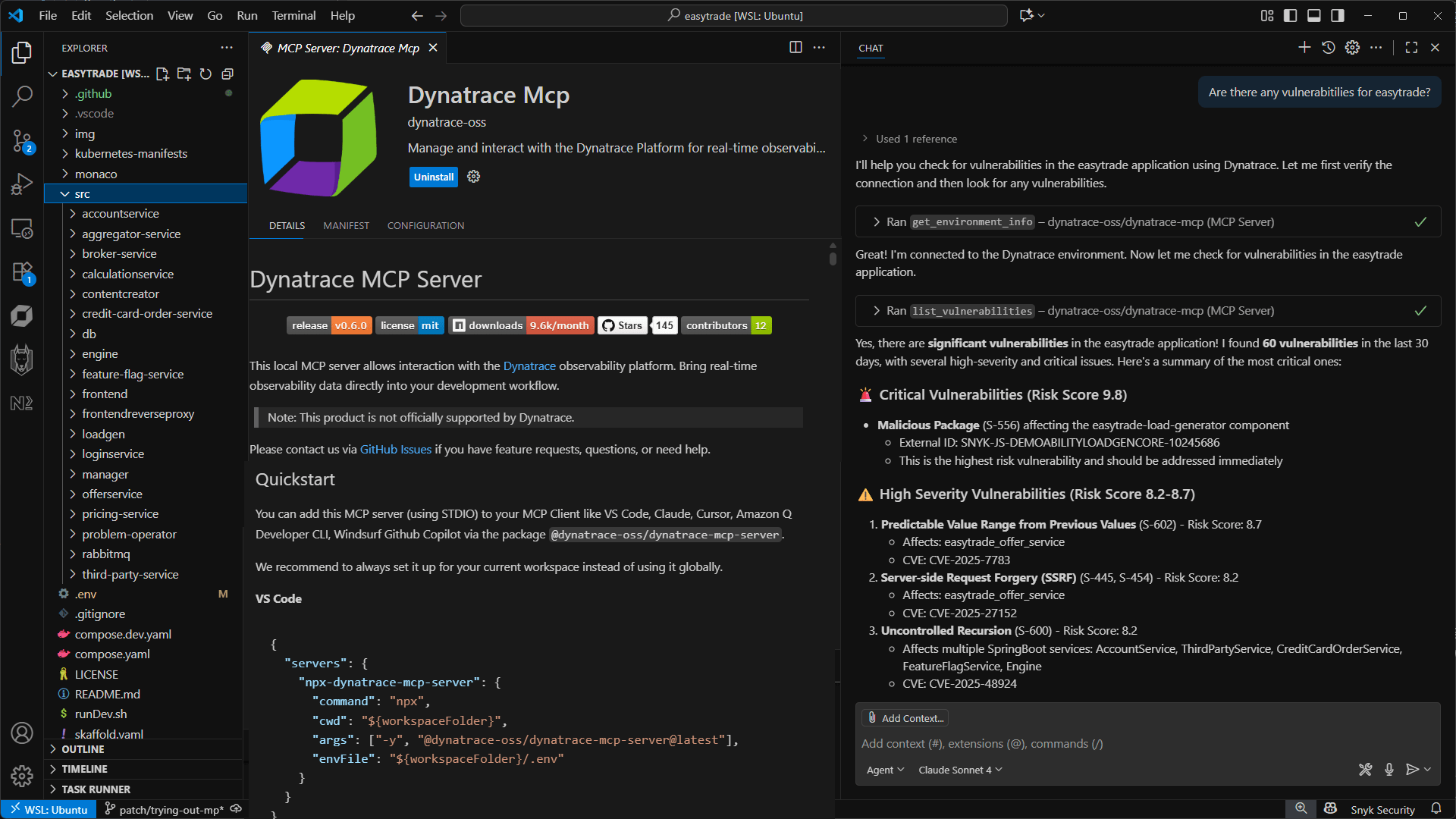
The Dynatrace MCP Server is now generally available
Dynatrace Intelligence provides insights grounded in real-time topology, deterministic causal analysis, and deep semantic understanding of your environments. Every recommendation is rooted in precise, explainable, and actionable production truth, giving AI systems the reliable foundation they need to operate safely and autonomously.
The Dynatrace MCP Server brings contextualized observability data and insights from Dynatrace Intelligence directly into your broader AI ecosystem.
Connect Dynatrace to any MCP client and start using it in minutes.
You can work with widely available MCP clients such as Microsoft Copilot or ChatGPT, integrate the Dynatrace MCP Server into your ITSM and incident management workflows through ServiceNow or Atlassian Rovo, bring production context directly into VS Code or other IDEs, or orchestrate automated actions through workflow tools like n8n or Copilot Studio.
Explore real-world examples in our latest blog post on the AI ecosystem, or explore all Dynatrace AI ecosystem-related announcements.
For details on configuring the Dynatrace MCP Server, go to our documentation.


Looking for answers?
Start a new discussion or ask for help in our Q&A forum.
Go to forum