


The integration of Dynatrace with Microsoft Azure SRE Agent establishes a new benchmark for cloud operations by leveraging AI-based root cause analysis and real-time production insights, alongside a comprehensive understanding of complex, large-scale IT environments. You can leverage the combined strengths of Dynatrace and Microsoft, enabling teams to resolve complex problems in large-scale IT environments more quickly and efficiently, and automate incident remediation, moving one step closer to driving autonomous operations across their complex environments.
In today’s cloud-first world, reliability isn’t just a goal; it’s a competitive advantage. As more services move online and LLM-powered assistants evolve into autonomous agents, maintaining the reliability, scalability, and cost-efficiency of critical systems becomes essential.
That’s why Dynatrace and Microsoft teamed up to integrate Dynatrace® AI-powered observability with the Azure SRE Agent. This collaboration allows site reliability engineers (SREs) to ensure seamless operations while proactively planning for future scalability and reliability requirements.
Transform your incident management through the combined capabilities of Azure SRE Agent and Dynatrace AI
Azure SRE Agent, introduced earlier this year, provides SREs and developers with the tools they need to increase the speed and efficiency of incident responses, diagnostics, and collaboration, allowing them to resolve problems quickly.
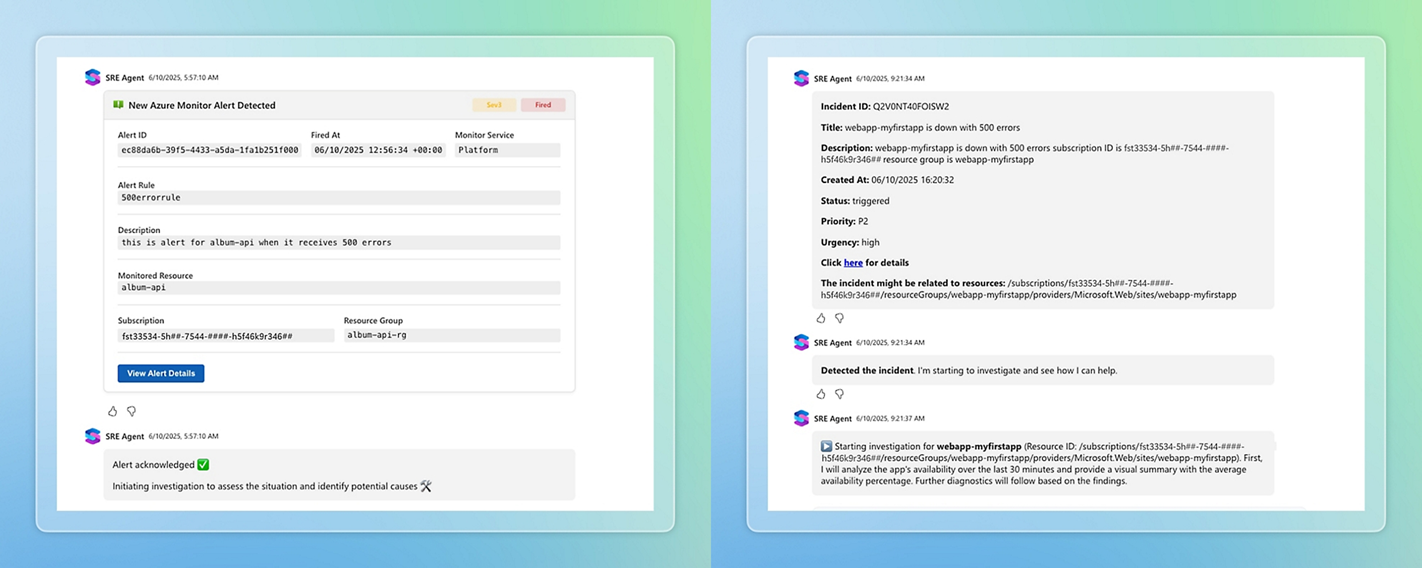
Seamlessly integrated with incident management tools such as ServiceNow, as well as the developer ecosystem, represented by GitHub Copilot or Azure DevOps, the agent runs in the background 24/7, learning and monitoring the health and performance of your cloud environment.
As a reliability assistant, Azure SRE Agent supports teams by efficiently diagnosing and resolving production issues. You can ask the agent questions in natural language, easily access clear and concise problem summaries, and coordinate incident workflows with integrated human-in-the-loop approvals.
Dynatrace enhances Azure SRE Agent’s troubleshooting and automation capabilities with advanced observability insights. By mapping topology, data, and business context, Dynatrace gains a comprehensive understanding and delivers production-accurate visibility across your entire IT system. This visibility feeds Dynatrace deterministic AI, allowing precise root-cause identification and impact analysis. All these insights are now seamlessly supplied to the Azure SRE Agent, equipping it with real-time production context and reliable root cause analysis.
This allows your teams to move beyond simply receiving alerts; teams are now provided with AI that acts, guides safe mitigations, and accelerates resolution within Azure-native workflows.
Gain efficiency across every stage of the incident lifecycle
Using the Model Context Protocol (MCP), the Azure SRE Agent is securely connected with Dynatrace. Whether a team member uses the agent to ask questions in plain natural language, or the agent interacts with Dynatrace directly—sharing insights, asking for real-time observability data, or root cause analysis, together with remediation steps—the close collaboration supports use cases across every stage of incident management, allowing you to:
- Cut MTTR by automating routine runbooks and diagnostics, with safe, approved mitigation actions based on full context.
- Reduce security risk by triaging vulnerabilities faster with production evidence, triggering guided fixes, and validating outcomes.
- Accelerate delivery with contextual GitHub issues and PRs that include root cause, blast radius, and tests, minimizing issue reproduction time and rework.
- Improve fix accuracy by correlating Azure and Dynatrace telemetry for precise root-cause and impact analysis.
- Prevent incidents before they happen using real-time signals and historical trends to stop regressions and reduce toil.
Illustrating the value: Proactively detect and remediate security vulnerabilities
Let’s take a look at a concrete example, which we presented at Microsoft Ignite. Imagine you run a Java-based payroll app on Azure, and a new security warning (CVE) appears. Every second matters now, and there’s no room for error: you need the issue fixed quickly, without lots of back-and-forth between teams.
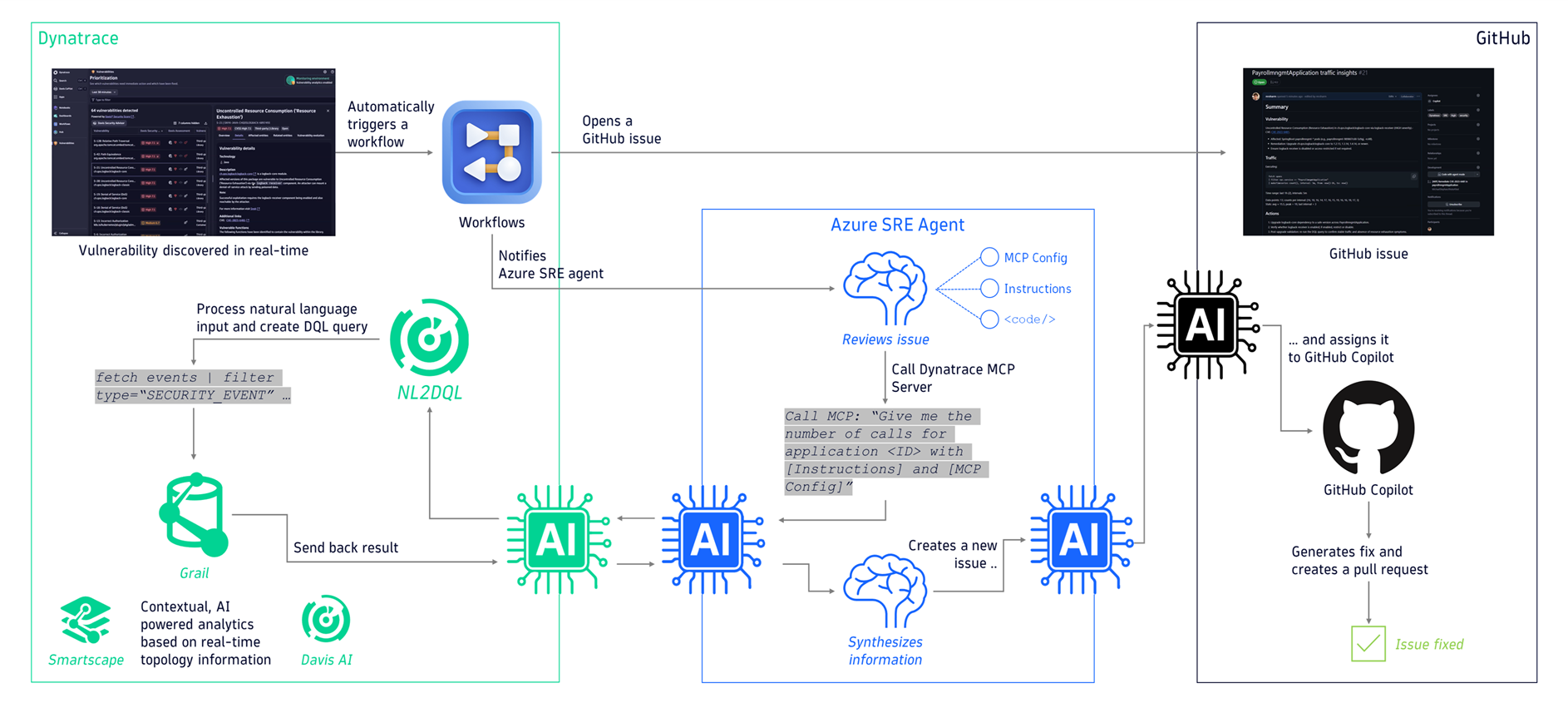
- Once the vulnerability is detected, Dynatrace automatically identifies the library that caused the vulnerability, opens a GitHub issue containing all relevant information, such as which parts of your app are affected, and informs Azure SRE Agent.
- The SRE agent reviews the GitHub issue and requests additional information from Dynatrace via the MCP server, such as the number of users affected, how often it happens, which endpoints are involved, or which customers might be affected, to assess the scope and impact of the vulnerability.
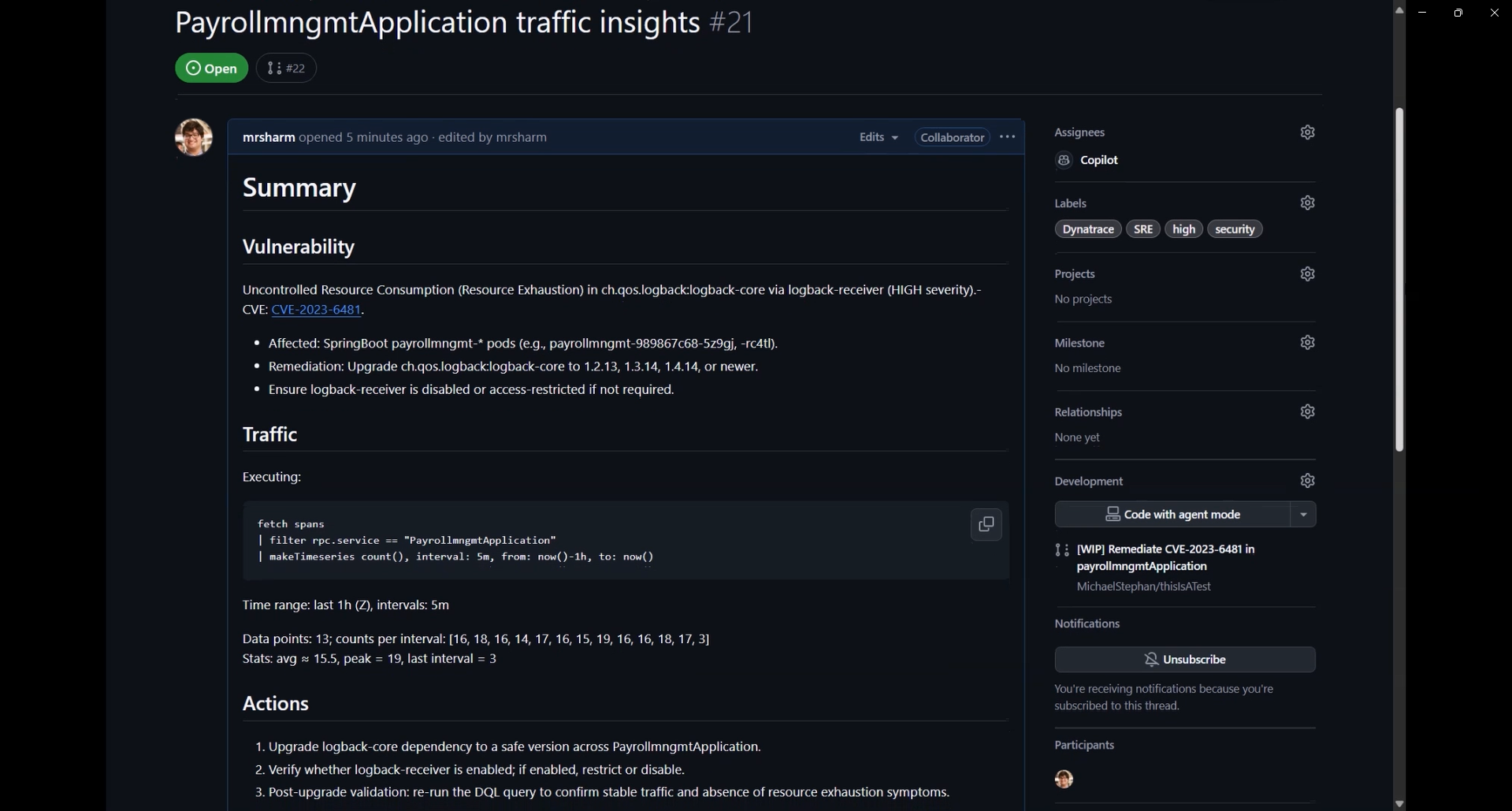
- After gathering all necessary details, the SRE Agent synthesizes the information and creates a new GitHub issue, assigning it to GitHub Copilot for remediation.
- GitHub Copilot then takes action by updating the configuration and code in the GitHub repository to resolve the vulnerability automatically.
- The pull request not only includes the necessary version changes but also includes documentation, highlighting all findings as well as how the issue was remediated, along with unit tests, to prevent the issue from recurring.

Try the power of Agentic AI for incident resolution
Dynatrace delivers deep, causation-based insights into your live systems, now seamlessly integrated with Azure SRE Agent to elevate your incident management. With this integration, you can unlock:
- Smarter detection and remediation: Deep contextual observability from Dynatrace, correlated with Azure telemetry, enhances issue identification and resolution across complex environments.
- Automated operations: Routine runbook actions and diagnostic workflows can be automated, reducing mean time to repair and freeing teams to focus on innovation.
- Proactive reliability: Continuous analysis of real-time and historical data identifies leading indicators of failure, allowing teams to prevent incidents before they impact customers.
Azure customers can now access Azure SRE Agent directly in the Azure portal. To connect Dynatrace with the agent and learn how to set up Dynatrace MCP Server, see Dynatrace Documentation.


Looking for answers?
Start a new discussion or ask for help in our Q&A forum.
Go to forum