


Skip to technology filters Skip to main content
Dynatrace Hub

Extend the platform,
empower your team.

Popular searches:
Home hero bg
SNMP AutodiscoverySNMP Autodiscovery
SNMP Autodiscovery

SNMP Autodiscovery

Scan through your subnets and build an inventory of SNMP-enabled network devices.

Extension
Free trialDocumentation
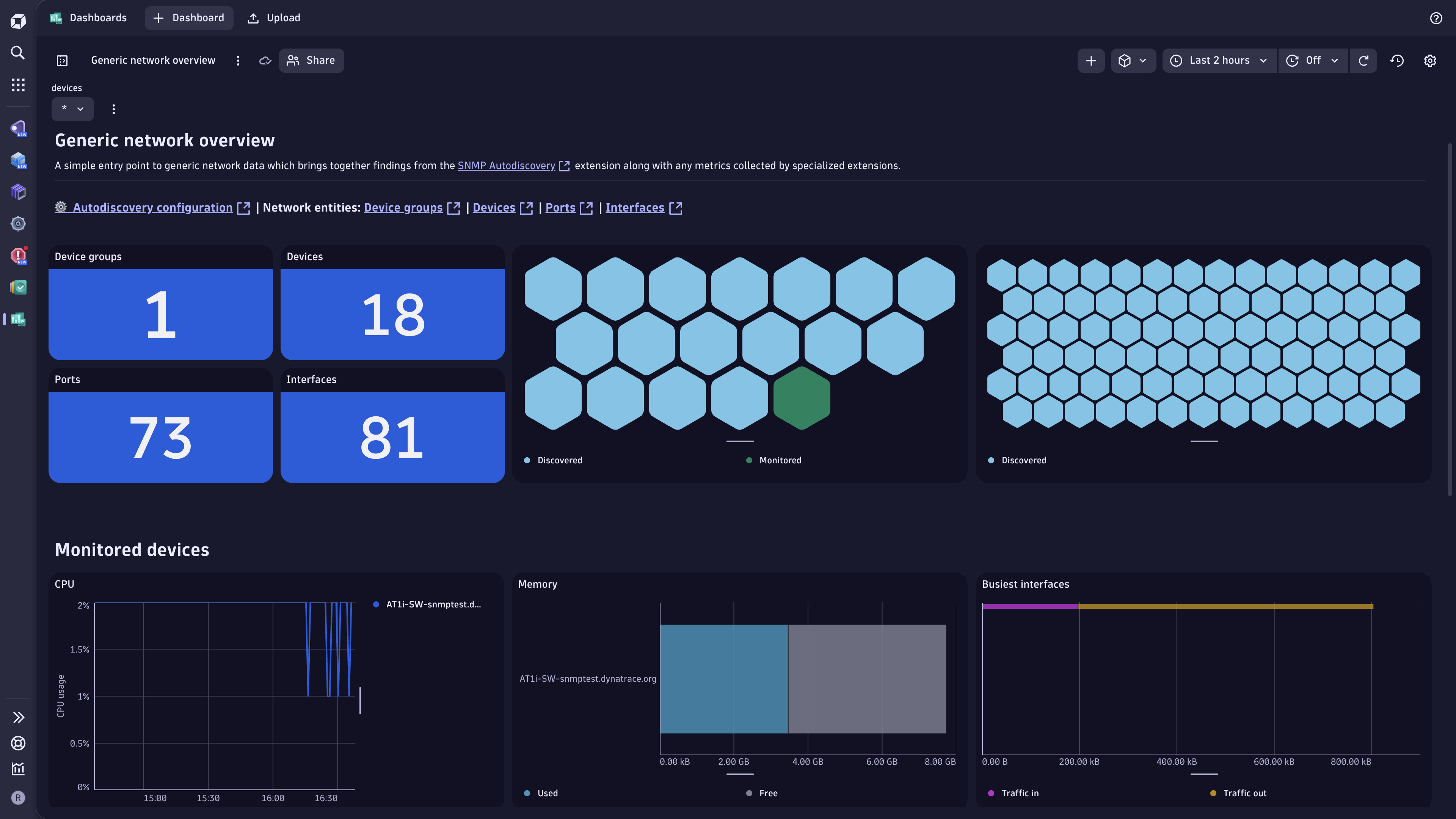
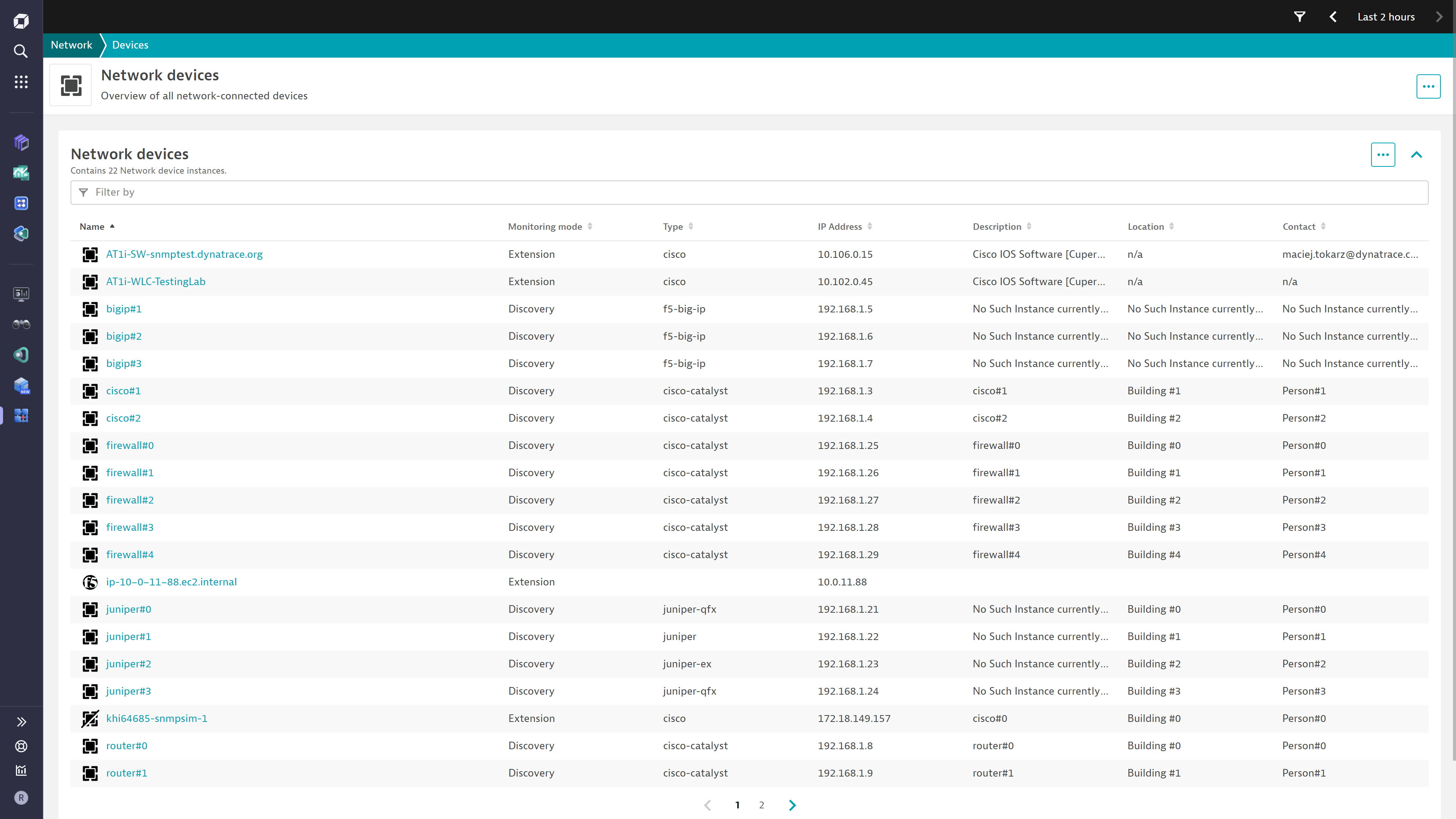
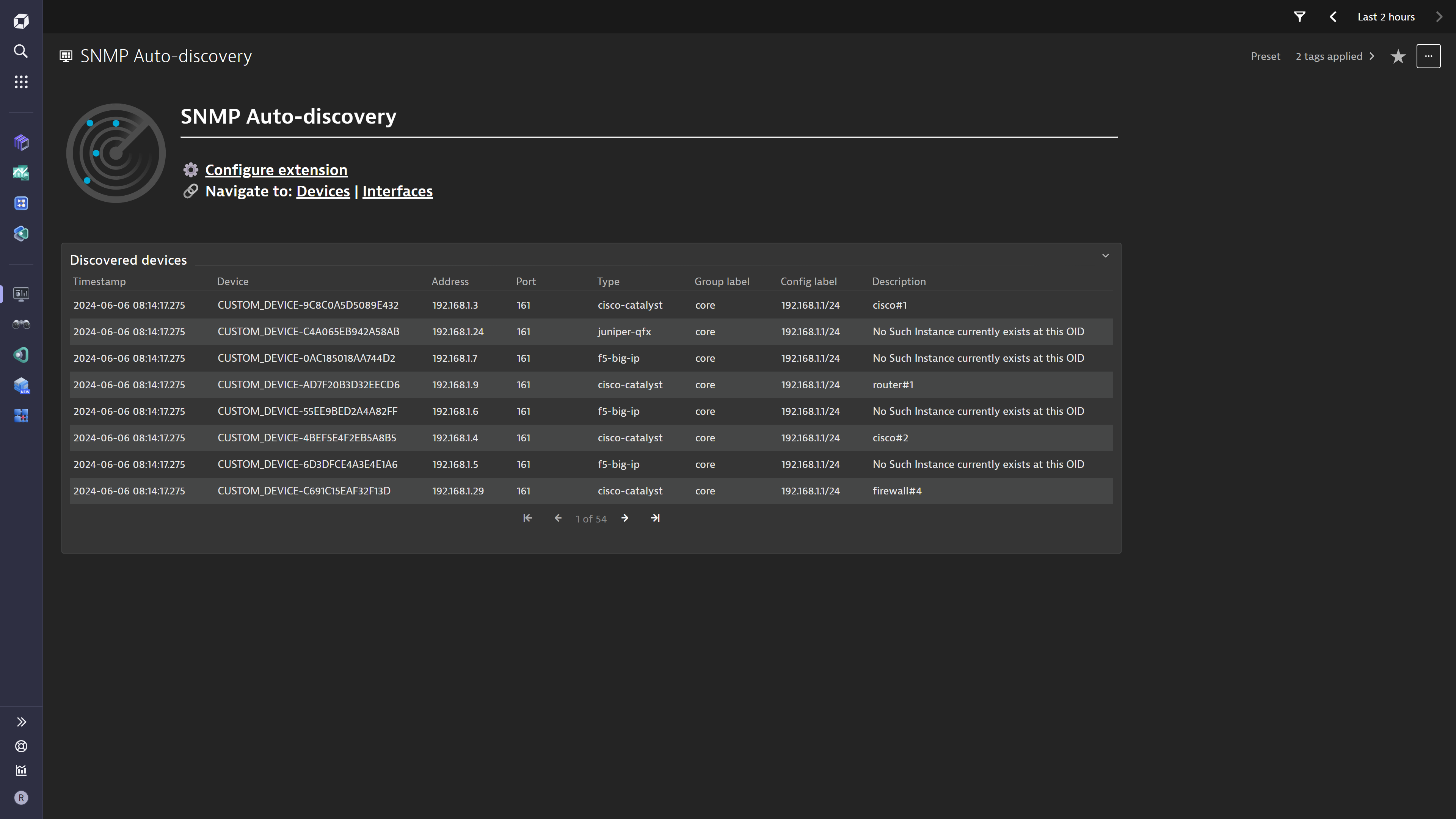
The "Generic network overview" dashboard offers a single pane of glass view over the key extension findings, including the extended network built through neighbor discovery.Build an inventory of all your network devices. Each device recommends a specialized extension that can provide monitoring insights.Reach your data easily through this convenient overview dashboard.
  • Product information
  • Release notes

Overview

This ActiveGate extension takes subnets and ranges of IP addresses along with SNMP credentials and scans through them to discover SNMP-enabled network devices. The devices are then reported as entities acting as an entry point to specialized extension configurations.

This is intended for users who:

  • Want to simplify the onboarding of network device monitoring in Dynatrace
  • Require a single pane of glass view over all network technologies

This extension enables you to:

  • Get an overview of all network devices, regardless of technology
  • Find out which Dynatrace Extension can best monitor each device
  • Access all extension network data in one place

Use cases

  • Build an inventory of SNMP-enabled network devices
  • Understand which extension Dynatrace recommends for further monitoring & insights
  • Enable the use of the Discovery & Coverage App for automatically setting up network monitors and extension configurations for the discovered devices
  • Understand your extended network in terms of device to device connectivity along with port & interface details

Get started

For more information on the installation and configuration, please see SNMP Autodiscovery extension in the Dynatrace Documentation.

Details

Compatibility information

  • SNMP v2c or v3 (supported parameters are detailed here)
  • Minimum ActiveGate version 1.280
  • Minimum Dynatrace version 1.280
Dynatrace
Documentation
By Dynatrace
Dynatrace support center
Subscribe to new releases
Copy to clipboard

Feature sets

Below is a complete list of the feature sets provided in this version. To ensure a good fit for your needs, individual feature sets can be activated and deactivated by your administrator during configuration.

Feature setsNumber of metrics included
Metric nameMetric keyDescriptionUnit
Devices OKsfm.snmp_autodiscovery.devices_okThe amount of addresses that responded to the scanner query as part of a given configuration.Count
Devices scannedsfm.snmp_autodiscovery.devices_scannedThe total amount of addresses that were scanned by the extension as part of a given configuration.Count
Scan durationsfm.snmp_autodiscovery.scan_durationThe time the extension took to scan through all addresses that are part of a given configuration.NanoSecond

Full version history

To have more information on how to install the downloaded package, please follow the instructions on this page.
ReleaseDate

Full version history

🪲 Fixed in this version:

  • Added dt.security_context field to discovered network devices and interfaces.

Full version history

⚠️ WARNING ⚠️: Possible breaking changes and warnings - PLEASE READ before upgrading:

  • This version requires a minimum Dynatrace version of 1.338.0 and a minimum ActiveGate version of 1.330.0
  • This version includes a breaking change for Dynatrace on Grail:
    • With the inclusion of OpenPipeline processing rules, any logs ingested from the extension will be processed by a dedicated OpenPipeline pipeline instead of the classic log pipeline.
    • This means that classic rules will no longer be used on logs ingested from the extension. Please be sure to migrate any requiered rules to OpenPipeline rules.
    • Additionally, some field names are handled differently in OpenPipeline, e.g. capitalization. Please double-check any custom dashboards and alerts you have created for this extension.
    • You must opt-in to OpenPipeline configuration via Settings API – see the documentation.
  • This version also requires a mandatory configuration change for Dynatrace SaaS:
    • The entity queries that were executed via the Environment API have now been migrated to DQL using the Platform API. As such, instead of an Access Token, the configuration now requires a Platform Token with storage:buckets:read and storage:smartscape:read scopes

✨ New in this version:

  • Additional advanced configuration parameters added for the SNMP scanner. These allow complete control over concurrency and resource limits for the scanner
  • Additional configuration details added to support proxy connections to the Dynatrace APIs

SaaS Only

  • Smartscape on Grail

🚀 Improved in this version:

  • Improved debug logging. The extension execution logs are more verbose and aggregated which should help troubleshooting
  • Neighbor discovery now leverages CDP protocol in addition to LLDP

SaaS Only

  • Platform queries now use DQL
  • The logs produced align with the Semantic Dictionary model for network
  • Network devices are de-duplicated based on Chassis MAC address

Full version history

Fixed in this version

  • Loose topology dimension requirements would sometimes result in unnamed network device entities created. This has been fixed by requiring the additional sys.name dimension to be present on all metrics.

Full version history

🚀 Improved in this version (3.2.16):

  • Adjusted naming of interface dimensions for traffic metrics.

Full version history

Fixed in this version:

  • Interfaces & Ports for network neighbor entities were not correctly created

Improved in this version:

  • Legacy com.dynatrace.extension.network_device.lldp_neighbor metric fully removed from the model and topology rules

Full version history

✨ New in this version (3.2.13):

  • Added metric metadata definitions for unicast/multicast/broadcast packet transmission.
  • Added debug log flag in extension configuration for troubleshooting.

🚀 Improved in this version:

  • Improved detection of interface names in LLDP neighbor resolution.
    • Extension will now match detected network interfaces to discovered ports via MAC address and create a relationship.
    • If local(7) subtype is found, it will be treated as interface name.

🪲 Fixed in this version:

  • Corrected treatment of whitelisted devices that could lead to neighbor discovery being stopped.

Full version history

✨ New in this version (3.2.10):

  • Added 2 new metric metadata definitions.

Full version history

Fixed in this version:

  • Network Device entities would be created for every IP Address, even if unresponsive

Full version history

Improvements:

  • Neighbor discovery queries have been optimized for large devices with lots of interfaces
  • Specialized extension recommendations now include the extensions for HP H3C and ICF Switches

Full version history

Fixed in this version:

  • Entities created through neighbor discovery were missing relationships between them

Full version history

Fixed in this version:

  • Syslog data is linked to its own entity which is then linked to network:device to not overcrowd the Infrastructure & Operations App view

  • For neighbor discovery, in some cases, a Physical Port would be wrongly reported as an Interface in the logs & dashboard data.

Full version history

🐛 Bugs fixed in this version:

  • Fixes bug in platform dashboard in which links were referencing the incorrect tenant

Full version history

New in this version:

  • Security Context is applied to all entities. Do not configure this if you would rather control it from one of the specialised SNMP extensions (e.g. F5, Cisco, Juniper, etc.)
  • The metrics metadata was expanded to include Interface Errors (In/Out) and Discards (In/Out)

Improved in this version:

  • An ignore rule was configured for devices whose System Object IDs start with "1.3.6.1.4.1.8072.3.2". These typically identify full linux servers, so they shouldn't be considered as "network devices" to be discovered.

Fixed in this version:

  • The Classic dashboard tile for log records would not fetch any records

Full version history

New in this version

  • Neighbor discovery

    • A new configuration switch has been added to enable Neighbor Discovery.
    • With this feature, every discovered device that is SNMP enabled will also be queried for Network Neighbors. Neighbors are other devices connected to the queried device which advertise themselves via LLDP protocol. It is down to each individual device to have this protocol enabled and accurately configured to broadcast correct data.
  • Platform dashboard

    • A "Generic network overview" dashboard is now available with the extension
    • This visualizes some of the key findings of the extension, along with the new network neighbors data.

Improved in this version

  • Custom timeout

    • A new configuration field allows setting a custom timeout for SNMP operations
    • In cases where the extension is reporting "No SNMP response received before timeout" for device groups you know are SNMP enabled, you may increase the value past the default of 1 second to compensate for network & device latency.
    • ⚠️ Warning this proportionately increases the duration of the scan as every address will be awaited longer.
  • Lower cost from log ingestion

    • The extension now produces a more optimized log record format which is expected to reduce cost especially in situations where multiple configurations are created.

Full version history

Fixed in this version:

  • glibc dependency introduced by cryptography package was lowered to 2.17, allowing more Linux distributions to run the extension.

Full version history

Fixed in this version:

  • Bandwidth property on network:interface corrected to MegaBitPerSecond unit
  • oper.status dimension on some interface metrics was incorrectly labelled as "MAC address"
  • cryptography package explicitly listed as a dependency. This would cause "ciphering services not available" error on some installations.

Full version history

Fixed in this version:

  • Operational & Admin status attributes are missing for network:interface entity

Full version history

Improved in this version:

  • Network devices are discovered even with partial data available
  • Extension log files contain a more detailed breakdown of SNMP errors seen across devices
  • Configuration parameter Performance profile renamed
  • Description & documentation for API Token updated to reflect new scopes required

Full version history

⚠️ Breaking changes introduced:

  • The configuration parameter for Threads has been removed.

  • A new configuration parameter for Performance profile was introduced.

  • Due to these changes, a direct upgrade of your monitoring configurations will not be possible.

    All configurations will have to be recreated.

Improved in this version:

  • The extension can handle 25 times the amount of IPs, in the same amount of time.
  • The extension automatically adjusts processing to stay within ActiveGate performance profile limits.

Fixed in this version:

  • Relationships between network interfaces and network ports would not be correctly identified
Dynatrace Hub
Hub HomeGet data into DynatraceBuild your own app
Dynatrace Intelligence - Agentic Operations SystemThe Dynatrace Agentic AI ecosystem
Log Management and AnalyticsKubernetesAI and LLM ObservabilityInfrastructure ObservabilitySoftware DeliveryApplication ObservabilityApplication SecurityBusiness ObservabilityDigital Experience
Filter
Type
Built and maintained by
Deployment model
SaaS
  • SaaS
  • Managed
Partner FinderBecome a partnerDynatrace Developer

All

221 Results filtered by:

Akamai logo

Akamai

Ingest logs and security events from Akamai products.

Extension

Alibaba Cloud logo

Alibaba Cloud

Automatically discover, baseline, and monitor Alicloud environment components.

Extension

Anypoint MQ logo

Anypoint MQ

Gather metrics about your Anypoint MQ Queues.

Extension

Apache ActiveMQ Classic logo

Apache ActiveMQ Classic

Automatic and smart observability for ActiveMQ with trace and metric insights.

Extension

Apache Cassandra logo

Apache Cassandra

Improve Apache Cassandra observability.

Extension

Apache CouchDB logo

Apache CouchDB

Intelligently observe and optimize health and performance of your database.

Extension

Apache Kafka logo

Apache Kafka

Automatic and intelligent observability with trace and metric insights.

Extension

Apache Solr logo

Apache Solr

Open-source enterprise-search platform, written in Java.

Extension

Apache Spark logo

Apache Spark

Enhanced insights for Spark Components.

Extension

Apache Zookeeper logo

Apache Zookeeper

Monitor and analyze your Apache Zookeeper with this JMX-based extension.

Extension

Apigee logo

Apigee

Remotely monitor your Apigee proxies.

Extension

AWS Cloud Monitoring logo

AWS Cloud Monitoring

New and enhanced monitoring capabilities for your AWS cloud platforms.

Extension

AWS Entities for Metric Streaming logo

AWS Entities for Metric Streaming

Analyse metrics in the context of an entity based on AWS Metric Streaming.

Extension

Azure Cloud Monitoring logo

Azure Cloud Monitoring

New and enhanced monitoring capabilities for your Azure cloud platforms.

Extensioncoming soon

Azure Managed Apache Cassandra logo

Azure Managed Apache Cassandra

Gain insights into your Azure Managed Cassandra Instance health and performance.

Extension

Black Duck logo

Black Duck

Ingest Black Duck security events and audit logs.

Extension

Ceph storage logo

Ceph storage

Monitor usage of Ceph storage system at both client side and host level.

Extension

Checkmarx logo

Checkmarx

Ingest Checkmarx security events and audit logs.

Extension

Check Point Firewall logo

Check Point Firewall

Gain insights into the performance of your Check Point Firewall devices.

Extension
Cisco ACI/APIC logo

Cisco ACI/APIC

Get insights into your Cisco Application Centric Infrastructure (ACI).

Extension

Cisco Catalyst Center (DNA Center) logo

Cisco Catalyst Center (DNA Center)

Get insights into the Cisco Catalyst Center infrastructure (f.k.a. DNA Center).

Extension
Cisco Catalyst SD-WAN Manager (Viptela) logo

Cisco Catalyst SD-WAN Manager (Viptela)

Get insights into the Cisco SD-WAN performance through the vManage API.

Extension

Cisco Firepower logo

Cisco Firepower

Monitor Cisco Firepower devices using SNMP.

Extension

Cisco UCS C-Series logo

Cisco UCS C-Series

Get insights into your Cisco UCS C-Series devices.

Extension

Cisco UCS M-Series logo

Cisco UCS M-Series

Get insights into your Cisco UCS M-Series devices.

Extension

Citrix DaaS & Virtual Apps and Desktops logo

Citrix DaaS & Virtual Apps and Desktops

Gain insight into your Citrix DaaS & Virtual Apps and Desktops environments.

Extension
Citrix Netscaler ADC logo

Citrix Netscaler ADC

Remotely monitor your Citrix NetScaler devices.

Extension
Citrix NetScaler SDX logo

Citrix NetScaler SDX

Remotely monitor your Citrix NetScaler SDX devices.

Extension

Cloudflare (extension) logo

Cloudflare (extension)

Collect notification history and various metrics from your Cloudflare accounts.

Extension

Cloud Foundry logo

Cloud Foundry

Monitor your Cloud Foundry resource definitions by connecting to the foundation.

Extension

Confluent Cloud (Kafka) logo

Confluent Cloud (Kafka)

Remotely monitor your Confluent Cloud Kafka Clusters and other resources!.

Extension

Connection Pools: Apache Commons logo

Connection Pools: Apache Commons

Application method of pooling and sharing multiple connections to a database.

Extension

Connection Pools: C3P0 logo

Connection Pools: C3P0

Application server method of pooling and sharing connections to a database.

Extension

Connection Pools: JBoss logo

Connection Pools: JBoss

Application server method of pooling and sharing connections to a database.

Extension

Connection Pools: WebLogic logo

Connection Pools: WebLogic

Application server method of pooling and sharing connections to a database.

Extension

Connection Pools: WebSphere Liberty logo

Connection Pools: WebSphere Liberty

Application server method of pooling and sharing connections to a database.

Extension

Consul Service Mesh (StatsD) logo

Consul Service Mesh (StatsD)

Extend visibility into your Consul Service Mesh instances to monitor health and improve performance.

Extension

Control-M Jobs v2 logo

Control-M Jobs v2

Monitor your Control-M jobs execution status.

Extension

CoreDNS (2.0) logo

CoreDNS (2.0)

Collect important data from your CoreDNS processes.

Extension

Couchbase logo

Couchbase

Couchbase Capella (SaaS) database monitoring.

Extension

CPU Core Monitoring logo

CPU Core Monitoring

Get insights into CPU Core utilization on your OneAgent hosts.

Extension

CrowdStrike logo

CrowdStrike

Ingest CrowdStrike detection findings.

Extension

CyberArk logo

CyberArk

Ingest CyberArk audit logs via SIEM integration for reporting and analysis.

Extension

Databricks logo

Databricks

Monitor your Databricks Clusters via its multiple APIs!.

Extension

Databricks Workspace logo

Databricks Workspace

Remotely monitor your Databricks Workspaces!.

Extension

definity logo

definity

Monitor and optimize your Lakehouse, Spark, and Databricks pipelines.

Extension

Defunct Process Monitoring logo

Defunct Process Monitoring

Monitoring defunct processes stuck on your linux servers.

Extension

Dell EMC Isilon - PowerScale logo

Dell EMC Isilon - PowerScale

Monitor your Dell EMC Isilon / Powerscale clusters through the OneFS API.

Extension

Dell EMC PowerMax logo

Dell EMC PowerMax

Monitor PowerMax Arrays for performance and health, with Dell Unisphere API.

Extension

Dell iDRAC logo

Dell iDRAC

Connect to the Redfish API to get insights into your Dell iDRAC environment.

Extension