
Skip to technology filters Skip to main content
Dynatrace Hub

Extend the platform,
empower your team.

Popular searches:
Home hero bg
Oracle Connector Hub signals ingestOracle Connector Hub signals ingest
Oracle Connector Hub signals ingest

Oracle Connector Hub signals ingest

Observe OCI services with signals ingested from the Oracle Connector Hub

Technology
Free trialDocumentation
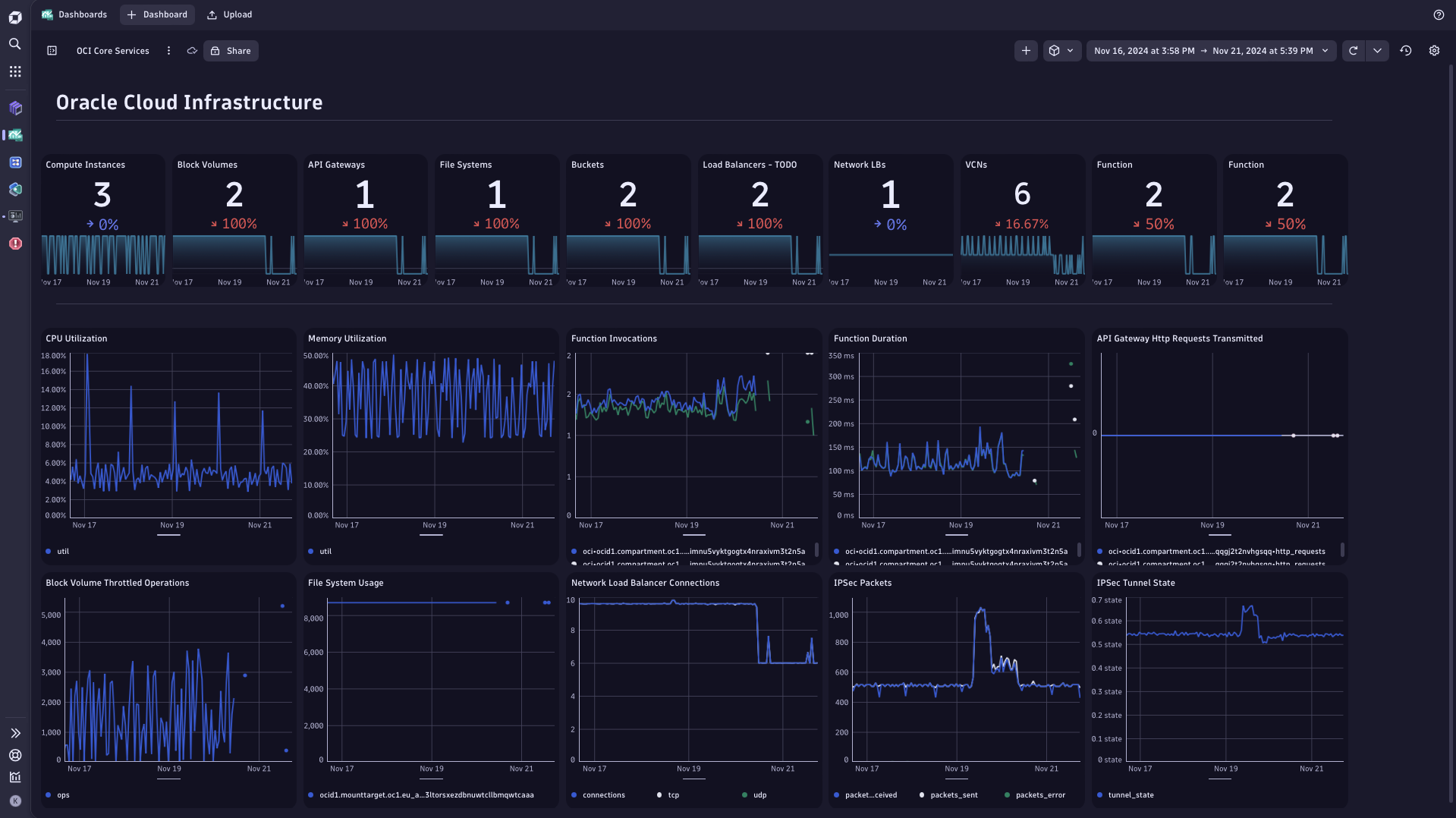
Oracle Cloud Infrastructure services sample dashboard
  • Product information

Overview

Oracle Connector Hub exposes metrics and logs from Oracle Cloud Infrastructure services, for consumption by the observability platforms. Dynatrace can ingest all these signals automatically and provide you with characteristics of your OCI services performance and usage - as exposed by Oracle through the Connector Hub.

Use this recipe to set up Oracle Connector Hub signals ingest into Dynatrace.

This is intended for users, who:

  • Want to analyze in Dynatrace all metrics and logs produced by all their Oracle Cloud Infrastructure services
  • Can accept basic data formats, as provided by Oracle, i.e. can work without metric metadata and topological relationships between observed entities
  • Are ready to provision themselves some custom dashboards and notebooks to get insights into collected data

This is not a intended for users, who:

  • Look for curated and topology-enriched observability signals, contextually reflecting how their specific OCI services work
  • Expect out-of-the-box dashboards and analysis screens that present OCI services performance and usage metrics

Users who look for guided OCI observability and out-of-the-box analytical screens, should have a look at the Oracle Cloud Infrastructure and Oracle Autonomous Database on OCI extensions.

Use cases

This recipe enables you to:

  • Monitor health and performance of any Oracle Cloud Infrastructure service
  • Enhance Oracle Cloud Infrastructure extension coverage to services outside of this extension scope
  • Enrich OCI observability with insights into the OCI service logs

Get started

To set up metrics and logs ingest from Oracle Connector Hub, you need to provision ingest functions on your Oracle tenant. These functions are executed on OCI and send metrics and logs to Dynatrace. Note that your Oracle tenant must be able to initiate network connection to your Dynatrace tenant's logs and metric ingest endpoints. Make sure that your network setup allows that before starting with OCI functions setup. You will need your Dynatrace tenant URL and Dynatrace API token or tokens with relevant ingest scopes of metrics.ingest and/or log.ingest. Set them up and test before starting the OCI side configuration.

There are separate functions for log and metrics ingest. You can provision one of them or both, depending on your needs.

OCI log ingest setup:

  • Visit oci-log-ingestion repository for instructions how to set up the ingest function on your Oracle tenant. Follow the recipe provided.

OCI metric ingest setup:

  • Visit oci-metric-ingestion repository for instructions how to set up the ingest function on your Oracle tenant. Follow the recipe provided.

Stay up-to-date with the patches and releases:

  • Use GitHub's Watch feature to subscribe to notifications on changes and updates to the ingest functions. We actively maintain and enhance them, so it's worth watching the changes and updating your environment.

Details

This recipe is not a Dynatrace extension by itself. There is no artifact to provision on Dynatrace platform to make it working.

However, this metric ingest method can benefit from presence of the Oracle Cloud Infrastructure extension on your Dynatrace tenant. Activate this extension to leverage metadata and analysis screens for services covered by this extension. Metrics ingested through OCI function will show up on Unified Analysis screens and dashboard provisioned by the Oracle Cloud Infrastructure extension.

Metrics collected: With this recipe you can collect any metric from any service on your OCI tenant. Use configuration settings on the ingest function side to filter out what you want to get ingested.

Monitoring cost: Push-based metric export on OCI side is not free. Please consult OCI Function Pricing for details on how this monitoring method incurs costs on Oracle side. For orientation, please also see an example in the Q&A section.

Q&A

Q: What Oracle services can be monitored with this extension?

A: OCI services that emit metrics are listed on Oracle site here. These services signals can be routed to Dynatrace via the Connector Hub and the extension.

Q: Can I monitor Oracle Fusion apps with this extension?

A: No. Fusion apps is not part of the Oracle Cloud Infrastructure. It is a SaaS appication, not an OCI service and therefore is not on the list of OCI services that emit metrics.

Q: What metrics and logs consumption does this integration incur?

A: Consumption depends on the number and kind of services you integrate, and the log volume produced on your OCI tenant. Number of metrics and dimensionality varies greatly between OCI services. Therefore, we are unable to provide the consumption estimation formula.

For more information, please visit Dynatrace Platform Subscription or Dynatrace classic licensing depending on your contract.

Q: What is the Oracle Connector Hub usage cost incurred by this extension?

A: OCI ingest functions, which send (push) metrics to Dynatrace, are executed on your Oracle tenant. Such execution has a cost; please consult OCI Function Pricing for details.

OCI function execution costs are based on number of function execution requests and function execution duration:

Total price = Requests fee + Duration fee

Where

Requests fee = (requests – free tier allocation) * (price-per-1M-requests)
Duration fee = ((requests) * (function-duration-seconds) *
(function-memory-GB)) – (free tier allocation) * (price-per-duration-GB-seconds)

Consult your Oracle contract for pricing and free tier allowances.

You can expect function-duration-seconds in the range of single-seconds or less and number of requests in single millions per month (i.e. one request per every metric, per minute).

Compatibility information

  • Network access from OCI tenant to Dynatrace tenant is required
  • You need enough privileges on Dynatrace tenant to set up API access tokens for log and/or metric ingest
  • You need enough privileges on OCI tenant to use the Oracle Cloud Shell or Oracle Code Editor to set up access to metrics and logs, and to create application (OCI portal > Applications > Create Application)
Dynatrace
DocumentationMore Information
By Dynatrace
Dynatrace support center
Copy to clipboard

Related to Oracle Connector Hub signals ingest

Oracle Cloud Infrastructure (OCI) logo

Oracle Cloud Infrastructure (OCI)

Monitor health and performance of the Oracle Cloud Infrastructure.

Dynatrace Hub
Hub HomeGet data into DynatraceBuild your own app
Log Management and AnalyticsKubernetesAI and LLM ObservabilityInfrastructure ObservabilitySoftware DeliveryApplication ObservabilityApplication SecurityDigital ExperienceBusiness Observability
Filter
Type
Built and maintained by
Deployment model
SaaS
  • SaaS
  • Managed
Partner FinderBecome a partnerDynatrace Developer

All

194 Results filtered by:

Palo Alto firewalls logo

Palo Alto firewalls

Palo Alto extension for problems detection

Extension
Confluent Cloud (Kafka) logo

Confluent Cloud (Kafka)

Remotely monitor your Confluent Cloud Kafka Clusters and other resources!

Extension
Kong - Prometheus logo

Kong - Prometheus

Monitor Prometheus metrics exposed by Kong and proxied upstream services

Extension
Nutanix Clusters logo

Nutanix Clusters

Monitor Nutanix clusters' performance, usage and availability, with Nutanix API.

Extension

Luna Network HSM Device logo

Luna Network HSM Device

Monitor your Luna Network Hardware Security Module (HSM) Devices through SNMP.

Extension

Consul Service Mesh (StatsD) logo

Consul Service Mesh (StatsD)

Extend visibility into your Consul Service Mesh instances to monitor health and improve performance.

Extension

Microsoft IIS logo

Microsoft IIS

Flexible and secure web server for hosting with Windows Server.

Extension

Kubernetes Monitoring Statistics logo

Kubernetes Monitoring Statistics

Troubleshoot your Dynatrace Kubernetes monitoring and Prometheus integration.

Extension
Snyk logo

Snyk

Ingest Snyk vulnerability findings, scans, and audit logs.

Extension
Citrix DaaS & Virtual Apps and Desktops logo

Citrix DaaS & Virtual Apps and Desktops

Gain insight into your Citrix DaaS & Virtual Apps and Desktops environments

Extension
Google Memorystore logo

Google Memorystore

Get insights into Google Memorystore service metrics collected from the Google Operations API to ensure health of your cloud infrastructure.

Extension

Databricks Workspace logo

Databricks Workspace

Remotely monitor your Databricks Workspaces!

Extension
Uptime logo

Uptime

Monitor the uptime of your hosts

Extension
UPS Device logo

UPS Device

Monitor your Uninterruptible Power Supplies (UPS) over SNMP

Extension
Google App Engine (integration) logo

Google App Engine (integration)

Insights into Google App Engine service metrics collected from Operations API

Extensioncoming soon
Traceroute logo

Traceroute

Run traceroute commands and collect step performance metrics

Extension
[Deprecated] Kubernetes PVCs logo

[Deprecated] Kubernetes PVCs

Monitor your Kubernetes persistent volume claims and alert on capacity limits.

Extension

Google Cloud Storage Transfer logo

Google Cloud Storage Transfer

Get insights into Google Cloud Storage Transfer metrics collected from the Google Operations API to ensure health of cloud infrastructure.

Extension

NVIDIA GPU logo

NVIDIA GPU

Monitor base parameters of the GPU, including load, memory and temperature

Extension
Oracle Database logo

Oracle Database

Observe, analyze and optimize the usage, health and performance of your database

Extension
Cisco ACI/APIC logo

Cisco ACI/APIC

Get insights into your Cisco Application Centric Infrastructure (ACI)

Extension
Dell iDRAC logo

Dell iDRAC

Connect to the Redfish API to get insights into your Dell iDRAC environment

Extension
Azure Managed Apache Cassandra logo

Azure Managed Apache Cassandra

Gain insights into your Azure Managed Cassandra Instance health and performance

Extension
PayShield HSM Device logo

PayShield HSM Device

Monitor PayShield Payment Hardware Security Module (HSM) Devices through SNMP.

Extension

NetApp OnTap (Remote) logo

NetApp OnTap (Remote)

Remote extension that collects NetApp OnTap metrics from the OnTap 9.6+ API.

Extension

Google Firestore in Datastore mode logo

Google Firestore in Datastore mode

Get insights into Google Firestore in Datastore mode metrics collected from the Google Operations API to ensure health of infrastructure.

Extension

Redis (2.0) logo

Redis (2.0)

Collect important additional data for your Redis instances.

Extension

PHP-FPM logo

PHP-FPM

Monitor the PHP-FPM status of your applications with this extension.

Extension

Timedrift Monitoring logo

Timedrift Monitoring

Monitor your host's NTP/Chrony Time Offset!

Extension
Apache Kafka logo

Apache Kafka

Automatic and intelligent observability with trace and metric insights.

Extension

MongoDB (local or remote monitoring) logo

MongoDB (local or remote monitoring)

Monitor your MongoDB servers either locally or remotely!

Extension
Connection Pools: C3P0 logo

Connection Pools: C3P0

Application server method of pooling and sharing connections to a database.

Extension

AWS Entities for Metric Streaming logo

AWS Entities for Metric Streaming

Analyse metrics in the context of an entity based on AWS Metric Streaming.

Extension

MongoDB Atlas logo

MongoDB Atlas

Remotely monitor your SaaS installation of MongoDB (Atlas)

Extension
Microsoft SQL Server logo

Microsoft SQL Server

Improve the health and performance monitoring of your Microsoft SQL Servers.

Extension

IBM MQ Appliance logo

IBM MQ Appliance

Monitor your IBM MQ Appliances over SNMP

Extension
Google Apigee logo

Google Apigee

Get insights into Google Apigee service metrics collected from the Google Operations API to ensure health of your cloud infrastructure.

Extension

Oracle Autonomous Database on OCI logo

Oracle Autonomous Database on OCI

Monitor health and performance of the Oracle Autonomous Database.

Extension
Google Pub/Sub Lite logo

Google Pub/Sub Lite

Get insights into Google Pub/Sub Lite service metrics collected from the Google Operations API to ensure health of the cloud infrastructure.

Extension

Infoblox DDI logo

Infoblox DDI

Monitor Infoblox DDI using SNMP

Extension
SAP HANA Database (remote monitoring) logo

SAP HANA Database (remote monitoring)

Easily understand the health and performance of your SAP HANA databases.

Extension

Connection Pools: WebSphere Liberty logo

Connection Pools: WebSphere Liberty

Application server method of pooling and sharing connections to a database.

Extension

Google Cloud Composer logo

Google Cloud Composer

Get insights into Google Cloud Composer metrics collected from the Google Operations API to ensure health of your cloud infrastructure.

Extension

Google Cloud Spanner logo

Google Cloud Spanner

Get insights into Google Cloud Spanner metrics collected from the Google Operations API to ensure health of your cloud infrastructure.

Extension

IBM i logo

IBM i

Collect performance data from your IBM i Hosts via this Remote extension.

Extension

Google reCAPTCHA Enterprise logo

Google reCAPTCHA Enterprise

Get insights into Google reCAPTCHA Enterprise metrics collected from the Google Operations API to ensure health of your cloud infrastructure

Extension
.NET logo

.NET

Automatic end-to-end observability for .NET applications and processes.

Extension

Google Cloud's operations suite logo

Google Cloud's operations suite

Get insights into Google Cloud's operations suite metrics collected from the Google Operations API to ensure health of cloud infrastructure.

Extension

Google Vertex AI logo

Google Vertex AI

Get insights into Google Vertex AI service metrics.

Extension
Oracle Exadata logo

Oracle Exadata

Monitor Oracle Exadata systems for performance, usage and availability

Extension