



Skip to technology filters Skip to main content
Dynatrace Hub

Extend the platform,
empower your team.

Popular searches:
Home hero bg
OpenPipelineOpenPipeline
OpenPipeline

OpenPipeline

Configure ingest, processing, and persistence of data sent to Grail.

App
Free trialDocumentation
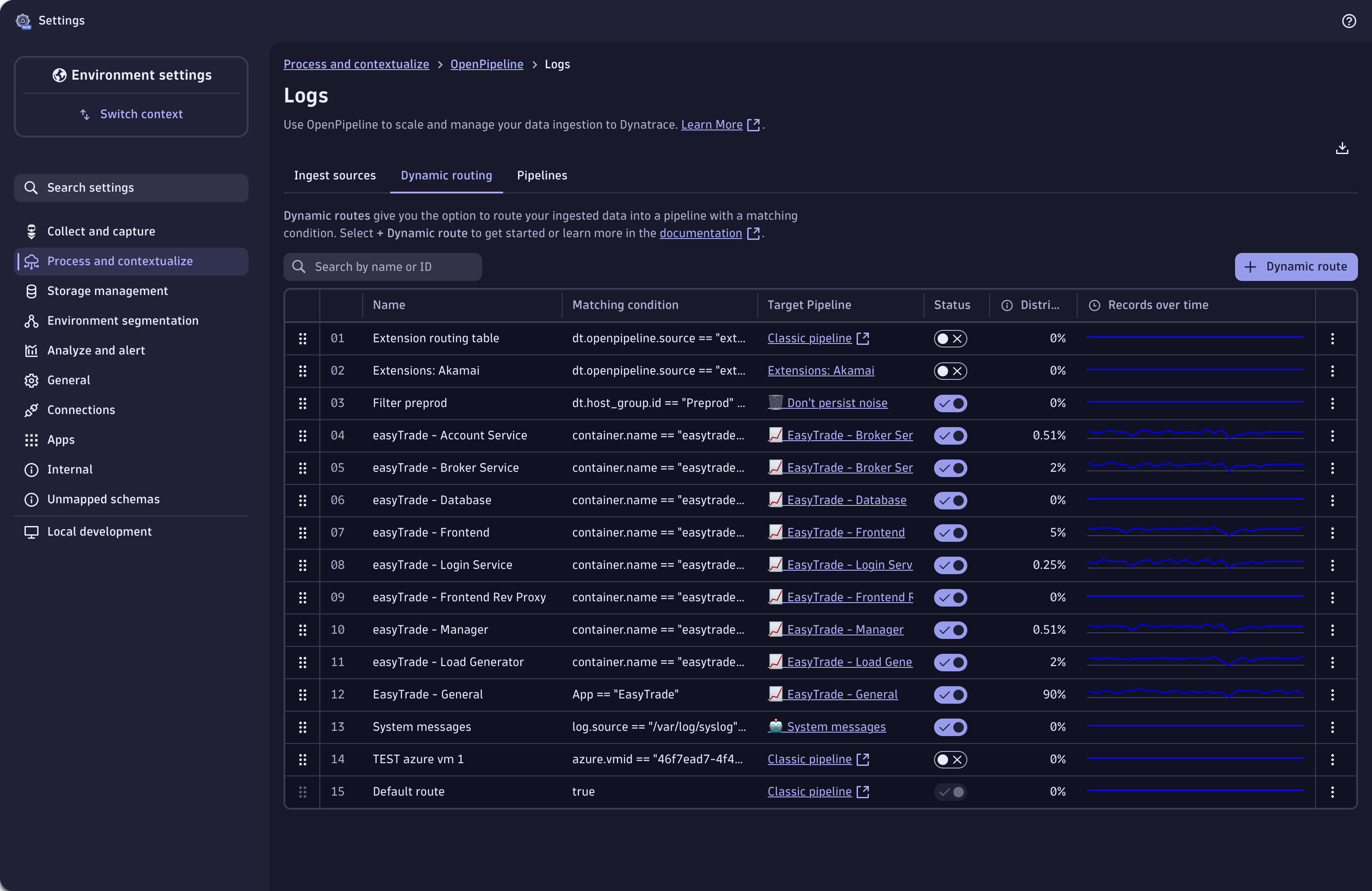
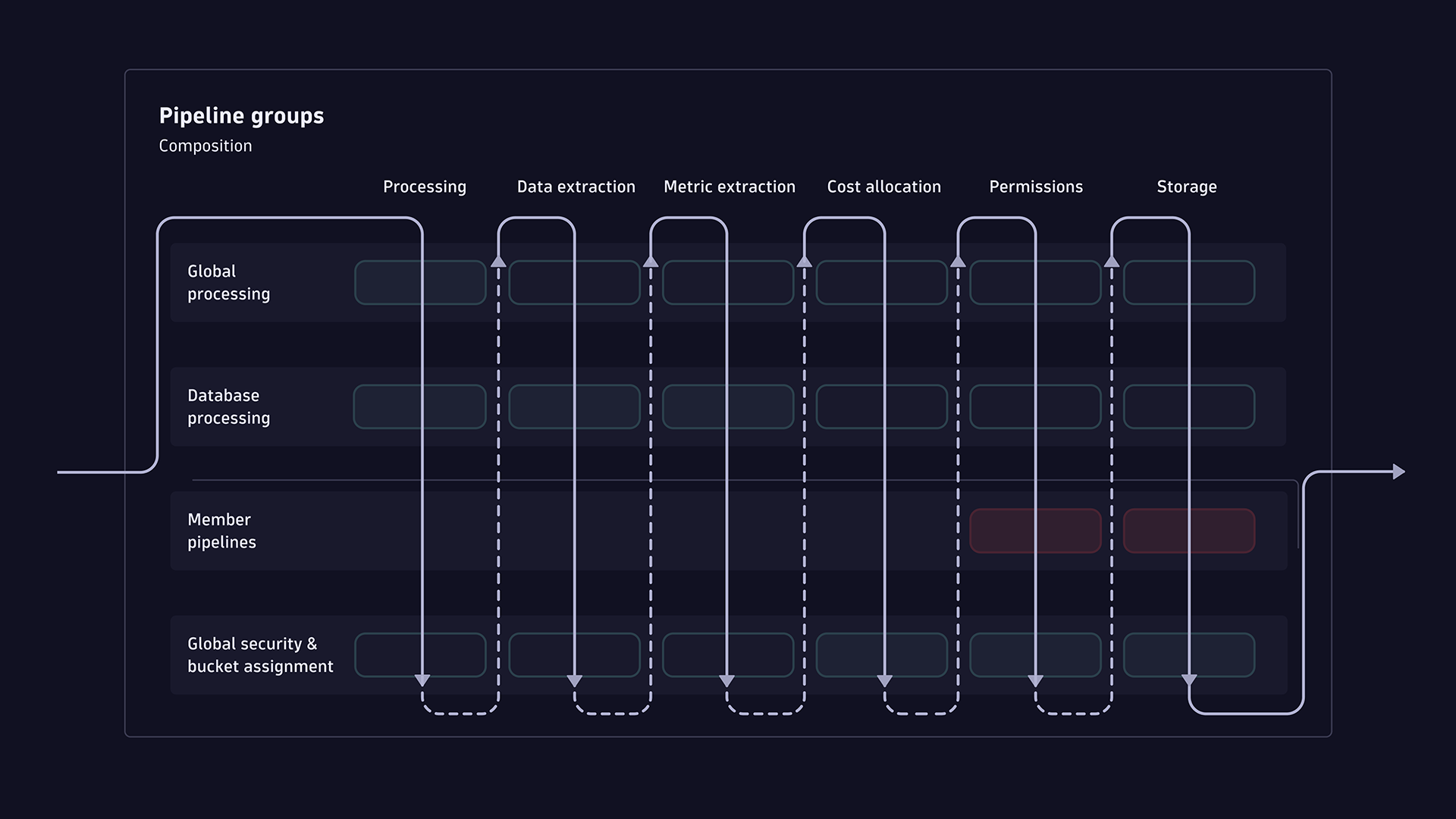
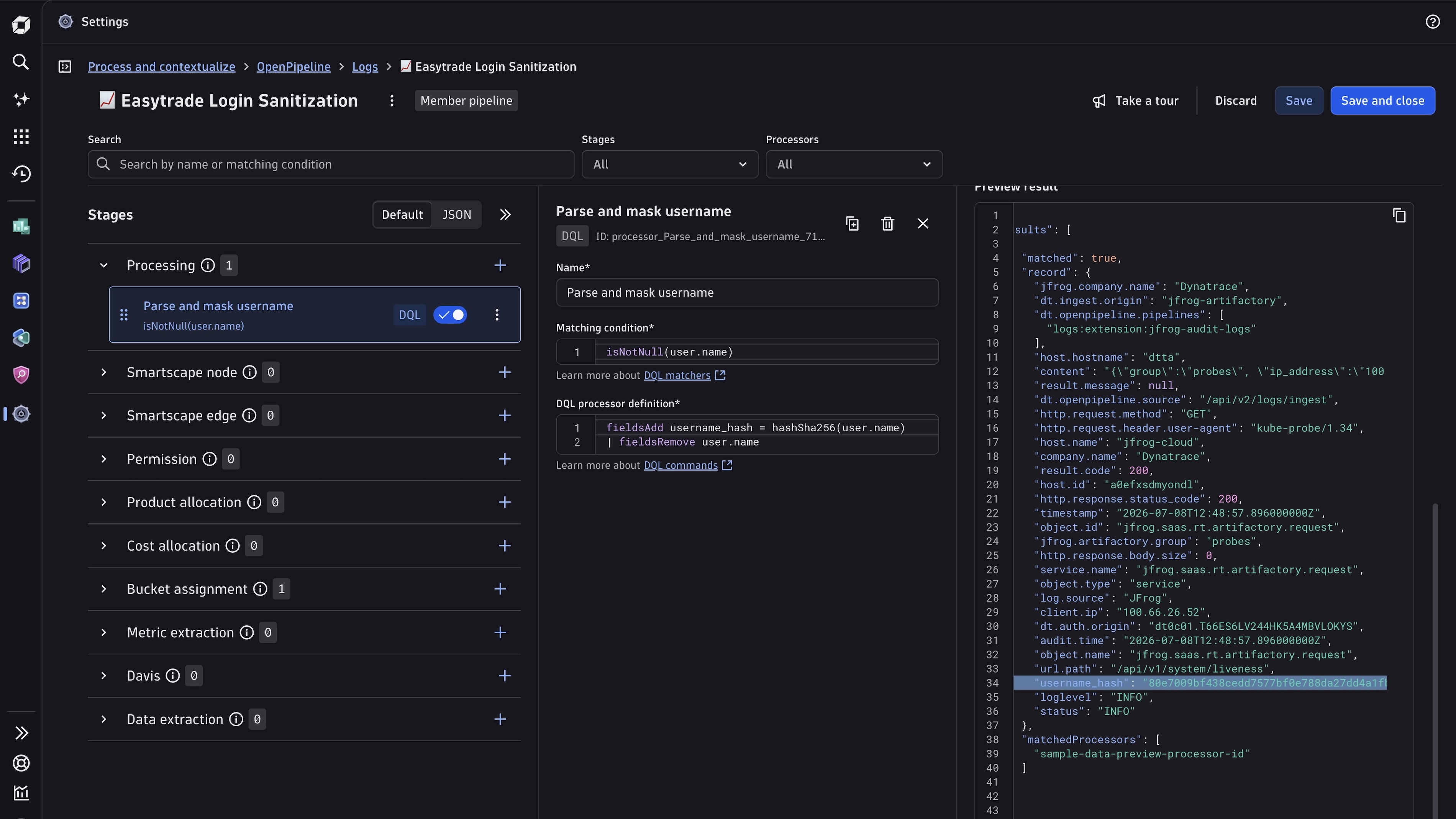
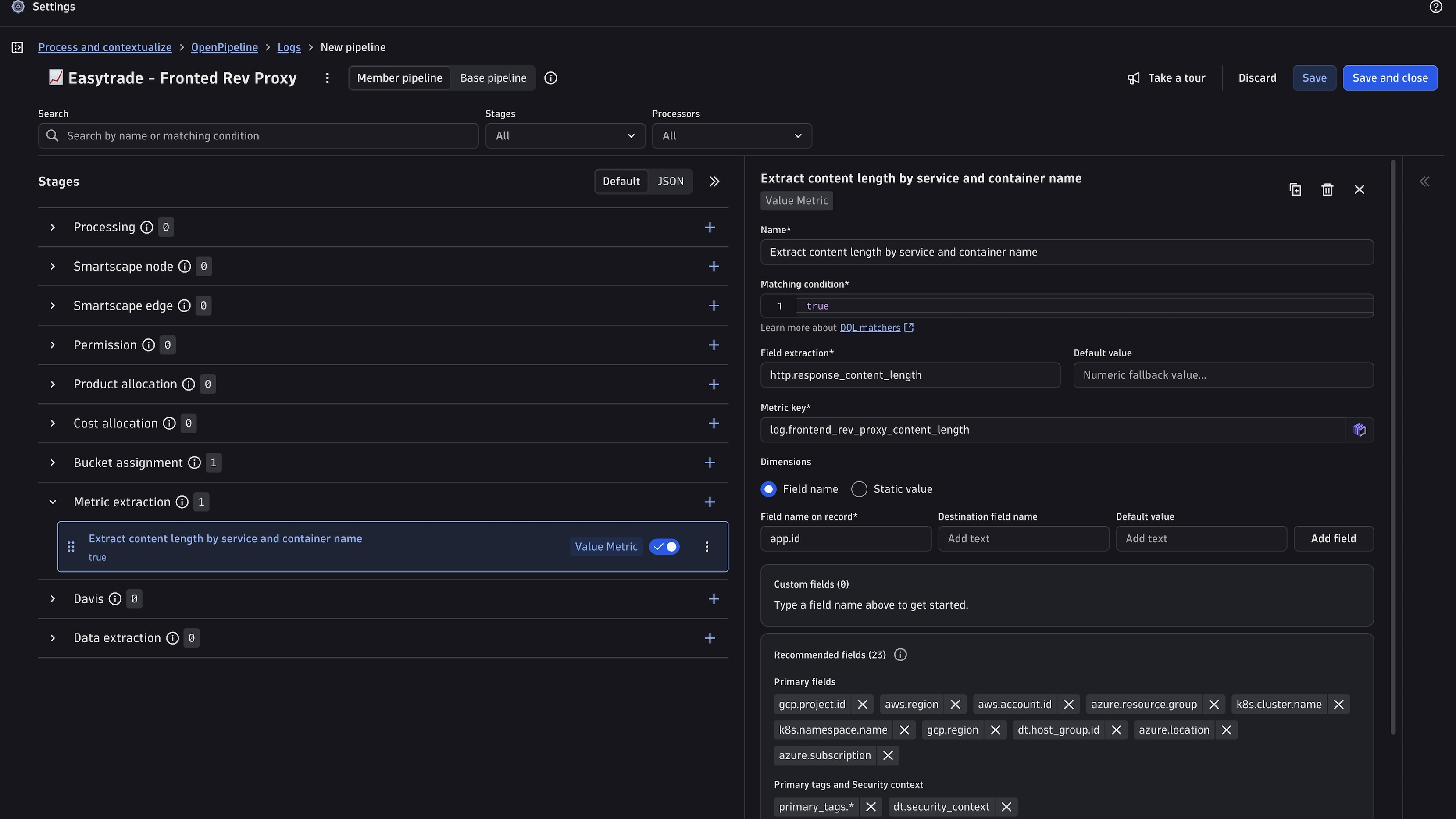
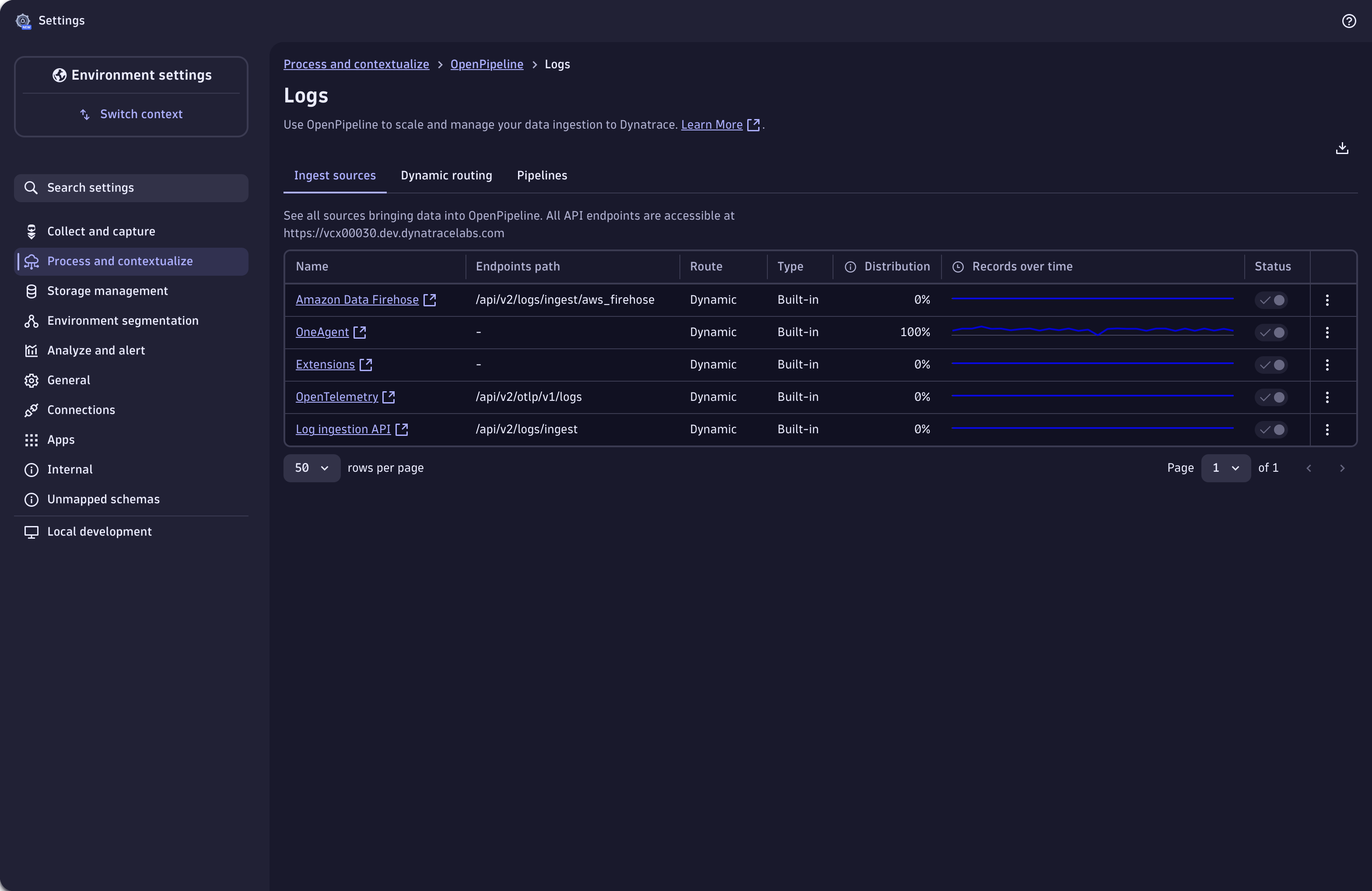
Use dynamic routing to route incoming records into pipelines.Log record processing: parsing and masking fields from log data.Extract metrics from your log record.Define ingest sources of log data.
  • Product information
  • Release notes

Overview

OpenPipeline is part of the unified Settings experience, inside the built-in Settings app.

With OpenPipeline, you can configure all aspects of ingesting, processing, and persisting streaming data into Dynatrace. It is designed to meet the high-throughput and processing demands of cloud- and AI-native companies and ...

  • Ensures compliant, secure ingestion across diverse data sources
  • Improve data quality through normalization, enrichment, and validation
  • Allows to extract other data types from logs, spans or events.
  • Simplifies pipeline setup, governance, and management

Use cases

With OpenPipeline you can:

  • Mask and filter records to remove sensitive data and comply with security and privacy requirements
  • Parse, add, remove, and rename fields to reshape or normalize the data format
  • Aggregate metrics from records for easier and faster query and dashboard display
  • convert a record to a different data type for domain-specific usage (eg create a business event out of a log record)
  • Set security-specific meta-data for defining record-based permissions
  • Assign data to Grail buckets to comply with proper retention time

Get started

OpenPipeline comes preinstalled with all Dynatrace SaaS environments.

  • Navigate to Settings > Process and contextualize > OpenPipeline
  • Create a new pipeline or open an existing one
  • Use one of the built-in parsing rules or create your own
  • Add further processing or data extraction steps directly on ingest before the record is stored in Grail

Today, OpenPipelines supports logs, spans, metrics, security / softwardevelopment lifecycle, Davis and generic events, and business data with more data types to come soon.

Dynatrace
DocumentationMore Information
By Dynatrace
Dynatrace support center
Subscribe to new releases
Copy to clipboard

Related to OpenPipeline

Grail logo

Grail

Dynatrace's data lakehouse providing unified storage for any type of data.

OneAgent logo

OneAgent

The simplest way to capture all observation signals automatically and in context

Storage Management logo

Storage Management

Organize your data and define retention times with custom Grail buckets.

OpenTelemetry logo

OpenTelemetry

Ingest and analyze OTel traces & metrics, set health alerts & view in context

Full version history

ReleaseDate

Full version history

  • Fixed ingest source duplicate issue for migrated schemas

Full version history

  • Added revision history
  • Updated list of disallowed event buckets
  • Updated ready-made dashboard OpenPipeline Usage Overview
  • Added refresh ingest sources and pipelines table after ownership is transferred
  • Added translations to OpenPipeline

Full version history

  • Removed histogram metric processor from UI when its not enabled on backend

Full version history

  • Fixed app crashing due to metrics not loaded
  • Reworked metric-dimension validations
  • Added deep linking capability
  • Added warning for matching-condition true on all necessary processors

Full version history

Patch Changes

  • Fixed incorrect bucket error message showing up when viewing an ingest source

Full version history

2.1.5

  • Fixed validation violations in sampling aware metric extraction processors for datatype spans

Full version history

  • Initial release with support for new migrated schemas
  • Updated dependencies
  • Fixed dynamic routes sheet form reset for avoiding triggering the dirty handler

Full version history

  • Fixed metric extraction processor when entering 'duration' in field extraction

Full version history

Major Changes

  • The stand-alone OpenPipeline app has been removed to streamline the user experience for your contextualizing and processing workload (from now on, you can access OpenPipeline as part of Settings. You can find it in Settings > Process and contextualize > OpenPipeline)

Minor Changes

  • Added sampling aware metric extraction processors for spans
  • Added default value for metric extraction processors
  • Added "View in Notebooks" button when editing metric extraction processor
  • Hid divider in widget header
  • Adapted chart filtering to support pipeline ID and ingest source unique identifier
  • Added handling for configuration disabled state
  • Modified message for OpenPipeline not fully enabled state
  • Improved pipelines select for Dynamic routes and Ingest Sources
  • Improved "Sample data preview" section
  • Marked Davis events and Davis problems configurations with label "New"
  • Added warning to matching conditions to make user aware that certain values shouldn't be used
  • Fixed search in Pipelines tab for default pipeline
  • Added one retry to our queries to minimize logs
  • Added check for backticks for dimension name

Full version history

  • Fixed editing first route in dynamic routes
  • Fixed status column display when filtering dynamic routes

Full version history

  • Fix interactions (edit, delete) with dynamic routes when filtering table

Full version history

  • Enabled OpenPipeline in Settings
  • Hid chart columns in ingest sources for metrics, events, security, business events, system events, and security events
  • Added default dimensions to metric extraction processors
  • Disabled row-ordering for dynamic routes in read-only mode
  • Unified help menu options

Full version history

  • Fixed move-to-end function in processors list

Full version history

  • Fixed edit of undefined on filtered dynamic routes

Full version history

  • Fixed Davis Event extraction processor error

Full version history

  • Added missing mandatory items to the Help dropdown menu
  • Made selection of Buckets clearable
  • Added traffic over time chart to the dynamic routes table
  • Added distribution column for Dynamic Routes
  • Improved UI elements for better user experience

Full version history

  • Aligned OpenPipeline with guidelines
  • Added open in Notebooks action for pipelines
  • Added a warning support from /matcher/verify endpoint while user edits matching condition
  • Added intents for viewing pipelines and ingest sources on a new tab
  • Added traffic distributions cells to pipelines
  • Added search by pipeline ID
  • Improved behavior of technology bundle search
  • Removed config scope prefix from metric extraction UI

Full version history

  • Fixed download for Mozilla and improved download for Safari
  • Added new open in Notebooks option
  • Added technology processor to ingest sources sheet for SDLC configuration
  • Added distribution for ingest sources in new column
  • Added sparkline charts for ingest sources

Full version history

  • Provided ready-made dashboard for OpenPipeline
  • Added discard modal on new dynamic routes and disabled tabs when unsaved changes on ingest-sources
  • Added intent to open a dynamic route on a new tab

Full version history

  • Fixed issue with undefined object

Full version history

  • Added extracted metric dimension naming
  • Added special handling for version conflict case when adding a new pipeline
  • Added metric extraction processors for spans
  • Added download configuration option

Full version history

  • Added link to builtin and default dynamic routes in the used by column
  • Added more information to bucket select option
  • Added flexible matching condition for technology processor
  • Fixed matcher behavior in modal

Full version history

  • Added sample data field to technology
  • Added readonly mode
  • Added link to open Storage Management inside of Settings
  • Added default-bucket to storage step in pipeline
  • Added validation for dimensions in metric extraction processors
  • Added functionality to enable or disable an ingest source
  • Refactored pipeline name input component
  • Fixed bug that would close pipeline sheet without showing discard-modal first
  • Fixed rename fields processor not properly processing data.

Full version history

  • Added modal for choosing a technology processor
  • Added tooltip to chips component
  • Added list to 'Used by' column in ingest sources and pipelines
  • Added sliders to resize the page size in the processor menu
  • Changed minor UI inconsistencies and improve UX
  • Fixed validation issue for business event processor
  • Fixed delete processor issue
  • Fixed safari onBlur behaviour

Full version history

  • Added Permission stage to "Spans" config scope

Full version history

  • Added "Technology" processor to Logs
  • Added "Drop record" processor
  • Added "Software Development Lifecycle" config scope
  • Added Third option for "Security Context" processor - static array (combined with 1.304+)
  • Fixed style issues for smaller screens

Full version history

  • Updated dependencies

Full version history

  • Added System Events to OpenPipeline (available from version 302)
  • Added length constraint to sample data preview
  • Added a feedback button

Full version history

  • Added autocomplete for Matching Condition and DQL processor
  • Added error state for sample data preview
  • Added tab-navigation
  • Dynamic route highlighted when navigating from Pipelines
  • Added "Copy endpoint" as a cell action

Full version history

  • Adapted minor wording things and improve UX
  • Added link from classic pipelines to Settings screen
  • Fixed responsiveness-issues of the app
  • Added Pipeline ID and Processor ID in UI
  • Added scrollbar to processor-menu
  • Added metric key validation
  • Updated message when OpenPipeline is not fully enabled

Full version history

  • Changed sidebar menu component
  • Renamed "AppSec" sidebar label and title to "Security events"
  • Updated columns for ingest sources table
  • Added onboarding banner
  • Handled non-existing link

Full version history

  • Initial release of OpenPipeline App
Dynatrace Hub
Hub HomeGet data into DynatraceBuild your own app
Log Management and AnalyticsKubernetesAI and LLM ObservabilityInfrastructure ObservabilitySoftware DeliveryApplication ObservabilityApplication SecurityDigital ExperienceBusiness Observability
Filter
Type
Built and maintained by
Deployment model
SaaS
  • SaaS
  • Managed
Partner FinderBecome a partnerDynatrace Developer

All

194 Results filtered by:

Palo Alto firewalls logo

Palo Alto firewalls

Palo Alto extension for problems detection

Extension
Confluent Cloud (Kafka) logo

Confluent Cloud (Kafka)

Remotely monitor your Confluent Cloud Kafka Clusters and other resources!

Extension
Kong - Prometheus logo

Kong - Prometheus

Monitor Prometheus metrics exposed by Kong and proxied upstream services

Extension
Nutanix Clusters logo

Nutanix Clusters

Monitor Nutanix clusters' performance, usage and availability, with Nutanix API.

Extension
Luna Network HSM Device logo

Luna Network HSM Device

Monitor your Luna Network Hardware Security Module (HSM) Devices through SNMP.

Extension
Consul Service Mesh (StatsD) logo

Consul Service Mesh (StatsD)

Extend visibility into your Consul Service Mesh instances to monitor health and improve performance.

Extension
Microsoft IIS logo

Microsoft IIS

Flexible and secure web server for hosting with Windows Server.

Extension
Kubernetes Monitoring Statistics logo

Kubernetes Monitoring Statistics

Troubleshoot your Dynatrace Kubernetes monitoring and Prometheus integration.

Extension
Snyk logo

Snyk

Ingest Snyk vulnerability findings, scans, and audit logs.

Extension
Citrix DaaS & Virtual Apps and Desktops logo

Citrix DaaS & Virtual Apps and Desktops

Gain insight into your Citrix DaaS & Virtual Apps and Desktops environments

Extension
Google Memorystore logo

Google Memorystore

Get insights into Google Memorystore service metrics collected from the Google Operations API to ensure health of your cloud infrastructure.

Extension
Databricks Workspace logo

Databricks Workspace

Remotely monitor your Databricks Workspaces!

Extension
Uptime logo

Uptime

Monitor the uptime of your hosts

Extension
UPS Device logo

UPS Device

Monitor your Uninterruptible Power Supplies (UPS) over SNMP

Extension
Google App Engine (integration) logo

Google App Engine (integration)

Insights into Google App Engine service metrics collected from Operations API

Extensioncoming soon
Traceroute logo

Traceroute

Run traceroute commands and collect step performance metrics

Extension
[Deprecated] Kubernetes PVCs logo

[Deprecated] Kubernetes PVCs

Monitor your Kubernetes persistent volume claims and alert on capacity limits.

Extension
Google Cloud Storage Transfer logo

Google Cloud Storage Transfer

Get insights into Google Cloud Storage Transfer metrics collected from the Google Operations API to ensure health of cloud infrastructure.

Extension
NVIDIA GPU logo

NVIDIA GPU

Monitor base parameters of the GPU, including load, memory and temperature

Extension
Oracle Database logo

Oracle Database

Observe, analyze and optimize the usage, health and performance of your database

Extension
Cisco ACI/APIC logo

Cisco ACI/APIC

Get insights into your Cisco Application Centric Infrastructure (ACI)

Extension
Dell iDRAC logo

Dell iDRAC

Connect to the Redfish API to get insights into your Dell iDRAC environment

Extension
Azure Managed Apache Cassandra logo

Azure Managed Apache Cassandra

Gain insights into your Azure Managed Cassandra Instance health and performance

Extension
PayShield HSM Device logo

PayShield HSM Device

Monitor PayShield Payment Hardware Security Module (HSM) Devices through SNMP.

Extension
NetApp OnTap (Remote) logo

NetApp OnTap (Remote)

Remote extension that collects NetApp OnTap metrics from the OnTap 9.6+ API.

Extension
Google Firestore in Datastore mode logo

Google Firestore in Datastore mode

Get insights into Google Firestore in Datastore mode metrics collected from the Google Operations API to ensure health of infrastructure.

Extension
Redis (2.0) logo

Redis (2.0)

Collect important additional data for your Redis instances.

Extension
PHP-FPM logo

PHP-FPM

Monitor the PHP-FPM status of your applications with this extension.

Extension
Timedrift Monitoring logo

Timedrift Monitoring

Monitor your host's NTP/Chrony Time Offset!

Extension
Apache Kafka logo

Apache Kafka

Automatic and intelligent observability with trace and metric insights.

Extension

MongoDB (local or remote monitoring) logo

MongoDB (local or remote monitoring)

Monitor your MongoDB servers either locally or remotely!

Extension
Connection Pools: C3P0 logo

Connection Pools: C3P0

Application server method of pooling and sharing connections to a database.

Extension
AWS Entities for Metric Streaming logo

AWS Entities for Metric Streaming

Analyse metrics in the context of an entity based on AWS Metric Streaming.

Extension

MongoDB Atlas logo

MongoDB Atlas

Remotely monitor your SaaS installation of MongoDB (Atlas)

Extension
Microsoft SQL Server logo

Microsoft SQL Server

Improve the health and performance monitoring of your Microsoft SQL Servers.

Extension
IBM MQ Appliance logo

IBM MQ Appliance

Monitor your IBM MQ Appliances over SNMP

Extension
Google Apigee logo

Google Apigee

Get insights into Google Apigee service metrics collected from the Google Operations API to ensure health of your cloud infrastructure.

Extension
Oracle Autonomous Database on OCI logo

Oracle Autonomous Database on OCI

Monitor health and performance of the Oracle Autonomous Database.

Extension
Google Pub/Sub Lite logo

Google Pub/Sub Lite

Get insights into Google Pub/Sub Lite service metrics collected from the Google Operations API to ensure health of the cloud infrastructure.

Extension
Infoblox DDI logo

Infoblox DDI

Monitor Infoblox DDI using SNMP

Extension
SAP HANA Database (remote monitoring) logo

SAP HANA Database (remote monitoring)

Easily understand the health and performance of your SAP HANA databases.

Extension
Connection Pools: WebSphere Liberty logo

Connection Pools: WebSphere Liberty

Application server method of pooling and sharing connections to a database.

Extension

Google Cloud Composer logo

Google Cloud Composer

Get insights into Google Cloud Composer metrics collected from the Google Operations API to ensure health of your cloud infrastructure.

Extension
Google Cloud Spanner logo

Google Cloud Spanner

Get insights into Google Cloud Spanner metrics collected from the Google Operations API to ensure health of your cloud infrastructure.

Extension
IBM i logo

IBM i

Collect performance data from your IBM i Hosts via this Remote extension.

Extension
Google reCAPTCHA Enterprise logo

Google reCAPTCHA Enterprise

Get insights into Google reCAPTCHA Enterprise metrics collected from the Google Operations API to ensure health of your cloud infrastructure

Extension
.NET logo

.NET

Automatic end-to-end observability for .NET applications and processes.

Extension
Google Cloud's operations suite logo

Google Cloud's operations suite

Get insights into Google Cloud's operations suite metrics collected from the Google Operations API to ensure health of cloud infrastructure.

Extension
Google Vertex AI logo

Google Vertex AI

Get insights into Google Vertex AI service metrics.

Extension
Oracle Exadata logo

Oracle Exadata

Monitor Oracle Exadata systems for performance, usage and availability

Extension