
Skip to technology filters Skip to main content
Dynatrace Hub

Extend the platform,
empower your team.

Popular searches:
Home hero bg
Microsoft SQL ServerMicrosoft SQL Server
Microsoft SQL Server

Microsoft SQL Server

Improve the health and performance monitoring of your Microsoft SQL Servers.

Extension
Free trialDocumentation
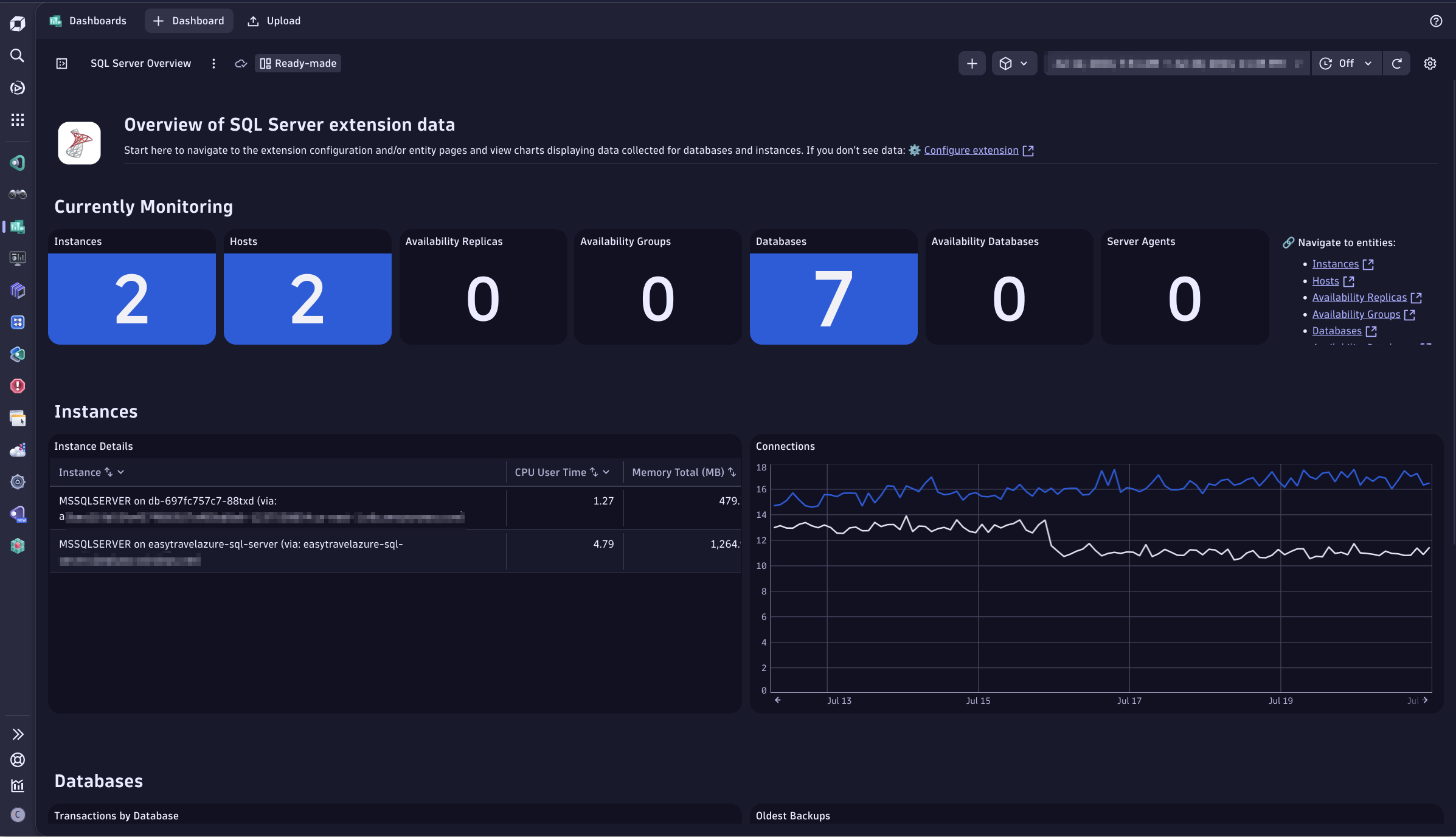
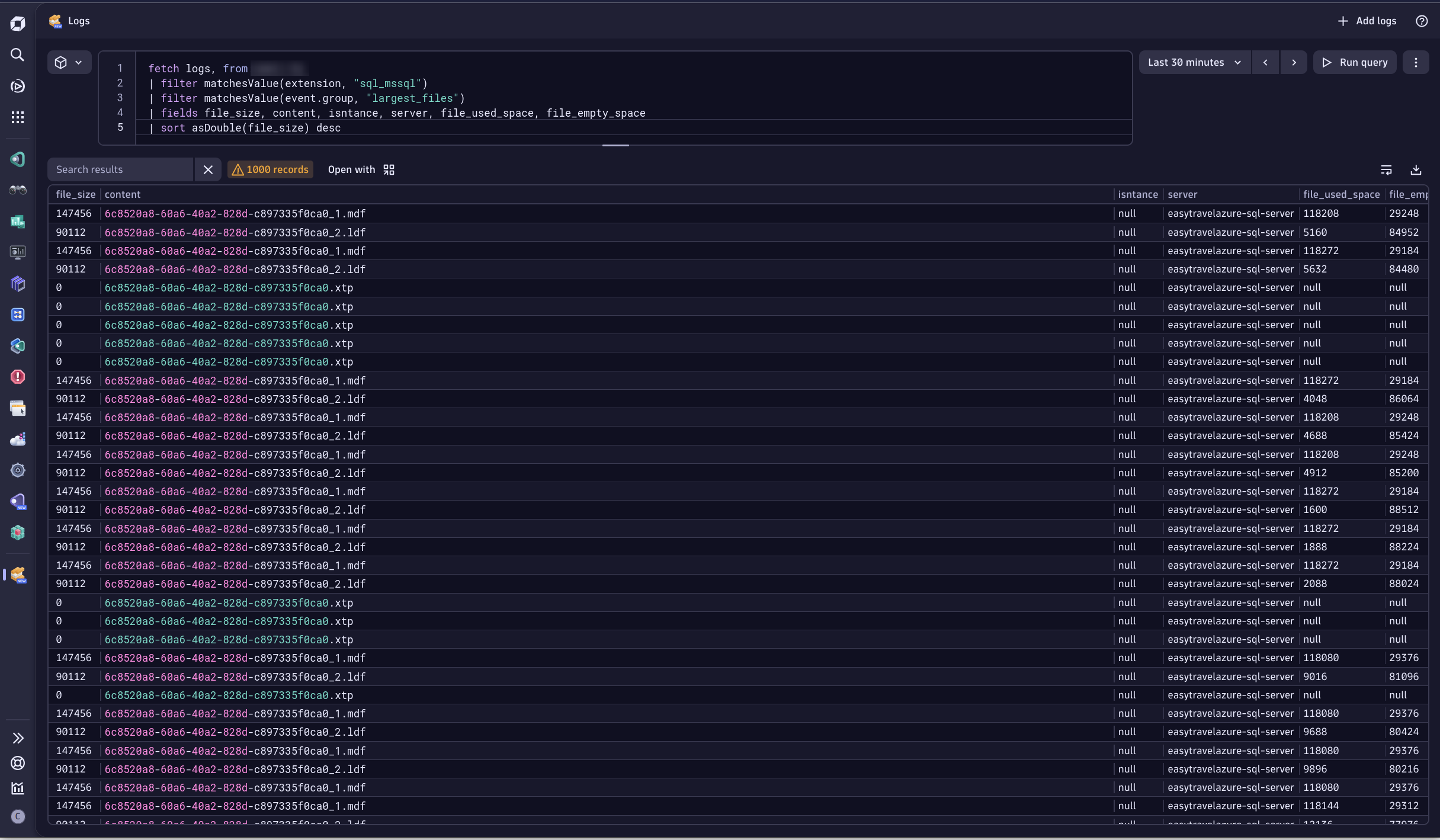
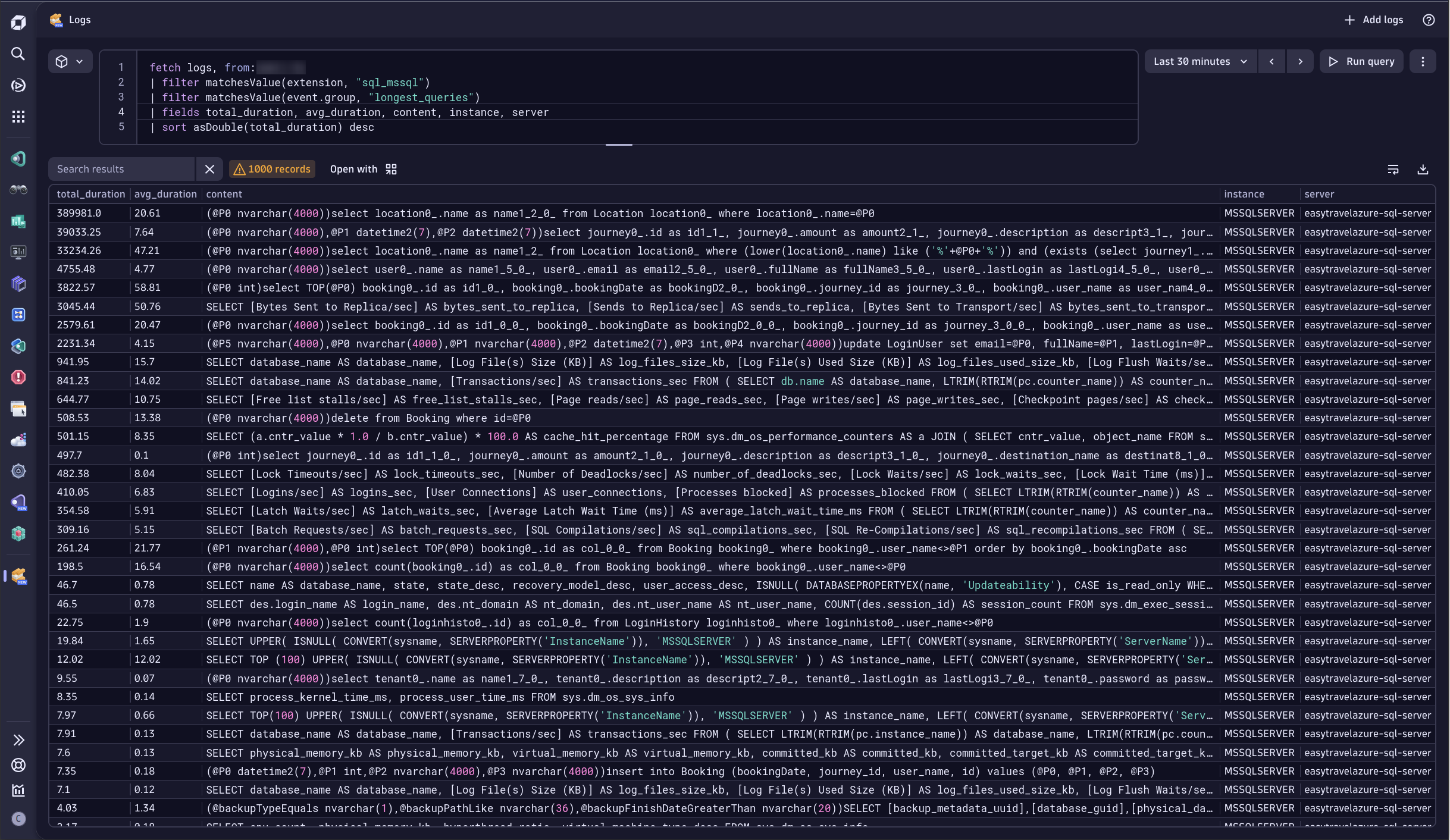
Get an overview of your SQL Server monitoring using New Dashboards, which are bundled with the extension upon activation.See the largest files in your SQL Server Environment via logs ingested by the extension.See the longest running queries in your SQL Server environment via logs ingested by the extension.Instance viewLocks and sql statements chartsMemory monitoring
  • Product information
  • Release notes

Overview

Microsoft SQL Server database monitoring is based on a remote monitoring approach implemented as a Dynatrace ActiveGate extension. The extension queries MS SQL databases for key performance and health metrics, extending your visibility, and allowing DAVIS AI to provide anomaly detection and problem analysis.

Use cases

  • Understand the impact of resource shortages, locks or other database issues have on your application by observing the database server itself.
  • Track health and performance of the MS SQL servers

Compatibility information

Supported types of SQL Server

  • SQL Server (editions: Enterprise, Standard, Developer, Web, Express) on Windows servers.
  • Azure SQL Database.
  • Azure SQL Managed Instance.

Important note: The extension is reported to work with other types of SQL Server, such as AWS RDS or SQL Server on Linux, but they are not officially supported.

Supported types of HA or replication

  • Always On

Important note: Other types of replication and HA monitoring, including publisher/subscriber model, are not supported yet.

Supported versions of SQL Server

Any version of SQL Server with active extended support by Microsoft is supported by this extension. Please refer to the official Microsoft documentation about lifecycle dates for SQL Server.

Simultaneous use of different versions of extension

  • Running two or more different versions of the extension against the same SQL Server is not supported.
  • Running different major versions (for example, version 1 and version 2) of the extension on the same tenant is highly discouraged and is not supported. This will break the topology model.

Compatibility with OneAgent

  • In order for SQL Server Instance entity to be linked to the Host entity, they must share the same IP address. If the monitoring configuration for SQL Server is configured with a different IP address, two instances will not be linked with each other.
Dynatrace
DocumentationMore Information
By Dynatrace
Dynatrace support center
Subscribe to new releases
Copy to clipboard

Extension content

Content typeNumber of items included
alerts
3
screen injections
1
list screen layout
6
document dashboard
2
screen actions
14
generic type
7
generic relationship
7
screen entities lists
22
screen custom cards
2
dashboards
1
screen properties
6
screen chart groups
25
screen layout
10
screen dql table
2
metric metadata
77

Feature sets

Below is a complete list of the feature sets provided in this version. To ensure a good fit for your needs, individual feature sets can be activated and deactivated by your administrator during configuration.

Feature setsNumber of metrics included
Metric nameMetric keyDescriptionUnit
Database statesql-server.databases.stateDatabase stateState
Transactionssql-server.databases.transactions.countNumber of transactions started for the databaseCount
CPU Countsql-server.host.cpusDetected CPU CountCount
Time spent in kernel modesql-server.cpu.kernelTime.countTime spent by all threads in kernel modeMilliSecond
Time spent in user modesql-server.cpu.userTime.countTime spent by all threads in user modeMilliSecond
Physical memorysql-server.memory.physicalTotal amount of physical memory on the machineKiloByte
Virtual memorysql-server.memory.virtualTotal amount of virtual address space available to the process in user modeKiloByte
Total server memorysql-server.memory.totalAmount of memory the server has committed using the memory managerKiloByte
Target server memorysql-server.memory.targetAmount of memory that can be consumed by memory managerKiloByte
Uptimesql-server.uptimeTime in seconds since instance was last startedSeconds
Loginssql-server.general.logins.countNumber of logins started, excluding pooled connectionsCount
User connectionssql-server.general.userConnectionsNumber of users currently connected to SQL ServerCount
Processes blockedsql-server.general.processesBlockedNumber of currently blocked processesCount
Active workerssql-server.worker.activeWorkersNumber of workers that are actively executing tasksgauge
Max workerssql-server.worker.maxWorkersMaximum number of workers that can be activegauge
Worker threads percentagesql-server.worker.threadsPercentPercentage of worker threads in usePercent
Metric nameMetric keyDescriptionUnit
-sql-server.sql.agent.status--
Metric nameMetric keyDescriptionUnit
Synchronization statesql-server.always-on.db.synchronizationStateData-movement stateState
Synchronization healthsql-server.always-on.db.synchronizationHealthIntersection of the synchronization state of a database that is joined to the group on the replica and the availability mode of the replicaState
Database statesql-server.always-on.db.stateState of the availability databaseState
Log send queue sizesql-server.always-on.db.logSendQueueSizeAmount of log records of the primary database not sent to the secondary databasesKibiByte
Log send ratesql-server.always-on.db.logSendRateAverage rate at which primary replica instance sends dataKiloBytePerSecond
Redo queue sizesql-server.always-on.db.redoQueueSizeAmount of log records in the log files of the secondary replica that has not yet been redoneKiloByte
Redo ratesql-server.always-on.db.redoRateAverage Rate at which the log records are being redone on a given secondary databaseKiloBytePerSecond
Filestream send ratesql-server.always-on.db.filestreamSendRateThe rate at which the filestream files are shipped to the secondary replicaKiloBytePerSecond
Automated backup preferencesql-server.always-on.ag.automatedBackupPreferencePreferred location for backups in this availability groupState
Primary recovery healthsql-server.always-on.ag.primaryRecoveryHealthIndicates the recovery health of the primary replicaState
Secondary recovery healthsql-server.always-on.ag.secondaryRecoveryHealthIndicates the recovery health of a secondary replicaState
Synchronization healthsql-server.always-on.ag.synchronizationHealthReflects a rollup of the synchronization health of all replicas the groupState
Availability modesql-server.always-on.ar.availabilityModeThe availability mode of the replicaState
Failover modesql-server.always-on.ar.failoverModeThe failover mode of the replicaState
Is replica localsql-server.always-on.ar.isLocalWhether the replica is localState
Replica rolesql-server.always-on.ar.roleCurrent groups role of a local replica or a connected remote replicaState
Operational statesql-server.always-on.ar.operationalStateCurrent operational state of the replicaState
Recovery healthsql-server.always-on.ar.recoveryHealthRollup of the database_state columnState
Synchronization healthsql-server.always-on.ar.synchronizationHealthRollup of the database synchronization state of all joined replicas and the availability mode of the replicaState
Connected statesql-server.always-on.ar.connectedStateWhether a secondary replica is currently connected to the primary replicaState
Metric nameMetric keyDescriptionUnit
Sessionssql-server.sessionsNumber of active sessions per userCount
Metric nameMetric keyDescriptionUnit
Lock timeoutssql-server.locks.timeouts.countNumber of lock requests that timed out, including requests for NOWAIT locksCount
Deadlockssql-server.locks.deadlocks.countNumber of lock requests that resulted in a deadlockCount
Lock waitssql-server.locks.waits.countNumber of lock requests that required the caller to waitCount
Lock wait timesql-server.locks.waitTime.countWait time for locksMilliSecond
Metric nameMetric keyDescriptionUnit
Log files sizesql-server.databases.log.filesSizeCumulative size of all the transaction log files in the databaseKiloByte
Log files used sizesql-server.databases.log.filesUsedSizeThe cumulative used size of all the log files in the databaseKiloByte
Log flush waitssql-server.databases.log.flushWaits.countNumber of commits waiting for the log flushCount
Log growthssql-server.databases.log.growths.countNumber of times the transaction log for the database has been expandedCount
Log shrinkssql-server.databases.log.shrinks.countNumber of log shrinks for this databaseCount
Log truncationssql-server.databases.log.truncations.countNumber of times the transaction log has been truncated (in Simple Recovery Model)Count
Percent log usedsql-server.databases.log.percentUsedPercentage of space in the log that is in usePercent
Metric nameMetric keyDescriptionUnit
Bytes sent to replicasql-server.replica.bytesSent.countMessage bytes queued to be sent to replicasByte
Sends to replicasql-server.replica.sends.countNumber of messages queued to be sent to replicaCount
Bytes sent to transportsql-server.replica.bytesSentToTransport.countDequeued message bytes sent across network to replicasByte
Sends to transportsql-server.replica.sendsToTransport.countNumber of messages sent across network to replicasCount
Bytes received from replicasql-server.replica.bytesReceived.countMessage bytes received from replicaByte
Receives from replicasql-server.replica.receives.countNumber of messages received from replicaCount
Resent messagessql-server.replica.resentMessages.countNumber of messages that had to be resent to replicaCount
Metric nameMetric keyDescriptionUnit
Failed Distributed Transactionssql-server.databases.failedDistributedTransactions.countThe number of failed distributed transactionsCount
-sql-server.locks.byWaitType--
Batch requestssql-server.sql.batchRequests.countNumber of Transact-SQL command batches receivedCount
SQL compilationssql-server.sql.compilations.countNumber of SQL statement compilationsCount
SQL re-compilationssql-server.sql.recompilations.countNumber of SQL statement re-compilationsCount
Percent of Elapsed time for Requests wait typesql-server.locks.elapsedTimeRequestsPercentPercentage of elapsed time for requests wait type performance counter_namePercent
Metric nameMetric keyDescriptionUnit
Minutes since last backupsql-server.databases.backup.ageNumber of minutes passed since last backupMinute
Size of the last backupsql-server.databases.backup.sizeSize of the last backup of that typeByte
Metric nameMetric keyDescriptionUnit
Buffer cache hitsql-server.buffers.cacheHitRatioPercentage of pages found in the buffer cache without having to read from diskPercent
Free list stallssql-server.buffers.freeListStalls.countNumber of requests that had to wait for a free pageCount
Page readssql-server.buffers.pageReads.countNumber of physical database page reads that are issuedCount
Page writessql-server.buffers.pageWrites.countNumber of physical database page writes that are issuedCount
Checkpoint pagessql-server.buffers.checkpointPages.countNumber of pages flushed to disk by a checkpoint or other operations that require all dirty pages to be flushedCount
Page life expectancysql-server.buffers.pageLifeExpectancyNumber of seconds a page will stay in the buffer pool without referencesSecond
Connection memorysql-server.memory.connectionTotal amount of dynamic memory the server is using for maintaining connectionsKiloByte
Memory grants outstandingsql-server.memory.grantsOutstandingNumber of processes that have successfully acquired a workspace memory grantCount
Memory grants pendingsql-server.memory.grantsPendingNumber of processes waiting for a workspace memory grantCount
Metric nameMetric keyDescriptionUnit
Latch waitssql-server.latches.waits.countNumber of latch requests that could not be granted immediatelyCount
Average latch wait timesql-server.latches.averageWaitTime.countAverage latch wait time for latch requests that had to waitMilliSecond
Metric nameMetric keyDescriptionUnit
Database file sizesql-server.databases.file.sizeTotal size of files of specific types per databaseKiloByte
Database file used sizesql-server.databases.file.usedSpaceTotal size of space used in files of specific types per databaseKiloByte
Database file empty sizesql-server.databases.file.emptySpaceTotal size of empty space in files of specific types per databaseKiloByte

Related to Microsoft SQL Server

Microsoft SQL Server (local) logo

Microsoft SQL Server (local)

Improve the health and performance monitoring of your Microsoft SQL Servers.

Full version history

To have more information on how to install the downloaded package, please follow the instructions on this page.
ReleaseDate

Full version history

New Features

  • Added Worker Metrics to the Default Feature Set

    • Active Workers: Displays the number of workers actively executing tasks.
    • Max Workers: Shows the maximum number of workers that can be active.
    • Worker Threads Percentage: Indicates the percentage of worker threads currently in use.
  • Added Query Performance Metric to the Queries Feature Set

    • Percent of Elapsed Time for Requests Wait Type: Represents the percentage of elapsed time for requests categorized by wait type performance counter.
  • Added @@servername as a New Attribute

    • Added as an additional attribute to Server Instances.

Improvements

  • Updated {device.name} to {device} on database instances, enabling the database name to appear in the naming string.

Bug Fixes

  • Failed Distributed Transactions Query Updated
    • Resolved an issue where a temporary duplicate could occur if an orphaned query was recorded.

Future Breaking Change

In a future update Transaction Logs and Transaction logs FeatureSets will be merged into one.

Full version history

Potential Breaking Change affecting Availability Replica Entities

Bug Fix:

  • Availability Replica would not handle name instances correctly. This has been fixed and now relationship mapping will happen as expected. The previously incorrect entities may no longer appear.

Dimension Changes:

  • Product Version Dimension has now been changed to DB Instance Version on SQL Server Instance Entity. This is now a standardized value across Database Extensions.

Attribute Changes

  • All Entities created by the SQL Server Extension now have the security_context attribute which is entered via the Monitoring Configuration.

Full version history

Bugfix

  • failed_jobs previously would ingest job failures older than 5 minutes depending on the time of hour. This has been corrected.

Warning

  • Transaction Logs featureSet to be removed in a future update. Transaction logs will continue to exist

Full version history

Improvements

  • Added new alert SQL Server is unreachable to monitor database availability, based on Uptime metric
  • Uptime visualization updated from single value display to graph chart visualization for better alert investigation

Full version history

Bug fixes:

  • Current Jobs query syntax fix. This was causing a breakage of the extension

Warning:

  • "Transaction Logs" featureSet to be removed in a future update. "Transaction logs" will continue to exist.
  • Minimum EEC version increased (1.303) for Query Interval which was causing breakage issues when updating to 2.7.0 and above

Full version history

Bug fixes:

  • buffer_cache_hit bundled alert now fixed.
  • Minimum EEC version increased to 1.303 for Query Interval which was causing breakage issues when updating to 2.7.0 and above

Improvements:

  • event.group added for agent and application queries log ingest
  • Added "Job Category id" and "Job Category name" to Current and Failed Jobs

Features:

  • Now able to see the locks and waits of impacted requests.
  • Added Gen 3 dashboard to visualize the locks and waits data

Warning:

  • "Transaction Logs" featureSet to be removed in a future update. "Transaction logs" will continue to exist.

Full version history

New Feature:

  • Configurable frequency for the SQL queries

Full version history

Adds the SAME_AS relationship between SQL Instances and related Process Group Instances on OneAgent monitored hosts.

Full version history

Features:

  • Added a built-in dashboard for 3rd gen SaaS tenants.

Full version history

Fixed in this version:

  • Sorting SQL statements in Databases app would produce duplicate results

Full version history

New Entity
  • SQL Agent added to topology
New Metrics
  • Agent Status
  • Failed Distributed Transactions Count
New Log Ingests
  • Top 25 Agent Queries running longer than 60 seconds
  • Top 25 Application Queries running longer than 60 seconds

Bug Fixes

  • Fixed an issue where Databases App did not display Uptime Hours due to syntax error.
  • Fixed Arithmetic Overflow Error that had a chance to occur in large environments on the Largest Files Managed calculation.

Full version history

Improvements

  • Execution Plan fetching now done in Databases App
  • Instance entity parsing from log records

Changes

  • Removed query plan from longest_queries query
  • Show latest back-up age

Full version history

Improvements:

  • Added default value for availability.replica.instance dimension: MSSQLSERVER.

    This enables the SAME AS relationship between the sql:sql_server_instance and sql:sql_server_availability_replica entities based on the equality of their respective attributes: server = ar_server_name and instance = ar_instance_name.

    Previously, if the replica was running on an instance that had a default name, the relationshp wasn't being established.

Full version history

Bug fixes:

  • Fixed typo in the metric description of the sql-server.databases.log.percentUsed.

Full version history

Bug fixes:

  • Added SAME_AS relationship from sql:sql_server_availability_replica to sql:sql_server_instance based on the matching ar_server_name -> server and ar_instance_name -> instance attributes.

Full version history

Bug fixes:

  • Hotfix for backup age retrieval in metric sql-server.databases.backup.age. Release 2.5.0 introduced a bug where age of the oldest backup instead of the latest one was retrieved.

Full version history

Bug fixes:

  • Only the age of the oldest observable backup was reported in the sql-server.databases.backup.age metric. This has now been fixed and the age of the most recent backup is being reported instead.

Improvements:

  • Additional dimensions in for backup metrics: device_type, recovery_model, software_name.
  • Better granularity for backup_type dimension: "Full", "Full copy-only", "Differential", "Transaction log", "File or filegroup", "Differential file", "Partial", "Differential partial".

Features:

  • Backup monitoring for Azure SQL Database is now available through "Backups" feature set. The sys.dm_database_backups view is queried every 5 minutes and a record about each finished backup is ingested as a log. Can be filtered using the backups_azure value for event.group attribute.
  • Monitoring of each individual backup for SQL Server and Azure SQL Managed Instances is now available through "Backups" feature set. Information about every backup finished within the last 5 minutes is retrieved and ingested as a log record.

Full version history

Improvements:

  • Default timeout for longest_queries is increased to 120 seconds. Allowing query to have more time to complete and fetch the data about top busiest queries on the target database.

Features:

  • New variable "Longest queries timeout" that can be specified per monitoring configuration. Default is 120 seconds. Can be increased to values up to 290 seconds.

Warning:

  • Any value specified in the "Longest queries timeout" variable field must be a valid integer.

Full version history

Bug fixes:

  • Fixed incorrectly detected relationship between Availability Databases and Availability Groups. Previously only one availability database was visible per group.

Warning:

  • Direct topology relationship between Availability Group and Availability Database entity types was removed. Instead, the relationship between them is now derived through Availability Replica.
  • Direct topology relationship between Database and Availability Database is removed. It wasn't detected properly in the past and has been removed as redundant.

Full version history

Bug fixes:

  • Fix retrieval problems in "Queries" and "Jobs" feature sets for instances in non-UTC time zones or running on hosts in non-UTC time zones.

Full version history

Bug fixes:

  • Fixed: Arithmetic overflow error / An expression of non-boolean type specified for Database Files feature set

Full version history

Improvements:

  • Top queries and failed jobs are now correctly retrieved for instances with a timezone other than UTC.

Full version history

New features:

  • Monitoring of current and failed jobs (enabled through Jobs feature set).

Addressed issues:

  • Improved compatibility with new Databases App.

Full version history

  • Number of longest queries collected every minute is reduced from 100 to 10 to comply with existing log ingestion limitations (to be increased back in the future release).
  • Monitoring of backups is now supported on Azure SQL Managed Instance and Analytics Platform System (PDW).
  • The backup_type dimension now contains full backup type names instead of a single letter.

Full version history

Major release with breaking changes

Breaking changes

  • All monitoring configurations must be recreated because of change in feature sets.
  • instance dimension changes its meaning to only contains an actual named instance name or MSSQLSERVER by default.
  • hoursSinceBackup metric is removed and replaced by sql-server.databases.backup.age.

New features

  • Query level monitoring: Top 100 longest running queries are collected every 5 minutes (enabled through Queries feature set).
  • Largest database files monitoring: Top 100 largest database files as monitored every 5 minutes (enabled through Database files feature set).
  • instance dimension is now retrieved from "InstanceName" server property but only contains an actual named instance name. Defaults to MSSQLSERVER for unnamed instances.
  • New server dimension is now retrieved from ServerName but only contains an actual machine or server name, without named instance.
  • Feature sets are not more granularly grouped allowing for fine grained control over which metrics are collected.
  • Detailed backup monitoring with backup size and backup age collected for backup type and individual database.
  • Detailed database files monitoring with average file size, used space, and empty space collected for each file type and individual database.
  • Entity screens are now adapted to the latest versions of SaaS and utilize DQL.
  • Monitoring of communication with availability replcia (bytes sent/received).
  • Conversion of database ID to human readable name for Azure SQL databases.
  • CPU and Memory monitoring.
  • Uptime monitoring.

Bug fixes

  • Incorrect detection of named instances in certain cases was addressed through better identification of instance and server dimensions.

Full version history

  • Fix: missing column name for SQL Server versions below 2019

Full version history

  • Always On support
  • Metric type fixed for Lock Wait Time and Latch Average Wait Time
  • Entities not being generated for hosts without a domain name
  • Entity topology updated
  • List of database entities is now available

Full version history

  • Support for monitoring databases on named instances.

Full version history

  • Release v1.0.1
  • Contains the same metrics that were collected by the previous generation of the SQL Server remote monitoring.
Dynatrace Hub
Hub HomeGet data into DynatraceBuild your own app
Log Management and AnalyticsKubernetesAI and LLM ObservabilityInfrastructure ObservabilitySoftware DeliveryApplication ObservabilityApplication SecurityDigital ExperienceBusiness Observability
Filter
Type
Built and maintained by
Deployment model
SaaS
  • SaaS
  • Managed
Partner FinderBecome a partnerDynatrace Developer

All

194 Results filtered by:

Palo Alto firewalls logo

Palo Alto firewalls

Palo Alto extension for problems detection

Extension
Confluent Cloud (Kafka) logo

Confluent Cloud (Kafka)

Remotely monitor your Confluent Cloud Kafka Clusters and other resources!

Extension
Kong - Prometheus logo

Kong - Prometheus

Monitor Prometheus metrics exposed by Kong and proxied upstream services

Extension
Nutanix Clusters logo

Nutanix Clusters

Monitor Nutanix clusters' performance, usage and availability, with Nutanix API.

Extension

Luna Network HSM Device logo

Luna Network HSM Device

Monitor your Luna Network Hardware Security Module (HSM) Devices through SNMP.

Extension

Consul Service Mesh (StatsD) logo

Consul Service Mesh (StatsD)

Extend visibility into your Consul Service Mesh instances to monitor health and improve performance.

Extension

Microsoft IIS logo

Microsoft IIS

Flexible and secure web server for hosting with Windows Server.

Extension

Kubernetes Monitoring Statistics logo

Kubernetes Monitoring Statistics

Troubleshoot your Dynatrace Kubernetes monitoring and Prometheus integration.

Extension
Snyk logo

Snyk

Ingest Snyk vulnerability findings, scans, and audit logs.

Extension

Citrix DaaS & Virtual Apps and Desktops logo

Citrix DaaS & Virtual Apps and Desktops

Gain insight into your Citrix DaaS & Virtual Apps and Desktops environments

Extension
Google Memorystore logo

Google Memorystore

Get insights into Google Memorystore service metrics collected from the Google Operations API to ensure health of your cloud infrastructure.

Extension

Databricks Workspace logo

Databricks Workspace

Remotely monitor your Databricks Workspaces!

Extension
Uptime logo

Uptime

Monitor the uptime of your hosts

Extension
UPS Device logo

UPS Device

Monitor your Uninterruptible Power Supplies (UPS) over SNMP

Extension
Google App Engine (integration) logo

Google App Engine (integration)

Insights into Google App Engine service metrics collected from Operations API

Extensioncoming soon
Traceroute logo

Traceroute

Run traceroute commands and collect step performance metrics

Extension
[Deprecated] Kubernetes PVCs logo

[Deprecated] Kubernetes PVCs

Monitor your Kubernetes persistent volume claims and alert on capacity limits.

Extension

Google Cloud Storage Transfer logo

Google Cloud Storage Transfer

Get insights into Google Cloud Storage Transfer metrics collected from the Google Operations API to ensure health of cloud infrastructure.

Extension

NVIDIA GPU logo

NVIDIA GPU

Monitor base parameters of the GPU, including load, memory and temperature

Extension
Oracle Database logo

Oracle Database

Observe, analyze and optimize the usage, health and performance of your database

Extension
Cisco ACI/APIC logo

Cisco ACI/APIC

Get insights into your Cisco Application Centric Infrastructure (ACI)

Extension
Dell iDRAC logo

Dell iDRAC

Connect to the Redfish API to get insights into your Dell iDRAC environment

Extension
Azure Managed Apache Cassandra logo

Azure Managed Apache Cassandra

Gain insights into your Azure Managed Cassandra Instance health and performance

Extension
PayShield HSM Device logo

PayShield HSM Device

Monitor PayShield Payment Hardware Security Module (HSM) Devices through SNMP.

Extension

NetApp OnTap (Remote) logo

NetApp OnTap (Remote)

Remote extension that collects NetApp OnTap metrics from the OnTap 9.6+ API.

Extension

Google Firestore in Datastore mode logo

Google Firestore in Datastore mode

Get insights into Google Firestore in Datastore mode metrics collected from the Google Operations API to ensure health of infrastructure.

Extension

Redis (2.0) logo

Redis (2.0)

Collect important additional data for your Redis instances.

Extension

PHP-FPM logo

PHP-FPM

Monitor the PHP-FPM status of your applications with this extension.

Extension

Timedrift Monitoring logo

Timedrift Monitoring

Monitor your host's NTP/Chrony Time Offset!

Extension
Apache Kafka logo

Apache Kafka

Automatic and intelligent observability with trace and metric insights.

Extension

MongoDB (local or remote monitoring) logo

MongoDB (local or remote monitoring)

Monitor your MongoDB servers either locally or remotely!

Extension
Connection Pools: C3P0 logo

Connection Pools: C3P0

Application server method of pooling and sharing connections to a database.

Extension

AWS Entities for Metric Streaming logo

AWS Entities for Metric Streaming

Analyse metrics in the context of an entity based on AWS Metric Streaming.

Extension

MongoDB Atlas logo

MongoDB Atlas

Remotely monitor your SaaS installation of MongoDB (Atlas)

Extension
Microsoft SQL Server logo

Microsoft SQL Server

Improve the health and performance monitoring of your Microsoft SQL Servers.

Extension

IBM MQ Appliance logo

IBM MQ Appliance

Monitor your IBM MQ Appliances over SNMP

Extension
Google Apigee logo

Google Apigee

Get insights into Google Apigee service metrics collected from the Google Operations API to ensure health of your cloud infrastructure.

Extension

Oracle Autonomous Database on OCI logo

Oracle Autonomous Database on OCI

Monitor health and performance of the Oracle Autonomous Database.

Extension
Google Pub/Sub Lite logo

Google Pub/Sub Lite

Get insights into Google Pub/Sub Lite service metrics collected from the Google Operations API to ensure health of the cloud infrastructure.

Extension

Infoblox DDI logo

Infoblox DDI

Monitor Infoblox DDI using SNMP

Extension
SAP HANA Database (remote monitoring) logo

SAP HANA Database (remote monitoring)

Easily understand the health and performance of your SAP HANA databases.

Extension

Connection Pools: WebSphere Liberty logo

Connection Pools: WebSphere Liberty

Application server method of pooling and sharing connections to a database.

Extension

Google Cloud Composer logo

Google Cloud Composer

Get insights into Google Cloud Composer metrics collected from the Google Operations API to ensure health of your cloud infrastructure.

Extension

Google Cloud Spanner logo

Google Cloud Spanner

Get insights into Google Cloud Spanner metrics collected from the Google Operations API to ensure health of your cloud infrastructure.

Extension

IBM i logo

IBM i

Collect performance data from your IBM i Hosts via this Remote extension.

Extension

Google reCAPTCHA Enterprise logo

Google reCAPTCHA Enterprise

Get insights into Google reCAPTCHA Enterprise metrics collected from the Google Operations API to ensure health of your cloud infrastructure

Extension
.NET logo

.NET

Automatic end-to-end observability for .NET applications and processes.

Extension

Google Cloud's operations suite logo

Google Cloud's operations suite

Get insights into Google Cloud's operations suite metrics collected from the Google Operations API to ensure health of cloud infrastructure.

Extension

Google Vertex AI logo

Google Vertex AI

Get insights into Google Vertex AI service metrics.

Extension
Oracle Exadata logo

Oracle Exadata

Monitor Oracle Exadata systems for performance, usage and availability

Extension