
Skip to technology filters Skip to main content
Dynatrace Hub

Extend the platform,
empower your team.

Popular searches:
Home hero bg
Microsoft Hyper-V InfrastructureMicrosoft Hyper-V Infrastructure
Microsoft Hyper-V Infrastructure

Microsoft Hyper-V Infrastructure

Monitor health and performance of the Hyper-V clusters, hosts and VMs.

Extension
Free trialDocumentation
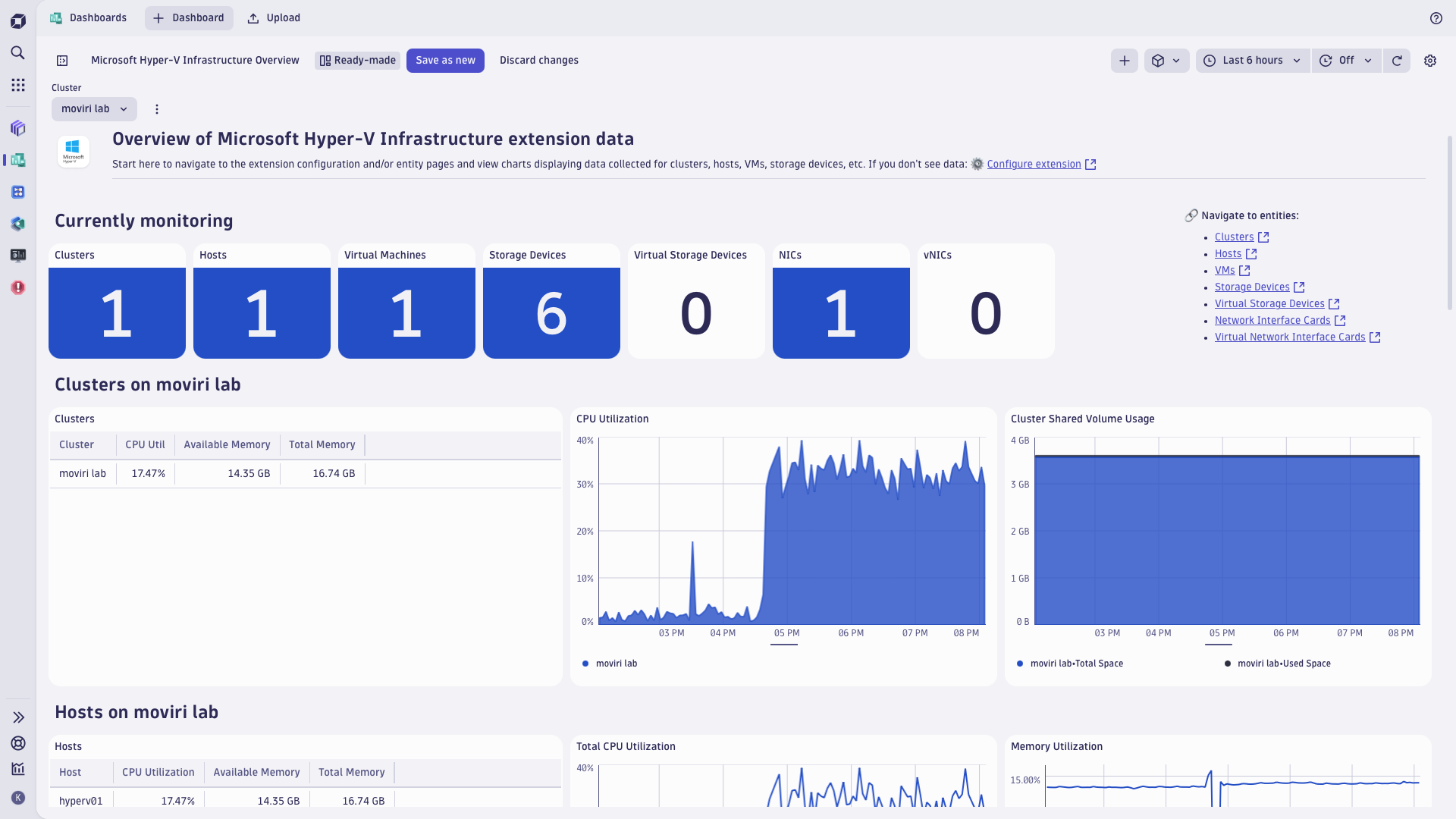
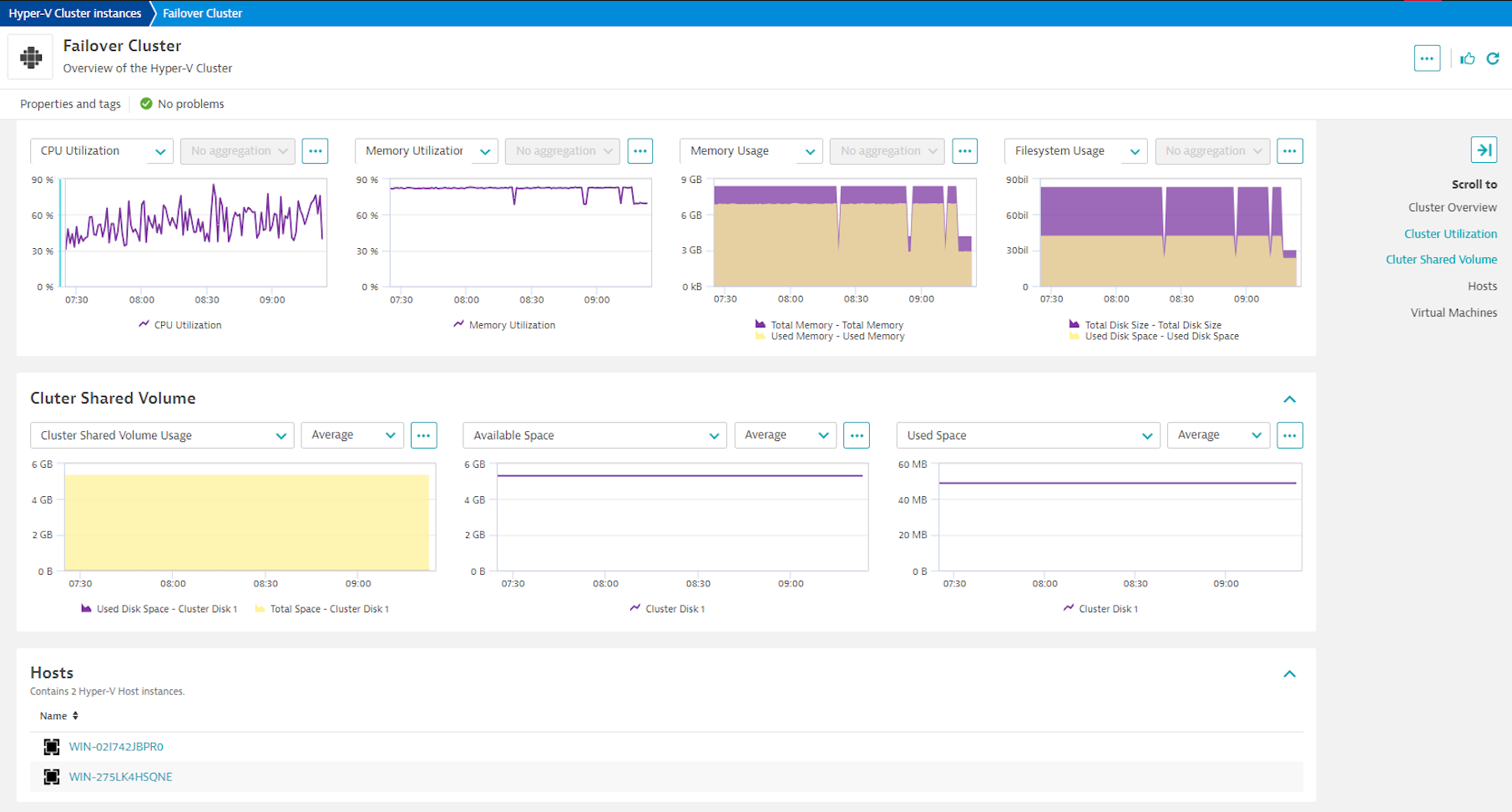
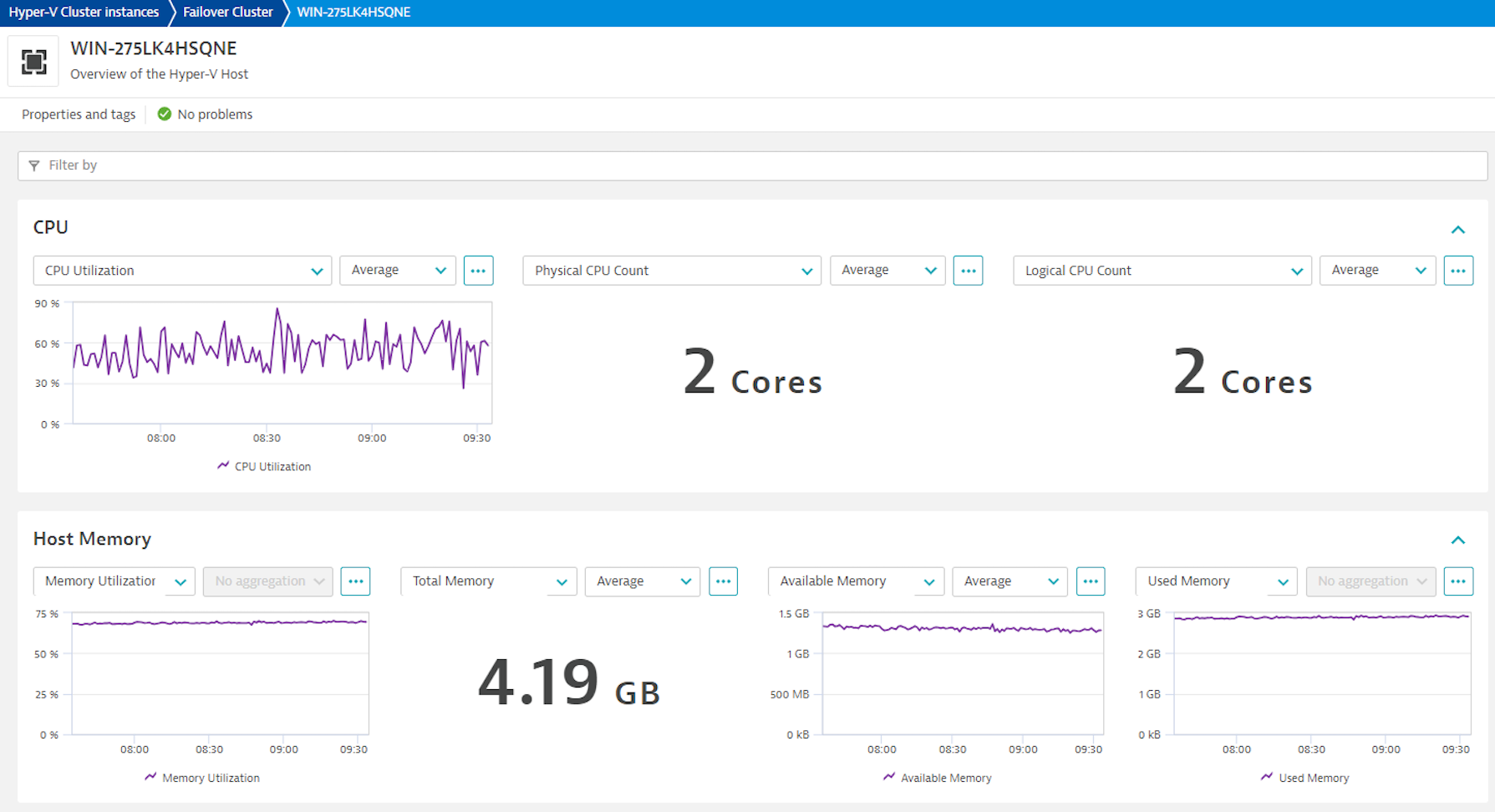
Hyper-V top level dashboardFailover cluster overviewFailover cluster performance metricsHyper-V host overview
  • Product information
  • Release notes

Overview

Get insights into performance of the Hyper-V fabric, tracking health, performance and resource utilization of the Hyper-V VMs, together with the context of their host and cluster resources. Monitor Hyper-V clusters, detect problems ahead of serious impact, and pinpoint the bottlenecks in the virtualization and application layer, including:

  • Processor bottlenecks
  • Memory shortages
  • Network overload
  • Storage shortages
  • Slowness in the dependent applications hosted on the Hyper-V cluster

Hyper-V extension leverages PowerShell cmdlets and WMI queries to collect data from the Windows hypervisor, following best practices employed by Microsoft, as well as Dynatrace customers who contributed to validation of this extension in real-life situations.

Use cases

  • Monitor health and performance of your Hyper-V cluster, using built-in analysis screens and easy-to-navigate dashboards
  • Make sure resources are split optimally between the virtual machines
  • Relate performance of the applications and VMs monitored with OneAgent to the underlying Hyper-V resources allotted to the VMs

Compatibility information

This extension requires:

  • x64 OS with BIOS-activated virtualization:
    • Windows 10 Enterprise/Pro/Education
    • Windows Server 2016 or newer
  • Hyper-V VM Configuration Version 9.0 or higher

Note on topological relationships between discovered Hyper-V VMs and OneAgent-monitored VM instances:

  • This extension maintains SAME_AS relationship between discovered VMs and OneAgent-monitored instances of the guest OS, using IP address as the join property.
  • This relationship enables:
    • Davis AI analytics to look together at metrics obtained by this extension and from OneAgent, to completely characterize monitored guest OS instances performance
    • Discovery and Coverage app to suggest which discovered VMs should be instrumented with OneAgent for full visibility into performance
  • This relationship works for known Windows guest OSes, but has limitations when guest OS is Linux. This limitation stems from the fact that on Hyper-V, Linux guest OS should be instrumented with the Microsoft's Linux Integration Service, while this service supports limited spectrum of the Linux distributions. See the link for details.
Dynatrace
DocumentationMore Information
By Dynatrace
Dynatrace support center
Subscribe to new releases
Copy to clipboard

Extension content

Content typeNumber of items included
list screen layout
7
screen injections
1
screen properties
2
document dashboard
1
screen dql table
7
metric metadata
51
screen chart groups
32
generic type
7
screen entities lists
11
alerts
10
dashboards
1
generic relationship
8
screen layout
14

Feature sets

Below is a complete list of the feature sets provided in this version. To ensure a good fit for your needs, individual feature sets can be activated and deactivated by your administrator during configuration.

Feature setsNumber of metrics included
Metric nameMetric keyDescriptionUnit
CPU Utilizationhyperv.host.cpu_utilization-Percent
Logical CPU Counthyperv.host.logical_cpu_count.gauge-Cores
Physical CPU Counthyperv.host.physical_cpu_count.gauge-Cores
CPU Reservehyperv.host.cpu_reserve-Percent
Metric nameMetric keyDescriptionUnit
Network Packets Senthyperv.virtual_machine.network_interface_card.packets_sent-PerSecond
Network Packets Receivedhyperv.virtual_machine.network_interface_card.packets_received-PerSecond
Network Packets Transferredhyperv.virtual_machine.network_interface_card.packets_transferred-PerSecond
Metric nameMetric keyDescriptionUnit
Total Disk Spacehyperv.virtual_machine.storage_device.total_disk_space-Byte
Used Disk Spacehyperv.virtual_machine.storage_device.used_disk_space-Byte
Metric nameMetric keyDescriptionUnit
Total Memoryhyperv.host.total_memory-KiloByte
Available Memoryhyperv.host.available_memory-KiloByte
Metric nameMetric keyDescriptionUnit
Network Bytes Senthyperv.virtual_machine.network_interface_card.bytes_sent-BytePerSecond
Network Bytes Receivedhyperv.virtual_machine.network_interface_card.bytes_received-BytePerSecond
Network Bytes Transferredhyperv.virtual_machine.network_interface_card.bytes_transferred-BytePerSecond
Metric nameMetric keyDescriptionUnit
Virtual Machine Counthyperv.host.virtual_machine_count.gauge-Count
Running Virtual Machine Counthyperv.host.running_virtual_machine_count.gauge-Count
Uptimehyperv.host.uptime-Second
Metric nameMetric keyDescriptionUnit
CPU Counthyperv.virtual_machine.cpu_count.gauge-Cores
CPU Reservehyperv.virtual_machine.cpu_reserve-Percent
CPU Utilizationhyperv.virtual_machine.cpu_utilizationCPU Utilization % relative to the hosts total capacity.Percent
Real CPU Utilizationhyperv.virtual_machine.real_cpu_utilizationCPU Utilization % as seen on the VMPercent
Total Memoryhyperv.virtual_machine.total_memory-Byte
Used Memoryhyperv.virtual_machine.used_memory-Byte
Memory Pressurehyperv.virtual_machine.memory_pressure-Percent
Metric nameMetric keyDescriptionUnit
Total Disk Sizehyperv.host.disk.total_size-Byte
Available Disk Spacehyperv.host.disk.space_free-Byte
Metric nameMetric keyDescriptionUnit
Network Bytes Senthyperv.host.network_interface_card.bytes_sent-BytePerSecond
Network Bytes Receivedhyperv.host.network_interface_card.bytes_received-BytePerSecond
Network Bytes Transferredhyperv.host.network_interface_card.bytes_transferred-BytePerSecond
Metric nameMetric keyDescriptionUnit
Disk Read Ratehyperv.host.disk.read_rate-PerSecond
Disk Write Ratehyperv.host.disk.write_rate-PerSecond
Metric nameMetric keyDescriptionUnit
Disk Read Ratehyperv.virtual_machine.storage_device.read_rate-PerSecond
Disk Write Ratehyperv.virtual_machine.storage_device.write_rate-PerSecond
Metric nameMetric keyDescriptionUnit
Network Packets Senthyperv.host.network_interface_card.packets_sent-BytePerSecond
Network Packets Receivedhyperv.host.network_interface_card.packets_received-BytePerSecond
Network Packets Transferredhyperv.host.network_interface_card.packets_transferred-BytePerSecond
Metric nameMetric keyDescriptionUnit
Total Spacehyperv.cluster_shared_volume.total_space-Byte
Used Disk Spacehyperv.cluster_shared_volume.used_space-Byte
Available Disk Spacehyperv.cluster_shared_volume.free_space-Byte

Related to Microsoft Hyper-V Infrastructure

Microsoft Hyper-V Virtual Machines logo

Microsoft Hyper-V Virtual Machines

Monitor Microsoft Hyper-V virtual machines from the guest OS perspective.

Full version history

To have more information on how to install the downloaded package, please follow the instructions on this page.
ReleaseDate

Full version history

Hyper-V extension release notes

Full version history

3.0.9

Published Thu Dec 4 2025

Patch level changes

  • Expire virtual machines so they don't appear on multiple hosts after a VM has been migrated
  • Clean up the DB to avoid re-ingesting existing datapoints

3.0.7

Published Thu Aug 28 2025

Patch level changes

  • Fixed an issue with improper filtering when the Hyper-V host is not part of a cluster or fails to retrieve the cluster name
  • Refreshed alert definitions

3.0.5

Published Fri Aug 08 2025

⚠️IMPORTANT CHANGES

  1. This extension release requires Dynatrace cluster version 1.313 or later.
  2. The extension now runs with elevated privileges, which requires editing the extensionsuser.conf to allow the extension to run with such privileges. In return, you get much improved scalability and stability of the monitoring. See the tile text for more details.
  3. Breaking change this upgrade will require recreation of the monitoring configurations.

New features

  • Added the ability to interpret entity filters as an allow or deny rule, which simplifies filtering configuration and makes it more flexible.
  • The dt.security_context attribute is now propagated to all entities created by the extension. When enabling entity access control based on dt.security_context ensure you set the Grail security context destination property to dt.security_context.
  • Enabled the extension to present the Dynatrace Platform (a.k.a. Gen3) entity details screens in the future platform apps that will expect these screens.

2.2.39

Published Tue Jun 24 2025

⚠️IMPORTANT CHANGE This extension release requires Dynatrace cluster version 1.310 or later. ⚠️If your Dynatrace cluster is on an earlier version, use previous release of this extension, tagged 2.2.38.

New features

  • Added the Dynatrace Platform (a.k.a. Gen3) dashboard

Plus, carry-on from release 2.2.38

  • Added an option to choose between Interactive and Batch logon types
  • Bug fixes related to the Cluster Shared Volume and Disk metrics reporting
  • Switch to use FQDNs instead of hostnames wherever possible in the cluster and host identification

2.2.38

Published Tue Jun 24 2025

New features

  • Added an option to choose between Interactive and Batch logon types

Patch level changes

  • Bug fixes related to the Cluster Shared Volume and Disk metrics reporting
  • Switch to use FQDNs instead of hostnames wherever possible in the cluster and host identification

2.2.21

Published Thu Mar 27 2025

Patch level changes

  • fixed CPU utilization metric readouts that were artificially inflated for multicore processors

2.2.15

Published Mon Feb 10 2025

New features

  • Added Real CPU Utilization metric

Patch level changes

  • Fixed slow memory leak showing up in some environments where PowerShell calls were not cleared entirely after each execution due to race conditions

2.2.11

Published Fri Aug 16 2024

Patch level changes

  • Changed way of reading the cluster name to PowerShell instead of WMI - to address an issue with access permissions

2.2.10

Published Tue Aug 06 2024

New features

  • Generate a log event when a VM is moved between hosts

Patch level changes

  • Fixed issue with multiple threads modifying the same list of VMs
  • Improve error handling for WMI queries

2.2.5

Published Fri Jul 12 2024

Patch level changes

  • Added ability to set a debug log level and the collection frequency
  • A fix for an incorrect count of VMs on one of the UA screens

2.2.4

Published Wed Jul 03 2024

Patch level changes

  • Fix locks that hindered performance and clean up the VM stats

2.0.15

Published Wed May 15 2024

New features

  • Added option to use the credential vault to manage user credentials required by the extension

Patch level changes

  • Split VM collection into 3 separate "query" methods to improve execution time
  • Added sourceEntityType for all metrics

2.0.14

Published Fri Apr 05 2024

Patch level changes

  • Fixed alert json for func metrics since they were using metricId instead of metricSelector.

2.0.13

Published Thu Apr 04 2024

New features

  • Added SAME_AS relationship between discovered VMs and OneAgent-monitored instances of the guest OS, using IP address as the join property. This relationship enables
    • Davis AI analytics to look together at metrics obtained by this extension and from OneAgent, to completely characterize monitored guest OS instances performance
    • Discovery and Coverage app to suggest which discovered VMs should be instrumented with OneAgent for full visibility into performance

Patch level changes

  • Stated the requirement that Windows user account who runs the extension requires Read and Write access to the Windows TEMP directory.

2.0.12

Published Mon Feb 26 2024

New features

  • This release introduces an important change Hyper-V extension requires local activation now (i..e. activation on an OneAgent-instrumented host).
  • Previous releases allowed remote installation (i.e. activation on an ActiveGate), but because of Hyper-V specifics, this very often caused permission issues that severely limited extension functionality and weren't solvable. So anyway - we have been advising you to move to local activation. Now it's the only way to activate this extension.

Patch level changes

  • Additionally, this release fixes some issues with filtering monitored entities.

2.0.10

Published Fri Feb 09 2024

Patch level changes

  • Fixed reporting of the rate metrics and occasional issues with metric extraction from nested environments.

2.0.3

Published Wed Nov 29 2023

Patch level changes

  • Fixed a bug affecting extension activation under certain conditions. Extension logs on affected systems reported "AttributeError 'dict' object has no attribute 'feature_sets' "

2.0.0

Published Wed Sep 27 2023

Dynatrace Hub
Hub HomeGet data into DynatraceBuild your own app
Log Management and AnalyticsKubernetesAI and LLM ObservabilityInfrastructure ObservabilitySoftware DeliveryApplication ObservabilityApplication SecurityDigital ExperienceBusiness Observability
Filter
Type
Built and maintained by
Deployment model
SaaS
  • SaaS
  • Managed
Partner FinderBecome a partnerDynatrace Developer

All

194 Results filtered by:

Palo Alto firewalls logo

Palo Alto firewalls

Palo Alto extension for problems detection

Extension
Confluent Cloud (Kafka) logo

Confluent Cloud (Kafka)

Remotely monitor your Confluent Cloud Kafka Clusters and other resources!

Extension
Kong - Prometheus logo

Kong - Prometheus

Monitor Prometheus metrics exposed by Kong and proxied upstream services

Extension
Nutanix Clusters logo

Nutanix Clusters

Monitor Nutanix clusters' performance, usage and availability, with Nutanix API.

Extension

Luna Network HSM Device logo

Luna Network HSM Device

Monitor your Luna Network Hardware Security Module (HSM) Devices through SNMP.

Extension

Consul Service Mesh (StatsD) logo

Consul Service Mesh (StatsD)

Extend visibility into your Consul Service Mesh instances to monitor health and improve performance.

Extension

Microsoft IIS logo

Microsoft IIS

Flexible and secure web server for hosting with Windows Server.

Extension

Kubernetes Monitoring Statistics logo

Kubernetes Monitoring Statistics

Troubleshoot your Dynatrace Kubernetes monitoring and Prometheus integration.

Extension
Snyk logo

Snyk

Ingest Snyk vulnerability findings, scans, and audit logs.

Extension
Citrix DaaS & Virtual Apps and Desktops logo

Citrix DaaS & Virtual Apps and Desktops

Gain insight into your Citrix DaaS & Virtual Apps and Desktops environments

Extension
Google Memorystore logo

Google Memorystore

Get insights into Google Memorystore service metrics collected from the Google Operations API to ensure health of your cloud infrastructure.

Extension

Databricks Workspace logo

Databricks Workspace

Remotely monitor your Databricks Workspaces!

Extension
Uptime logo

Uptime

Monitor the uptime of your hosts

Extension
UPS Device logo

UPS Device

Monitor your Uninterruptible Power Supplies (UPS) over SNMP

Extension
Google App Engine (integration) logo

Google App Engine (integration)

Insights into Google App Engine service metrics collected from Operations API

Extensioncoming soon
Traceroute logo

Traceroute

Run traceroute commands and collect step performance metrics

Extension
[Deprecated] Kubernetes PVCs logo

[Deprecated] Kubernetes PVCs

Monitor your Kubernetes persistent volume claims and alert on capacity limits.

Extension

Google Cloud Storage Transfer logo

Google Cloud Storage Transfer

Get insights into Google Cloud Storage Transfer metrics collected from the Google Operations API to ensure health of cloud infrastructure.

Extension

NVIDIA GPU logo

NVIDIA GPU

Monitor base parameters of the GPU, including load, memory and temperature

Extension
Oracle Database logo

Oracle Database

Observe, analyze and optimize the usage, health and performance of your database

Extension
Cisco ACI/APIC logo

Cisco ACI/APIC

Get insights into your Cisco Application Centric Infrastructure (ACI)

Extension
Dell iDRAC logo

Dell iDRAC

Connect to the Redfish API to get insights into your Dell iDRAC environment

Extension
Azure Managed Apache Cassandra logo

Azure Managed Apache Cassandra

Gain insights into your Azure Managed Cassandra Instance health and performance

Extension
PayShield HSM Device logo

PayShield HSM Device

Monitor PayShield Payment Hardware Security Module (HSM) Devices through SNMP.

Extension

NetApp OnTap (Remote) logo

NetApp OnTap (Remote)

Remote extension that collects NetApp OnTap metrics from the OnTap 9.6+ API.

Extension

Google Firestore in Datastore mode logo

Google Firestore in Datastore mode

Get insights into Google Firestore in Datastore mode metrics collected from the Google Operations API to ensure health of infrastructure.

Extension

Redis (2.0) logo

Redis (2.0)

Collect important additional data for your Redis instances.

Extension

PHP-FPM logo

PHP-FPM

Monitor the PHP-FPM status of your applications with this extension.

Extension

Timedrift Monitoring logo

Timedrift Monitoring

Monitor your host's NTP/Chrony Time Offset!

Extension
Apache Kafka logo

Apache Kafka

Automatic and intelligent observability with trace and metric insights.

Extension

MongoDB (local or remote monitoring) logo

MongoDB (local or remote monitoring)

Monitor your MongoDB servers either locally or remotely!

Extension
Connection Pools: C3P0 logo

Connection Pools: C3P0

Application server method of pooling and sharing connections to a database.

Extension

AWS Entities for Metric Streaming logo

AWS Entities for Metric Streaming

Analyse metrics in the context of an entity based on AWS Metric Streaming.

Extension

MongoDB Atlas logo

MongoDB Atlas

Remotely monitor your SaaS installation of MongoDB (Atlas)

Extension
Microsoft SQL Server logo

Microsoft SQL Server

Improve the health and performance monitoring of your Microsoft SQL Servers.

Extension

IBM MQ Appliance logo

IBM MQ Appliance

Monitor your IBM MQ Appliances over SNMP

Extension
Google Apigee logo

Google Apigee

Get insights into Google Apigee service metrics collected from the Google Operations API to ensure health of your cloud infrastructure.

Extension

Oracle Autonomous Database on OCI logo

Oracle Autonomous Database on OCI

Monitor health and performance of the Oracle Autonomous Database.

Extension
Google Pub/Sub Lite logo

Google Pub/Sub Lite

Get insights into Google Pub/Sub Lite service metrics collected from the Google Operations API to ensure health of the cloud infrastructure.

Extension

Infoblox DDI logo

Infoblox DDI

Monitor Infoblox DDI using SNMP

Extension
SAP HANA Database (remote monitoring) logo

SAP HANA Database (remote monitoring)

Easily understand the health and performance of your SAP HANA databases.

Extension

Connection Pools: WebSphere Liberty logo

Connection Pools: WebSphere Liberty

Application server method of pooling and sharing connections to a database.

Extension

Google Cloud Composer logo

Google Cloud Composer

Get insights into Google Cloud Composer metrics collected from the Google Operations API to ensure health of your cloud infrastructure.

Extension

Google Cloud Spanner logo

Google Cloud Spanner

Get insights into Google Cloud Spanner metrics collected from the Google Operations API to ensure health of your cloud infrastructure.

Extension

IBM i logo

IBM i

Collect performance data from your IBM i Hosts via this Remote extension.

Extension

Google reCAPTCHA Enterprise logo

Google reCAPTCHA Enterprise

Get insights into Google reCAPTCHA Enterprise metrics collected from the Google Operations API to ensure health of your cloud infrastructure

Extension
.NET logo

.NET

Automatic end-to-end observability for .NET applications and processes.

Extension

Google Cloud's operations suite logo

Google Cloud's operations suite

Get insights into Google Cloud's operations suite metrics collected from the Google Operations API to ensure health of cloud infrastructure.

Extension

Google Vertex AI logo

Google Vertex AI

Get insights into Google Vertex AI service metrics.

Extension
Oracle Exadata logo

Oracle Exadata

Monitor Oracle Exadata systems for performance, usage and availability

Extension