 Linkerd
Linkerd
LInkerd service mesh provides runtime debugging, observability, reliability, and security with zero code changes.
Extension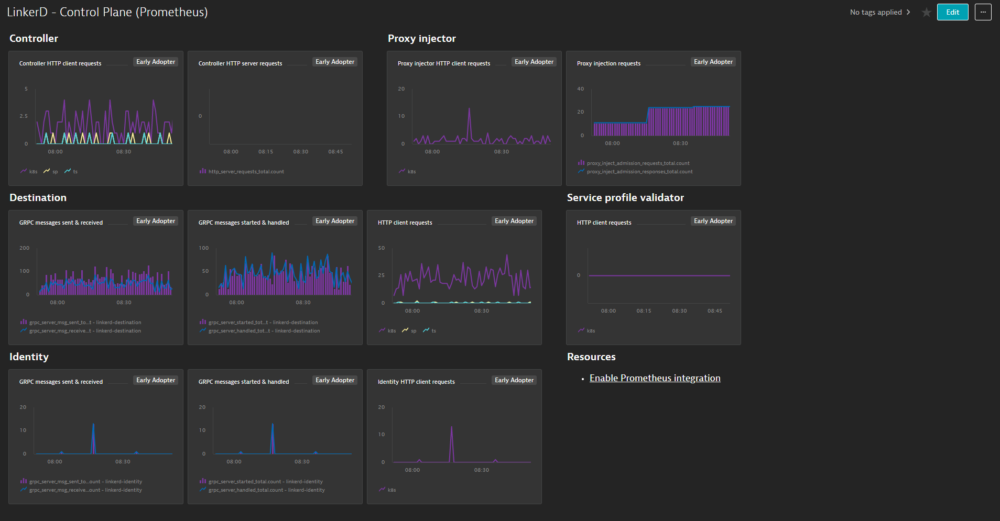
- Product information
- Release notes
Overview
Configurations to enable dashboards and alerts for Linkerd service mesh metrics coming in through the Prometheus exporter integration. It requires metrics already ingested into Dynatrace via Prometheus integration. Follow the steps described in the Setup section for proper installation.
Use cases
- Monitor Linkerd control plane performance and sidecar proxies performance
- Alert on anomalies leading to performance issues
- Visualize service mesh component status and performance on dashboards
- Leverage Kubernetes Prometheus exporter integration to obtain all necessary telemetry data.
Get started
For more information on the installation and configuration, please see Linkerd extension in the Dynatrace Documentation.
Details
Setup
1. Enable Prometheus monitoring in Dynatrace
In your Dynatrace environment, go to Settings > Cloud and virtualization > Kubernetes and turn on Enable monitoring and Monitor Prometheus exporters. For more information see our official documentation.
2. Annotate resources to begin collecting metrics
Annotations can either be set on the services (requires ActiveGate or Dynatrace Operator 1.215+) or on the pods. If you annotate the pods directly the annotations will go away when they are destroyed so be sure to add the annotations in the pod template at the deployment or replica set level. But do not annotate the deployments themselves as this will have no effect.
Refer to documentation for annotation best practices.
Start ingesting Linkerd (control plane) metrics
Controller
This component has been removed in the latest Kubernetes releases of Linkerd, so can be skipped if you do not see a linkerd-controller service.
metrics.dynatrace.com/port: "9995"
metrics.dynatrace.com/scrape: "true"
metrics.dynatrace.com/filter: |
  {
    "mode": "include",
    "names": [
      "http_client_requests_total",
      "http_server_requests_total"
    ]
  }
Proxy injector
This is the linkerd-proxy-injector service and deployment.
metrics.dynatrace.com/port: "9995"
metrics.dynatrace.com/scrape: "true"
metrics.dynatrace.com/filter: |
  {
    "mode": "include",
    "names": [
      "http_client_requests_total",
      "proxy_inject_admission_requests_total",
      "proxy_inject_admission_responses_total"
    ]
  }
Identity
This is the linkerd-identity service and deployment.
metrics.dynatrace.com/port: "9990"
metrics.dynatrace.com/scrape: "true"
metrics.dynatrace.com/filter: |
  {
    "mode": "include",
    "names": [
      "grpc_server_handled_total",
      "grpc_server_msg_received_total",
      "grpc_server_msg_sent_total",
      "grpc_server_started_total",
      "http_client_requests_total"
    ]
  }
Destination
This may either be linkerd-destination or linkerd-dst in the latest versions.
metrics.dynatrace.com/port: "9996"
metrics.dynatrace.com/scrape: "true"
metrics.dynatrace.com/filter: |
  {
    "mode": "include",
    "names": [
      "grpc_server_handled_total",
      "grpc_server_msg_received_total",
      "grpc_server_msg_sent_total",
      "grpc_server_started_total",
      "http_client_requests_total"
    ]
  }
Service profile validator
This is the linkerd-sp-validator service and deployment. If you see a service for this component but no deployments/pods, this functionality was moved to the linkerd-destination component in the latest releases so you do not need to add annotations for this.
metrics.dynatrace.com/port: "9997"
metrics.dynatrace.com/scrape: "true"
metrics.dynatrace.com/filter: |
  {
    "mode": "include",
    "names": [
      "http_client_requests_total"
    ]
  }
Start ingesting Linkerd (data plane) metrics
Set the below annotations on on either the services in front of the pods or in the pod templates for the pods that you would like to collect Linkerd metrics for. The pods must have the sidecar proxy injected into them for the metrics to be available.
metrics.dynatrace.com/port: "4191"
metrics.dynatrace.com/scrape: "true"
metrics.dynatrace.com/filter: |
  {
    "mode": "include",
    "names": [
      "response_total",
      "request_total",
      "tcp_close_total",
      "tcp_open_total",
      "tcp_read_bytes_total",
      "tcp_write_bytes_total"
    ]
  }
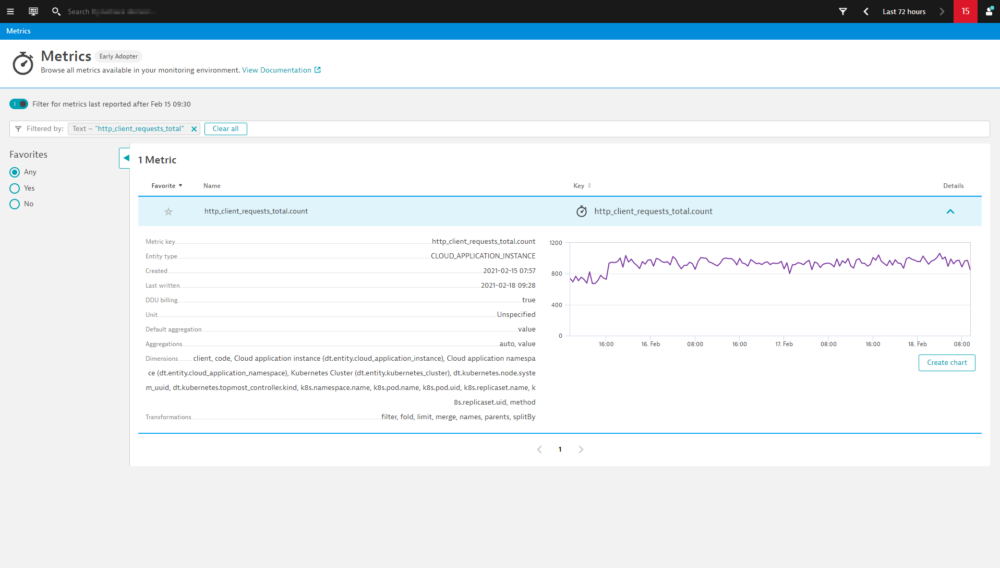
After some minutes, you can verify if everything works as expected by finding Linkerd related metrics using the Dynatrace metrics browser. The metric keys included in our filter annotations will be the best to look for.
For troubleshooting and further annotation methods, see Monitor Prometheus metrics in Dynatrace documentation.
4. Add extension to environment
To add this extension to your environment click Add to environment on the page of this extension in the Dynatrace Hub. After activating the extension, select Dashboards in Dynatrace. You should now find out of the box dashboards for Linkerd - Control Plane and Linkerd - Data Plane.
5. Activate metric events for alerting
Additionally, the extension comes with a pre-configured metric event for alerting. To activate it:
-
From the Dynatrace navigation menu, select Settings > Anomaly detection > Custom events for alerting.
-
Find the following event
- Linkerd - Large number of failure responses: notifies you if more than 10 failure responses are detected in 3 minutes in any 5 minute period.
-
If necessary, select the Edit button to customize the event conditions.
-
Move the switch next an event to the On position to activate it.
Compatibility information
Requires metrics already ingested into Dynatrace via Prometheus integration. See Kubernetes Prometheus exporter integration documentation for details.
Full version history
To have more information on how to install the downloaded package, please follow the instructions on this page.
ReleaseDate
Full version history
No release notes