


All
0 Results filtered by:

We couldn't find any results
You can search all listings, or try a different spelling or keyword. Still nothing? Dynatrace makes it easy to create custom apps.
 Juniper Networks (SNMP)
Gain insights into the performance of your Juniper networking solutions.
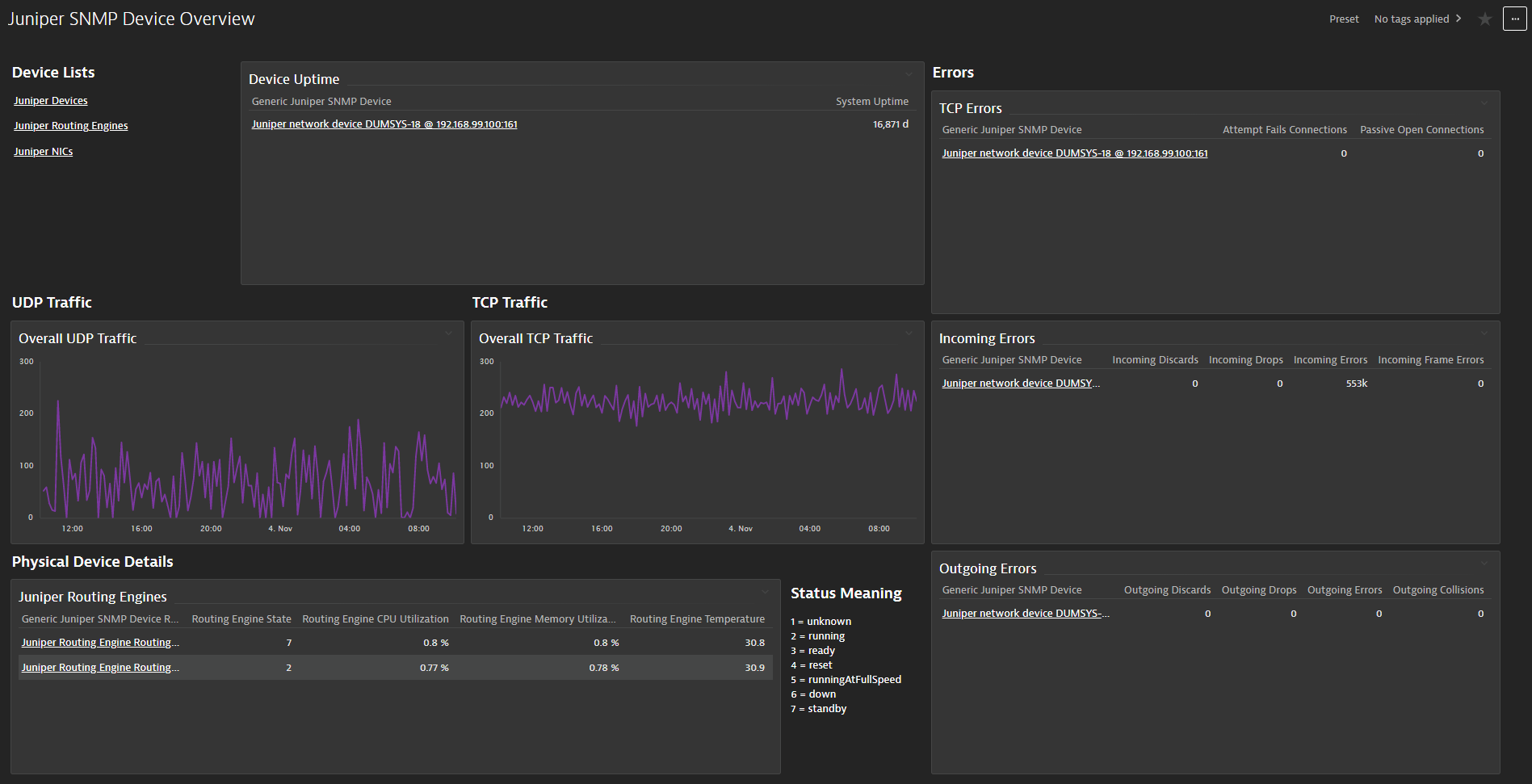
ExtensionThis extension leverages the SNMP protocol to track the health state and performance of your Juniper network infrastructure. It provides a unified analysis capabilities for Ops, DevOps and IT Admins.
Below is a complete list of the feature sets provided in this version. To ensure a good fit for your needs, individual feature sets can be activated and deactivated by your administrator during configuration.
| Metric name | Metric key | Description | Unit |
|---|---|---|---|
| - | com.dynatrace.extension.network_device.sysuptime | - | - |
| - | com.dynatrace.extension.juniper.generic.routingengine.entity | - | - |
| - | com.dynatrace.extension.network_device.cpu_usage | - | - |
| - | com.dynatrace.extension.network_device.memory_usage | - | - |
| - | com.dynatrace.extension.network_device.if.bytes_in.count | - | - |
| - | com.dynatrace.extension.network_device.if.bytes_out.count | - | - |
| - | com.dynatrace.extension.network_device.if.status | - | - |
| - | com.dynatrace.extension.network_device.if.in.err.count | - | - |
| - | com.dynatrace.extension.network_device.if.in.discards.count | - | - |
| - | com.dynatrace.extension.network_device.if.out.err.count | - | - |
| - | com.dynatrace.extension.network_device.if.out.discards.count | - | - |
| Metric name | Metric key | Description | Unit |
|---|---|---|---|
| Installed Application Entity | com.dynatrace.extension.juniper.generic.app.installed.entity | Used to create Juniper Installed Applications | Count |
| CPU Time (raw) | com.dynatrace.extension.juniper.generic.app.running.cpu.count | Juniper Running Application Raw CPU Time (centi-seconds) | Unspecified |
| Used Memory | com.dynatrace.extension.juniper.generic.app.running.memory | Juniper SNMP Running Application Memory Use | KiloByte |
| Metric name | Metric key | Description | Unit |
|---|---|---|---|
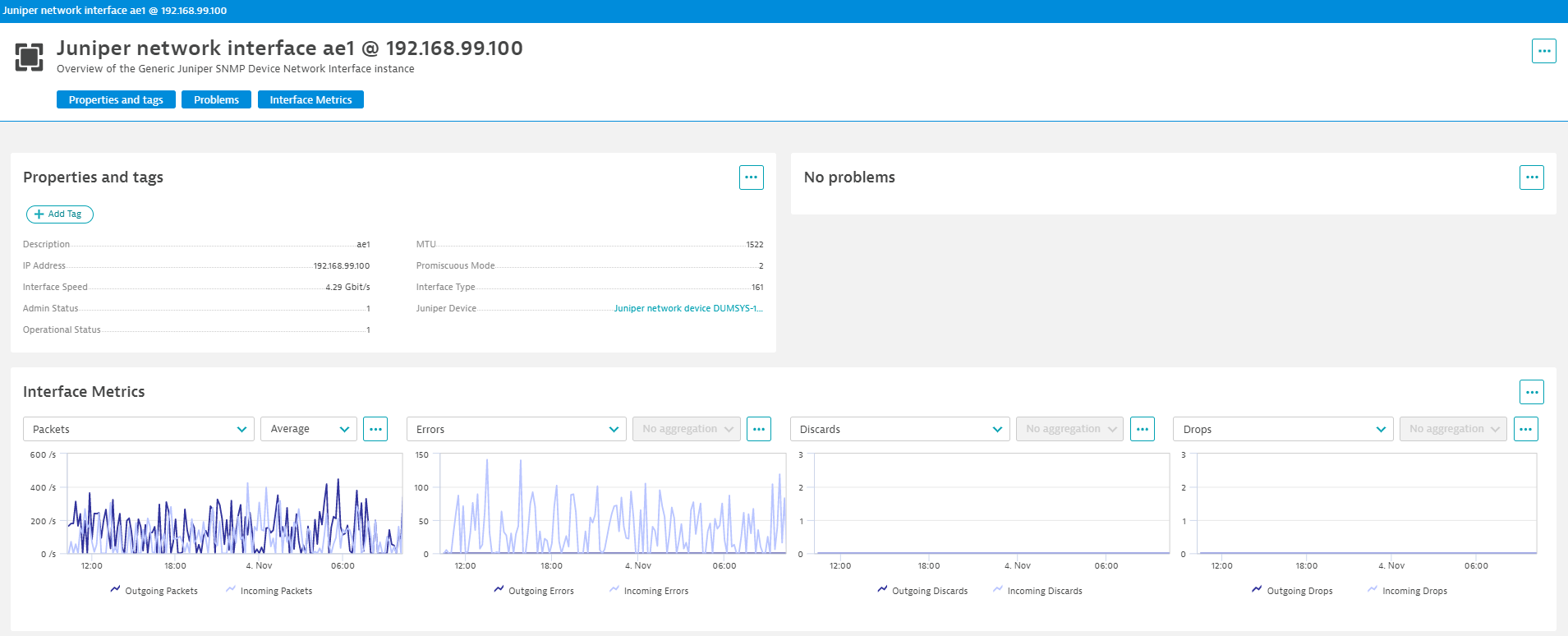
| Incoming Bits | com.dynatrace.extension.juniper.generic.if.in.bits | The number of incoming bits per second for an interface. | BitPerSecond |
| Outgoing Bits | com.dynatrace.extension.juniper.generic.if.out.bits | The number of outgoing bits per second for an interface. | BitPerSecond |
| Outgoing Collisions | com.dynatrace.extension.juniper.generic.if.out.collisions.count | The number of output collisions detected for an interface. | Count |
| Incoming Discards | com.dynatrace.extension.juniper.generic.if.in.discards.count | The number of inbound packets which were chosen to be discarded for an interface. | Count |
| Outgoing Discards | com.dynatrace.extension.juniper.generic.if.out.discards.count | The number of outbound packets which were chosen to be discarded for an interface. | Count |
| Incoming Drops | com.dynatrace.extension.juniper.generic.if.in.drops.count | The number of packets dropped by the input queue for an interface. | Count |
| Outgoing Drops | com.dynatrace.extension.juniper.generic.if.out.drops.count | The number of packets dropped by the output queue for an interface. | Count |
| Incoming Errors | com.dynatrace.extension.juniper.generic.if.in.err.count | The number of inbound packets that contained errors for an interface. | Count |
| Outgoing Errors | com.dynatrace.extension.juniper.generic.if.out.err.count | The number of outbound packets that contained errors for an interface. | Count |
| Incoming Frame Errors | com.dynatrace.extension.juniper.generic.if.in.frame_errors.count | The number of input packets which were misaligned for an interface. | Count |
| Incoming Octets | com.dynatrace.extension.juniper.generic.if.in.octets.count | The total number of octets received on the interface. | Byte |
| Outgoing Octets | com.dynatrace.extension.juniper.generic.if.out.octets.count | The total number of octets transmitted out of the interface. | Byte |
| Incoming Packets | com.dynatrace.extension.juniper.generic.if.in.packets | The number of packets per second received by the interface. | PerSecond |
| Outgoing Packets | com.dynatrace.extension.juniper.generic.if.out.packets | The number of packets per second sent by the interface. | PerSecond |
| Metric name | Metric key | Description | Unit |
|---|---|---|---|
| Juniper SNMP Ping Probe Responses | com.dynatrace.extension.juniper.generic.last_ping.probe_responses | Number of Ping Probes that Responded | Count |
| Juniper SNMP Ping Probes Sent | com.dynatrace.extension.juniper.generic.last_ping.probes_sent | Number of Ping Probes Sent | Count |
| Average Ping RTT | com.dynatrace.extension.juniper.generic.last_ping.avg_rtt | The average of the round trip delays measured for all the probes during the most recently completed tes | MicroSecond |
| Ping Avg Egress Time | com.dynatrace.extension.juniper.generic.last_ping.avg_egress | The average of the egress trip delays measured over all probes during the most recently completed test | MicroSecond |
| Ingress | com.dynatrace.extension.juniper.generic.last_ping.avg_ingress | The average of the ingress trip delays measured over all probes during the most recently completed test | MicroSecond |
| Metric name | Metric key | Description | Unit |
|---|---|---|---|
| Info | com.dynatrace.extension.juniper.generic.layer3.info | Used to get Juniper SNMP IS-IS Info | Count |
| Metric name | Metric key | Description | Unit |
|---|---|---|---|
| Vlan Entity | com.dynatrace.extension.juniper.generic.device.vlan | Used to create Juniper SNMP VLAN Entity | Count |
| Metric name | Metric key | Description | Unit |
|---|---|---|---|
| Juniper IP Address | com.dynatrace.extension.juniper.generic.ip_addr.entity | Used to create Juniper IP Address Entity | Count |
| Metric name | Metric key | Description | Unit |
|---|---|---|---|
| Disk Size | com.dynatrace.extension.juniper.generic.device.storage.size | Size of Disk | Byte |
| Disk Used | com.dynatrace.extension.juniper.generic.device.storage.used | Amount Used of Disk | Byte |
| Metric name | Metric key | Description | Unit |
|---|---|---|---|
| Active Open Connections | com.dynatrace.extension.juniper.generic.device.tcp.conn.active_open.count | The number of times TCP connections have made a direct transition to the SYN-SENT state from the CLOSED state. | Count |
| Passive Open Connections | com.dynatrace.extension.juniper.generic.device.tcp.conn.passive_open.count | The number of times TCP connections have made a direct transition to the SYN-RCVD state from the LISTEN state. | Count |
| Attempt Fails Connections | com.dynatrace.extension.juniper.generic.device.tcp.conn.attempt_fails.count | The number of times TCP connections have made a direct transition to the CLOSED state from either the SYN-SENT state or the SYN-RCVD state, plus the number of times TCP connections have made a direct transition to the LISTEN state from the SYN-RCVD state. | Count |
| TCP Established Resets | com.dynatrace.extension.juniper.generic.device.tcp.estab_resets.count | The number of times TCP connections have made a direct transition to the CLOSED state from either the ESTABLISHED state or the CLOSE-WAIT state. | Count |
| Current Established Connections | com.dynatrace.extension.juniper.generic.device.tcp.conn.curr_estab | The number of TCP connections for which the current state is either ESTABLISHED or CLOSE- WAIT. | Count |
| TCP Incoming Segments | com.dynatrace.extension.juniper.generic.device.tcp.in.segs.count | The total number of segments received, including those received in error. This count includes segments received on currently established connections. | Count |
| TCP Outgoing Segments | com.dynatrace.extension.juniper.generic.device.tcp.out.segs.count | The total number of segments sent, including those on current connections but excluding those containing only retransmitted octets. | Count |
| TCP Retransmitted Segments | com.dynatrace.extension.juniper.generic.device.tcp.retrans.segs.count | The total number of segments retransmitted - that is, the number of TCP segments transmitted containing one or more previously transmitted octets. | Count |
| TCP Incoming Errors | com.dynatrace.extension.juniper.generic.device.tcp.in.errors.count | The total number of segments received in error (e.g., bad TCP checksums). | Count |
| TCP Outgoing Resets | com.dynatrace.extension.juniper.generic.device.tcp.out.resets.count | The number of TCP segments sent containing the RST flag. | Count |
| Datagrams Received | com.dynatrace.extension.juniper.generic.device.udp.in.datagrams.count | The total number of UDP datagrams delivered | Count |
| UPD Incoming No Port | com.dynatrace.extension.juniper.generic.device.udp.in.no_ports.count | The total number of received UDP datagrams for which there was no application at the destination port. | Count |
| UPD Incoming Errors | com.dynatrace.extension.juniper.generic.device.udp.in.errors.count | The number of received UDP datagrams that could not be delivered for reasons other than the lack of an application at the destination port. | Count |
| Datagrams Sent | com.dynatrace.extension.juniper.generic.device.udp.out.datagrams.count | The total number of UDP datagrams sent | Count |
| Metric name | Metric key | Description | Unit |
|---|---|---|---|
| FRU State | com.dynatrace.extension.juniper.generic.device.fru.state | State of the Juniper SNMP Device FRU | Count |
| FRU Temp | com.dynatrace.extension.juniper.generic.device.fru.temp | Temperature of Juniper SNMP FRU | Count |
| Metric name | Metric key | Description | Unit |
|---|---|---|---|
| Routing Engine CPU Utilization | com.dynatrace.extension.juniper.generic.routingengine.cpu.utilization | CPU Utilization of the Routing Engine | Percent |
| Routing Engine Memory Utilization | com.dynatrace.extension.juniper.generic.routingengine.memory.utilization | Memory Utilization of the Routing Engine | Percent |
| Routing Engine State | com.dynatrace.extension.juniper.generic.routingengine.state | unknown(1),running(2),ready(3),reset(4),runningAtFullSpeed(5),down(6),standby(7) | Count |
| Routing Engine Temperature | com.dynatrace.extension.juniper.generic.routingengine.temperature | The temperature of the Routing Engine in Celsius. | Count |
| Metric name | Metric key | Description | Unit |
|---|---|---|---|
| IP Route | com.dynatrace.extension.juniper.generic.cidr.route | Used to get Juniper SNMP IP Routing Info | Count |
| Metric name | Metric key | Description | Unit |
|---|---|---|---|
| Vlan Entity | com.dynatrace.extension.juniper.generic.device.vlan | Used to create Juniper SNMP VLAN Entity | Count |
| Ex Vlan Entity | com.dynatrace.extension.juniper.generic.device.ex.vlan | Used to create Juniper SNMP VLAN Entity | Count |
| Portgroup Entity | com.dynatrace.extension.juniper.generic.device.vlan.portgroup | Used to create Juniper SNMP Portgroup Entity | Count |
| Ex Portgroup Entity | com.dynatrace.extension.juniper.generic.device.ex.vlan.portgroup | Used to create Juniper SNMP Portgroup Entity | Count |
| Metric name | Metric key | Description | Unit |
|---|---|---|---|
| Table | com.dynatrace.extension.juniper.generic.device.arp.table | Used to show ARP Table | Count |
| Metric name | Metric key | Description | Unit |
|---|---|---|---|
| - | com.dynatrace.extension.network_device.if.in.multicast_pkts.count | - | - |
| - | com.dynatrace.extension.network_device.if.out.multicast_pkts.count | - | - |
| - | com.dynatrace.extension.network_device.if.in.broadcast_pkts.count | - | - |
| - | com.dynatrace.extension.network_device.if.out.broadcast_pkts.count | - | - |
| - | com.dynatrace.extension.network_device.if.in.ucast_pkts.count | - | - |
| - | com.dynatrace.extension.network_device.if.out.ucast_pkts.count | - | - |
| - | com.dynatrace.extension.network_device.if.lastchange | - | - |
| - | com.dynatrace.extension.network_device.if.in.crc_errors.count | - | - |
Advanced interfaces feature set:
com.dynatrace.extension.network_device.if.in.multicast_pkts.countcom.dynatrace.extension.network_device.if.out.multicast_pkts.countcom.dynatrace.extension.network_device.if.in.broadcast_pkts.countcom.dynatrace.extension.network_device.if.out.broadcast_pkts.countcom.dynatrace.extension.network_device.if.in.ucast_pkts.countcom.dynatrace.extension.network_device.if.out.ucast_pkts.countIP addressing feature set:
com.dynatrace.extension.juniper.generic.ip_addr.entityBridge feature set:
com.dynatrace.extension.juniper.generic.device.vlan❗IMPORTANT: Make sure to toggle these new IP addressing and Bridge feature sets on in your configurations if you are using those metrics, as they are no longer captured by default.
Advanced interfaces feature set:
com.dynatrace.extension.network_device.if.lastchangecom.dynatrace.extension.network_device.if.in.crc_errorsMetrics in "default" feature set will always be enabled and cannot be disabled. These metrics are mandatory. Take extra caution configuring devices and interfaces for which you are collecting data. Make use of Interface filters to limit the number of interfaces, otherwise, all interfaces on the device will be collected by default.
In case you do not wish to collect interfaces on your device, enter $eq(!) in the "Interface Name" filter field on the Feature Sets screen during configuration.
These metrics introduced into the "default" feature set are per interface and cannot be disabled.
5min interval changed to 1min.
Initial revision. Minimal required Dynatrace and ActiveGate version: 1.226