

Skip to technology filters Skip to main content
Dynatrace Hub

Extend the platform,
empower your team.

Popular searches:
Home hero bg
IBM MQIBM MQ
IBM MQ

IBM MQ

Monitor performance of your IBM MQ queue manager objects.

Extension
Free trialDocumentation
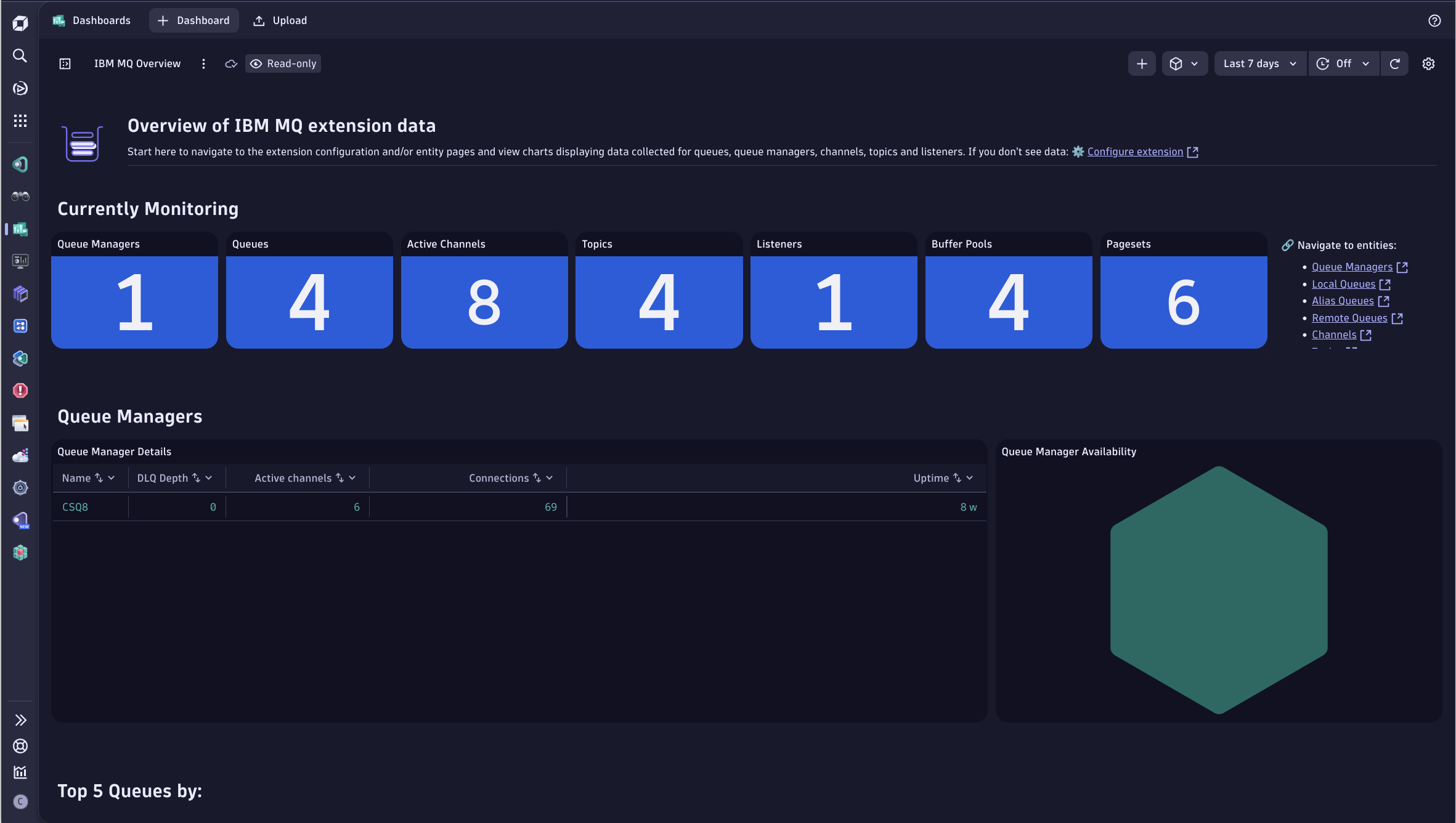
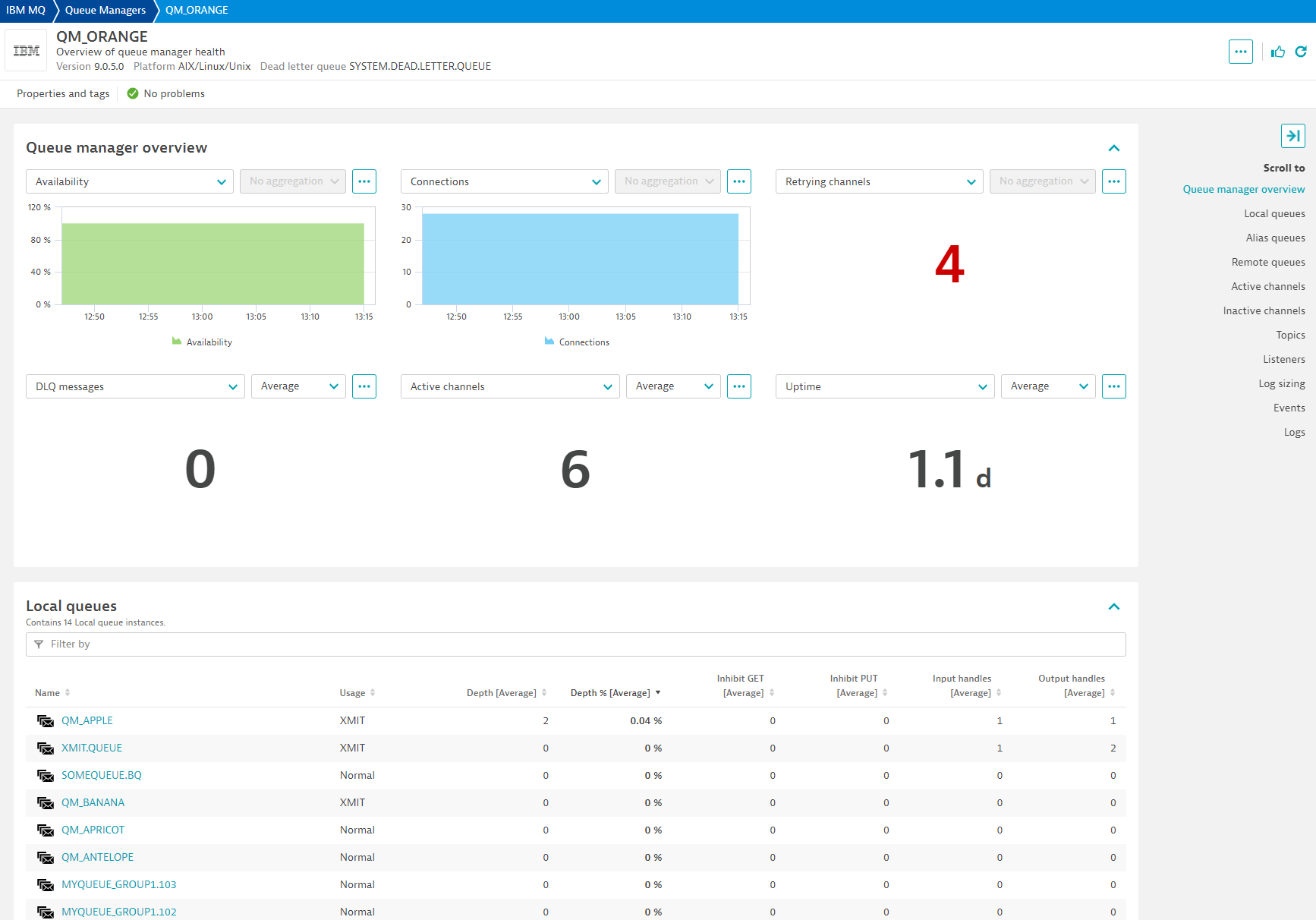
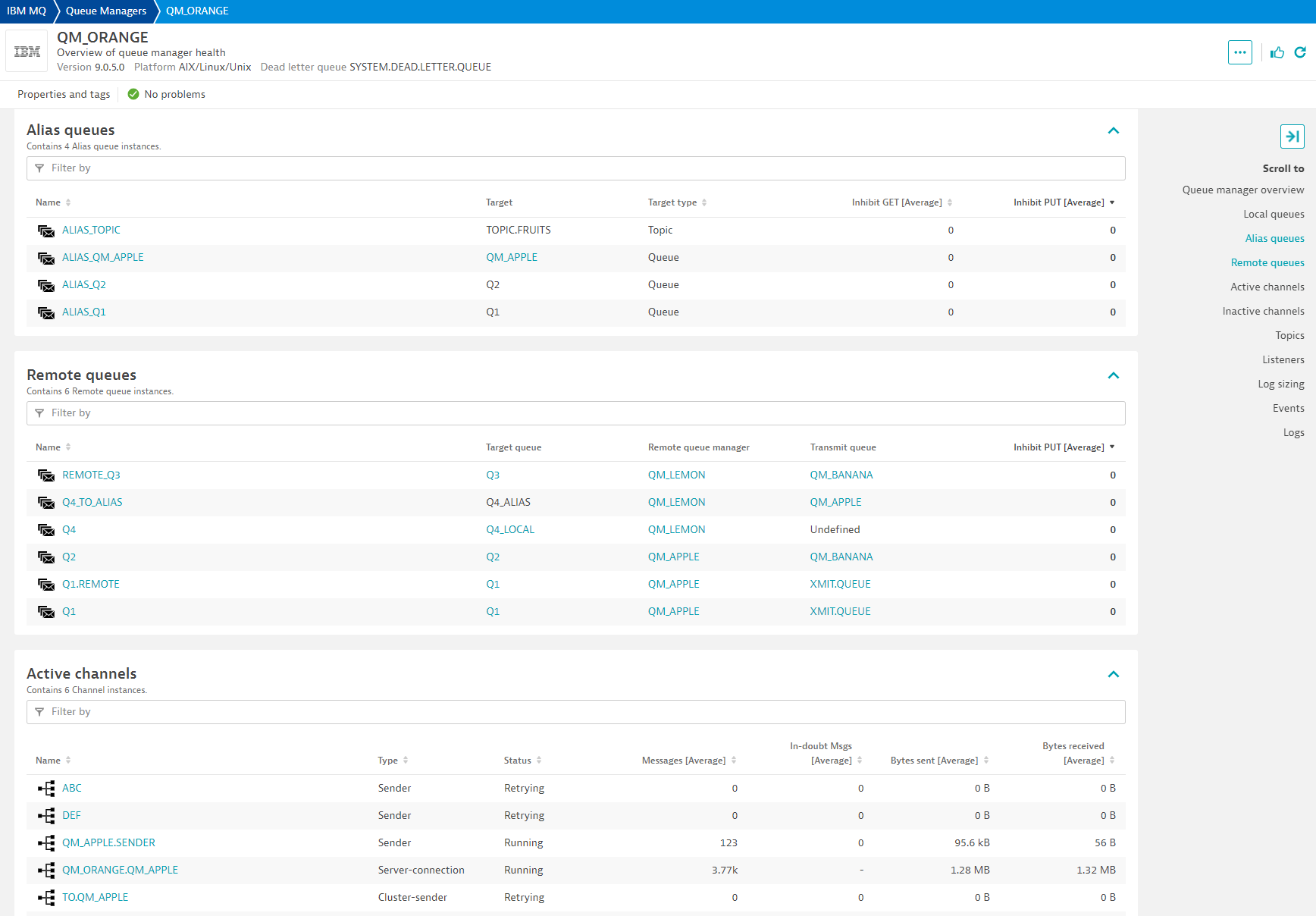
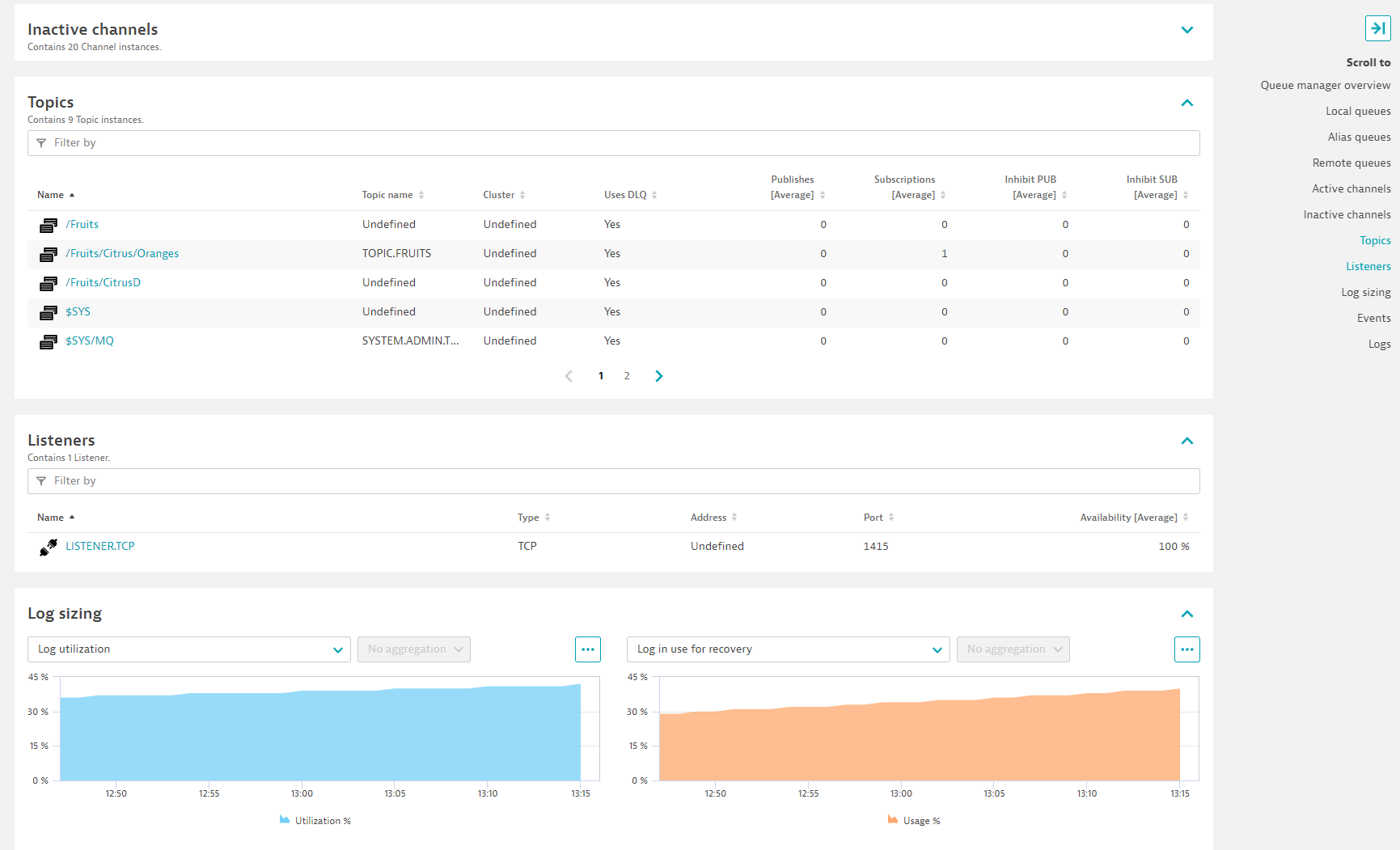
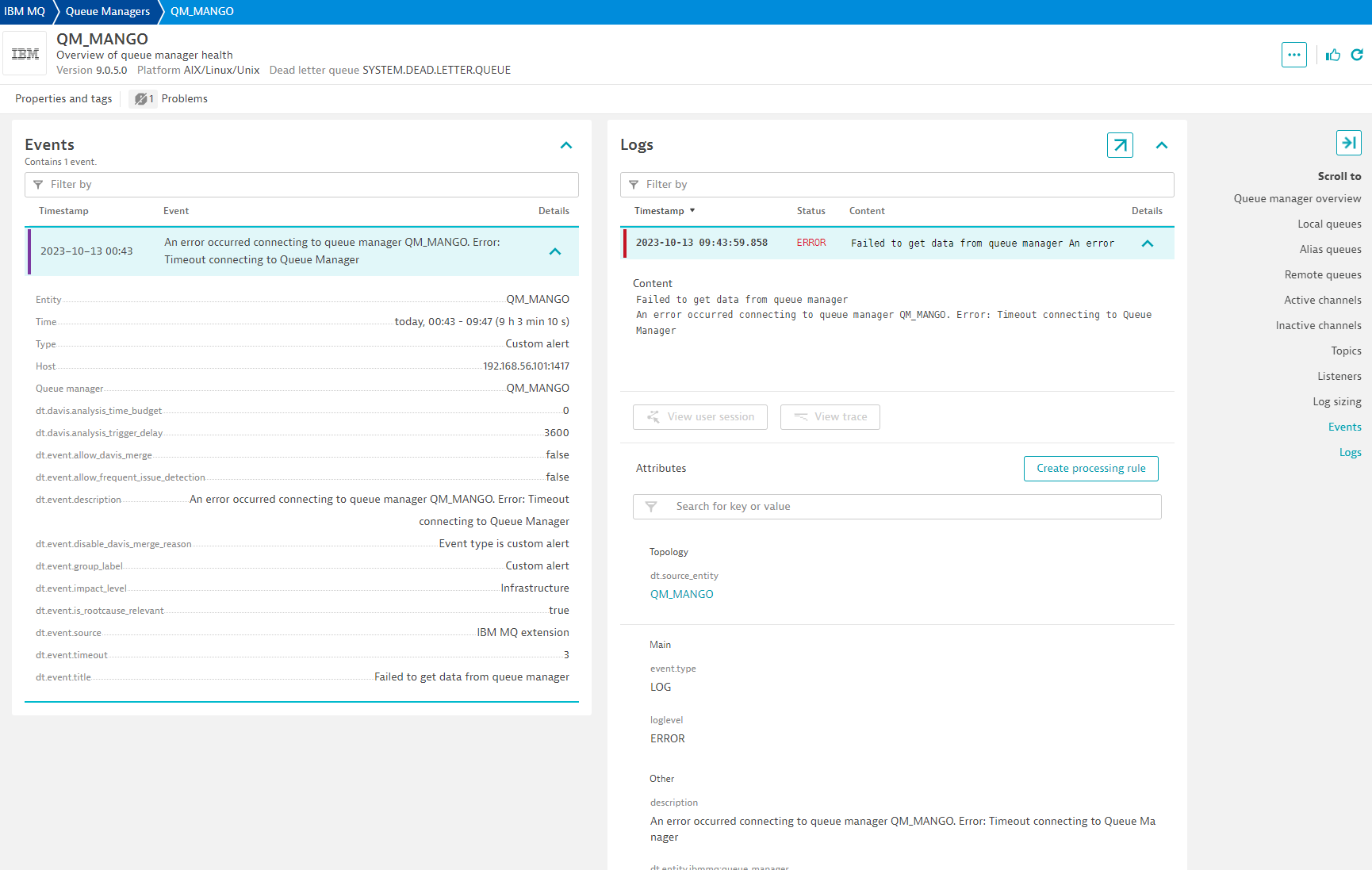
Get an overview of your IBM MQ monitoring environment with the bundled Overview Dashboard.A Unified Analysis screen is included for Queue Manager Entities with contains all of the important Queue Manager information needed -- at a glance.Within the Queue Manager UA screen, all queues and channels belonging to the Queue Manager are listed.The Queue Manager UA screen also includes Topic, listener, and log sizing information.Logs and Events related to a the Queue Manager entity are also included in the Queue Manager UA screen, providing a comprehensive view of all happenings related to a Queue Manager.When using a local (OneAgent) deployment, the Queue Unified Analysis Screen shows the relationship with existing detected entities.The Unified Analysis screen for a Queue entity will show different information if the extension is deployed remotely.A UA screen is provided for Channel entities, showing important metric information for the selected Channel.
  • Product information
  • Release notes

Overview

With the Extensions Framework 2.0 release of the IBM MQ extension, collect performance metrics from your queue managers running locally on your OneAgent host or remotely from your ActiveGates.

New metadata and metrics are included in this version.

Use cases

  • Monitor IBM MQ infrastructure, including Queue Managers, Queues, Channels, Topics, and listeners.
  • Get alerted if a Queue Manager recently has started, is not available, has retrying channels, and more.
  • Monitor your IBM MQ by deploying locally on a OneAgent monitored-host, or remotely using an ActiveGate.

Compatibility information

Reference the Get Started section for more details on compatibility information.

Dynatrace
Documentation
By Dynatrace
Dynatrace support center
Subscribe to new releases
Copy to clipboard

Extension content

Content typeNumber of items included
screen injections
2
screen entities lists
29
screen logs cards
2
list screen layout
9
generic relationship
17
document dashboard
1
screen dql table
16
metric metadata
63
screen message cards
28
screen events cards
2
screen actions
10
generic type
9
screen chart groups
34
screen layout
18
dashboards
1
screen properties
9
metric query
4
alerts
8

Feature sets

Below is a complete list of the feature sets provided in this version. To ensure a good fit for your needs, individual feature sets can be activated and deactivated by your administrator during configuration.

Feature setsNumber of metrics included
Metric nameMetric keyDescriptionUnit
Inhibit publishibmmq.topic.inhibit_pubWhether publishes are not allowedUnspecified
Inhibit subscriptionibmmq.topic.inhibit_subWhether subscriptions are not allowedUnspecified
Metric nameMetric keyDescriptionUnit
Connectionsibmmq.queue_manager.connectionsNumber of active connections to queue managerCount
Queues countibmmq.queue_manager.monitored_queuesNumber of monitored queuesCount
DLQ depthibmmq.queue_manager.dlq_depthNumber of messages in dead letter queueCount
Active channelsibmmq.queue_manager.active_channelsNumber of channels in an active current statusCount
Metric nameMetric keyDescriptionUnit
Channel instancesibmmq.channel.instancesNumber of instances of this channel. This metric is only available to server-connection channels.Count
Total channel instances usedibmmq.channel.total_instances_pctPercentage of instances of this channel over its max intances. This metric is only available to server-connection channels.Percent
Current shared conversationsibmmq.channel.current_sharing_convsNumber of conversations currently active on this channel instance. This parameter is returned only for TCP/IP server-connection channels.Count
Metric nameMetric keyDescriptionUnit
Total pagesibmmq.queue_manager.usage.pageset.total_pagesThe total number of 4 KB pages in the page set. Available only on z/OS IBM MQCount
Expand countibmmq.queue_manager.usage.pageset.expand_cntThe number of times the page set has been dynamically expanded since restart. Available only on z/OS IBM MQCount
Unused pagesibmmq.queue_manager.usage.pageset.unused_pagesThe number of pages that are not used (that is, available page sets). Available only on z/OS IBM MQCount
Persistent pagesibmmq.queue_manager.usage.pageset.persistent_data_pagesThe number of pages holding persistent data. Available only on z/OS IBM MQCount
Non-persistent pagesibmmq.queue_manager.usage.pageset.nonpersistent_data_pagesThe number of pages holding nonpersistent data. Available only on z/OS IBM MQCount
Free buffersibmmq.queue_manager.usage.buffer_pool.free_buffersNumber of free buffers in buffer pool. Available only on z/OS IBM MQCount
Percent of free buffersibmmq.queue_manager.usage.buffer_pool.percent_free_buffersNumber of free buffers as a percentage of all buffers in the buffer pool. Available only on z/OS IBM MQPercent
Total buffersibmmq.queue_manager.usage.buffer_pool.total_buffersThe number of buffers defined for specified buffer pool. Available only on z/OS IBM MQCount
Metric nameMetric keyDescriptionUnit
Bytes sentibmmq.channel.bytes_sentNumber of bytes sentByte
Bytes receivedibmmq.channel.bytes_rcvdNumber of bytes receivedByte
Buffers sentibmmq.channel.buffers_sentNumber of buffers sent.Count
Buffers receivedibmmq.channel.buffers_rcvdNumber of buffers received.Count
Metric nameMetric keyDescriptionUnit
Last message sentibmmq.channel.last_msgTime when last message was sent, or MQI call was handledSecond
Network time shortibmmq.channel.nettime_shortAmount of time, in microseconds, to send an end of batch request to the remote end of the channel and receive a response over a short period.MicroSecond
Network time longibmmq.channel.nettime_longAmount of time, in microseconds, to send an end of batch request to the remote end of the channel and receive a response over a longer period.MicroSecond
XMIT queue time shortibmmq.channel.xmitqtime_shortTime, in microseconds, that messages remained on the transmission queue before being retrieved over a short period.MicroSecond
XMIT queue time longibmmq.channel.xmitqtime_longTime, in microseconds, that messages remained on the transmission queue before being retrieved over a longer period.MicroSecond
Metric nameMetric keyDescriptionUnit
Availabilityibmmq.listener.availabilityPercentage this listener was running and available.Percent
Metric nameMetric keyDescriptionUnit
Oldest messageibmmq.queue.oldest_messageAge in seconds of the oldest message on the queue.Second
Uncommitted messagesibmmq.queue.uncommitted_messagesNumber of handles opened by applications for outputCount
Last GETibmmq.queue.last_getTime at which the last message was successfully read from the queue.MilliSecond
Last PUTibmmq.queue.last_putTime at which the last message was successfully put in queue.MilliSecond
Short time indicatoribmmq.queue.time_indicator_shortAmount of time that a message spent on the queue over a short period.MicroSecond
Long time indicatoribmmq.queue.time_indicator_longAmount of time that a message spent on the queue over a long period.MicroSecond
Metric nameMetric keyDescriptionUnit
Inhibit GETibmmq.queue.inhibit_getWhether queue inhibits MQGETUnspecified
Inhibit PUTibmmq.queue.inhibit_putWhether queue inhibits MQPUTUnspecified
Metric nameMetric keyDescriptionUnit
In-doubtibmmq.channel.in_doubtWhether the channel is currently in doubt. 0 = No. 1 = YesUnspecified
Metric nameMetric keyDescriptionUnit
Enqueue countibmmq.queue.enqueue_cntNumber of messages enqueued. This count includes messages that have been put to the queue, but have not yet been committed. Enqueue rate also comes with this metric.Count
Dequeue countibmmq.queue.dequeue_cntNumber of messages dequeued. This count includes messages that have been successfully retrieved (with a nonbrowse MQGET) from the queue, even though the MQGET has not yet been committed. Dequeue rate also comes with this metric.Count
Metric nameMetric keyDescriptionUnit
Open input handlesibmmq.queue.open_input_handlesNumber of handles opened by applications for inputCount
Open output handlesibmmq.queue.open_output_handlesNumber of handles opened by applications for outputCount
Metric nameMetric keyDescriptionUnit
Publish countibmmq.topic.pub_cntThe number of applications currently publishing to the topic.Count
Subcription countibmmq.topic.sub_cntThe number of subscribers for this topic string, including durable subscribers who are not currently connected.Count
Metric nameMetric keyDescriptionUnit
Depthibmmq.queue.depthNumber of messages in queueCount
Depth percentageibmmq.queue.depth_percentPercentage of messages filling up queuePercent
Metric nameMetric keyDescriptionUnit
Channel statusibmmq.channel.statusUsed to round up channel status counts for alerting and charting purposesUnspecified
Last started timeibmmq.channel.last_startedTime when this channel was last startedSecond
Metric nameMetric keyDescriptionUnit
Log utilizationibmmq.queue_manager.log_utilizationPercentage estimate of how well the queue manager workload is contained within the primary log spacePercent
Log in useibmmq.queue_manager.log_in_usePercentage of the primary log space in use for restart recoveryPercent
Log archive sizeibmmq.queue_manager.log_archive_sizeAmount of space occupied, in megabytes, by log extents no longer required for restart or media recovery, but waiting to be archived.MegaByte
Log reuse sizeibmmq.queue_manager.log_reuse_sizeAmount of space occupied, in megabytes, by log extents available to be reused.MegaByte
z/OS Total log data setsibmmq.queue_manager.total_log_data_setsThe total number of active log data sets.Count
z/OS Full log data setsibmmq.queue_manager.full_log_data_setsThe total number of full active log data sets that have not yet been archived.Count
Metric nameMetric keyDescriptionUnit
Availabilityibmmq.queue_manager.availabilityPercentage of time queue manager was reachable and available to this extension. While a queue manager sometimes may be up and running, availability is within the context of this extension.Percent
Uptimeibmmq.queue_manager.uptimeTime in seconds since last time queue manager startedSecond
Metric nameMetric keyDescriptionUnit
Long retries leftibmmq.channel.long_retries_leftNumber of long retry attempts remainingCount
Short retries leftibmmq.channel.short_retries_leftNumber of short retry attempts remainingCount
Metric nameMetric keyDescriptionUnit
Messagesibmmq.channel.messagesNumber of messages sent or received, or number of MQI calls handled.Count
Batchesibmmq.channel.batchesNumber of completed batchesCount
In-doubt messagesibmmq.channel.current_messagesNumber of messages in-doubtCount

Related to IBM MQ

OneAgent logo

OneAgent

The simplest way to capture all observation signals automatically and in context

ActiveGate logo

ActiveGate

Route traffic, monitor clouds and remote technologies & run Synthetic monitors

IBM MQ logo

IBM MQ

Monitor performance of your IBM MQ queue manager objects.

Full version history

To have more information on how to install the downloaded package, please follow the instructions on this page.
ReleaseDate

Full version history

⚠️ Important Change:

  • Minimum EEC version requirement was increased to 1.313.0

What's new:

  • Added support to auto-defined cluster sender channels
  • Added Endpoint status roll up to monitoring configuration.

Fixed in this version:

  • Resolved an issue where channel instances metric was incorrect.
  • Resolved an issue where Dead Letter Queue access was too broad on z/OS.

Full version history

Fixed in this version:

  • Fixed issue when channel auto-definition was enabled and extension would stop monitoring.

Full version history

⚠️ IMPORTANT ⚠️

  • Minimum EEC version and Dynatrace version were increased to 1.313

New in this version:

  • Added enablePCFResponseExpiry JVM parameter to work around IBM MQ (APAR IT11161) issue that could leave messages orphaned in Reply queues.
  • Added auto-defined channel support.
  • Added support for OpenShift routing using Outbound SNI
  • Added Last start time metric to channels.
  • Added error codes to facilitate troubleshooting.
  • Added more situations that could indicate Queue Manager is not reachable from extension.

Fixed in this version:

  • Resolved issue where logs were not showing for local deployment
  • Resolved performance issue when collecting channels using bulk mode.

Full version history

Issues resolved in this version:

  • An issue where ActiveChannels and Channels would not display or show any data.
  • An issue where Total Channels Percentage metric was not correct.
  • An issue where extension would not start on custom installations where there would be a mix of config folders across multiple locations.

Features in this version:

  • New generation dashboard has been added.

Full version history

⚠️IMPORTANT CHANGE⚠️

This extension version requires minimum Dynatrace cluster version 1.310.

In this version:

  • New dashboard compatible with new Dynatrace look & feel.

Full version history

Issues resolved in this version:

  • Resolved issue where Active Channels metric was not showing on Remote version.
  • Resolved issue where Channel metrics could spike up when going into Retrying mode on certain MQ use cases.
  • Resolved issue where Topology could not be sent to Dynatrace API on newer ActiveGate versions.

Full version history

Fixed in this version:

  • Issue where broken connections would not auto-reconnect.
  • Issue with reading local configuration on OneAgent (Local) deployment.
  • High/Low Queue Depth Limit dimension is sent every minute to allow for metric events to work properly.

New metric:

  • Total Channel Instances Percent

Full version history

Release notes:

⚠️ When migrating from any version below 3.5.x, please read 3.5.2 Release Notes

Changes in this version:

  • Short/Long retries channel metric adjustment.
  • Disable auto-alerting feature was added.
  • Task bucket size feature was added to optimize resource utilization across ActiveGates.
  • Fixed issue with a gap occurring once an hour for certain dimensions on channels.

Full version history

⚠️ When migrating from any version below 3.5.x, please read 3.5.2 Release Notes

Changes in this version:

  • Minor filters fix

Full version history

⚠️IMPORTANT CHANGE⚠️

This version takes filtering rules and evaluates them in sequential order. This allows you to enter more complex filtering rules based on results from the previous step.

For example:

  • Monitor all queues
  • Do not monitor queues that start with SYSTEM.
  • Monitor queues that start with SYSTEM.CLUSTER.
  • Do not monitor queues that start with SYSTEM.CLUSTER.TRANSMIT.

will evaluate them in that specific order.

Same as: *, -SYSTEM*, SYSTEM.CLUSTER*, -SYSTEM.CLUSTER.TRANSMIT.*

  • Make sure you review your rules when upgrading to this version to ensure they are ordered in the sequence you want to evaluate them

  • In case you need to change the order, there is no need to recreate rules. You can drag & drop them using your mouse over the dots next to each rule.

Other changes:

  • actual_qm_name property is in all entities.
  • Resolved "No KeepAlive from datasource Python" message in some specific instances that was causing restarts.
  • Resolved issue with channel metrics on z/OS that were not aggregating properly.

Full version history

  • Resolved java error on ConcurrentModification exception

Full version history

  • Resolved issue with channels showing incremental values.
  • Some large numbers display as negative.

Full version history

Note: All patches are cumulative. For a list of fixes and enhancements, please look at Release notes in previous releases.

In this release:

  • Resolved an issue on Windows Local deployments only where it could not find MQ libraries.

Full version history

  • Fixed an issue on z/OS and channel metrics coming in once an hour.
  • Fixed an issue where some dimensions regarding QSG were missing.
  • Fixed an issue where topology was not being sent.
  • Minor bug fixes

Full version history

  • Fixed issue that caused gaps in metrics.
  • Modified data collection to no longer require permissions to all objects but still optional when collecting data in bulk.
  • Added functionality to send a log event when multi-instanced queue manager switch hosts (failover). This allows the creation of alerting when failover occurs.
  • Minor improvements and bug fixes

Full version history

  • Resolves a java error dependency on java.time.Instant#seconds

Full version history

  • Credential Vault support was added.
  • Ability to Rename/Prefix queue managers allowing you to have same queue manager names from different environments or datacenters.
  • Minor fixes.

Full version history

  • Improved memory consumption.
  • Added Connection name list and Connected host properties to MQ objects (Remote deployment only).
  • Fixed non-ascii characters in description fields causing rejection.
  • Fixed issue causing extension initialization problems on some rare use cases.
  • Fixed an issue with filters no picking up new channels.

Full version history

  • Solved an issue with connections that gave a MQRC_QMGR_NAME_ERROR error

Full version history

  • Solved a communication error with cluster when sending Topology data.
  • Added Management zone support to metrics.
  • Added type of activation, configuration labels and description to Queue manager metadata for rapid configuration lookup.
  • Various UI fixes

Full version history

  • ⚠️ For customers upgrading from versions 3.0.x, new entities will be created for all objects (queue managers, queues, channels, topics, listeners). You will see double entities temporarily, and it will fix itself over time. Your old entities will eventually fall off. Please update any references to any existing entities in any custom alert rules or any custom dashboards you may have created. This change does not affect customers coming from 1.x.x or 2.x.x versions. Please disregard this warning if you are not upgrading from 3.0.x.

  • Added support to Remote (ActiveGate) deployment, therefore consolidating activations.
  • Added Remote queues
  • Made adjustments to Unified Analysis screens to reflect new metrics and deployment.
  • Support for z/OS and AIX on Remote deployment only.
  • Fixed issue with circular dependencies in libraries.
Dynatrace Hub
Hub HomeGet data into DynatraceBuild your own app
Log Management and AnalyticsKubernetesAI and LLM ObservabilityInfrastructure ObservabilitySoftware DeliveryApplication ObservabilityApplication SecurityDigital ExperienceBusiness Observability
Filter
Type
Built and maintained by
Deployment model
SaaS
  • SaaS
  • Managed
Partner FinderBecome a partnerDynatrace Developer

All

194 Results filtered by:

Palo Alto firewalls logo

Palo Alto firewalls

Palo Alto extension for problems detection

Extension
Confluent Cloud (Kafka) logo

Confluent Cloud (Kafka)

Remotely monitor your Confluent Cloud Kafka Clusters and other resources!

Extension
Kong - Prometheus logo

Kong - Prometheus

Monitor Prometheus metrics exposed by Kong and proxied upstream services

Extension
Nutanix Clusters logo

Nutanix Clusters

Monitor Nutanix clusters' performance, usage and availability, with Nutanix API.

Extension

Luna Network HSM Device logo

Luna Network HSM Device

Monitor your Luna Network Hardware Security Module (HSM) Devices through SNMP.

Extension

Consul Service Mesh (StatsD) logo

Consul Service Mesh (StatsD)

Extend visibility into your Consul Service Mesh instances to monitor health and improve performance.

Extension

Microsoft IIS logo

Microsoft IIS

Flexible and secure web server for hosting with Windows Server.

Extension

Kubernetes Monitoring Statistics logo

Kubernetes Monitoring Statistics

Troubleshoot your Dynatrace Kubernetes monitoring and Prometheus integration.

Extension
Snyk logo

Snyk

Ingest Snyk vulnerability findings, scans, and audit logs.

Extension

Citrix DaaS & Virtual Apps and Desktops logo

Citrix DaaS & Virtual Apps and Desktops

Gain insight into your Citrix DaaS & Virtual Apps and Desktops environments

Extension
Google Memorystore logo

Google Memorystore

Get insights into Google Memorystore service metrics collected from the Google Operations API to ensure health of your cloud infrastructure.

Extension

Databricks Workspace logo

Databricks Workspace

Remotely monitor your Databricks Workspaces!

Extension
Uptime logo

Uptime

Monitor the uptime of your hosts

Extension
UPS Device logo

UPS Device

Monitor your Uninterruptible Power Supplies (UPS) over SNMP

Extension
Google App Engine (integration) logo

Google App Engine (integration)

Insights into Google App Engine service metrics collected from Operations API

Extensioncoming soon
Traceroute logo

Traceroute

Run traceroute commands and collect step performance metrics

Extension
[Deprecated] Kubernetes PVCs logo

[Deprecated] Kubernetes PVCs

Monitor your Kubernetes persistent volume claims and alert on capacity limits.

Extension

Google Cloud Storage Transfer logo

Google Cloud Storage Transfer

Get insights into Google Cloud Storage Transfer metrics collected from the Google Operations API to ensure health of cloud infrastructure.

Extension

NVIDIA GPU logo

NVIDIA GPU

Monitor base parameters of the GPU, including load, memory and temperature

Extension
Oracle Database logo

Oracle Database

Observe, analyze and optimize the usage, health and performance of your database

Extension
Cisco ACI/APIC logo

Cisco ACI/APIC

Get insights into your Cisco Application Centric Infrastructure (ACI)

Extension
Dell iDRAC logo

Dell iDRAC

Connect to the Redfish API to get insights into your Dell iDRAC environment

Extension
Azure Managed Apache Cassandra logo

Azure Managed Apache Cassandra

Gain insights into your Azure Managed Cassandra Instance health and performance

Extension
PayShield HSM Device logo

PayShield HSM Device

Monitor PayShield Payment Hardware Security Module (HSM) Devices through SNMP.

Extension

NetApp OnTap (Remote) logo

NetApp OnTap (Remote)

Remote extension that collects NetApp OnTap metrics from the OnTap 9.6+ API.

Extension

Google Firestore in Datastore mode logo

Google Firestore in Datastore mode

Get insights into Google Firestore in Datastore mode metrics collected from the Google Operations API to ensure health of infrastructure.

Extension

Redis (2.0) logo

Redis (2.0)

Collect important additional data for your Redis instances.

Extension

PHP-FPM logo

PHP-FPM

Monitor the PHP-FPM status of your applications with this extension.

Extension

Timedrift Monitoring logo

Timedrift Monitoring

Monitor your host's NTP/Chrony Time Offset!

Extension
Apache Kafka logo

Apache Kafka

Automatic and intelligent observability with trace and metric insights.

Extension

MongoDB (local or remote monitoring) logo

MongoDB (local or remote monitoring)

Monitor your MongoDB servers either locally or remotely!

Extension
Connection Pools: C3P0 logo

Connection Pools: C3P0

Application server method of pooling and sharing connections to a database.

Extension

AWS Entities for Metric Streaming logo

AWS Entities for Metric Streaming

Analyse metrics in the context of an entity based on AWS Metric Streaming.

Extension

MongoDB Atlas logo

MongoDB Atlas

Remotely monitor your SaaS installation of MongoDB (Atlas)

Extension
Microsoft SQL Server logo

Microsoft SQL Server

Improve the health and performance monitoring of your Microsoft SQL Servers.

Extension

IBM MQ Appliance logo

IBM MQ Appliance

Monitor your IBM MQ Appliances over SNMP

Extension
Google Apigee logo

Google Apigee

Get insights into Google Apigee service metrics collected from the Google Operations API to ensure health of your cloud infrastructure.

Extension

Oracle Autonomous Database on OCI logo

Oracle Autonomous Database on OCI

Monitor health and performance of the Oracle Autonomous Database.

Extension
Google Pub/Sub Lite logo

Google Pub/Sub Lite

Get insights into Google Pub/Sub Lite service metrics collected from the Google Operations API to ensure health of the cloud infrastructure.

Extension

Infoblox DDI logo

Infoblox DDI

Monitor Infoblox DDI using SNMP

Extension
SAP HANA Database (remote monitoring) logo

SAP HANA Database (remote monitoring)

Easily understand the health and performance of your SAP HANA databases.

Extension

Connection Pools: WebSphere Liberty logo

Connection Pools: WebSphere Liberty

Application server method of pooling and sharing connections to a database.

Extension

Google Cloud Composer logo

Google Cloud Composer

Get insights into Google Cloud Composer metrics collected from the Google Operations API to ensure health of your cloud infrastructure.

Extension

Google Cloud Spanner logo

Google Cloud Spanner

Get insights into Google Cloud Spanner metrics collected from the Google Operations API to ensure health of your cloud infrastructure.

Extension

IBM i logo

IBM i

Collect performance data from your IBM i Hosts via this Remote extension.

Extension

Google reCAPTCHA Enterprise logo

Google reCAPTCHA Enterprise

Get insights into Google reCAPTCHA Enterprise metrics collected from the Google Operations API to ensure health of your cloud infrastructure

Extension
.NET logo

.NET

Automatic end-to-end observability for .NET applications and processes.

Extension

Google Cloud's operations suite logo

Google Cloud's operations suite

Get insights into Google Cloud's operations suite metrics collected from the Google Operations API to ensure health of cloud infrastructure.

Extension

Google Vertex AI logo

Google Vertex AI

Get insights into Google Vertex AI service metrics.

Extension
Oracle Exadata logo

Oracle Exadata

Monitor Oracle Exadata systems for performance, usage and availability

Extension