
Skip to technology filters Skip to main content
Dynatrace Hub

Extend the platform,
empower your team.

Popular searches:
Home hero bg
Dell iDRACDell iDRAC
Dell iDRAC

Dell iDRAC

Connect to the Redfish API to get insights into your Dell iDRAC environment

Extension
Free trialDocumentation
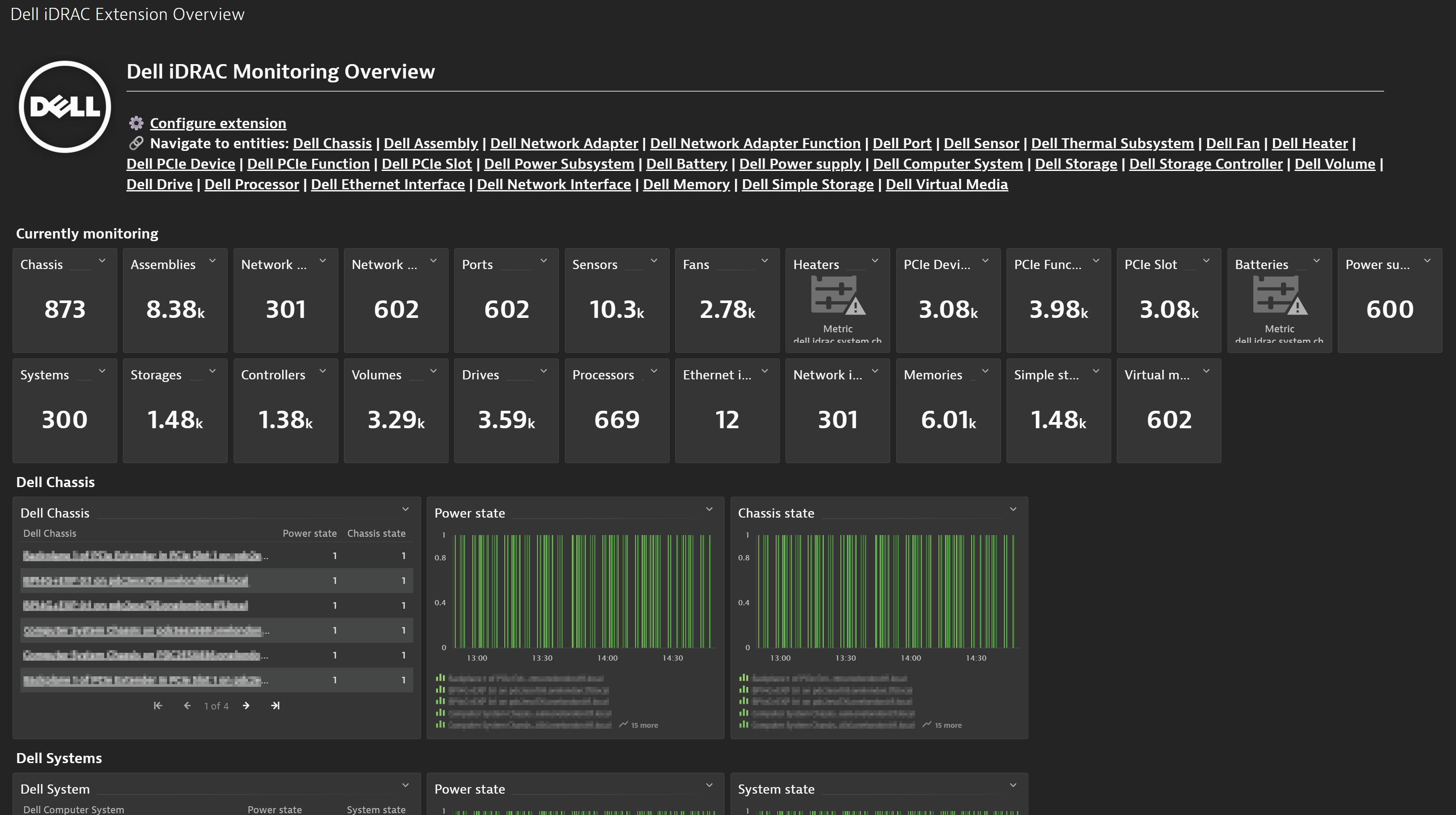
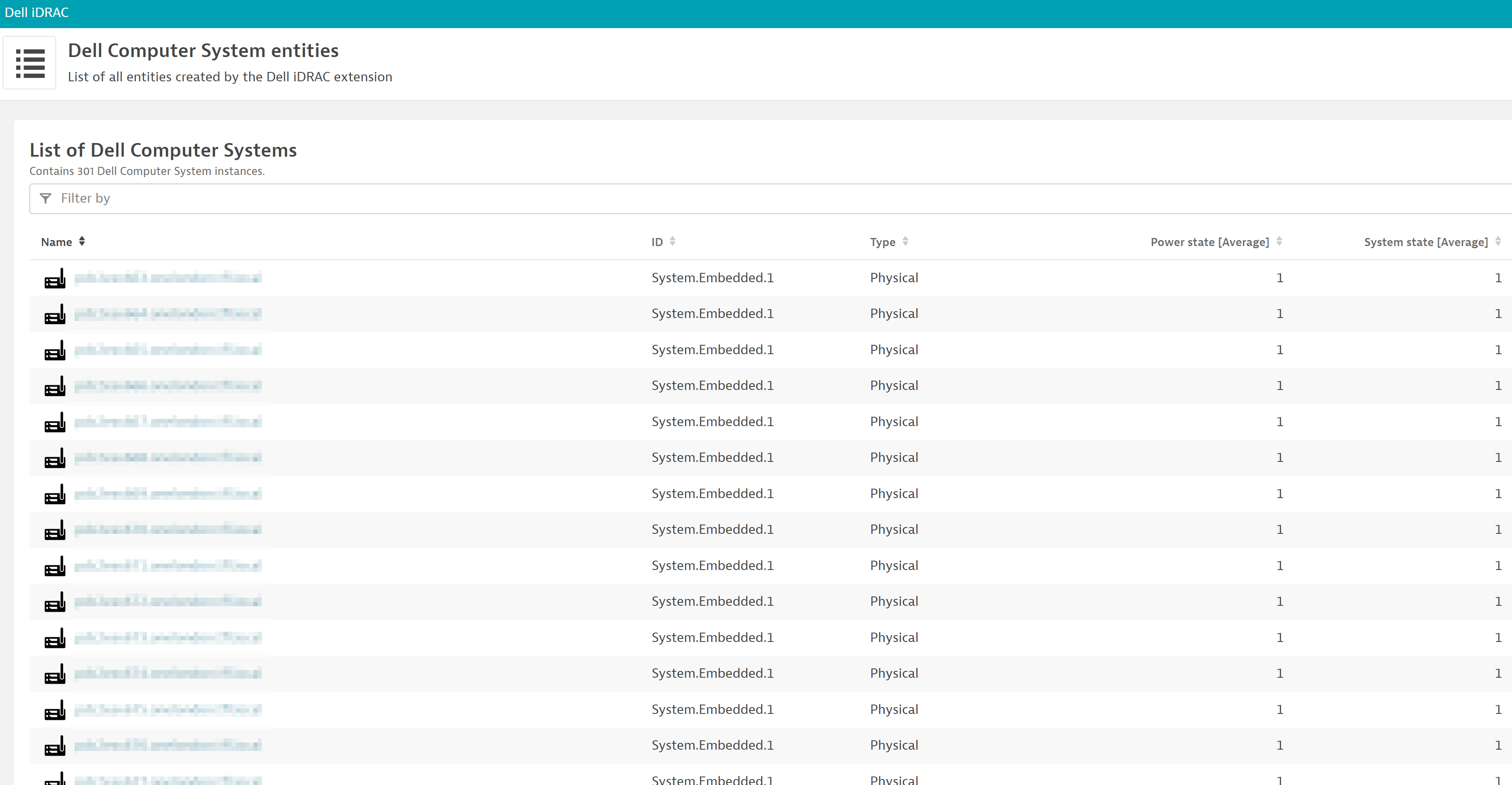
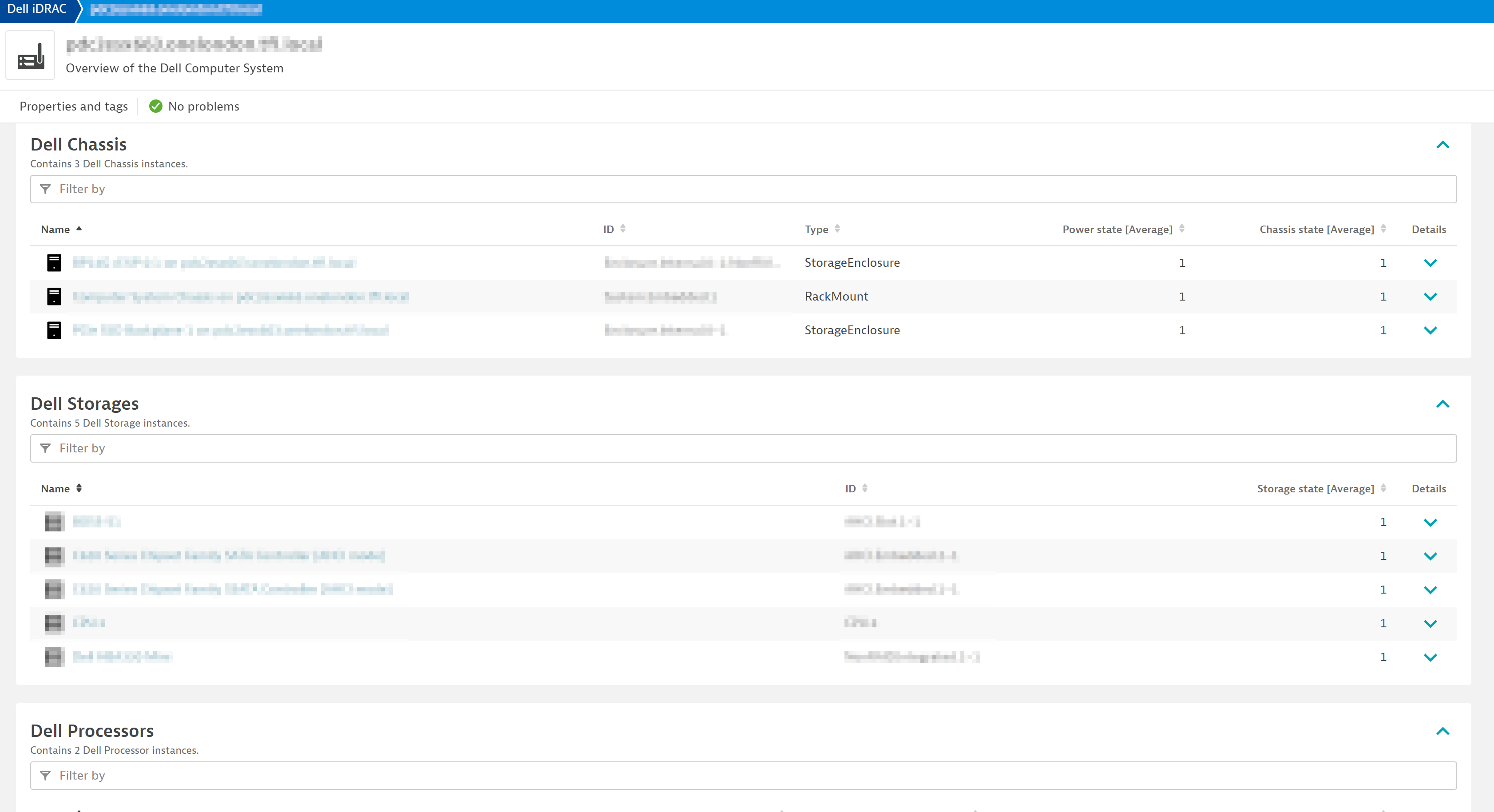
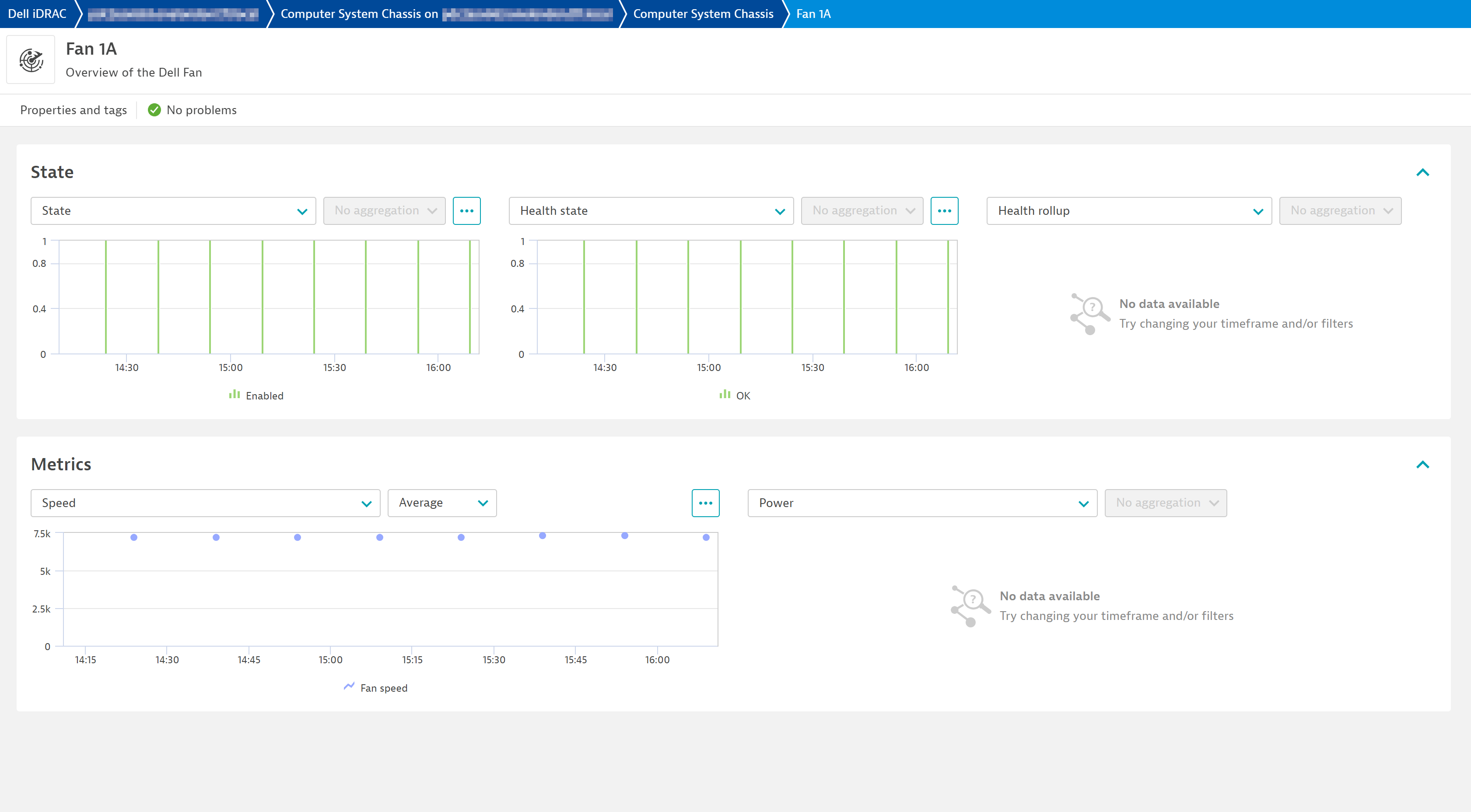
Get a quick overview of the monitored devices of your Dell iDRAC environment with the included overview dashboardList all your monitored entities to access their individual viewsNavigate each individual entity and its relationships for a clear and comprehensive view of your environmentDrill down the different levels in your stack to get the most detailed insights
  • Product information
  • Release notes

Overview

The Integrated Dell Remote Access Controller (iDRAC) is designed for secure local and remote server management and helps IT administrators deploy, update and monitor PowerEdge servers anywhere, anytime. Monitoring these assets is essential to ensure a healthy environment. Use this extension to connect to the Redfish API of your Dell iDRAC instance and get all the needed insights into your Dell iDRAC stack.

Dynatrace
Documentation
By Dynatrace
Dynatrace support center
Subscribe to new releases
Copy to clipboard

Extension content

Content typeNumber of items included
screen dql table
25
list screen layout
26
screen chart groups
92
generic type
26
metric metadata
182
screen layout
52
screen actions
52
document dashboard
1
dashboards
1
screen properties
25
generic relationship
25
screen entities lists
51

Feature sets

Below is a complete list of the feature sets provided in this version. To ensure a good fit for your needs, individual feature sets can be activated and deactivated by your administrator during configuration.

Feature setsNumber of metrics included
Metric nameMetric keyDescriptionUnit
Simple storage statedell.idrac.system.simpleStorage.Status.StateThe current state of the simple storage. Equals 1 if Enabled, 0 otherwise. You can check the actual state on the Status.State dimension.Count
Simple storage healthdell.idrac.system.simpleStorage.Status.HealthThe current health state of the simple storage. Equals 1 if Ok, 0 otherwise. You can check the actual state on the Status.Health dimension.Count
Simple storage health rollupdell.idrac.system.simpleStorage.Status.HealthRollupThe overall health state from the view of this simple storage. Equals 1 if Ok, 0 otherwise. You can check the actual state on the Status.HealthRollup dimension.Count
Metric nameMetric keyDescriptionUnit
Power supply statedell.idrac.system.chassis.powerSubsystem.supply.Status.StateThe current state of the power supply. Equals 1 if Enabled, 0 otherwise. You can check the actual state on the Status.State dimension.Count
Power supply healthdell.idrac.system.chassis.powerSubsystem.supply.Status.HealthThe current health state of the power supply. Equals 1 if Ok, 0 otherwise. You can check the actual state on the Status.Health dimension.Count
Power supply health rollupdell.idrac.system.chassis.powerSubsystem.supply.Status.HealthRollupThe overall health state from the view of the power supply. Equals 1 if Ok, 0 otherwise. You can check the actual state on the Status.HealthRollup dimension.Count
Power supply capacitydell.idrac.system.chassis.powerSubsystem.supply.PowerCapacityWattsThe maximum capacity of this power supply.Watt
Power supply frequencydell.idrac.system.chassis.powerSubsystem.supply.FrequencyHz.Reading-Hertz
Power supply input ampsdell.idrac.system.chassis.powerSubsystem.supply.InputCurrentAmps.Reading-Ampere
Power supply input voltagedell.idrac.system.chassis.powerSubsystem.supply.InputVoltage.Reading-Volt
Power supply outputdell.idrac.system.chassis.powerSubsystem.supply.OutputPowerWatts.Reading-Watt
Metric nameMetric keyDescriptionUnit
Port statedell.idrac.system.chassis.networkAdapter.port.Status.StateThe current state of the port. Equals 1 if Enabled, 0 otherwise. You can check the actual state on the Status.State dimension.Count
Port healthdell.idrac.system.chassis.networkAdapter.port.Status.HealthThe current health state of the port. Equals 1 if Ok, 0 otherwise. You can check the actual state on the Status.Health dimension.Count
Port health rollupdell.idrac.system.chassis.networkAdapter.port.Status.HealthRollupThe overall health state from the view of the port. Equals 1 if Ok, 0 otherwise. You can check the actual state on the Status.HealthRollup dimension.Count
Port speeddell.idrac.system.chassis.networkAdapter.port.CurrentLinkSpeedMbpsThe current speed of the port.MegaBitPerSecond
Port link statusdell.idrac.system.chassis.networkAdapter.port.LinkStatusThe status of the link between this port and its link partner.Count
Metric nameMetric keyDescriptionUnit
Power statedell.idrac.system.PowerStateThe current power state of the system. Equals 1 if On, 0 otherwise. You can check the actual state on the PowerState dimension.Count
System statedell.idrac.system.Status.StateThe current state of the system. Equals 1 if Enabled, 0 otherwise. You can check the actual state on the Status.State dimension.Count
System healthdell.idrac.system.Status.HealthThe current health state of the system. Equals 1 if Ok, 0 otherwise. You can check the actual state on the Status.Health dimension.Count
System health rollupdell.idrac.system.Status.HealthRollupThe overall health state from the view of this system. Equals 1 if Ok, 0 otherwise. You can check the actual state on the Status.HealthRollup dimension.Count
Boot progress statedell.idrac.system.BootProgress.LastStateThe last boot progress state.Count
Graphical console statusdell.idrac.system.GraphicalConsole.ServiceEnabledThe information about a graphical console service for this system.Count
Metric nameMetric keyDescriptionUnit
Storage statedell.idrac.system.storage.Status.StateThe current state of the storage. Equals 1 if Enabled, 0 otherwise. You can check the actual state on the Status.State dimension.Count
Storage healthdell.idrac.system.storage.Status.HealthThe current health state of the storage. Equals 1 if Ok, 0 otherwise. You can check the actual state on the Status.Health dimension.Count
Storage health rollupdell.idrac.system.storage.Status.HealthRollupThe overall health state from the view of this storage. Equals 1 if Ok, 0 otherwise. You can check the actual state on the Status.HealthRollup dimension.Count
Metric nameMetric keyDescriptionUnit
Processor statedell.idrac.system.processor.Status.StateThe current state of the processor. Equals 1 if Enabled, 0 otherwise. You can check the actual state on the Status.State dimension.Count
Processor healthdell.idrac.system.processor.Status.HealthThe current health state of the processor. Equals 1 if Ok, 0 otherwise. You can check the actual state on the Status.Health dimension.Count
Processor health rollupdell.idrac.system.processor.Status.HealthRollupThe overall health state from the view of this processor. Equals 1 if Ok, 0 otherwise. You can check the actual state on the Status.HealthRollup dimension.Count
Cache sizedell.idrac.system.processor.MemorySummary.TotalCacheSizeMiBTotal size of cache memory of this processor.MebiByte
Memory sizedell.idrac.system.processor.MemorySummary.TotalMemorySizeMiBTotal size of non-cache, volatile or non-volatile memory attached to this processor. Examples include DRAMs and NV-DIMMs that are not configured as block storage.MebiByte
Processor speeddell.idrac.system.processor.MaxSpeedMHzThe maximum clock speed of the processor.Count
Operating speeddell.idrac.system.processor.OperatingSpeedMHzOperating speed of the processor in MHz.Count
Turbo statedell.idrac.system.processor.TurboStateThe state of the turbo for this processor.Count
Metric nameMetric keyDescriptionUnit
Network interface statedell.idrac.system.networkInterface.Status.StateThe current state of the network interface. Equals 1 if Enabled, 0 otherwise. You can check the actual state on the Status.State dimension.Count
Network interface healthdell.idrac.system.networkInterface.Status.HealthThe current health state of the network interface. Equals 1 if Ok, 0 otherwise. You can check the actual state on the Status.Health dimension.Count
Network interface health rollupdell.idrac.system.networkInterface.Status.HealthRollupThe overall health state from the view of this network interface. Equals 1 if Ok, 0 otherwise. You can check the actual state on the Status.HealthRollup dimension.Count
Metric nameMetric keyDescriptionUnit
Assembly statusdell.idrac.system.chassis.assembly.Status.StateThe current state of the dell:assembly. Equals 1 if Enabled, 0 otherwise. You can check the actual state on the Status.State dimension.Count
Assembly member IDdell.idrac.system.chassis.assembly.MemberIdThe identifier for the member within the collection.Count
Metric nameMetric keyDescriptionUnit
Current bootdell.idrac.system.SecureBootCurrentBootThe UEFI Secure Boot state during the current boot cycle.Count
Secure boot modedell.idrac.system.SecureBootModeThe current UEFI Secure Boot Mode.Count
Secure boot enableddell.idrac.system.SecureBootEnableAn indication of whether UEFI Secure Boot is enabled.Count
Metric nameMetric keyDescriptionUnit
Drive statedell.idrac.system.storage.drive.Status.StateThe current state of the drive. Equals 1 if Enabled, 0 otherwise. You can check the actual state on the Status.State dimension.Count
Drive healthdell.idrac.system.storage.drive.Status.HealthThe current health state of the drive. Equals 1 if Ok, 0 otherwise. You can check the actual state on the Status.Health dimension.Count
Drive health rollupdell.idrac.system.storage.drive.Status.HealthRollupThe overall health state from the view of the drive. Equals 1 if Ok, 0 otherwise. You can check the actual state on the Status.HealthRollup dimension.Count
Drive status indicatordell.idrac.system.storage.drive.StatusIndicatorThe state of the status indicator, which communicates status information about this drive.Count
Drive block sizedell.idrac.system.storage.drive.BlockSizeBytesThe size, in bytes, of the smallest addressable unit, or block.Byte
Drive capable speeddell.idrac.system.storage.drive.CapableSpeedGbsThe speed, in gigabit per second (Gbit/s), at which this drive can communicate to a storage controller in ideal conditions.GigaBitPerSecond
Drive sizedell.idrac.system.storage.drive.CapacityBytesThe size, in bytes, of this drive.Byte
Encryption statusdell.idrac.system.storage.drive.EncryptionStatusThe status of the encryption of this drive.Byte
Negotation speeddell.idrac.system.storage.drive.NegotiatedSpeedGbsThe speed, in gigabit per second (Gbit/s), at which this drive currently communicates to the storage controller.GigaBitPerSecond
Predicted life percentdell.idrac.system.storage.drive.PredictedMediaLifeLeftPercentThe percentage of reads and writes that are predicted to be available for the media.Percent
Rotation speeddell.idrac.system.storage.drive.RotationSpeedRPMThe rotation speed of this drive, in revolutions per minute (RPM).PerMinute
Metric nameMetric keyDescriptionUnit
Memory statedell.idrac.system.memory.Status.StateThe current state of the memory. Equals 1 if Enabled, 0 otherwise. You can check the actual state on the Status.State dimension.Count
Memory healthdell.idrac.system.memory.Status.HealthThe current health state of the memory. Equals 1 if Ok, 0 otherwise. You can check the actual state on the Status.Health dimension.Count
Memory health rollupdell.idrac.system.memory.Status.HealthRollupThe overall health state from the view of this memory. Equals 1 if Ok, 0 otherwise. You can check the actual state on the Status.HealthRollup dimension.Count
Bus widthdell.idrac.system.memory.BusWidthBitsThe bus width, in bits.Bit
Cache sizedell.idrac.system.memory.CacheSizeMiBTotal size of the cache portion memory in MiB.MebiByte
Memory capacitydell.idrac.system.memory.CapacityMiBMemory capacity in mebibytes (MiB).MebiByte
Data widthdell.idrac.system.memory.DataWidthBitsData width in bits.Bit
Memory enableddell.idrac.system.memory.EnabledAn indication of whether this memory is enabled.Count
Logical sizedell.idrac.system.memory.LogicalSizeMiBTotal size of the logical memory in MiB.MebiByte
Non volatile memorydell.idrac.system.memory.NonVolatileSizeMiBTotal size of the non-volatile portion memory in MiB.MebiByte
Volatile memorydell.idrac.system.memory.VolatileSizeMiBTotal size of the non-volatile portion memory in MiB.MebiByte
Rank countdell.idrac.system.memory.RankCountNumber of ranks available in the memory device.Count
Operating speeddell.idrac.system.memory.OperatingSpeedMhzOperating speed of memory in MHz or MT/s as appropriate.Count
Bandwidth usagedell.idrac.system.memory.BandwidthPercentThe memory bandwidth utilization as a percentage.Percent
Metric nameMetric keyDescriptionUnit
Sensor statedell.idrac.system.chassis.sensor.Status.StateThe current state of the sensor. Equals 1 if Enabled, 0 otherwise. You can check the actual state on the Status.State dimension.Count
Sensor healthdell.idrac.system.chassis.sensor.Status.HealthThe current health state of the sensor. Equals 1 if Ok, 0 otherwise. You can check the actual state on the Status.Health dimension.Count
Sensor health rollupdell.idrac.system.chassis.sensor.Status.HealthRollupThe overall health state from the view of the sensor. Equals 1 if Ok, 0 otherwise. You can check the actual state on the Status.HealthRollup dimension.Count
Sensor readingdell.idrac.system.chassis.sensor.ReadingThe sensor value.Count
Sensor speeddell.idrac.system.chassis.sensor.SpeedRPMThe rotational speedCount
Sensor current statedell.idrac.system.chassis.sensor.Oem.Dell.CurrentStateThe current state indicated by the Sensor.Count
Metric nameMetric keyDescriptionUnit
Network adapter function statedell.idrac.system.chassis.networkAdapter.functions.Status.StateThe current state of the network adapter function. Equals 1 if Enabled, 0 otherwise. You can check the actual state on the Status.State dimension.Count
Network adapter function healthdell.idrac.system.chassis.networkAdapter.functions.Status.HealthThe current health state of the network adapter function. Equals 1 if Ok, 0 otherwise. You can check the actual state on the Status.Health dimension.Count
Network adapter function health rollupdell.idrac.system.chassis.networkAdapter.functions.Status.HealthRollupThe overall health state from the view of the network adapter function. Equals 1 if Ok, 0 otherwise. You can check the actual state on the Status.HealthRollup dimension.Count
Discarded packetsdell.idrac.system.chassis.networkAdapter.functions.Oem.Dell.DellNICPortMetrics.DiscardedPktsIndicates the total number of discarded packets.Count
Partition link statusdell.idrac.system.chassis.networkAdapter.functions.Oem.Dell.DellNICPortMetrics.PartitionLinkStatusIndicates whether the partition link is up or down. Equals 1 if Up, 0 otherwise.Count
Partition OS drive statusdell.idrac.system.chassis.networkAdapter.functions.Oem.Dell.DellNICPortMetrics.PartitionOSDriverStateIndicates operating system driver states of the partitions. Equals 1 if Operational, 0 otherwise.Count
Received alignment errorsdell.idrac.system.chassis.networkAdapter.functions.Oem.Dell.DellNICPortMetrics.RxErrorPktAlignmentErrorsIndicates the total number of packets received with alignment errors.Count
Bytes receiveddell.idrac.system.chassis.networkAdapter.functions.Oem.Dell.DellNICPortMetrics.RxBytesIndicates the total number of bytes received, including host and remote management pass through traffic. Remote management passthrough traffic is applicable to LOMs only.Byte
Received FCS errorsdell.idrac.system.chassis.networkAdapter.functions.Oem.Dell.DellNICPortMetrics.RxErrorPktFCSErrorsIndicates the total number of packets received with FCS errors.Count
Received false carrier errorsdell.idrac.system.chassis.networkAdapter.functions.Oem.Dell.DellNICPortMetrics.RxFalseCarrierDetectionIndicates the total number of false carrier errors received from PHY.Count
Received jabber framesdell.idrac.system.chassis.networkAdapter.functions.Oem.Dell.DellNICPortMetrics.RxJabberPktIndicates the total number of frames that are too long.Count
Received pause XON framesdell.idrac.system.chassis.networkAdapter.functions.Oem.Dell.DellNICPortMetrics.RxPauseXONFramesIndicates the flow control frames from the network to resume transmission.Count
Received pause XOFF framesdell.idrac.system.chassis.networkAdapter.functions.Oem.Dell.DellNICPortMetrics.RxPauseXOFFFramesIndicates the flow control frames from the network to pause transmission.Count
Received runt packetsdell.idrac.system.chassis.networkAdapter.functions.Oem.Dell.DellNICPortMetrics.RxRuntPktIndicates the total number of frames that are too short (< 64 bytes).Count
Received unicast packetsdell.idrac.system.chassis.networkAdapter.functions.Oem.Dell.DellNICPortMetrics.RxUnicastPacketsIndicates the total number of good unicast packets transmitted.Count
Received multicast packetsdell.idrac.system.chassis.networkAdapter.functions.Oem.Dell.DellNICPortMetrics.RxMulticastPacketsIndicates the total number of good multicast packets received.Count
Transmitted broadcastdell.idrac.system.chassis.networkAdapter.functions.Oem.Dell.DellNICPortMetrics.TxBroadcastIndicates the total number of good broadcast packets transmitted.Count
Received broadcastdell.idrac.system.chassis.networkAdapter.functions.Oem.Dell.DellNICPortMetrics.RxBroadcastIndicates the total number of good broadcast packets received.Count
Transmitted bytesdell.idrac.system.chassis.networkAdapter.functions.Oem.Dell.DellNICPortMetrics.TxBytesIndicates the total number of bytes transmitted, including host and remote management passthrough traffic. Remote management passthrough traffic is applicable to LOMs only.Count
Transmitted excessive collisionsdell.idrac.system.chassis.networkAdapter.functions.Oem.Dell.DellNICPortMetrics.TxErrorPktExcessiveCollisionIndicates the number of times a single transmitted packet encountered more than 15 collisions.Count
Transmitted late collisionsdell.idrac.system.chassis.networkAdapter.functions.Oem.Dell.DellNICPortMetrics.TxErrorPktLateCollisionIndicates the number of collisions that occurred after one slot time (defined by IEEE 802.3).Count
Transmitted multiple collisionsdell.idrac.system.chassis.networkAdapter.functions.Oem.Dell.DellNICPortMetrics.TxErrorPktMultipleCollisionIndicates the number of times that a transmitted packet encountered 2-15 collisions.Count
Transmitted single collisiondell.idrac.system.chassis.networkAdapter.functions.Oem.Dell.DellNICPortMetrics.TxErrorPktSingleCollisionIndicates the number of times that a successfully transmitted packet encountered a single collision.Count
Transmitted multicast packetsdell.idrac.system.chassis.networkAdapter.functions.Oem.Dell.DellNICPortMetrics.TxMulticastPacketsIndicates the total number of good multicast packets transmitted.Count
Transmitted XOFF packetsdell.idrac.system.chassis.networkAdapter.functions.Oem.Dell.DellNICPortMetrics.TxPauseXOFFFramesIndicates the number of XOFF packets transmitted to the network.Count
Transmitted XON packetsdell.idrac.system.chassis.networkAdapter.functions.Oem.Dell.DellNICPortMetrics.TxPauseXONFramesIndicates the number of XON packets transmitted to the network.Count
Transmitted unicast packetsdell.idrac.system.chassis.networkAdapter.functions.Oem.Dell.DellNICPortMetrics.TxUnicastPacketsIndicates the total number of good unicast packets transmitted.Count
Metric nameMetric keyDescriptionUnit
Volume statedell.idrac.system.storage.volume.Status.StateThe current state of the volume. Equals 1 if Enabled, 0 otherwise. You can check the actual state on the Status.State dimension.Count
Volume healthdell.idrac.system.storage.volume.Status.HealthThe current health state of the volume. Equals 1 if Ok, 0 otherwise. You can check the actual state on the Status.Health dimension.Count
Volume health rollupdell.idrac.system.storage.volume.Status.HealthRollupThe overall health state from the view of this volume. Equals 1 if Ok, 0 otherwise. You can check the actual state on the Status.HealthRollup dimension.Count
Volume block sizedell.idrac.system.storage.volume.BlockSizeBytesThe size of the smallest addressable unit (Block) of this volume in bytes.Byte
Volume capacitydell.idrac.system.storage.volume.CapacityBytesThe size in bytes of this Volume.Byte
Allocated bytes (Data)dell.idrac.system.storage.volume.Capacity.Data.AllocatedBytesThe number of bytes currently allocated by the storage system in this data store for this data type.Byte
Consumed bytes (Data)dell.idrac.system.storage.volume.Capacity.Data.ConsumedBytesThe number of bytes consumed in this data store for this data type.Byte
Guaranteed bytes (Data)dell.idrac.system.storage.volume.Capacity.Data.GuaranteedBytesThe number of bytes the storage system guarantees can be allocated in this data store for this data type.Byte
Provisioned bytes (Data)dell.idrac.system.storage.volume.Capacity.Data.ProvisionedBytesThe maximum number of bytes that can be allocated in this data store for this data type.Byte
Allocated bytes (MetaData)dell.idrac.system.storage.volume.Capacity.Metadata.AllocatedBytesThe number of bytes currently allocated by the storage system in this data store for this data type.Byte
Consumed bytes (MetaData)dell.idrac.system.storage.volume.Capacity.Metadata.ConsumedBytesThe number of bytes consumed in this data store for this data type.Byte
Guaranteed bytes (MetaData)dell.idrac.system.storage.volume.Capacity.Metadata.GuaranteedBytesThe number of bytes the storage system guarantees can be allocated in this data store for this data type.Byte
Provisioned bytes (MetaData)dell.idrac.system.storage.volume.Capacity.Metadata.ProvisionedBytesThe maximum number of bytes that can be allocated in this data store for this data type.Byte
Allocated bytes (Snapshot)dell.idrac.system.storage.volume.Capacity.Snapshot.AllocatedBytesThe number of bytes currently allocated by the storage system in this data store for this data type.Byte
Consumed bytes (Snapshot)dell.idrac.system.storage.volume.Capacity.Snapshot.ConsumedBytesThe number of bytes consumed in this data store for this data type.Byte
Guaranteed bytes (Snapshot)dell.idrac.system.storage.volume.Capacity.Snapshot.GuaranteedBytesThe number of bytes the storage system guarantees can be allocated in this data store for this data type.Byte
Provisioned bytes (Snapshot)dell.idrac.system.storage.volume.Capacity.Snapshot.ProvisionedBytesThe maximum number of bytes that can be allocated in this data store for this data type.Byte
Non-IO requestsdell.idrac.system.storage.volume.IOStatistics.NonIORequestsCount of non IO requests.Count
Read hit IO requestsdell.idrac.system.storage.volume.IOStatistics.ReadHitIORequestsCount of read IO requests satisfied from memory.Count
Read IO bytesdell.idrac.system.storage.volume.IOStatistics.ReadIOKiBytesNumber of kibibytes read.KibiByte
Read IO requestsdell.idrac.system.storage.volume.IOStatistics.ReadIORequestsCount of read IO requests.Count
Write hit IO requestsdell.idrac.system.storage.volume.IOStatistics.WriteHitIORequestsCount of write IO requests coalesced into memory.Count
Write IO bytesdell.idrac.system.storage.volume.IOStatistics.WriteIOKiBytesNumber of kibibytes written.KibiByte
Write IO requestsdell.idrac.system.storage.volume.IOStatistics.WriteIORequestsCount of write IO requests.Count
Metric nameMetric keyDescriptionUnit
Storage controller statedell.idrac.system.storage.controller.Status.StateThe current state of the storage controller. Equals 1 if Enabled, 0 otherwise. You can check the actual state on the Status.State dimension.Count
Storage controller healthdell.idrac.system.storage.controller.Status.HealthThe current health state of the storage controller. Equals 1 if Ok, 0 otherwise. You can check the actual state on the Status.Health dimension.Count
Storage controller health rollupdell.idrac.system.storage.controller.Status.HealthRollupThe overall health state from the view of this storage controller. Equals 1 if Ok, 0 otherwise. You can check the actual state on the Status.HealthRollup dimension.Count
Total cache sizedell.idrac.system.storage.controller.CacheSummary.TotalCacheSizeMiBThe total configured cache memory, measured in MiB.MebiByte
Speeddell.idrac.system.storage.controller.SpeedGbpsThe maximum speed of the storage controller's device interface.GigaBitPerSecond
Consistency check ratedell.idrac.system.storage.controller.ControllerRates.ConsistencyCheckRatePercent-Percent
Rebuild ratedell.idrac.system.storage.controller.ControllerRates.RebuildRatePercent-Percent
Metric nameMetric keyDescriptionUnit
Virtual media statedell.idrac.system.virtualMedia.Status.StateThe current state of the virtual media. Equals 1 if Enabled, 0 otherwise. You can check the actual state on the Status.State dimension.Count
Virtual media healthdell.idrac.system.virtualMedia.Status.HealthThe current health state of the virtual media. Equals 1 if Ok, 0 otherwise. You can check the actual state on the Status.Health dimension.Count
Virtual media health rollupdell.idrac.system.virtualMedia.Status.HealthRollupThe overall health state from the view of this virtual media. Equals 1 if Ok, 0 otherwise. You can check the actual state on the Status.HealthRollup dimension.Count
Virtual media inserteddell.idrac.system.virtualMedia.InsertedAn indication of whether virtual media is inserted into the virtual device.Count
Metric nameMetric keyDescriptionUnit
PCIe slot statedell.idrac.system.chassis.pcieslot.Status.StateThe current state of the PCIe slot. Equals 1 if Enabled, 0 otherwise. You can check the actual state on the Status.State dimension.Count
PCIe slot healthdell.idrac.system.chassis.pcieslot.Status.HealthThe current health state of the PCIe slot. Equals 1 if Ok, 0 otherwise. You can check the actual state on the Status.Health dimension.Count
PCIe slot health rollupdell.idrac.system.chassis.pcieslot.Status.HealthRollupThe overall health state from the view of the PCIe slot. Equals 1 if Ok, 0 otherwise. You can check the actual state on the Status.HealthRollup dimension.Count
PCIe slot lanesdell.idrac.system.chassis.pcieslot.LanesThe number of PCIe lanes supported by the slot.Count
Metric nameMetric keyDescriptionUnit
PCIe device function statedell.idrac.system.chassis.pciedevice.pciefunction.Status.StateThe current state of the PCIe device function. Equals 1 if Enabled, 0 otherwise. You can check the actual state on the Status.State dimension.Count
PCIe device function healthdell.idrac.system.chassis.pciedevice.pciefunction.Status.HealthThe current health state of the PCIe device function. Equals 1 if Ok, 0 otherwise. You can check the actual state on the Status.Health dimension.Count
PCIe device function health rollupdell.idrac.system.chassis.pciedevice.pciefunction.Status.HealthRollupThe overall health state from the view of the PCIe device function. Equals 1 if Ok, 0 otherwise. You can check the actual state on the Status.HealthRollup dimension.Count
Metric nameMetric keyDescriptionUnit
Ethernet interface statedell.idrac.system.ethernetInterface.Status.StateThe current state of the ethernet interface. Equals 1 if Enabled, 0 otherwise. You can check the actual state on the Status.State dimension.Count
Ethernet interface healthdell.idrac.system.ethernetInterface.Status.HealthThe current health state of the ethernet interface. Equals 1 if Ok, 0 otherwise. You can check the actual state on the Status.Health dimension.Count
Ethernet interface health rollupdell.idrac.system.ethernetInterface.Status.HealthRollupThe overall health state from the view of this ethernet interface. Equals 1 if Ok, 0 otherwise. You can check the actual state on the Status.HealthRollup dimension.Count
Interface speeddell.idrac.system.ethernetInterface.SpeedMbpsThe current speed, in Mbit/s, of this interface.MegaBitPerSecond
Interface enableddell.idrac.system.ethernetInterface.InterfaceEnabledAn indication of whether this interface is enabled.Count
Interface link statusdell.idrac.system.ethernetInterface.LinkStatusThe link status of this interface, or port.Count
Metric nameMetric keyDescriptionUnit
PCIe device statedell.idrac.system.chassis.pciedevice.Status.StateThe current state of the PCIe device. Equals 1 if Enabled, 0 otherwise. You can check the actual state on the Status.State dimension.Count
PCIe device healthdell.idrac.system.chassis.pciedevice.Status.HealthThe current health state of the PCIe device. Equals 1 if Ok, 0 otherwise. You can check the actual state on the Status.Health dimension.Count
PCIe device health rollupdell.idrac.system.chassis.pciedevice.Status.HealthRollupThe overall health state from the view of the PCIe device. Equals 1 if Ok, 0 otherwise. You can check the actual state on the Status.HealthRollup dimension.Count
Metric nameMetric keyDescriptionUnit
Power wattsdell.idrac.system.chassis.PowerWatts.ReadingPower consumption (W).Watt
Metric nameMetric keyDescriptionUnit
Power subsystem statedell.idrac.system.chassis.powerSubsystem.Status.StateThe current state of the power subsystem. Equals 1 if Enabled, 0 otherwise. You can check the actual state on the Status.State dimension.Count
Power subsystem healthdell.idrac.system.chassis.powerSubsystem.Status.HealthThe current health state of the power subsystem. Equals 1 if Ok, 0 otherwise. You can check the actual state on the Status.Health dimension.Count
Power subsystem health rollupdell.idrac.system.chassis.powerSubsystem.Status.HealthRollupThe overall health state from the view of the power subsystem. Equals 1 if Ok, 0 otherwise. You can check the actual state on the Status.HealthRollup dimension.Count
Power capacitydell.idrac.system.chassis.powerSubsystem.CapacityWattsThe total amount of power that can be allocated to this subsystem. This value can be either the power supply capacity or the power budget that an upstream chassis assigns to this subsystem.Watt
Power allocateddell.idrac.system.chassis.powerSubsystem.Allocation.AllocatedWattsThe total amount of power that has been allocated or budgeted to this subsystem.Watt
Power requesteddell.idrac.system.chassis.powerSubsystem.Allocation.RequestedWattsThe potential power, in watts, that the subsystem requests, which might be higher than the current level being consumed because the requested power includes a budget that the subsystem wants for future use.Watt
Metric nameMetric keyDescriptionUnit
Fan statedell.idrac.system.chassis.thermalSubsystem.fan.Status.StateThe current state of the fan. Equals 1 if Enabled, 0 otherwise. You can check the actual state on the Status.State dimension.Count
Fan healthdell.idrac.system.chassis.thermalSubsystem.fan.Status.HealthThe current health state of the fan. Equals 1 if Ok, 0 otherwise. You can check the actual state on the Status.Health dimension.Count
Fan health rollupdell.idrac.system.chassis.thermalSubsystem.fan.Status.HealthRollupThe overall health state from the view of the fan. Equals 1 if Ok, 0 otherwise. You can check the actual state on the Status.HealthRollup dimension.Count
Fan speeddell.idrac.system.chassis.thermalSubsystem.fan.SpeedPercent.SpeedRPM-Count
Fan PWMdell.idrac.system.chassis.thermalSubsystem.fan.Oem.Dell.FanPWM-Count
Metric nameMetric keyDescriptionUnit
Thermal subsystem statedell.idrac.system.chassis.thermalSubsystem.Status.StateThe current state of the thermal subsystem. Equals 1 if Enabled, 0 otherwise. You can check the actual state on the Status.State dimension.Count
Thermal subsystem healthdell.idrac.system.chassis.thermalSubsystem.Status.HealthThe current health state of the thermal subsystem. Equals 1 if Ok, 0 otherwise. You can check the actual state on the Status.Health dimension.Count
Thermal subsystem health rollupdell.idrac.system.chassis.thermalSubsystem.Status.HealthRollupThe overall health state from the view of the thermal subsystem. Equals 1 if Ok, 0 otherwise. You can check the actual state on the Status.HealthRollup dimension.Count
Intake temperaturedell.idrac.system.chassis.thermalSubsystem.TemperatureSummaryCelsius.Intake.ReadingThe intake temperature (Celsius) of this subsystem.Celsius
Internal temperaturedell.idrac.system.chassis.thermalSubsystem.TemperatureSummaryCelsius.Internal.ReadingThe internal temperature (Celsius) of this subsystem.Celsius
Exhaust temperaturedell.idrac.system.chassis.thermalSubsystem.TemperatureSummaryCelsius.Exhaust.ReadingThe exhaust temperature (Celsius) of this subsystem.Celsius
Prepower on heating timedell.idrac.system.chassis.thermalSubsystem.HeaterSummary.TotalPrePowerOnHeatingTimeSecondsThe total number of seconds all the heaters in the thermal subsystem were active while the respective devices they heat were powered off.Second
Runtime heating timedell.idrac.system.chassis.thermalSubsystem.HeaterSummary.TotalRuntimeHeatingTimeSecondsThe total number of seconds all the heaters in the thermal subsystem were active while the respective devices they heat were powered on.Second
Metric nameMetric keyDescriptionUnit
Heater statedell.idrac.system.chassis.thermalSubsystem.heater.Status.StateThe current state of the heater. Equals 1 if Enabled, 0 otherwise. You can check the actual state on the Status.State dimension.Count
Heater healthdell.idrac.system.chassis.thermalSubsystem.heater.Status.HealthThe current health state of the heater. Equals 1 if Ok, 0 otherwise. You can check the actual state on the Status.Health dimension.Count
Heater health rollupdell.idrac.system.chassis.thermalSubsystem.heater.Status.HealthRollupThe overall health state from the view of the heater. Equals 1 if Ok, 0 otherwise. You can check the actual state on the Status.HealthRollup dimension.Count
Metric nameMetric keyDescriptionUnit
Network adapter statedell.idrac.system.chassis.networkAdapter.Status.StateThe current state of the network adapter. Equals 1 if Enabled, 0 otherwise. You can check the actual state on the Status.State dimension.Count
Network adapter healthdell.idrac.system.chassis.networkAdapter.Status.HealthThe current health state of the network adapter. Equals 1 if Ok, 0 otherwise. You can check the actual state on the Status.Health dimension.Count
Network adapter health rollupdell.idrac.system.chassis.networkAdapter.Status.HealthRollupThe overall health state from the view of the network adapter. Equals 1 if Ok, 0 otherwise. You can check the actual state on the Status.HealthRollup dimension.Count
Metric nameMetric keyDescriptionUnit
Power statedell.idrac.system.chassis.PowerStateThe current power state of the system.chassis. Equals 1 if On, 0 otherwise. You can check the actual state on the PowerState dimension.Count
Chassis statedell.idrac.system.chassis.Status.StateThe current state of the system.chassis. Equals 1 if Enabled, 0 otherwise. You can check the actual state on the Status.State dimension.Count
Chassis healthdell.idrac.system.chassis.Status.HealthThe current health state of the system.chassis. Equals 1 if Ok, 0 otherwise. You can check the actual state on the Status.Health dimension.Count
Chassis health rollupdell.idrac.system.chassis.Status.HealthRollupThe overall health state from the view of this system.chassis. Equals 1 if Ok, 0 otherwise. You can check the actual state on the Status.HealthRollup dimension.Count
Metric nameMetric keyDescriptionUnit
Charge statedell.idrac.system.chassis.powerSubsystem.battery.ChargeStateThe charge state of this battery.Count
Charge percentdell.idrac.system.chassis.powerSubsystem.battery.ChargePercent.ReadingThe amount of charge available (percent) in this battery.Percent

Related to Dell iDRAC

ActiveGate logo

ActiveGate

Route traffic, monitor clouds and remote technologies & run Synthetic monitors

Full version history

To have more information on how to install the downloaded package, please follow the instructions on this page.
ReleaseDate

Full version history

  • New dashboard and screens for platform UI
  • Added dt.security_context attribute to all custom iDRAC entities

Full version history

  • Improvements to endpoint scheduling

Full version history

  • Improved error handling for empty API responses
  • Add device.address dimension
  • Add status reporting per endpoint
  • Add Dynatrace Error Codes to extension logs

Full version history

  • Added support for credential vault
  • Improved performance when disabling feature sets
  • Added option to generate a session token to reduce authentication requests
  • Fixed an issue with the power watts metric
  • Improved custom entity creation

Full version history

Official release of the Dell iDRAC extension. Includes:

  • 181 metrics divided in 28 feature sets
  • 26 generic types and their screens
  • 25 generic relationships
  • 1 overview dashboard
Dynatrace Hub
Hub HomeGet data into DynatraceBuild your own app
Log Management and AnalyticsKubernetesAI and LLM ObservabilityInfrastructure ObservabilitySoftware DeliveryApplication ObservabilityApplication SecurityDigital ExperienceBusiness Observability
Filter
Type
Built and maintained by
Deployment model
SaaS
  • SaaS
  • Managed
Partner FinderBecome a partnerDynatrace Developer

All

194 Results filtered by:

Palo Alto firewalls logo

Palo Alto firewalls

Palo Alto extension for problems detection

Extension
Confluent Cloud (Kafka) logo

Confluent Cloud (Kafka)

Remotely monitor your Confluent Cloud Kafka Clusters and other resources!

Extension
Kong - Prometheus logo

Kong - Prometheus

Monitor Prometheus metrics exposed by Kong and proxied upstream services

Extension
Nutanix Clusters logo

Nutanix Clusters

Monitor Nutanix clusters' performance, usage and availability, with Nutanix API.

Extension
Luna Network HSM Device logo

Luna Network HSM Device

Monitor your Luna Network Hardware Security Module (HSM) Devices through SNMP.

Extension
Consul Service Mesh (StatsD) logo

Consul Service Mesh (StatsD)

Extend visibility into your Consul Service Mesh instances to monitor health and improve performance.

Extension
Microsoft IIS logo

Microsoft IIS

Flexible and secure web server for hosting with Windows Server.

Extension
Kubernetes Monitoring Statistics logo

Kubernetes Monitoring Statistics

Troubleshoot your Dynatrace Kubernetes monitoring and Prometheus integration.

Extension
Snyk logo

Snyk

Ingest Snyk vulnerability findings, scans, and audit logs.

Extension
Citrix DaaS & Virtual Apps and Desktops logo

Citrix DaaS & Virtual Apps and Desktops

Gain insight into your Citrix DaaS & Virtual Apps and Desktops environments

Extension
Google Memorystore logo

Google Memorystore

Get insights into Google Memorystore service metrics collected from the Google Operations API to ensure health of your cloud infrastructure.

Extension
Databricks Workspace logo

Databricks Workspace

Remotely monitor your Databricks Workspaces!

Extension
Uptime logo

Uptime

Monitor the uptime of your hosts

Extension
UPS Device logo

UPS Device

Monitor your Uninterruptible Power Supplies (UPS) over SNMP

Extension
Google App Engine (integration) logo

Google App Engine (integration)

Insights into Google App Engine service metrics collected from Operations API

Extensioncoming soon
Traceroute logo

Traceroute

Run traceroute commands and collect step performance metrics

Extension
[Deprecated] Kubernetes PVCs logo

[Deprecated] Kubernetes PVCs

Monitor your Kubernetes persistent volume claims and alert on capacity limits.

Extension
Google Cloud Storage Transfer logo

Google Cloud Storage Transfer

Get insights into Google Cloud Storage Transfer metrics collected from the Google Operations API to ensure health of cloud infrastructure.

Extension
NVIDIA GPU logo

NVIDIA GPU

Monitor base parameters of the GPU, including load, memory and temperature

Extension
Oracle Database logo

Oracle Database

Observe, analyze and optimize the usage, health and performance of your database

Extension
Cisco ACI/APIC logo

Cisco ACI/APIC

Get insights into your Cisco Application Centric Infrastructure (ACI)

Extension
Dell iDRAC logo

Dell iDRAC

Connect to the Redfish API to get insights into your Dell iDRAC environment

Extension
Azure Managed Apache Cassandra logo

Azure Managed Apache Cassandra

Gain insights into your Azure Managed Cassandra Instance health and performance

Extension
PayShield HSM Device logo

PayShield HSM Device

Monitor PayShield Payment Hardware Security Module (HSM) Devices through SNMP.

Extension
NetApp OnTap (Remote) logo

NetApp OnTap (Remote)

Remote extension that collects NetApp OnTap metrics from the OnTap 9.6+ API.

Extension
Google Firestore in Datastore mode logo

Google Firestore in Datastore mode

Get insights into Google Firestore in Datastore mode metrics collected from the Google Operations API to ensure health of infrastructure.

Extension
Redis (2.0) logo

Redis (2.0)

Collect important additional data for your Redis instances.

Extension
PHP-FPM logo

PHP-FPM

Monitor the PHP-FPM status of your applications with this extension.

Extension
Timedrift Monitoring logo

Timedrift Monitoring

Monitor your host's NTP/Chrony Time Offset!

Extension
Apache Kafka logo

Apache Kafka

Automatic and intelligent observability with trace and metric insights.

Extension

MongoDB (local or remote monitoring) logo

MongoDB (local or remote monitoring)

Monitor your MongoDB servers either locally or remotely!

Extension
Connection Pools: C3P0 logo

Connection Pools: C3P0

Application server method of pooling and sharing connections to a database.

Extension
AWS Entities for Metric Streaming logo

AWS Entities for Metric Streaming

Analyse metrics in the context of an entity based on AWS Metric Streaming.

Extension

MongoDB Atlas logo

MongoDB Atlas

Remotely monitor your SaaS installation of MongoDB (Atlas)

Extension
Microsoft SQL Server logo

Microsoft SQL Server

Improve the health and performance monitoring of your Microsoft SQL Servers.

Extension
IBM MQ Appliance logo

IBM MQ Appliance

Monitor your IBM MQ Appliances over SNMP

Extension
Google Apigee logo

Google Apigee

Get insights into Google Apigee service metrics collected from the Google Operations API to ensure health of your cloud infrastructure.

Extension
Oracle Autonomous Database on OCI logo

Oracle Autonomous Database on OCI

Monitor health and performance of the Oracle Autonomous Database.

Extension
Google Pub/Sub Lite logo

Google Pub/Sub Lite

Get insights into Google Pub/Sub Lite service metrics collected from the Google Operations API to ensure health of the cloud infrastructure.

Extension
Infoblox DDI logo

Infoblox DDI

Monitor Infoblox DDI using SNMP

Extension
SAP HANA Database (remote monitoring) logo

SAP HANA Database (remote monitoring)

Easily understand the health and performance of your SAP HANA databases.

Extension
Connection Pools: WebSphere Liberty logo

Connection Pools: WebSphere Liberty

Application server method of pooling and sharing connections to a database.

Extension

Google Cloud Composer logo

Google Cloud Composer

Get insights into Google Cloud Composer metrics collected from the Google Operations API to ensure health of your cloud infrastructure.

Extension
Google Cloud Spanner logo

Google Cloud Spanner

Get insights into Google Cloud Spanner metrics collected from the Google Operations API to ensure health of your cloud infrastructure.

Extension
IBM i logo

IBM i

Collect performance data from your IBM i Hosts via this Remote extension.

Extension
Google reCAPTCHA Enterprise logo

Google reCAPTCHA Enterprise

Get insights into Google reCAPTCHA Enterprise metrics collected from the Google Operations API to ensure health of your cloud infrastructure

Extension
.NET logo

.NET

Automatic end-to-end observability for .NET applications and processes.

Extension
Google Cloud's operations suite logo

Google Cloud's operations suite

Get insights into Google Cloud's operations suite metrics collected from the Google Operations API to ensure health of cloud infrastructure.

Extension
Google Vertex AI logo

Google Vertex AI

Get insights into Google Vertex AI service metrics.

Extension
Oracle Exadata logo

Oracle Exadata

Monitor Oracle Exadata systems for performance, usage and availability

Extension