

Skip to technology filters Skip to main content
Dynatrace Hub

Extend the platform,
empower your team.

Popular searches:
Home hero bg
Cisco ACI/APICCisco ACI/APIC
Cisco ACI/APIC

Cisco ACI/APIC

Get insights into your Cisco Application Centric Infrastructure (ACI).

Extension
Free trialDocumentation
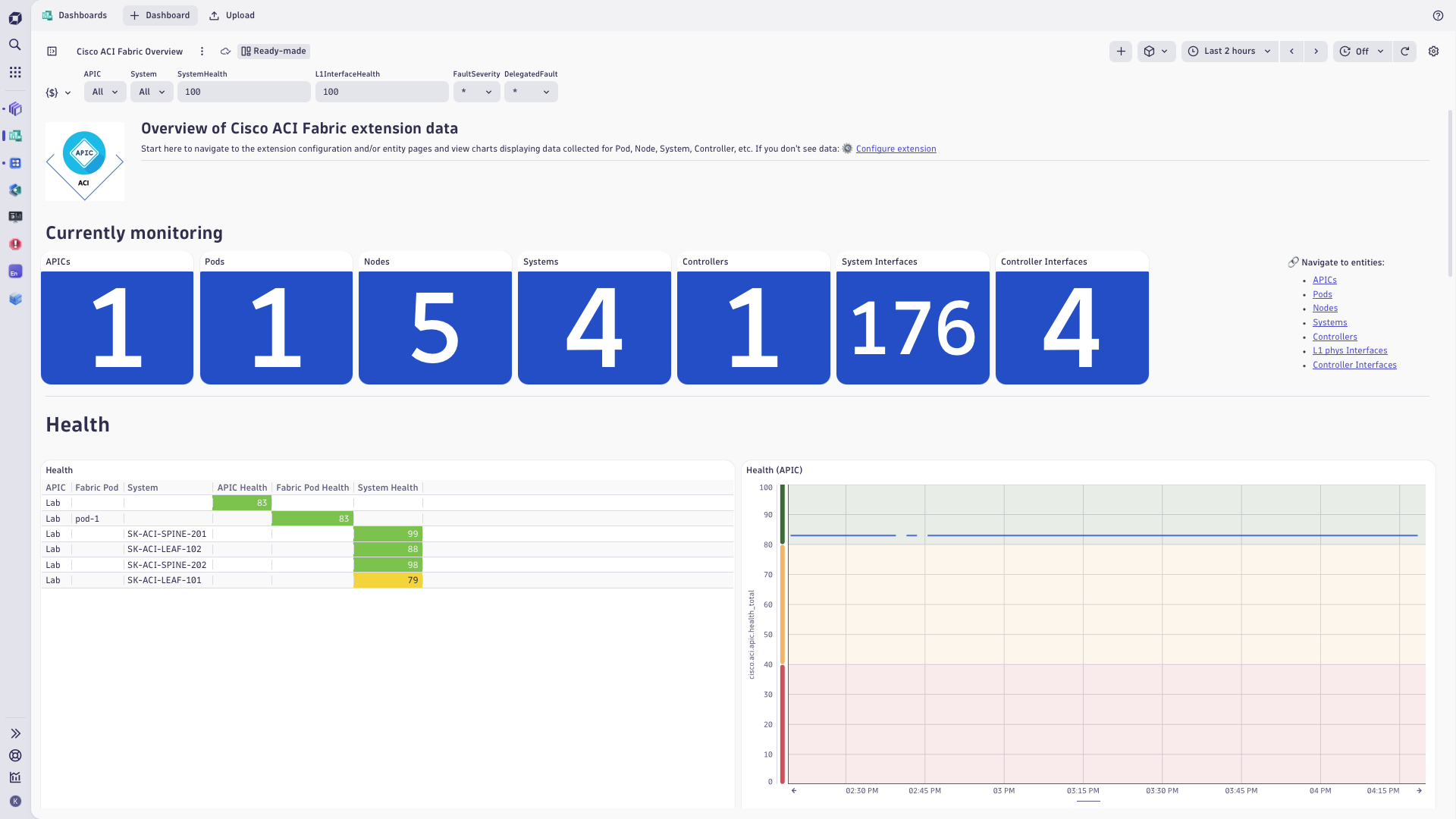
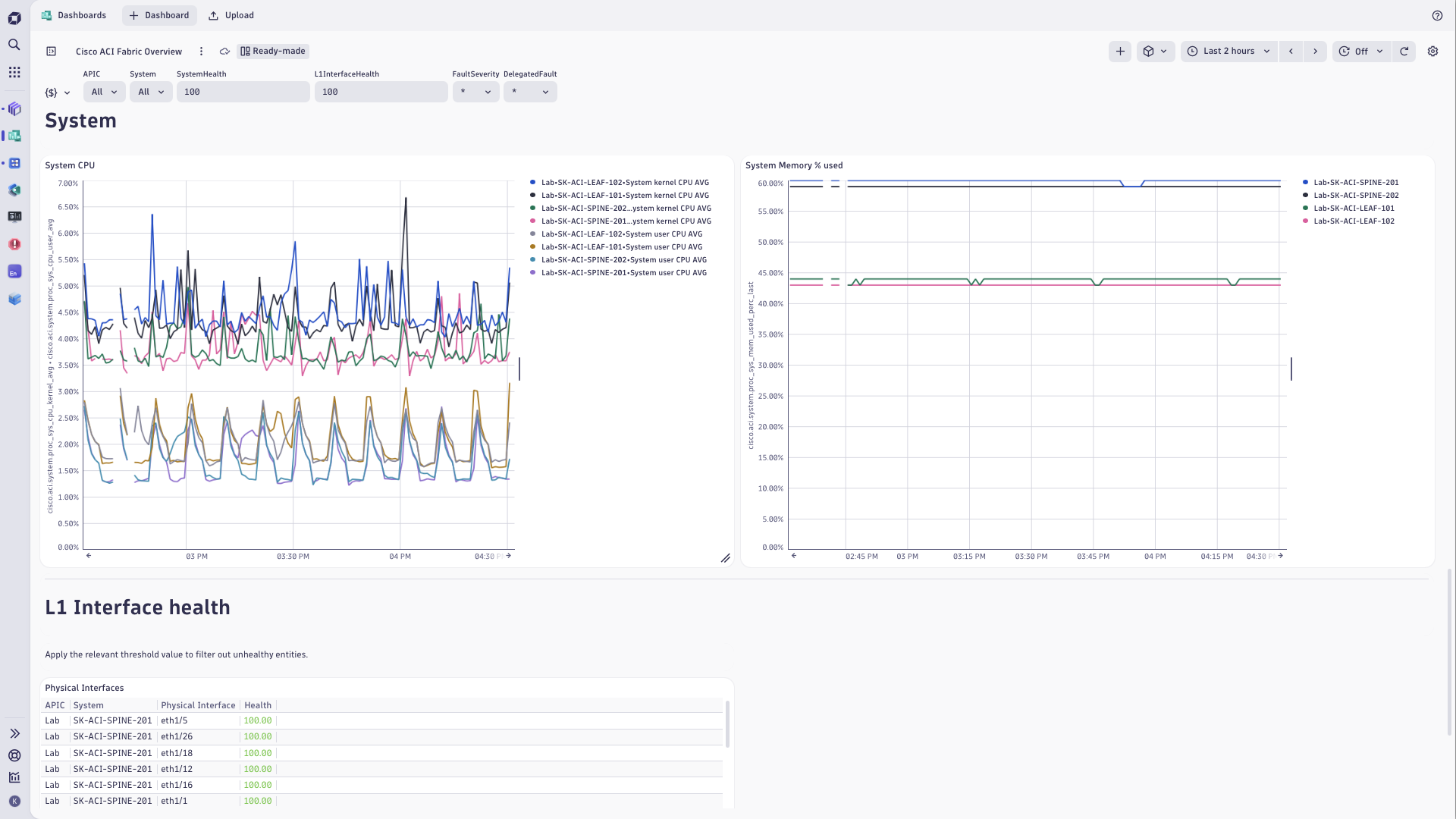
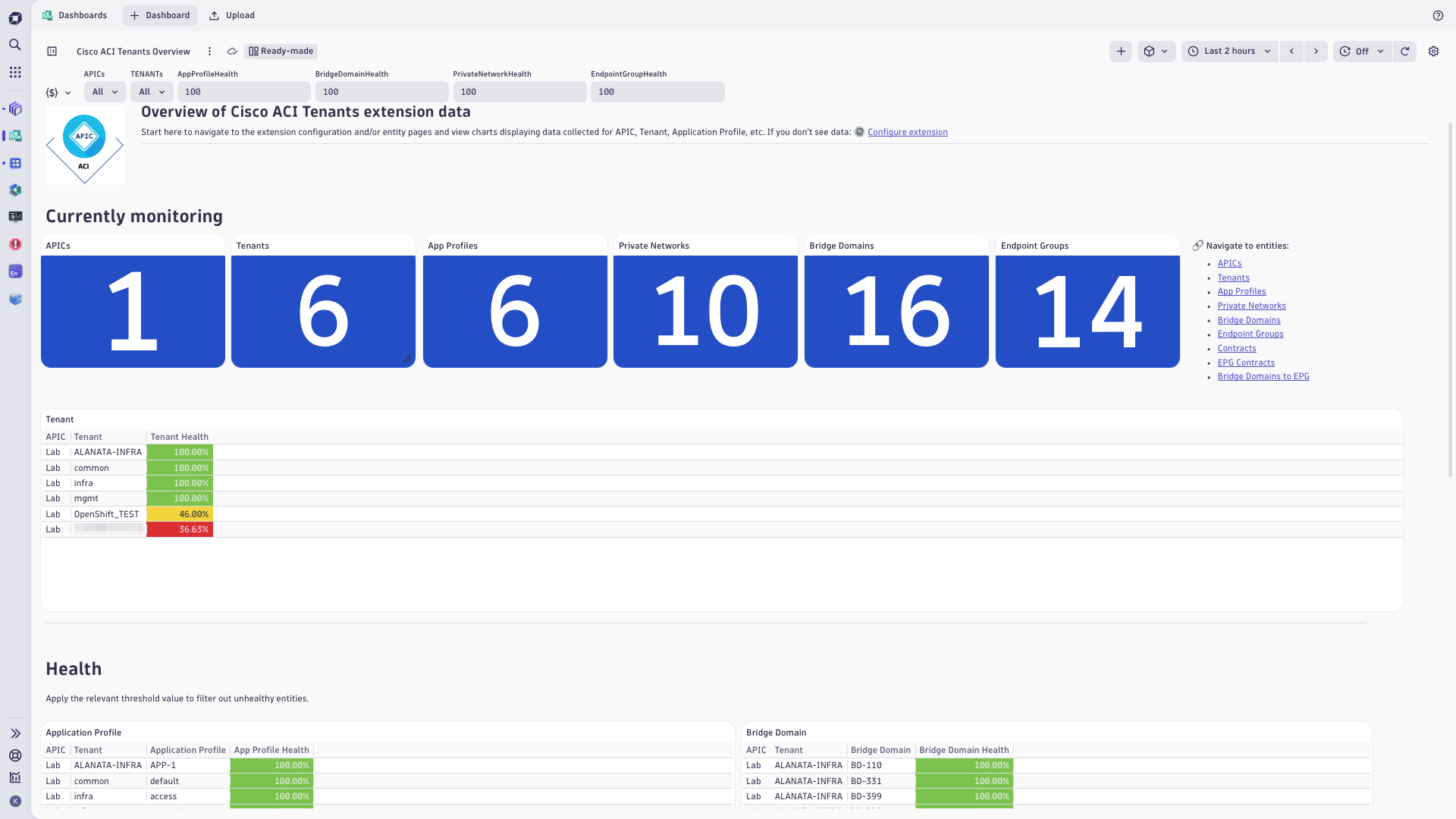
Cisco ACI fabric dashboardCisco ACI fabric metricsCisco ACI tenants dashboard
  • Product information
  • Release notes

Overview

Cisco ACI/APIC extension uses Cisco APIC REST API to collect information about the network fabric managed by APIC controllers.

The extension provides comprehensive visibility into the ACI Fabric and Tenants.

The extension collects performance metrics, health scores, and faults from ACI Fabric components, including leaf and spine nodes, controller cluster elements, and Layer 1 physical and Management interfaces. It also gathers information about Tenants and their Application Profiles, Private Networks, Bridge Domains, Contracts, and Endpoint Groups (EPGs).

This extension is intended for users who

  • Use Dynatrace for infrastructure monitoring
  • Have deployed Cisco ACI in their environment
  • Need deep visibility into their ACI-based network infrastructure

Use cases

  • Comprehensive monitoring of ACI Fabric and Tenants health and performance
  • Integration with broader infrastructure and application monitoring in Dynatrace
  • Root cause analysis of network issues, in the light of the entire application and infrastructure landscape observed by Dynatrace.

Get started

For more information on the installation and configuration, please see Cisco ACI/APIC extension in the Dynatrace Documentation.

Details

Compatibility information

  • Network access from Dynatrace ActiveGate to APIC controllers
  • Cisco APIC version 6.0 and above
Dynatrace
Documentation
By Dynatrace
Dynatrace support center
Subscribe to new releases
Copy to clipboard

Feature sets

Below is a complete list of the feature sets provided in this version. To ensure a good fit for your needs, individual feature sets can be activated and deactivated by your administrator during configuration.

Feature setsNumber of metrics included
Metric nameMetric keyDescriptionUnit
Overall Metrics Data Collection Timesfm.cisco.aci.monitor.run.durationTotal duration of all queries to collect data reported as metrics and log recordsSeconds
Metrics Data Collection Errorsfm.cisco.aci.monitor.run.errorIndicates whether an error occurred during the most recent data collection.Count
Paged Data Query Durationsfm.cisco.aci.fetch_class_page.durationDuration of paged queries to collect data reported as metrics and log recordsSeconds
Paged Data Query Errorssfm.cisco.aci.fetch_class_page.errorNumber of errors that occurred during the most recent paged queries to collect data reported as metrics and log recordsCount
Paged Data Count Query Durationsfm.cisco.aci.fetch_class_count.durationDuration of queries to get object counts for paged queriesSeconds
Paged Data Count Query Errorssfm.cisco.aci.fetch_class_count.errorNumber of errors that occurred during the most recent queries to get object counts for paged queriesCount
Object Count Query Durationsfm.cisco.aci.fetch_count_query.durationDuration of queries to get object counts reported as metricsSeconds
Object Count Query Errorssfm.cisco.aci.fetch_count_query.errorNumber of errors that occurred during the most recent queries to get object counts reported as metricsCount
Metric nameMetric keyDescriptionUnit
-com.dynatrace.extension.network_device.sysuptime--
-com.dynatrace.extension.network_device.memory_usage--
-com.dynatrace.extension.network_device.memory_free--
-com.dynatrace.extension.network_device.memory_total--
-com.dynatrace.extension.network_device.memory_used--
-com.dynatrace.extension.network_device.cpu_usage--
-com.dynatrace.extension.network_device.if.status--
-com.dynatrace.extension.network_device.if.bytes_in.count--
-com.dynatrace.extension.network_device.if.bytes_out.count--
Metric nameMetric keyDescriptionUnit
-cisco.aci.app_profile.l2_egr_bytes_ag_hist.multicast_cum--
Application Profile Multicast Egress Bytes Ratecisco.aci.app_profile.l2_egr_bytes_ag_hist.multicast_rateApplication Profile - Multicast Egress Bytes Rate in a 15 minute sampling intervalBytePerSecond
-cisco.aci.app_profile.l2_egr_bytes_ag_hist.unicast_cum--
Application Profile Unicast Egress Bytes Ratecisco.aci.app_profile.l2_egr_bytes_ag_hist.unicast_rateApplication Profile - Unicast Egress Bytes Rate in a 15 minute sampling intervalBytePerSecond
-cisco.aci.app_profile.l2_ingr_bytes_ag_hist.drop_cum--
Application Profile Ingress Drop Ratecisco.aci.app_profile.l2_ingr_bytes_ag_hist.drop_rateApplication Profile - Ingress Drop Rate in a 15 minute sampling intervalBytePerSecond
-cisco.aci.app_profile.l2_ingr_bytes_ag_hist.flood_cum--
Application Profile Ingress Flood Ratecisco.aci.app_profile.l2_ingr_bytes_ag_hist.flood_rateApplication Profile - Ingress Flood Rate in a 15 minute sampling intervalBytePerSecond
-cisco.aci.app_profile.l2_ingr_bytes_ag_hist.multicast_cum--
Application Profile Multicast Ingress Bytes Ratecisco.aci.app_profile.l2_ingr_bytes_ag_hist.multicast_rateApplication Profile - Multicast Ingress Bytes Rate in a 15 minute sampling intervalBytePerSecond
-cisco.aci.app_profile.l2_ingr_bytes_ag_hist.unicast_cum--
Application Profile Unicast Ingress Bytes Ratecisco.aci.app_profile.l2_ingr_bytes_ag_hist.unicast_rateApplication Profile - Unicast Ingress Bytes Rate in a 15 minute sampling intervalBytePerSecond
-cisco.aci.bridge_domain.l2_egr_bytes_ag_hist.multicast_cum--
Bridge Domain Multicast Egress Bytes Ratecisco.aci.bridge_domain.l2_egr_bytes_ag_hist.multicast_rateBridge Domain - Multicast Egress Bytes Rate in a 15 minute sampling intervalBytePerSecond
-cisco.aci.bridge_domain.l2_egr_bytes_ag_hist.unicast_cum--
Bridge Domain Unicast Egress Bytes Ratecisco.aci.bridge_domain.l2_egr_bytes_ag_hist.unicast_rateBridge Domain - Unicast Egress Bytes Rate in a 15 minute sampling intervalBytePerSecond
-cisco.aci.bridge_domain.l2_ingr_bytes_ag_hist.drop_cum--
Bridge Domain Ingress Drop Ratecisco.aci.bridge_domain.l2_ingr_bytes_ag_hist.drop_rateBridge Domain - Ingress Drop Rate in a 15 minute sampling intervalBytePerSecond
-cisco.aci.bridge_domain.l2_ingr_bytes_ag_hist.flood_cum--
Bridge Domain Ingress Flood Ratecisco.aci.bridge_domain.l2_ingr_bytes_ag_hist.flood_rateBridge Domain - Ingress Flood Rate in a 15 minute sampling intervalBytePerSecond
-cisco.aci.bridge_domain.l2_ingr_bytes_ag_hist.multicast_cum--
Bridge Domain Multicast Ingress Bytes Ratecisco.aci.bridge_domain.l2_ingr_bytes_ag_hist.multicast_rateBridge Domain - Multicast Ingress Bytes Rate in a 15 minute sampling intervalBytePerSecond
-cisco.aci.bridge_domain.l2_ingr_bytes_ag_hist.unicast_cum--
Bridge Domain Unicast Ingress Bytes Ratecisco.aci.bridge_domain.l2_ingr_bytes_ag_hist.unicast_rateBridge Domain - Unicast Ingress Bytes Rate in a 15 minute sampling intervalBytePerSecond
-cisco.aci.endpoint_group.l2_egr_bytes_ag_hist.multicast_cum--
Endpoint Group Multicast Egress Bytes Ratecisco.aci.endpoint_group.l2_egr_bytes_ag_hist.multicast_rateEndpoint Group - Multicast Egress Bytes Rate in a 15 minute sampling intervalBytePerSecond
-cisco.aci.endpoint_group.l2_egr_bytes_ag_hist.unicast_cum--
Endpoint Group Unicast Egress Bytes Ratecisco.aci.endpoint_group.l2_egr_bytes_ag_hist.unicast_rateEndpoint Group - Unicast Egress Bytes Rate in a 15 minute sampling intervalBytePerSecond
-cisco.aci.endpoint_group.l2_ingr_bytes_ag_hist.drop_cum--
Endpoint Group Ingress Drop Ratecisco.aci.endpoint_group.l2_ingr_bytes_ag_hist.drop_rateEndpoint Group - Ingress Drop Rate in a 15 minute sampling intervalBytePerSecond
-cisco.aci.endpoint_group.l2_ingr_bytes_ag_hist.flood_cum--
Endpoint Group Ingress Flood Ratecisco.aci.endpoint_group.l2_ingr_bytes_ag_hist.flood_rateEndpoint Group - Ingress Flood Rate in a 15 minute sampling intervalBytePerSecond
-cisco.aci.endpoint_group.l2_ingr_bytes_ag_hist.multicast_cum--
Endpoint Group Multicast Ingress Bytes Ratecisco.aci.endpoint_group.l2_ingr_bytes_ag_hist.multicast_rateEndpoint Group - Multicast Ingress Bytes Rate in a 15 minute sampling intervalBytePerSecond
-cisco.aci.endpoint_group.l2_ingr_bytes_ag_hist.unicast_cum--
Endpoint Group Unicast Ingress Bytes Ratecisco.aci.endpoint_group.l2_ingr_bytes_ag_hist.unicast_rateEndpoint Group - Unicast Ingress Bytes Rate in a 15 minute sampling intervalBytePerSecond
-cisco.aci.private_network.l2_egr_bytes_ag_hist.multicast_cum--
Private Network Multicast Egress Bytes Ratecisco.aci.private_network.l2_egr_bytes_ag_hist.multicast_ratePrivate Network - Multicast Egress Bytes Rate in a 15 minute sampling intervalBytePerSecond
-cisco.aci.private_network.l2_egr_bytes_ag_hist.unicast_cum--
Private Network Unicast Egress Bytes Ratecisco.aci.private_network.l2_egr_bytes_ag_hist.unicast_ratePrivate Network - Unicast Egress Bytes Rate in a 15 minute sampling intervalBytePerSecond
-cisco.aci.private_network.l2_ingr_bytes_ag_hist.drop_cum--
Private Network Ingress Drop Ratecisco.aci.private_network.l2_ingr_bytes_ag_hist.drop_ratePrivate Network - Ingress Drop Rate in a 15 minute sampling intervalBytePerSecond
-cisco.aci.private_network.l2_ingr_bytes_ag_hist.flood_cum--
Private Network Ingress Flood Ratecisco.aci.private_network.l2_ingr_bytes_ag_hist.flood_ratePrivate Network - Ingress Flood Rate in a 15 minute sampling intervalBytePerSecond
-cisco.aci.private_network.l2_ingr_bytes_ag_hist.multicast_cum--
Private Network Multicast Ingress Bytes Ratecisco.aci.private_network.l2_ingr_bytes_ag_hist.multicast_ratePrivate Network - Multicast Ingress Bytes Rate in a 15 minute sampling intervalBytePerSecond
-cisco.aci.private_network.l2_ingr_bytes_ag_hist.unicast_cum--
Private Network Unicast Ingress Bytes Ratecisco.aci.private_network.l2_ingr_bytes_ag_hist.unicast_ratePrivate Network - Unicast Ingress Bytes Rate in a 15 minute sampling intervalBytePerSecond
-cisco.aci.tenant.l2_egr_bytes_ag_hist.multicast_cum--
Tenant Multicast Egress Bytes Ratecisco.aci.tenant.l2_egr_bytes_ag_hist.multicast_rateTenant - Multicast Egress Bytes Rate in a 15 minute sampling intervalBytePerSecond
-cisco.aci.tenant.l2_egr_bytes_ag_hist.unicast_cum--
Tenant Unicast Egress Bytes Ratecisco.aci.tenant.l2_egr_bytes_ag_hist.unicast_rateTenant - Unicast Egress Bytes Rate in a 15 minute sampling intervalBytePerSecond
-cisco.aci.tenant.l2_ingr_bytes_ag_hist.drop_cum--
Tenant Ingress Drop Ratecisco.aci.tenant.l2_ingr_bytes_ag_hist.drop_rateTenant - Ingress Drop Rate in a 15 minute sampling intervalBytePerSecond
-cisco.aci.tenant.l2_ingr_bytes_ag_hist.flood_cum--
Tenant Ingress Flood Ratecisco.aci.tenant.l2_ingr_bytes_ag_hist.flood_rateTenant - Ingress Flood Rate in a 15 minute sampling intervalBytePerSecond
-cisco.aci.tenant.l2_ingr_bytes_ag_hist.multicast_cum--
Tenant Multicast Ingress Bytes Ratecisco.aci.tenant.l2_ingr_bytes_ag_hist.multicast_rateTenant - Multicast Ingress Bytes Rate in a 15 minute sampling intervalBytePerSecond
-cisco.aci.tenant.l2_ingr_bytes_ag_hist.unicast_cum--
Tenant Unicast Ingress Bytes Ratecisco.aci.tenant.l2_ingr_bytes_ag_hist.unicast_rateTenant - Unicast Ingress Bytes Rate in a 15 minute sampling intervalBytePerSecond
Metric nameMetric keyDescriptionUnit
Global pcTagcisco.aci.apic.global_pc_tagsFabric Capacity - Global pcTagCount
MAC Endpointscisco.aci.apic.global_mac_endpointsFabric Capacity - MAC EndpointsCount
IPv6 Endpointscisco.aci.apic.global_ipv6_endpointsFabric Capacity - IPv6 EndpointsCount
IPv4 Endpointscisco.aci.apic.global_ipv4_endpointsFabric Capacity - IPv4 EndpointsCount
Proxy Database Entriescisco.aci.apic.global_proxy_db_entriesFabric Capacity - MAC + IP EndpointsCount
Fabric Health AVGcisco.aci.apic.health_avgFabric Health AVG in a 5 minute sampling intervalUnspecified
Fabric Health MAXcisco.aci.apic.health_maxFabric Health MAX in a 5 minute sampling intervalUnspecified
Fabric Health MINcisco.aci.apic.health_minFabric Health MIN in a 5 minute sampling intervalUnspecified
Fabric Total Health Scorecisco.aci.apic.health_totalFabric Total Health ScoreUnspecified
Fabric Monitoring Endpoint Statuscisco.aci.apic.statusFabric - Extension Monitoring Endpoint Status. A state metric representing a monitored Fabric endpoint, whose value is always 1 and its dimensions indicate its endpoint configuration details.State
Administrative state (in-service)cisco.aci.cluster_element.admin_state_in_serviceCuster Element - Administrative state of the cluster is: in-serviceState
Appliance's health (fully-fit)cisco.aci.cluster_element.health_fully_fitController - Appliance's health is: fully-fitState
Runtime State (available)cisco.aci.cluster_element.oper_state_availableController - Runtime State is availableState
Admin Statuscisco.aci.cnw_phys_if.admin_statusController Physical Interface - Administrative statusState
Operational Statuscisco.aci.cnw_phys_if.oper_statusController Physical Interface - Operational statusState
Administrative State (on)cisco.aci.fabric_node.admin_state_onFabric Node - Administrative State is: onState
Fabric State (active)cisco.aci.fabric_node.fabric_state_activeFabric Node - Fabric State is: activeState
Fabric Pod Controllerscisco.aci.fabric_pod.controllersFabric Pod - ControllersCount
Fabric Pod Nodescisco.aci.fabric_pod.fabric_nodesFabric Pod - NodesCount
Fabric Health AVGcisco.aci.fabric_pod.health_avgFabric Pod - Fabric Health AVG in a 5 minute sampling intervalUnspecified
Fabric Health MAXcisco.aci.fabric_pod.health_maxFabric Pod - Fabric Health MAX in a 5 minute sampling intervalUnspecified
Fabric Health MINcisco.aci.fabric_pod.health_minFabric Pod - Fabric Health MIN in a 5 minute sampling intervalUnspecified
Fabric Total Health Scorecisco.aci.fabric_pod.health_totalFabric Pod - Fabric Total Health ScoreUnspecified
Fabric Pod Leavescisco.aci.fabric_pod.leavesFabric Pod - LeavesCount
Fabric Pod Leavescisco.aci.fabric_pod.spinesFabric Pod - LeavesCount
Faults by Domaincisco.aci.fault_count.domainFaults by DomainCount
Faults by Typecisco.aci.fault_count.typeFaults by TypeCount
Admin Statuscisco.aci.l1_phys_if.admin_statusPhysical Interface - Admin statusState
Interface Healthcisco.aci.l1_phys_if.healthPhysical Interface - HealthUnspecified
Operational Statuscisco.aci.l1_phys_if.oper_statusPhysical Interface - Operational statusState
Operational Statuscisco.aci.mgmt_if.admin_statusManagement Interface - Operational statusState
Interface Healthcisco.aci.mgmt_if.healthManagement Interface - HealthPercent
Operational Statuscisco.aci.mgmt_if.oper_statusManagement Interface - Operational statusState
System Health Scorecisco.aci.system.healthSystem - Health ScoreUnspecified
System Health AVGcisco.aci.system.health_avgSystem - System Node Health AVG in a 5 minute sampling intervalUnspecified
System Health MAXcisco.aci.system.health_maxSystem - System Node Health MAX in a 5 minute sampling intervalUnspecified
System Health MINcisco.aci.system.health_minSystem - System Node Health MIN in a 5 minute sampling intervalUnspecified
Total L2 Endpointscisco.aci.system.l2_total_ep_lastLeaf Layer2 usage statistics - Total L2 Endpoints in a 5 minute sampling intervalCount
L2 Endpoints Capacitycisco.aci.system.l2_total_ep_maxLeaf Layer2 usage statistics - L2 Endpoints capacity in a 5 minute sampling intervalCount
L2 Endpoints Usagecisco.aci.system.l2_total_ep_percLeaf Layer2 usage statistics - Total L2 Endpoints divided by L2 Endpoints capacityPercent
TCAMscisco.aci.system.pol_tcamsLeaf Policy entries usage statistics - TCAMs = (Cumulative - Baseline)Count
Policy Usage Capacitycisco.aci.system.pol_tcams_maxLeaf Policy entries usage statistics - Policy Usage CapacityCount
TCAMs Usagecisco.aci.system.pol_tcams_percLeaf Policy entries usage statistics - TCAMs Usage = (Cumulative - Baseline) / CapacityPercent
Policy Usage Baselinecisco.aci.system.pol_usage_baseLeaf Policy entries usage statistics - Policy Usage BaselineCount
Policy Usage Cumulativecisco.aci.system.pol_usage_cumLeaf Policy entries usage statistics - Policy Usage CumulativeCount
System Kernel CPU Utilization AVGcisco.aci.system.proc_sys_cpu_kernel_avgSystem - Kernel CPU Utilization AVGPercent
System Kernel CPU Utilization AVG Lastcisco.aci.system.proc_sys_cpu_kernel_avg_lastSystem - Kernel CPU Utilization AVG LastPercent
System User CPU Utilization AVGcisco.aci.system.proc_sys_cpu_user_avgSystem - User CPU Utilization AVGPercent
System User CPU Utilization AVG Lastcisco.aci.system.proc_sys_cpu_user_avg_lastSystem - User CPU Utilization AVG LastPercent
System System CPU Utilization AVGcisco.aci.system.proc_sys_load_avgSystem - System CPU Utilization AVGPercent
System System CPU Utilization AVG Lastcisco.aci.system.proc_sys_load_avg_lastSystem - System CPU Utilization AVG LastPercent
System Memory Free Lastcisco.aci.system.proc_sys_mem_free_lastSystem - Memory Free LastByte
System Memory Total Lastcisco.aci.system.proc_sys_mem_total_lastSystem - Memory Total LastByte
System Memory Used Lastcisco.aci.system.proc_sys_mem_used_lastSystem - Memory Used LastByte
System Memory Used % Lastcisco.aci.system.proc_sys_mem_used_perc_lastSystem - Memory Used % LastPercent
System Uptimecisco.aci.system.system_uptimeSystem - UptimeMilliSecond
IPv4 Addressescisco.aci.system.v4_addressesLeaf Layer3 v4/32 total entries usage statistics - IPv4 Addresses = (Cumulative - Baseline)Count
Total v4 Endpoints Capacitycisco.aci.system.v4_addresses_maxLeaf Layer3 total entries usage capacity - Total v4 Endpoints capacity current valueCount
IPv4 Addresses Usagecisco.aci.system.v4_addresses_percLeaf Layer3 v4/32 total entries usage statistics, Leaf Layer3 total entries usage capacity - IPv4 Addresses Usage = (Cumulative - Baseline) / CapacityPercent
Total v4 32 Endpoints Baselinecisco.aci.system.v4_ep_baseLeaf Layer3 v4/32 total entries usage statistics - Total v4 32 Endpoints BaselineCount
Total v4 32 Endpoints Cumulativecisco.aci.system.v4_ep_cumLeaf Layer3 v4/32 total entries usage statistics - Total v4 32 Endpoints CumulativeCount
Total Vlan Entries Baselinecisco.aci.system.vlan_usage_total_baseLeaf Vlan entries usage statistics - Total vlan entries BaselineCount
Total Vlan Entries Cumulativecisco.aci.system.vlan_usage_total_cumLeaf Vlan entries usage statistics - Total Vlan Entries CumulativeCount
Vlanscisco.aci.system.vlan_vlansLeaf Vlan entries usage statistics - Vlans = (Cumulative - Baseline)Count
Vlan Entries Capacitycisco.aci.system.vlan_vlans_maxLeaf Vlan entries usage statistics - Vlan Entries CapacityCount
Vlans Usagecisco.aci.system.vlan_vlans_percLeaf Vlan entries usage statistics - Vlans Usage = (Cumulative - Baseline) / CapacityPercent
Metric nameMetric keyDescriptionUnit
Application Profile Healthcisco.aci.app_profile.healthApplication Profile - HealthUnspecified
Bridge Domain Healthcisco.aci.bridge_domain.healthBridge Domain - HealthUnspecified
Endpoint Group Contract Consumerscisco.aci.endpoint_group.contract_consumersEndpoint Group - Contract ConsumersCount
Endpoint Group Contract Providerscisco.aci.endpoint_group.contract_providersEndpoint Group - Contract ProvidersCount
Endpoint Group Healthcisco.aci.endpoint_group.healthEndpoint Group - HealthUnspecified
Private Network Healthcisco.aci.private_network.healthPrivate Network - HealthUnspecified
Application Profilescisco.aci.tenant.app_profilesApplication ProfilesCount
Bridge Domainscisco.aci.tenant.bridge_domainsBridge DomainsCount
Contractscisco.aci.tenant.contractsContractsCount
Tenant healthcisco.aci.tenant.healthTenant - HealthUnspecified
Private Networkscisco.aci.tenant.private_networksPrivate NetworksCount
Metric nameMetric keyDescriptionUnit
Egress Bytes Cumulativecisco.aci.l1_phys_if.eqpt_egr_total_hist_5min.bytes_cum.countPhysical Interface - Egress Bytes CumulativeByte
Egress Bytes Ratecisco.aci.l1_phys_if.eqpt_egr_total_hist_5min.bytes_ratePhysical Interface - Egress Bytes RateBytePerSecond
Egress Packets ratecisco.aci.l1_phys_if.eqpt_egr_total_hist_5min.pkts_ratePhysical Interface - Egress Packets ratePerSecond
Egress Link Utilizationcisco.aci.l1_phys_if.eqpt_egr_total_hist_5min.util_avgPhysical Interface - Egress Link UtilizationPercent
Ingress Bytes Cumulativecisco.aci.l1_phys_if.eqpt_ingr_total_hist_5min.bytes_cum.countPhysical Interface - Ingress Bytes CumulativeByte
Ingress Bytes ratecisco.aci.l1_phys_if.eqpt_ingr_total_hist_5min.bytes_ratePhysical Interface - Ingress Bytes RateBytePerSecond
Ingress Packets ratecisco.aci.l1_phys_if.eqpt_ingr_total_hist_5min.pkts_ratePhysical Interface - Ingress Packets ratePerSecond
Ingress Link Utilizationcisco.aci.l1_phys_if.eqpt_ingr_total_hist_5min.util_avgPhysical Interface - Ingress Link UtilizationPercent
Egress Bytes Cumulativecisco.aci.mgmt_if.eqpt_egr_total_hist_5min.bytes_cum.countManagement Interface - Egress Bytes CumulativeByte
Egress Bytes Ratecisco.aci.mgmt_if.eqpt_egr_total_hist_5min.bytes_rateManagement Interface - Egress Bytes RateBytePerSecond
Egress Packets ratecisco.aci.mgmt_if.eqpt_egr_total_hist_5min.pkts_rateManagement Interface - Egress Packets ratePerSecond
Egress Link Utilizationcisco.aci.mgmt_if.eqpt_egr_total_hist_5min.util_avgManagement Interface - Egress Link UtilizationPercent
Ingress Bytes Cumulativecisco.aci.mgmt_if.eqpt_ingr_total_hist_5min.bytes_cum.countManagement Interface - Ingress Bytes CumulativeByte
Ingress Bytes Ratecisco.aci.mgmt_if.eqpt_ingr_total_hist_5min.bytes_rateManagement Interface - Ingress Bytes RateBytePerSecond
Ingress Packets ratecisco.aci.mgmt_if.eqpt_ingr_total_hist_5min.pkts_rateManagement Interface - Ingress Packets ratePerSecond
Ingress Link Utilizationcisco.aci.mgmt_if.eqpt_ingr_total_hist_5min.util_avgManagement Interface - Ingress Link UtilizationPercent

Full version history

To have more information on how to install the downloaded package, please follow the instructions on this page.
ReleaseDate

Full version history

⚠️ WARNING ⚠️️: Possible breaking changes and warnings — PLEASE READ before upgrading

  • This version requires a minimum Dynatrace version of 1.338.0 and a minimum EEC version of 1.333.0.
  • This version includes a possible breaking change for Dynatrace on Grail.
    • With the inclusion of OpenPipeline processing rules, any metrics ingested from the extension will be processed by a dedicated OpenPipeline pipeline instead of the default pipeline.
    • This means that any custom dynamic rules you created will no longer apply to metrics from this extension. To keep enforcing them, please create pipeline groups.
    • Additionally, some field names are handled differently in OpenPipeline (e.g. capitalization). Please double-check any custom dashboards and alerts you created for this extension.
    • You must opt-in to OpenPipeline configuration via Settings API — see the documentation.
  • The apic dimension/property is deprecated and will be discontinued in a future release. Note that this dimension doesn't identify an APIC controller — its value reflects the monitored fabric infrastructure name as defined in the extension's monitoring configuration (the configuration name). The new fabric_name property carries that exact value under an accurate name. apic is still reported for backward compatibility. Please base any custom dashboards, notebooks, alerts, and DQL queries on fabric_name instead of apic.
  • The following fault log event properties have been renamed for consistency. Both old and new names are present in this release. The old names will be removed in the next release — update your DQL queries and log processing rules to use the new names.
Old nameNew name
codefault_code
causefault_cause
severityfault_severity
typefault_type
lifecyclefault_lc

This applies to both fault_info and fault_record log event types (filtered by cisco_aci_event_type).

New in this version

  • Smartscape on Grail. This extension will populate new Smartscape nodes and edges via OpenPipeline extraction.
  • Added vendor, software_revision, and serial_number properties to fabric node discovery log events, surfaced as entity attributes on cisco_aci:fabric_node.
  • Added if_name property to management interface discovery log events.
  • New fabric_name dimension/property identifying the monitored ACI fabric (one per monitoring configuration). It is present on all metrics and log events, on the classic cisco_aci:* entities, and on the Smartscape nodes. It carries the same value as the existing apic dimension.
  • Report fault records without matching fault instance (expert config): when enabled, fault records (faultRecord) are reported even when no matching fault instance (faultInst or faultDelegate) is reported. Default: disabled. Useful when fault instances are filtered out due to APIC security domain restrictions (e.g. Report Fault Instance Only combined with an APIC user that only sees faultDelegate entries).
  • Primary tags and Primary fields (monitoring configuration): two new optional sections on the APIC endpoint, planned for an upcoming release.

Improved in this version

  • Extension runtime upgraded to Python 3.14. Requires ActiveGate or OneAgent EEC version 1.333 or later (released March 2026).
  • Gen3 dashboards no longer contain navigation links to Gen2 entity screens.
  • Feature sets now include recommended flags to guide installation defaults.
  • Fault collection now uses a two-window approach: full Max age of Fault Infos and Fault Records window on first cycle to warm the cache, then a shorter Fault subsequent collection window (hours) + collection frequency window on subsequent cycles to reduce APIC API load.
  • Fixed faultInst deduplication: fault_info log records are now re-reported only when the fault's lc (lifecycle), severity, or cause properties actually change. Previously, APIC's ~5-minute heartbeat on lastTransition caused the same fault to be re-reported ~288 times/day. The occur (occurrence count) change is intentionally not considered a re-report trigger as it represents the same periodic re-evaluation, not a meaningful state change.

Full version history

Added

  • Report fault records without matching fault instance (expert config): when enabled, fault records (faultRecord) are reported even when no matching fault instance (faultInst or faultDelegate) is reported. Default: disabled. Useful when fault instances are filtered out due to APIC security domain restrictions (e.g. Report Fault Instance Only combined with an APIC user that only sees faultDelegate entries).

Changed

  • Extension runtime upgraded to Python 3.14. Requires ActiveGate or OneAgent EEC version 1.333 or later (released March 2026).
  • Gen3 dashboards no longer contain navigation links to Gen2 entity screens.
  • Feature sets now include recommended flags to guide installation defaults.
  • Fault collection now uses a two-window approach: full Max age of Fault Infos and Fault Records window on first cycle to warm the cache, then a shorter Fault subsequent collection window (hours) + collection frequency window on subsequent cycles to reduce APIC API load.

Fixed

  • Fixed faultInst deduplication: fault_info log records are now re-reported only when the fault's lc (lifecycle), severity, or cause properties actually change. Previously, APIC's ~5-minute heartbeat on lastTransition caused the same fault to be re-reported ~288 times/day. The occur (occurrence count) change is intentionally not considered a re-report trigger as it represents the same periodic re-evaluation, not a meaningful state change.

Deprecated

The following fault log event properties have been renamed for consistency. Both old and new names are present in this release. The old names will be removed in the next release — update your DQL queries and log processing rules to use the new names.

Old nameNew name
codefault_code
causefault_cause
severityfault_severity
typefault_type
lifecyclefault_lc

This applies to both fault_info and fault_record log event types (filtered by cisco_aci_event_type).

Full version history

Improved in this version

  • Improved entity topology handling in very large environments

Full version history

Improved in this version

  • Fixed display issues with the single-value metric visualization in the Infrastructure & Operations application.

Full version history

Patch level changes

  • Resolved an issue where the com.dynatrace.extension.network_device.sysuptime metric was calculated incorrectly.

Full version history

This is the first generally available release of this extension.

Note to the early adopters of the pre-release version: monitoring configuration needs to be re-created from scratch, it won't upgrade. However, if you keep the same configuration name, your previously collected metrics will remain available.

Dynatrace Hub
Hub HomeGet data into DynatraceBuild your own app
Dynatrace Intelligence - Agentic Operations SystemThe Dynatrace Agentic AI ecosystem
Log Management and AnalyticsKubernetesAI and LLM ObservabilityInfrastructure ObservabilitySoftware DeliveryApplication ObservabilityApplication SecurityBusiness ObservabilityDigital Experience
Filter
Type
Built and maintained by
Deployment model
SaaS
  • SaaS
  • Managed
Partner FinderBecome a partnerDynatrace Developer

All

222 Results filtered by:

Akamai logo

Akamai

Ingest logs and security events from Akamai products.

Extension

Alibaba Cloud logo

Alibaba Cloud

Automatically discover, baseline, and monitor Alicloud environment components.

Extension

Anypoint MQ logo

Anypoint MQ

Gather metrics about your Anypoint MQ Queues.

Extension

Apache ActiveMQ Classic logo

Apache ActiveMQ Classic

Automatic and smart observability for ActiveMQ with trace and metric insights.

Extension

Apache Cassandra logo

Apache Cassandra

Improve Apache Cassandra observability.

Extension

Apache CouchDB logo

Apache CouchDB

Intelligently observe and optimize health and performance of your database.

Extension

Apache Kafka logo

Apache Kafka

Automatic and intelligent observability with trace and metric insights.

Extension

Apache Solr logo

Apache Solr

Open-source enterprise-search platform, written in Java.

Extension

Apache Spark logo

Apache Spark

Enhanced insights for Spark Components.

Extension

Apache Zookeeper logo

Apache Zookeeper

Monitor and analyze your Apache Zookeeper with this JMX-based extension.

Extension

Apigee logo

Apigee

Remotely monitor your Apigee proxies.

Extension

AWS Cloud Monitoring logo

AWS Cloud Monitoring

New and enhanced monitoring capabilities for your AWS cloud platforms.

Extension

AWS Entities for Metric Streaming logo

AWS Entities for Metric Streaming

Analyse metrics in the context of an entity based on AWS Metric Streaming.

Extension

Azure Cloud Monitoring logo

Azure Cloud Monitoring

New and enhanced monitoring capabilities for your Azure cloud platforms.

Extensioncoming soon

Azure Managed Apache Cassandra logo

Azure Managed Apache Cassandra

Gain insights into your Azure Managed Cassandra Instance health and performance.

Extension

Black Duck logo

Black Duck

Ingest Black Duck security events and audit logs.

Extension

Ceph storage logo

Ceph storage

Monitor usage of Ceph storage system at both client side and host level.

Extension

Checkmarx logo

Checkmarx

Ingest Checkmarx security events and audit logs.

Extension

Check Point Firewall logo

Check Point Firewall

Gain insights into the performance of your Check Point Firewall devices.

Extension
Cisco ACI/APIC logo

Cisco ACI/APIC

Get insights into your Cisco Application Centric Infrastructure (ACI).

Extension

Cisco Catalyst Center (DNA Center) logo

Cisco Catalyst Center (DNA Center)

Get insights into the Cisco Catalyst Center infrastructure (f.k.a. DNA Center).

Extension
Cisco Catalyst SD-WAN Manager (Viptela) logo

Cisco Catalyst SD-WAN Manager (Viptela)

Get insights into the Cisco SD-WAN performance through the vManage API.

Extension

Cisco Firepower logo

Cisco Firepower

Monitor Cisco Firepower devices using SNMP.

Extension

Cisco UCS C-Series logo

Cisco UCS C-Series

Get insights into your Cisco UCS C-Series devices.

Extension

Cisco UCS M-Series logo

Cisco UCS M-Series

Get insights into your Cisco UCS M-Series devices.

Extension

Citrix DaaS & Virtual Apps and Desktops logo

Citrix DaaS & Virtual Apps and Desktops

Gain insight into your Citrix DaaS & Virtual Apps and Desktops environments.

Extension

Citrix Netscaler ADC logo

Citrix Netscaler ADC

Remotely monitor your Citrix NetScaler devices.

Extension
Citrix NetScaler SDX logo

Citrix NetScaler SDX

Remotely monitor your Citrix NetScaler SDX devices.

Extension

Cloudflare (extension) logo

Cloudflare (extension)

Collect notification history and various metrics from your Cloudflare accounts.

Extension

Cloud Foundry logo

Cloud Foundry

Monitor your Cloud Foundry resource definitions by connecting to the foundation.

Extension

Confluent Cloud (Kafka) logo

Confluent Cloud (Kafka)

Remotely monitor your Confluent Cloud Kafka Clusters and other resources!.

Extension

Connection Pools: Apache Commons logo

Connection Pools: Apache Commons

Application method of pooling and sharing multiple connections to a database.

Extension

Connection Pools: C3P0 logo

Connection Pools: C3P0

Application server method of pooling and sharing connections to a database.

Extension

Connection Pools: JBoss logo

Connection Pools: JBoss

Application server method of pooling and sharing connections to a database.

Extension

Connection Pools: WebLogic logo

Connection Pools: WebLogic

Application server method of pooling and sharing connections to a database.

Extension

Connection Pools: WebSphere Liberty logo

Connection Pools: WebSphere Liberty

Application server method of pooling and sharing connections to a database.

Extension

Consul Service Mesh (StatsD) logo

Consul Service Mesh (StatsD)

Extend visibility into your Consul Service Mesh instances to monitor health and improve performance.

Extension

Control-M Jobs v2 logo

Control-M Jobs v2

Monitor your Control-M jobs execution status.

Extension

CoreDNS (2.0) logo

CoreDNS (2.0)

Collect important data from your CoreDNS processes.

Extension

Couchbase logo

Couchbase

Couchbase Capella (SaaS) database monitoring.

Extension

CPU Core Monitoring logo

CPU Core Monitoring

Get insights into CPU Core utilization on your OneAgent hosts.

Extension

CrowdStrike logo

CrowdStrike

Ingest CrowdStrike detection findings, threat reports, and audit logs.

Extension

CyberArk logo

CyberArk

Ingest CyberArk audit logs via SIEM integration for reporting and analysis.

Extension

Databricks logo

Databricks

Monitor your Databricks Clusters via its multiple APIs!.

Extension

Databricks Workspace logo

Databricks Workspace

Remotely monitor your Databricks Workspaces!.

Extension

definity logo

definity

Monitor and optimize your Lakehouse, Spark, and Databricks pipelines.

Extension

Defunct Process Monitoring logo

Defunct Process Monitoring

Monitoring defunct processes stuck on your linux servers.

Extension

Dell EMC Isilon - PowerScale logo

Dell EMC Isilon - PowerScale

Monitor your Dell EMC Isilon / Powerscale clusters through the OneFS API.

Extension

Dell EMC PowerMax logo

Dell EMC PowerMax

Monitor PowerMax Arrays for performance and health, with Dell Unisphere API.

Extension

Dell iDRAC logo

Dell iDRAC

Connect to the Redfish API to get insights into your Dell iDRAC environment.

Extension