
Skip to technology filters Skip to main content
Dynatrace Hub

Extend the platform,
empower your team.

Popular searches:
Home hero bg
InvestigationsInvestigations
Investigations

Investigations

Fast and precise incident response on Grail data with DQL queries.

App
Try in PlaygroundDocumentation
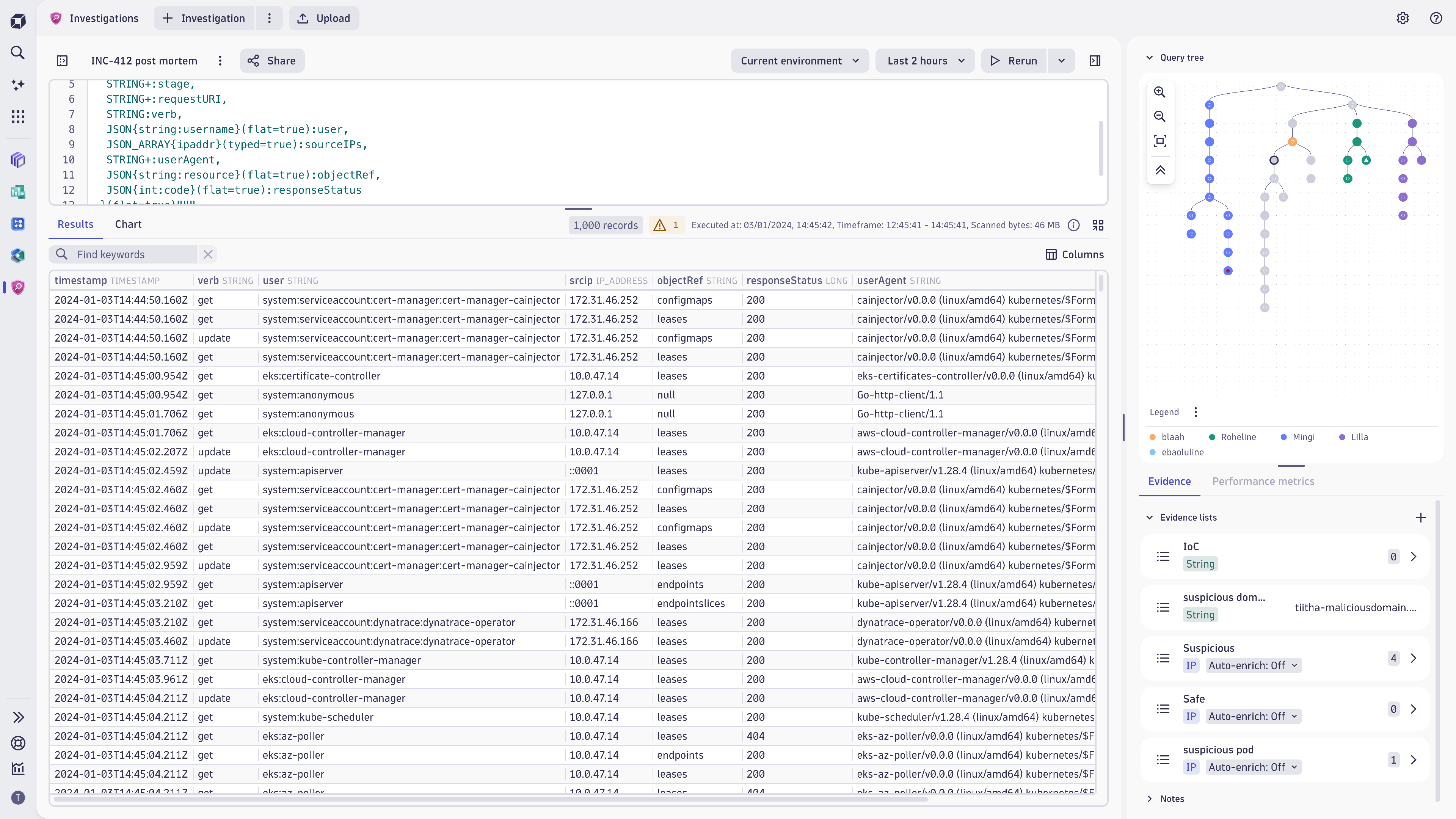
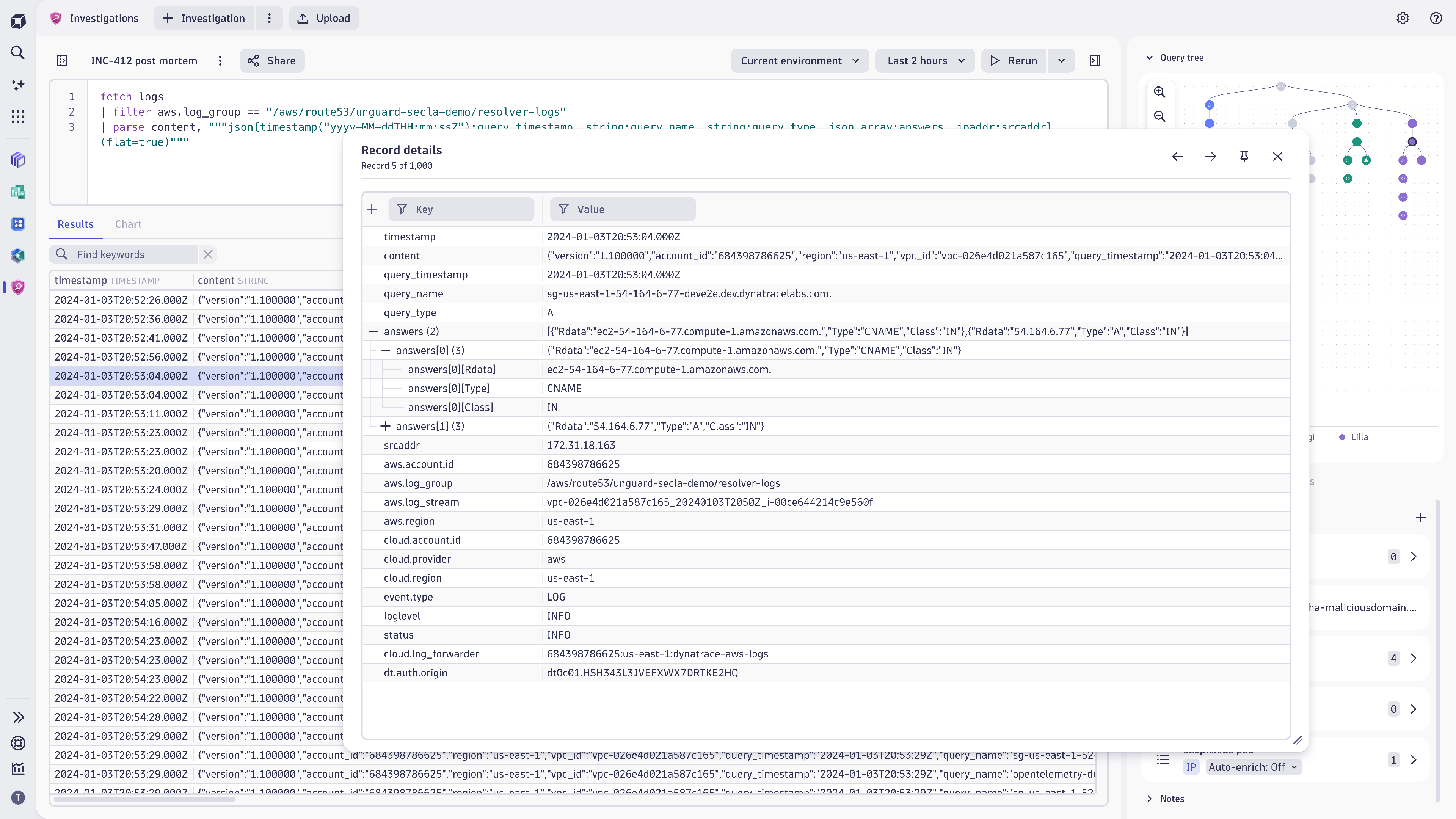
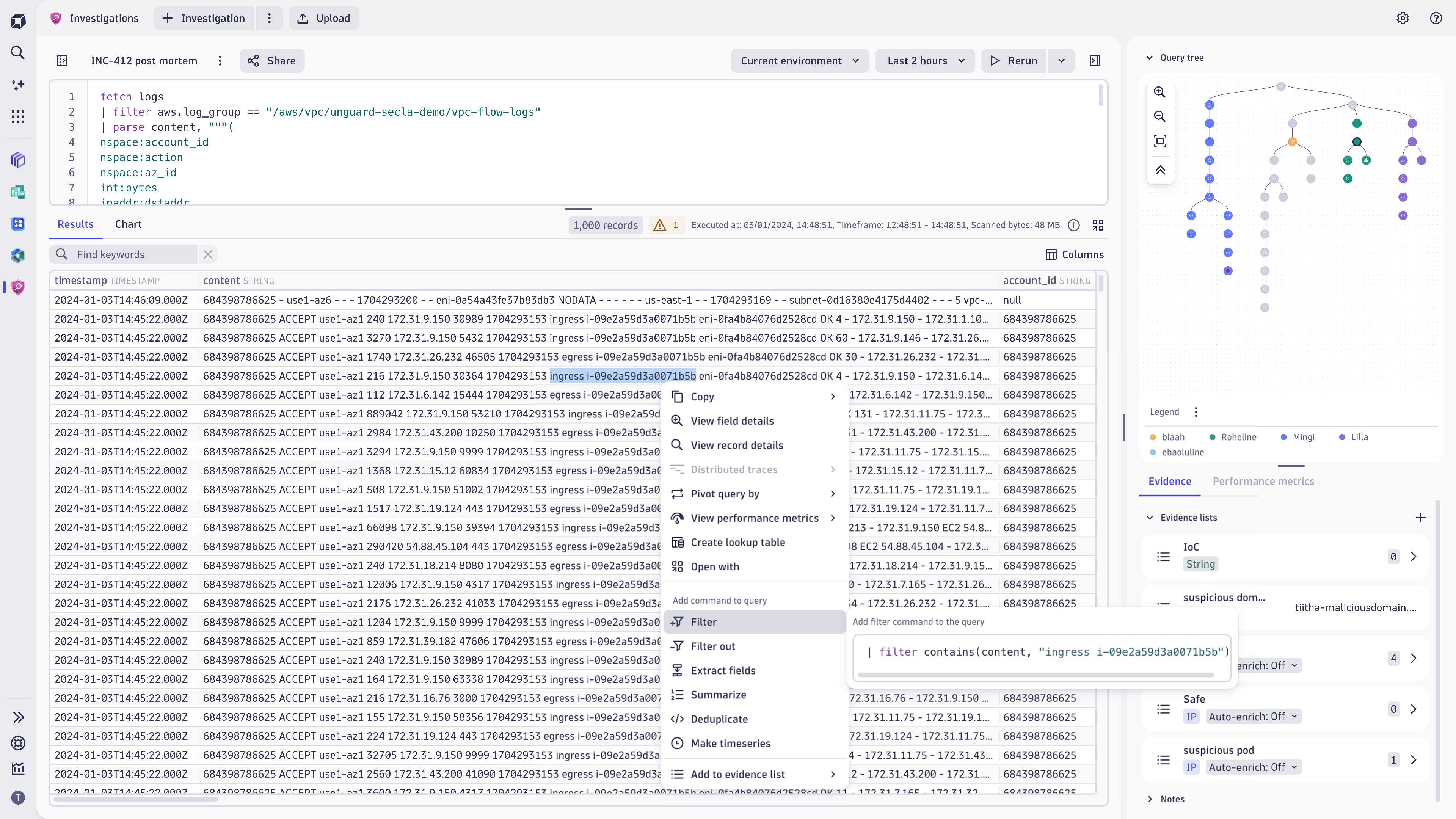
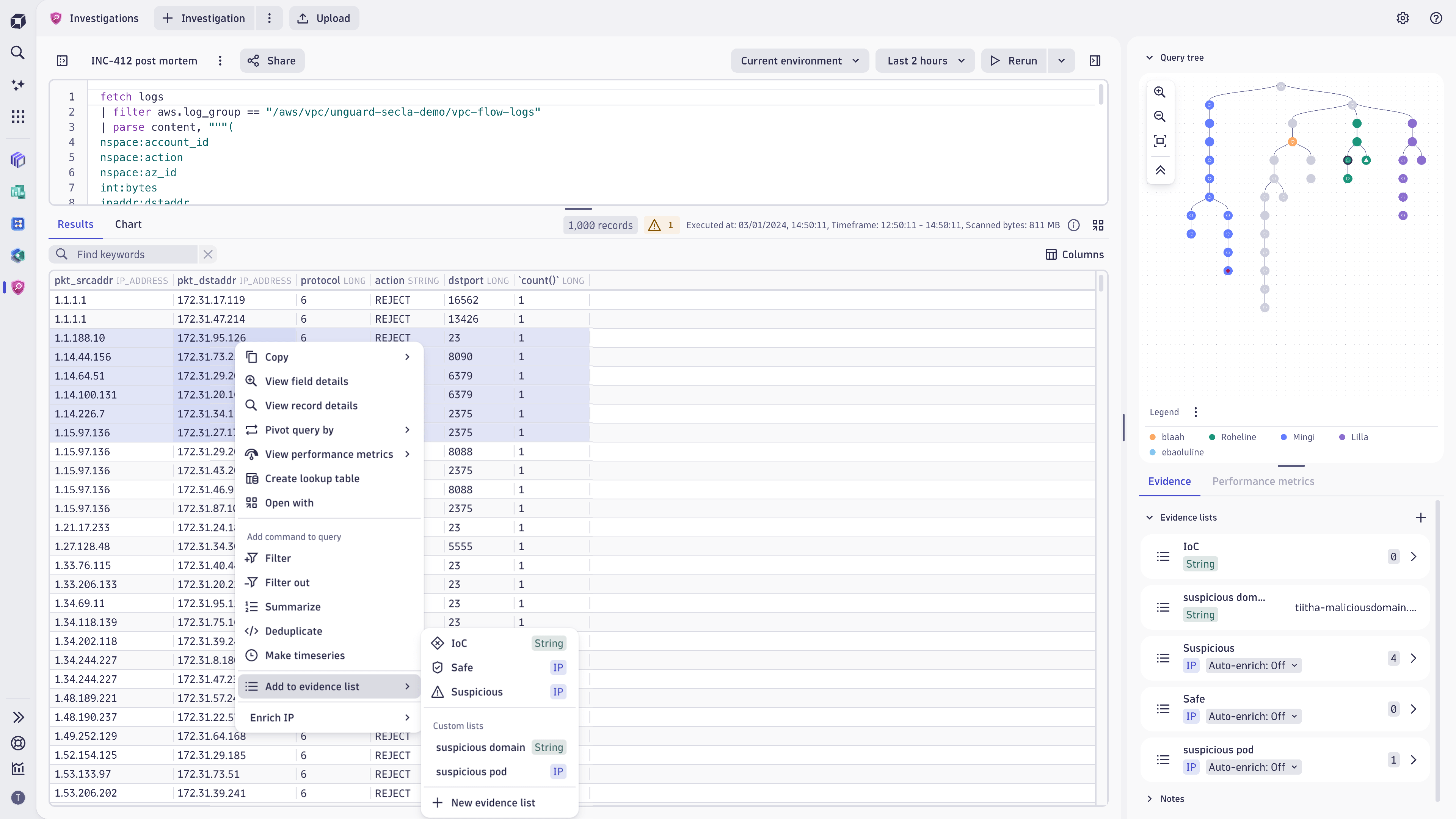
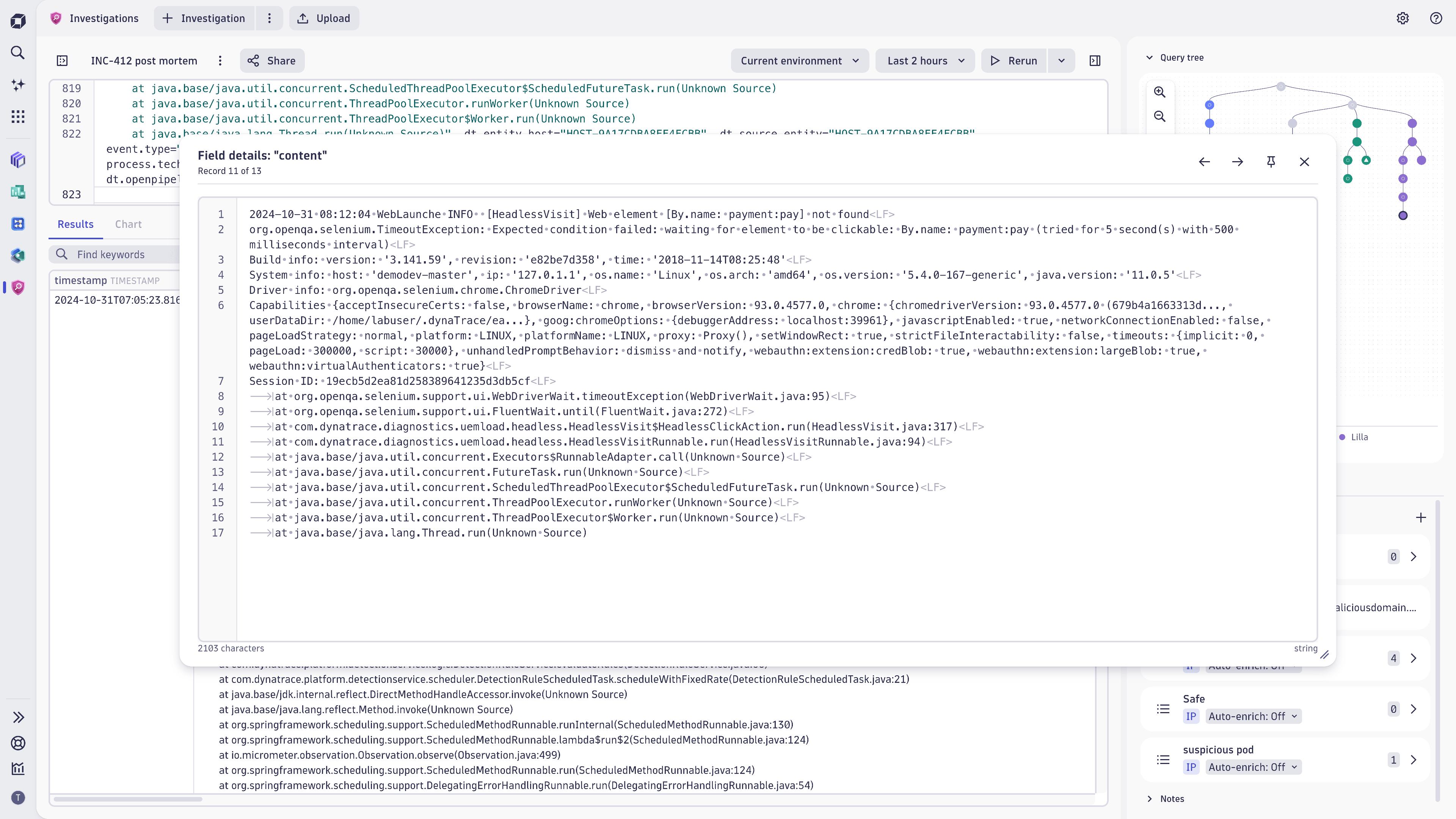
You can see your whole investigation flow as you go along with the ability to always jump back to the previous step of the investigation.Detailed view of the record will show all record fields at once with the possibility to drill down to the details of the field.You can use the data in results with the character precision. Creating new evidence of DQL filters can be done by selecting portion of the field.Evidence and filter manipulations can be done with multiple values: just select the range of IP-s and create a DQL filter based on the values!Investigations enables you to view your data in wrapped and multi-line modes. With Inspector view you can also visualize the non-printable characters.
  • Product information
  • Release notes

Overview

Dynatrace Investigations is one of the pre-installed apps shipped with Dynatrace. It's designed for evidence-driven security use cases based on the logs, metrics, and traces ingested into Grail.

Investigations enables you to

  • Keep your whole investigation flow in context
  • Analyze large DQL results in their original form at a detailed level
  • Perform complex investigations on data stored in Dynatrace Grail®
  • Build DQL queries quickly and efficiently based on your findings
  • Save and use the found evidence to build your DQL queries and find answers to your questions
  • Navigate with ease to any point in your investigation history and review queries and results
  • Fetch detailed results in the original format to quickly understand the information
  • Analyze the observability metrics connected to your log sources

Use cases

  • Threat hunting and hunting for the unknown
  • Forensic analysis, where keeping track of the investigation is a must
  • Incident root cause analysis, where evidence-driven queries bring clarity to the incidents
  • Create faster filters for DQL queries to speed up any investigation
  • Investigate API call throttling using DQL and Investigations
  • Debug AWS Integration issues

Learn how to perform threat hunting and forensics

Are you looking for additional use cases and functionality? Let us know in the Dynatrace Community Forum!

Get started

Investigations comes preinstalled on Dynatrace SaaS environments. Launch the app and Create your first investigation scenario.

Dynatrace
Documentation
By Dynatrace
Dynatrace support center
Subscribe to new releases
Copy to clipboard

Related to Investigations

Grail logo

Grail

Dynatrace's data lakehouse providing unified storage for any type of data.

Full version history

ReleaseDate

Full version history

1.336.0

With this release you can now:

  • See the references to Dynatrace entities (e.g. Security Events in Threats & Exploits), where the Investigation was started from, keeping track of all the connected entities relevant for your investigation
  • Bookmark your most relevant investigations for faster access
  • Selecting all the descending nodes from in a query tree to speed up query management in Investigations

Full version history

1.334.1

With this release, minor fixes and improvements were added to improve your user experience.

Full version history

1.332.1

With this release, minor fixes and improvements were added to improve your user experience

Full version history

1.330.0

Security Investigator is now called Investigations!

Additionally you can now:

  • easily choose to show and hide columns in the results table
  • access distributed traces from your results in a faster way from the right-click menu
  • filter record details by their column name or a value in the Record Details pane

Full version history

1.329.2

With this version of Security Investigator you can now

  • Create DQL queries, add filters to your query and highlight logs in results table from Performance Metrics chart
  • Create lookup tables from query results or from files from your disk
  • Create custom results pivoting dimensions
  • Beautify your DQL queries in Query Editor using a shortcut Mod+L

Full version history

1.324.0

With this release you can now:

  • Create reference time and query filters directly from Performance Metrics charts
  • Upload files from your computer and store them as Lookup tables in Grail
  • Create lookup tables from your query results

Full version history

1.323.0

Minor Changes

  • to performance metrics
  • to results table

Full version history

1.320.1

Minor Changes

  • to performance metrics

Full version history

1.319

With this release You can now

  • View performance metrics of the system from query results
  • Set reference time from record details
  • Enrich IP addresses in your DQL query results

Full version history

1.317.2

With this release You can now

  • Enrich IP addresses for additional context from external sources
  • Download cases as templates and vice versa
  • Get more data with fetching data from Grail up to 300mb at once

Full version history

1.316.1

With this release You can now

  • Quickly shift your investigations based on metadata fields using Query Pivoting. Read more from Dynatrace documentation
  • Download cases as templates and vice versa
  • Copy your results in CSV format to operationalize your query results
  • Access filtering and copying functions from the Record Details view
  • Fetch data from Grail up to 300MB at once

Full version history

1.313.1

With this release you can now

  • Share cases with all environment users in read-only mode at once
  • Upload cases as templates and vice versa
  • Select all values in a column at once from the column header menu
  • Search results table by a keyword and jump to the next occurrence of your search keywords
  • See the in-place filters count above the results table
  • Define query editor settings - toggle between condensed and normal code view and enable/disable line wrap

Full version history

1.312.0

With this version you can now:

  • use chart visualization automatically when fetching timeseries data
  • use reference time as additional context when conducting investigations.
  • enable the line wrap option from settings for DQL query window

Full version history

1.310

With this release you can now

  • Save multi-line evidence to evidence list
  • Use automated charts for data visualization
  • Access security events in Grail

Full version history

1.308.0

With improved case management features, you can now

  • duplicate existing cases to create snapshots or continue cases that are shared with you
  • download and upload the cases to move them between environments
  • create use case templates as boilerplates for your investigations

To streamline investigations, you can work with your findings more efficiently by clicking on evidence to copy it directly from your Evidence list. You can use the copied evidence in DQL queries, or case reports directly and fast.

To speed up investigations and grasp results faster, you can now visualise your results as charts

Minor changes:

You can now

  • access query tree color labels and their titles from the query tree legend
  • view complex data elements (like arrays and records) in a multiline mode in the response table
  • share your cases from the main page without opening the case
  • share templates with everyone on your environment with one click
  • filter your cases and templates on the main page by their type: either view All the cases accessible by you, see only My cases or only cases that have been Shared with you.

Full version history

1.305.0

With this version of Security Investigator it is now possible to:

  • Create custom timeframe by clicking on analysis timeframe in result statistics.
  • Add time range filters for timestamp data type.

Full version history

1.304.3

With this version of Security Investigator it is now possible to:

  • Download selected nodes as a Notebooks document
  • Upload evidence to an evidence list from text file

Full version history

1.302.1

Patch Changes

  • Minor bug fixes.

Full version history

1.302

With this version of Security Investigator it is now possible to:

  • execute a query without creating a new node
  • add IP addresses from a string-type fields to IP evidence lists
  • create new cases from every page of the Security Investigator
  • access Distributed Traces when analyzing your logs by right-clicking on the record in the results table
  • see Duration datatype in the results table in a human-readable format

Full version history

1.298.8

Patch Changes

  • Fixed bugs related to sharing in safari.

Major Changes

  • Introducing Case Sharing: It is now possible to share your investigations with peers and stakeholders!
    • You can share your cases with either a link or share cases to a person or a group.
    • Cases can be shared in either a read-only mode or with edit privileges.
    • Read more at https://www.dynatrace.com/news/blog/collaborate-with-peers-in-hunting-security-threats/ .

Full version history

1.295

  • A search field has been added to highlight keywords in the result table.
  • User can set record limits for DQL queries in the App settings
  • Added color legend with customizable color labels in query tree.

Full version history

1.291

You can now:

  • View the query tree legend to see the explanations of different query node statuses.
  • Rename your cases on the main page in the Cards' menu.
  • Open the Security Investigator from other Dynatrace applications.

Full version history

1.290.0

Minor Changes

  • Updated result statistics and notifications.
  • Added a new result status indicator to the query tree.
  • Added a context menu to the field details window.

Full version history

1.289.0

Minor Changes

  • 138f865: Added filtering to the context menu in the record details window.
  • 29ce2db: Added an 'Add field' command for nested objects in the record details window.

Patch Changes

  • 5f84f0a: Added the selected record number to the record details window.
  • 9fa665a: Updated the result table context menu.
  • f05b039: Added a 'Copy field' option to the context menu in the results table.

Full version history

1.288.0

Patch Changes

  • 4574b72: Close inspect and complex view if DPL Architect is opened. Remove back button if inspect view is opened directly from result table.
  • f2c946e: Added possibility to cancel queries in multiple nodes that are running at the same time
  • 50573cb: Close DPL Architect if case is switched. Close toasts after 5 seconds.
  • 662d89d: Modify query tree deletion portion. Strip trailing newlines and scroll editor to bottom when DQL is added to query.
  • 542c37e: Cosmetic improvements
  • cda16d3: Update adding new evidence collections
  • 834049a: Add help menu
  • eb8a6cd: Add view-query intent

Full version history

1.0.0

Patch Changes

  • c6d0b00: Update record count on poll response
  • 51b21a8: Remove milliseconds in timeframe selector
  • 241ef0e: Add multiline and line wrap support
  • c92a971: Different nodes can be polled separately and result is updated only for selected node
  • b6d7178: Add case heading menu
  • a971214: Add filter out option
  • 62b4e45: Update result statistics timeframes
  • ce7d7fa: UI improvements
  • 8305454: Update complex view and timeframes
  • 787ada3: Fix submit forms with enter
  • f7c31f4: Add header filter and timeframe rename
  • 3cd4e5e: Multiple samples now can be passed to DPL Architect when clicking "Extract fields"
  • a35f624: Add metrics, bizevents and spans scopes
  • 11d1490: Add filter and delete for selection in collection details
  • 59e45c0: Analytics walk-through e2e tests
  • c1a9045: Ask the user if he wants to cancel polling queries
  • 58e79cd: Fix filterOut statements
  • 7f3d38b: Add new collection creation in context menu
  • 1fb2569: Update zooming in query tree
  • f3249db: Rework details panel
  • 6923e54: Add JSON formatting into detailed content viewer
  • 59b0f6b: Add evidences from collections list menu
Dynatrace Hub
Hub HomeGet data into DynatraceBuild your own app
Dynatrace Intelligence - Agentic Operations SystemThe Dynatrace Agentic AI ecosystem
Log Management and AnalyticsKubernetesAI and LLM ObservabilityInfrastructure ObservabilitySoftware DeliveryApplication ObservabilityApplication SecurityBusiness ObservabilityDigital Experience
Filter
Type
Built and maintained by
Deployment model
SaaS
  • SaaS
  • Managed
Partner FinderBecome a partnerDynatrace Developer

All

210 Results filtered by:

Palo Alto firewalls logo

Palo Alto firewalls

Palo Alto extension for problems detection

Extension
Confluent Cloud (Kafka) logo

Confluent Cloud (Kafka)

Remotely monitor your Confluent Cloud Kafka Clusters and other resources!

Extension
Kong - Prometheus logo

Kong - Prometheus

Monitor Prometheus metrics exposed by Kong and proxied upstream services

Extension
Nutanix Clusters logo

Nutanix Clusters

Monitor Nutanix clusters' performance, usage and availability, with Nutanix API.

Extension
Luna Network HSM Device logo

Luna Network HSM Device

Monitor your Luna Network Hardware Security Module (HSM) Devices through SNMP.

Extension
Consul Service Mesh (StatsD) logo

Consul Service Mesh (StatsD)

Extend visibility into your Consul Service Mesh instances to monitor health and improve performance.

Extension
Microsoft IIS logo

Microsoft IIS

Flexible and secure web server for hosting with Windows Server.

Extension
Kubernetes Monitoring Statistics logo

Kubernetes Monitoring Statistics

Troubleshoot your Dynatrace Kubernetes monitoring and Prometheus integration.

Extension
Snyk logo

Snyk

Ingest Snyk vulnerability findings, scans, and audit logs.

Extension
Citrix DaaS & Virtual Apps and Desktops logo

Citrix DaaS & Virtual Apps and Desktops

Gain insight into your Citrix DaaS & Virtual Apps and Desktops environments

Extension
Google Memorystore logo

Google Memorystore

Get insights into Google Memorystore service metrics collected from the Google Operations API to ensure health of your cloud infrastructure.

Extension
Databricks Workspace logo

Databricks Workspace

Remotely monitor your Databricks Workspaces!

Extension
UPS Device logo

UPS Device

Monitor your Uninterruptible Power Supplies (UPS) over SNMP

Extension
Google App Engine (integration) logo

Google App Engine (integration)

Insights into Google App Engine service metrics collected from Operations API

Extensioncoming soon
Traceroute logo

Traceroute

Run traceroute commands and collect step performance metrics

Extension
[Deprecated] Kubernetes PVCs logo

[Deprecated] Kubernetes PVCs

Monitor your Kubernetes persistent volume claims and alert on capacity limits.

Extension
Google Cloud Storage Transfer logo

Google Cloud Storage Transfer

Get insights into Google Cloud Storage Transfer metrics collected from the Google Operations API to ensure health of cloud infrastructure.

Extension
NVIDIA GPU logo

NVIDIA GPU

Monitor base parameters of the GPU, including load, memory and temperature

Extension
Oracle Database logo

Oracle Database

Observe, analyze and optimize the usage, health and performance of your database

Extension
Dell iDRAC logo

Dell iDRAC

Connect to the Redfish API to get insights into your Dell iDRAC environment

Extension
Cisco ACI/APIC logo

Cisco ACI/APIC

Get insights into your Cisco Application Centric Infrastructure (ACI)

Extension
Azure Managed Apache Cassandra logo

Azure Managed Apache Cassandra

Gain insights into your Azure Managed Cassandra Instance health and performance

Extension
PayShield HSM Device logo

PayShield HSM Device

Monitor PayShield Payment Hardware Security Module (HSM) Devices through SNMP.

Extension
NetApp OnTap (Remote) logo

NetApp OnTap (Remote)

Remote extension that collects NetApp OnTap metrics from the OnTap 9.6+ API.

Extension
Google Firestore in Datastore mode logo

Google Firestore in Datastore mode

Get insights into Google Firestore in Datastore mode metrics collected from the Google Operations API to ensure health of infrastructure.

Extension
Redis (2.0) logo

Redis (2.0)

Collect important additional data for your Redis instances.

Extension
PHP-FPM logo

PHP-FPM

Monitor the PHP-FPM status of your applications with this extension.

Extension
Timedrift Monitoring logo

Timedrift Monitoring

Monitor your host's NTP/Chrony Time Offset!

Extension
Apache Kafka logo

Apache Kafka

Automatic and intelligent observability with trace and metric insights.

Extension

SNMP Generic Server logo

SNMP Generic Server

Monitor your Servers and Hosts over SNMP

Extension
MongoDB (local or remote monitoring) logo

MongoDB (local or remote monitoring)

Monitor your MongoDB servers either locally or remotely!

Extension
Connection Pools: C3P0 logo

Connection Pools: C3P0

Application server method of pooling and sharing connections to a database.

Extension
AWS Entities for Metric Streaming logo

AWS Entities for Metric Streaming

Analyse metrics in the context of an entity based on AWS Metric Streaming.

Extension

MongoDB Atlas logo

MongoDB Atlas

Remotely monitor your SaaS installation of MongoDB (Atlas)

Extension
Microsoft SQL Server logo

Microsoft SQL Server

Improve the health and performance monitoring of your Microsoft SQL Servers.

Extension
IBM MQ Appliance logo

IBM MQ Appliance

Monitor your IBM MQ Appliances over SNMP

Extension
AWS Cloud Monitoring logo

AWS Cloud Monitoring

New and enhanced monitoring capabilities for your AWS cloud platforms

Extension
Google Apigee logo

Google Apigee

Get insights into Google Apigee service metrics collected from the Google Operations API to ensure health of your cloud infrastructure.

Extension
Oracle Base DB and Autonomous DB on OCI logo

Oracle Base DB and Autonomous DB on OCI

Monitor health of the Oracle Base Service and Autonomous Database.

Extension
Google Pub/Sub Lite logo

Google Pub/Sub Lite

Get insights into Google Pub/Sub Lite service metrics collected from the Google Operations API to ensure health of the cloud infrastructure.

Extension
Infoblox DDI logo

Infoblox DDI

Monitor Infoblox DDI using SNMP

Extension
SAP HANA Database (remote monitoring) logo

SAP HANA Database (remote monitoring)

Easily understand the health and performance of your SAP HANA databases.

Extension
Connection Pools: WebSphere Liberty logo

Connection Pools: WebSphere Liberty

Application server method of pooling and sharing connections to a database.

Extension

Google Cloud Composer logo

Google Cloud Composer

Get insights into Google Cloud Composer metrics collected from the Google Operations API to ensure health of your cloud infrastructure.

Extension
Google Cloud Spanner logo

Google Cloud Spanner

Get insights into Google Cloud Spanner metrics collected from the Google Operations API to ensure health of your cloud infrastructure.

Extension
IBM i logo

IBM i

Collect performance data from your IBM i Hosts via this Remote extension.

Extension
Google reCAPTCHA Enterprise logo

Google reCAPTCHA Enterprise

Get insights into Google reCAPTCHA Enterprise metrics collected from the Google Operations API to ensure health of your cloud infrastructure

Extension
.NET logo

.NET

Automatic end-to-end observability for .NET applications and processes.

Extension
Google Cloud's operations suite logo

Google Cloud's operations suite

Get insights into Google Cloud's operations suite metrics collected from the Google Operations API to ensure health of cloud infrastructure.

Extension
Google Vertex AI logo

Google Vertex AI

Get insights into Google Vertex AI service metrics.

Extension