


Skip to technology filters Skip to main content
Dynatrace Hub

Extend the platform,
empower your team.

Popular searches:
Home hero bg
Red Hat AnsibleRed Hat Ansible
Red Hat Ansible

Red Hat Ansible

Integrate with Red Hat Ansible (EDA, AAC, AWX) to trigger job templates

App
Free trialDocumentation
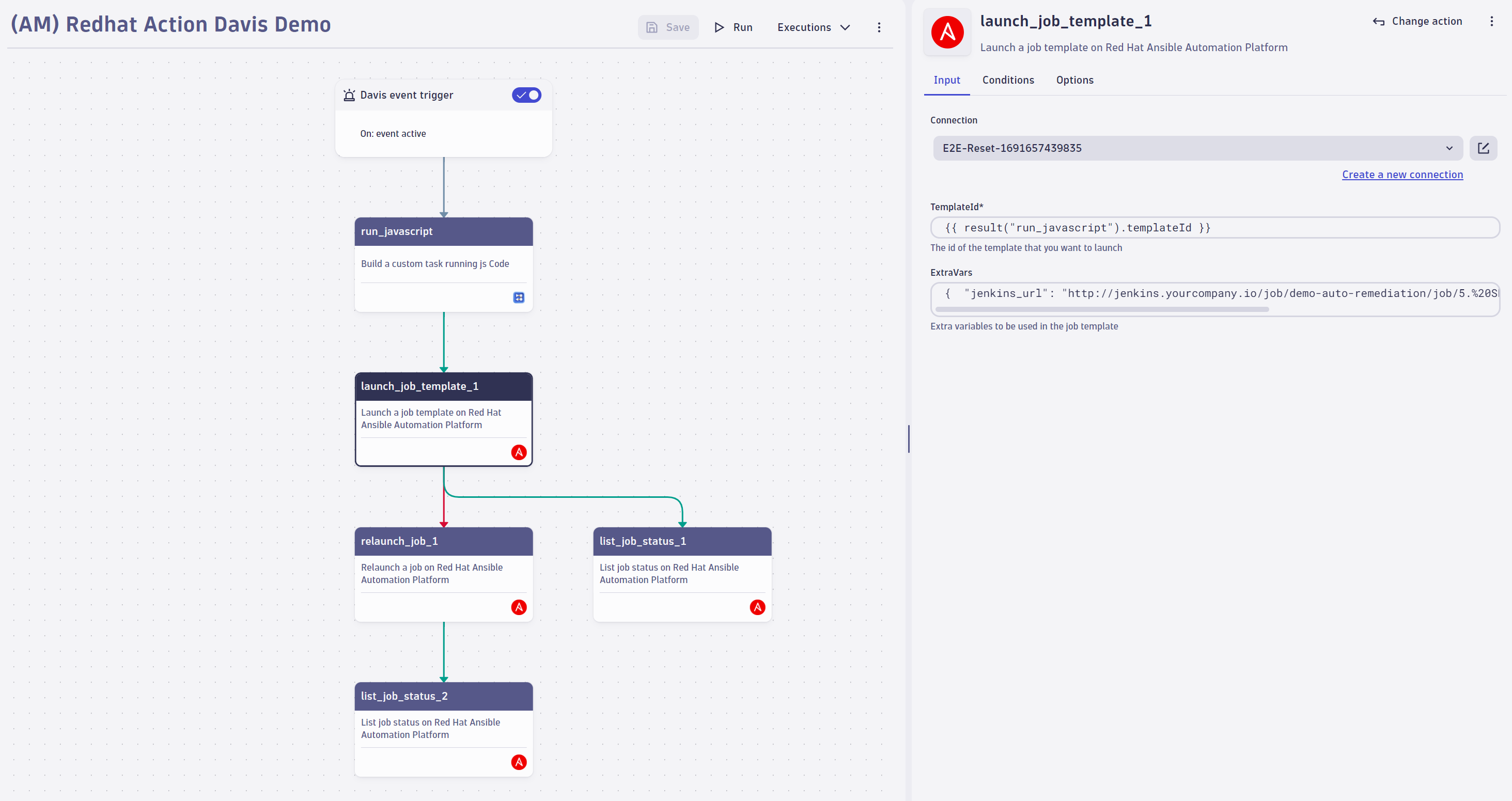
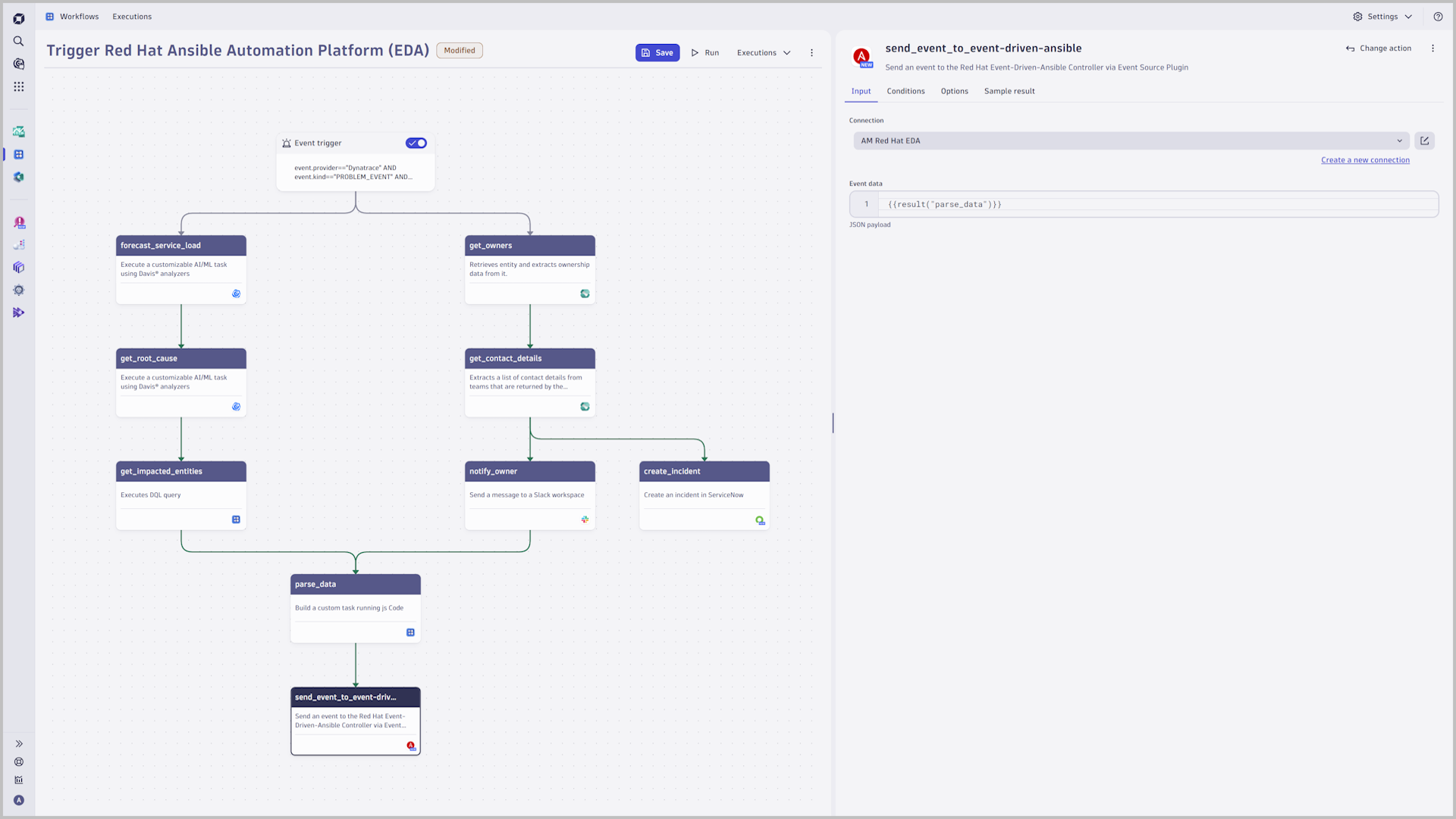
Launch a job template in Red Hat Ansible Automation Controller, list job status or retry a job.The integration of Dynatrace workflows with Red Hat Event-Driven Ansible provides the highest flexibility to remediate detected problems or to mitigate security vulnerabilities by leveraging rulebooks to identify the correct playbook.
  • Product information
  • Release notes

Overview

Integrate your Dynatrace environment with the Red Hat Ansible Automation Platform or with AWX to trigger job templates based on your monitoring data or send events to Red Hat Event-Driven Ansible for highest flexibility to remediate detected problems or to mitigate security vulnerabilities.

Use cases

This enables you to:

  • Integrate workflows with Red Hat Event-Driven Ansible to remediate detected problems or to mitigate security vulnerabilities
  • Integrate workflows with Red Hat Ansible Automation Controller or AWX to trigger job templates
  • List job-status
  • Retry a failed job

Get started

Follow the instructions detailed in Dynatrace Documentation.

Ensure that you have installed Red Hat Ansible, that outbound connections are configured, and that the connection to the Automation Controller is authorized.

If your Red Hat Ansible Automation Platform is behind your firewall, configure EdgeConnect to tunnel the traffic securely.

Details

Red Hat Ansible enables users to model remediation processes within Dynatrace:

Define various incident triggers:

  • Use the power of DQL and leverage events to react to any problem, security incident, or attack to trigger a reconfiguration of your system
  • Use Biz-Events as a trigger to react on extended events like a failed release validation, certain logs messages, or external system events
  • Define a scheduler for periodic tasks

Flexible Remediation processes

  • Send events to Red Hat Event-Driven Ansible for the highest flexibility to remediate problems or vulnerabilities with rulebooks
  • Trigger any job template within a Dynatrace workflow
  • Hand over extra vars to fine-tune any playbook execution
  • List job status or retry a job
Dynatrace
Documentation
By Dynatrace
Dynatrace support center
Subscribe to new releases
Copy to clipboard

Related to Red Hat Ansible

Workflows logo

Workflows

Automate tasks in your IT landscape, remediate problems, and visualize processes

Full version history

ReleaseDate

Full version history

This maintenance release is bundled with some minor quality of life improvements.

Full version history

This release improves the stability of the Red Hat Ansible app

Full version history

Improved app stability and performance through updated dependencies

Full version history

  • Updated dependencies
  • Memorize the event stream setting between creating connections

Full version history

  • add support for Red Hat event streams
  • Updated dependencies

Full version history

2.0.2

Patch Changes

  • Updated dependencies

2.0.1

Patch Changes

  • Improved visual fidelity of connection management in modals
  • Updated dependencies

2.0.0

Major changes

  • Migrated to owner based access control (ACL)

Full version history

2.0.0

Major changes

  • Migrated to owner based access control (ACL)

Full version history

1.1.1

Patch Changes

  • Updated dependencies

1.1.0

Minor Changes

  • App is headless again. To control your connections, please use the Settings app.

Patch Changes

  • Add grouping of input fields in workflow widget.

Full version history

1.1.0

Minor Changes

  • App is headless again. To control your connections, please use the Settings app.

Patch Changes

  • Add grouping of input fields in workflow widget.

Full version history

1.0.1

Patch Changes

  • Change: "for Workflows" was removed from the app title
  • Chore: Increase URL limit to 255 characters
  • Fix: Launch job template did not wait until the job finished

1.0.0

This marks the first initial release of Red Hat Ansible for Workflows.

Full version history

1.0.0

This marks the first initial release of Red Hat Ansible for Workflows.

Full version history

0.3.2

Patch Changes

  • Fix: eventData is now more resilient to different input types
  • Fix: Ensure that there is a default widget state to avoid data validation issues

0.3.1

Patch Changes

  • Updated dependencies

0.3.0

  • Breaking: connections have been changed from an ordered list to an unordered list. This was done in preparation for better ACL support. However, inserting connections via API or Monaco using insertAfter will no longer be possible.

Full version history

0.3.1

Patch Changes

  • Updated dependencies

0.3.0

  • Breaking: connections have been changed from an ordered list to an unordered list. This was done in preparation for better ACL support. However, inserting connections via API or Monaco using insertAfter will no longer be possible.

Full version history

0.3.0

  • Breaking: connections have been changed from an ordered list to an unordered list. This was done in preparation for better ACL support. However, inserting connections via API or Monaco using insertAfter will no longer be possible.

Full version history

0.2.4

Patch Changes

  • Updated dependencies

0.2.3

Patch Changes

  • Fix typo in display name of settings schema

0.2.2

Patch Changes

  • Update app icon
  • Ensure proper handling of trailing slashes in API
  • Add sample results for all actions
  • Fix a typo in description

0.2.1

Patch Changes

  • Update dependencies

0.2.0

Minor Changes

  • Improve support for multi-line extraVars in Launch job template action

Patch Changes

  • Update dependencies
  • Update app description and value statement

Full version history

0.2.3

Patch Changes

  • ce0a373: fix typo in display name of settings schema

0.2.2

Patch Changes

  • 0d98026: Update app icon
  • b5c1248: Ensure proper handling of trailing slashes in API
  • 918d4a1: Add sample results for all actions
  • 6797e83: Fixed a typo in description

0.2.1

Patch Changes

  • Update dependencies

0.2.0

Minor Changes

  • 19cf5a6: Improve support for multi-line extraVars in Launch job template action

Patch Changes

  • 041e0b9: Update dependencies
  • 11f148e: Update app description and value statement

Full version history

0.2.1

Patch Changes

  • Update dependencies

0.2.0

Minor Changes

  • 19cf5a6: Improve support for multi-line extraVars in Launch job template action

Patch Changes

  • 041e0b9: Update dependencies
  • 11f148e: Update app description and value statement

Full version history

0.1.4

Patch Changes

  • Update dependencies

0.1.3

Patch Changes

  • Update dependencies

0.1.2

Patch Changes

  • 8f38470: Update dependencies

0.1.1

Patch Changes

  • 6e7a75d: Force resubmission of API token before saving connection configuration.

0.1.0

Minor Changes

  • da91c19: Introduced new actions launch-job-template, list-job-status and relaunch-job

Full version history

No release notes

Dynatrace Hub
Hub HomeGet data into DynatraceBuild your own app
Log Management and AnalyticsKubernetesAI and LLM ObservabilityInfrastructure ObservabilitySoftware DeliveryApplication ObservabilityApplication SecurityDigital ExperienceBusiness Observability
Filter
Type
Built and maintained by
Deployment model
SaaS
  • SaaS
  • Managed
Partner FinderBecome a partnerDynatrace Developer

All

0 Results filtered by:

Default empty state

We couldn't find any results

You can search all listings, or try a different spelling or keyword. Still nothing? Dynatrace makes it easy to create custom apps.

Find a partnerLearn to build apps