


Skip to technology filters Skip to main content
Dynatrace Hub

Extend the platform,
empower your team.

Popular searches:
Home hero bg
Microsoft TeamsMicrosoft Teams
Microsoft Teams

Microsoft Teams

Automate Microsoft Teams messaging for problems, security incidents, and more.

App
Free trialDocumentation
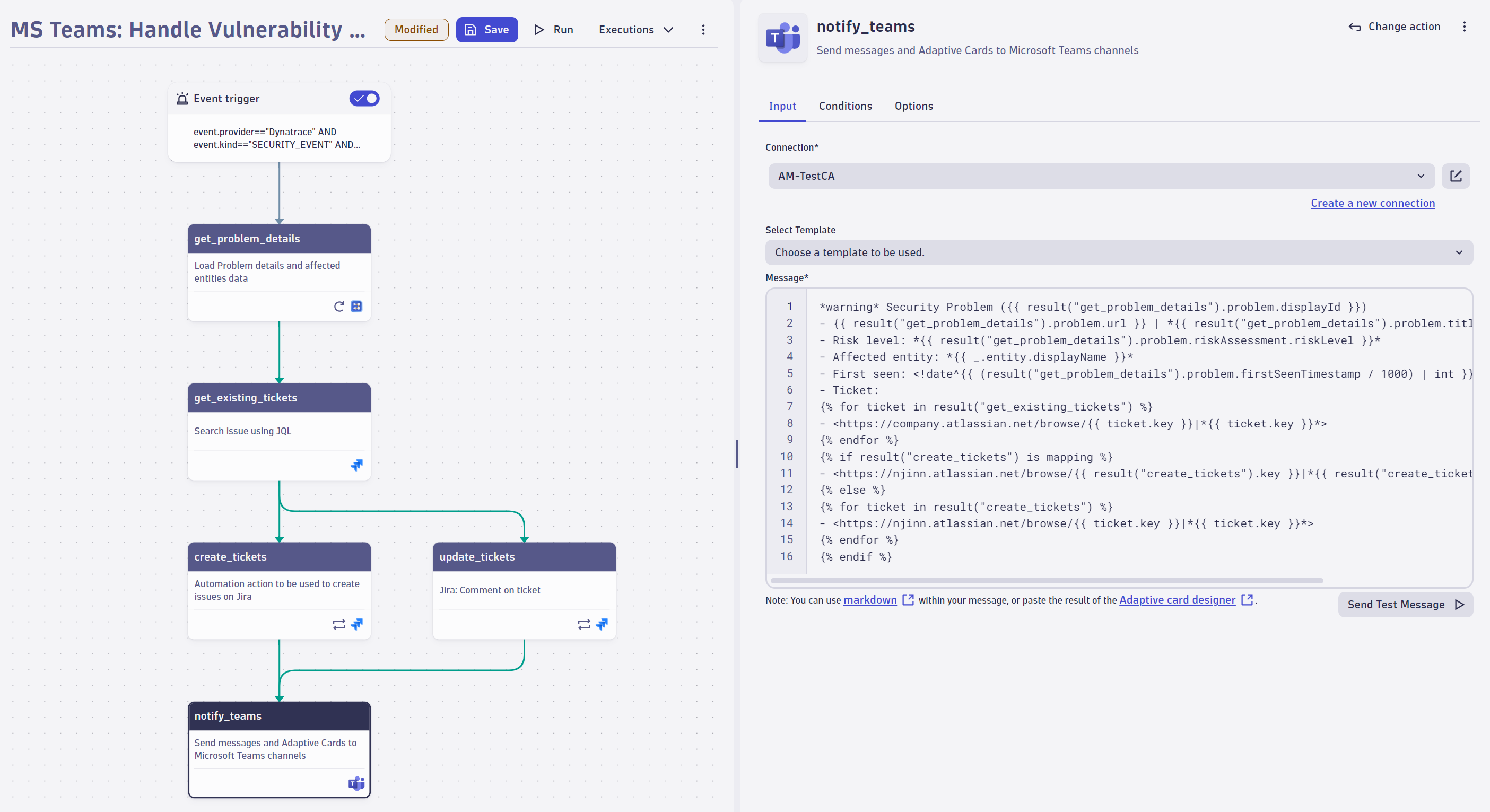
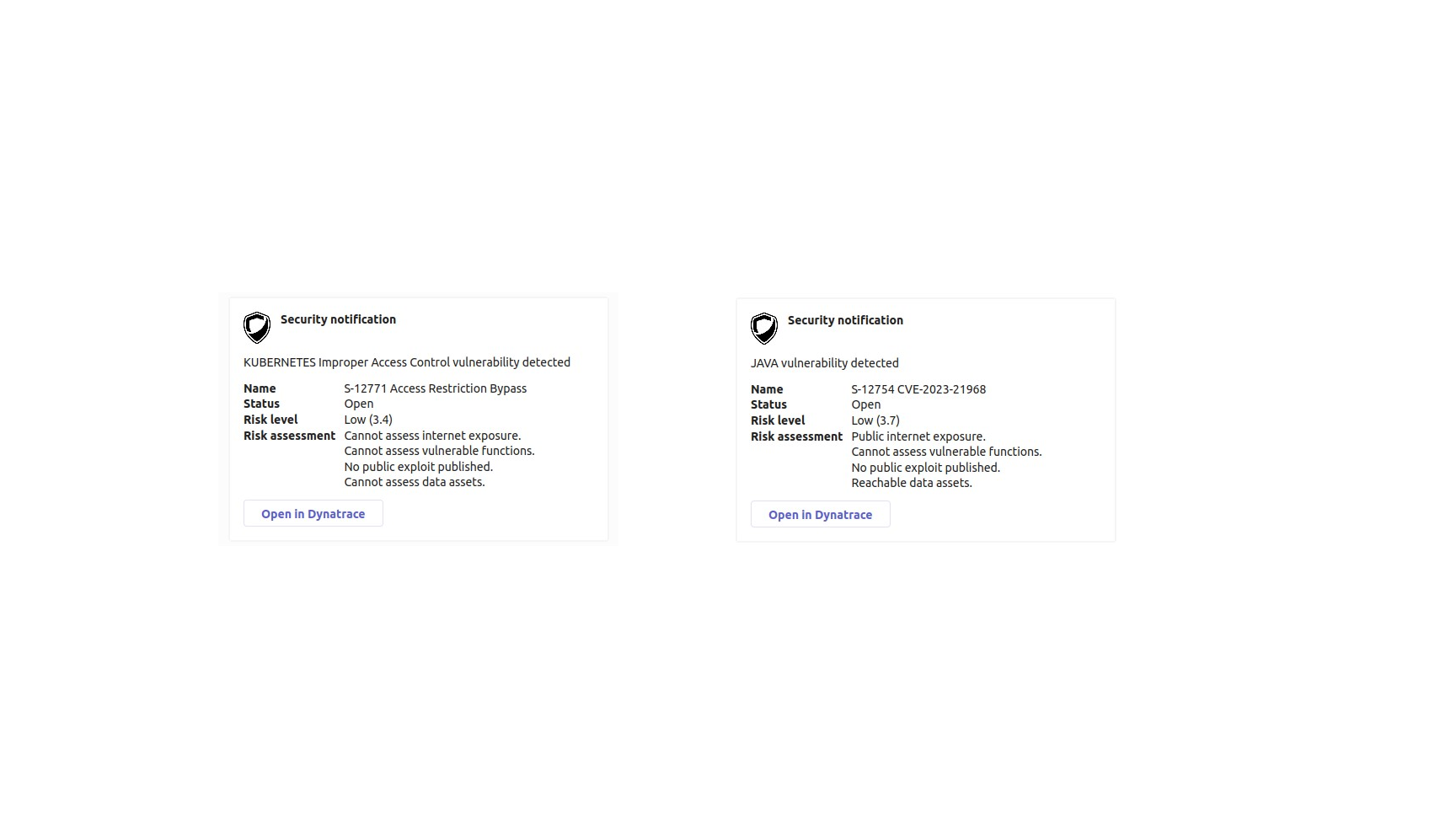
Create a workflow to enrich security information, create tickets, and inform users via Microsoft Teams about security incidents and tickets. Leverage expressions and markdown syntax for message composition.Leverage card templates for problems and security incidents to send formatted cards, including links to the respective problem or security incident.
  • Product information
  • Release notes

Overview

Microsoft Teams enables you to model communication flows within Dynatrace through actions like these:

Define various notification triggers
  • Use the power of DQL and leverage events to react to any problem, security incident, or attack within workflows.
  • Use Business events as a trigger to react on extended events like a failed release validation, certain log messages, or external system events.
  • Define a scheduler and be informed at specific time intervals.
Flexible content composing
  • Enrich message information with tags, hierarchy details, or any arbitrary Smartscape information.
  • Leverage the expression builder for simple message composition.
  • Leverage Microsoft card templates for problems or security incidents.
  • Reuse workflow step results, such as creating a Jira ticket and posting the ticket number to a specific group channel.
  • Send a test message to ensure that a connection is configured correctly.

Use cases

  • Send Microsoft Teams notifications within workflows.
  • Leverage Microsoft Teams card templates to send preformatted messages for problems and security incidents.
  • Add reports, logs, and other files for improved insights.

Get started

Follow the instructions detailed in Dynatrace Documentation.

Ensure that you have installed Microsoft Teams, that outbound connections are configured, and that the connection to Microsoft Teams is authorized.

Dynatrace
DocumentationMore Information
By Dynatrace
Dynatrace support center
Subscribe to new releases
Copy to clipboard

Related to Microsoft Teams

Workflows logo

Workflows

Automate tasks in your IT landscape, remediate problems, and visualize processes

Full version history

ReleaseDate

Full version history

  • Intent Schema Update Compatibility – Updated the app to support changes introduced in intent schema v0.8.0:
    • Added support for new fields: instantMessage and description
    • Removed deprecated fields: message, target and type
  • Improved Validation for Connection Details – Enhanced the validation logic within the send-message action to ensure more reliable connection configurations.
  • Bugfix for Action Widget - Fixed an issue that could cause the action widget to crash when provided with an invalid connection ID.

Full version history

  • Various improvements and dependency updates.

Full version history

  • Bugfix for selecting a connection in expression mode - Resolved an issue where the widget would crash when switching away from expression mode in the connection input field.
  • Bugfix for Connection Settings Form - Resolved an issue where the connection settings form remained open after editing a connection.
  • Improved Connection Management - When creating or editing a connection from within an intent, the form now opens in a new tab, offering better usability.

Full version history

  • Various improvements and dependency updates

Full version history

  • Various improvements and dependency updates.

Full version history

  • New Intents - Reworked the send-message intent to enable forwarding of problems to MS Teams.
  • Access Control for Connectors Management - Added fine-grained access control for connections, enabling only specific users to have access to connection settings.

Full version history

  • Optimized Connections Overview - The height of the Connections overview table in Connector Settings is now limited to the window size.

Full version history

  • Optimized Retry Logic - Reduced the time allocated for retrying API calls, enhancing overall efficiency.
  • Grouped input fields - Improved the user experience by grouping related input fields, making navigation and usage easier.

Full version history

  • Expression in Connection Selection - An expression can now be used when selecting the connection, providing greater flexibility and customization.

Full version history

Connection Management - All connections of the App can now be managed via the newly released Settings App. To manage your connections got to Settings > Connections > Microsoft Teams.

Full version history

  • New Connectors Management - Introduce a new, streamlined connection management experience with a modernized interface. This update makes adding and editing connections directly within workflows easier and provides connection control and convenience in one place.
  • App renamed to "Microsoft Teams" - Streamlined the app name by removing the suffix “for Workflows”.

Full version history

  • Bugfix: Fixed an issue with dropdowns breaking in Chrome 129

Full version history

  • Major release: The App is now officially released, we removed the "(Preview)" postfix.
  • Send message action: The intent is now an add-on intent, meaning that it will show up in an in-app modal instead of a different window.

Full version history

  • Dual Webhook Compatibility due to Office 365 Webhooks Deprecation: To address the upcoming deprecation of Office 365 webhooks, our application now supports both the traditional Office 365 webhooks and the new Microsoft Power Automate webhooks. Please be aware that according to Microsoft’s latest announcement, Office 365 webhooks will stop working after December 31, 2024. For detailed guidance on migrating to the new webhook format, please refer to our documentation.
  • Breaking change: Changed Connection list to an unordered list.
  • Bugfix: Fixed an issue in the message field where the cursor occasionally jumped to the beginning of the editor.
  • Bugfix: Fixed a problem where error logs were not shown to the user.
  • Updated the App icon.

Full version history

  • Small UI enhancements

Full version history

  • Maintenance release

Full version history

  • Maintenance release

Full version history

  • Error handling: Improve error handling for the microsoft teams API.

Full version history

  • General App and performance improvements

Full version history

0.3.4

Patch Changes

  • Enable templates feature

0.3.3

Patch Changes

  • Remove start and end date from Davis problem template

0.3.2

Patch Changes

  • Modify deployed templates

0.3.1

Patch Changes

  • Show icon of event type in Adaptive Card
  • Fix a problem in the security event template

0.3.0

Minor Changes

  • Introducing Card templates for Security event and Davis problem

Full version history

No release notes

Dynatrace Hub
Hub HomeGet data into DynatraceBuild your own app
Log Management and AnalyticsKubernetesAI and LLM ObservabilityInfrastructure ObservabilitySoftware DeliveryApplication ObservabilityApplication SecurityDigital ExperienceBusiness Observability
Filter
Type
Built and maintained by
Deployment model
SaaS
  • SaaS
  • Managed
Partner FinderBecome a partnerDynatrace Developer

All

0 Results filtered by:

Default empty state

We couldn't find any results

You can search all listings, or try a different spelling or keyword. Still nothing? Dynatrace makes it easy to create custom apps.
Find a partnerLearn to build apps