

Skip to technology filters Skip to main content
Dynatrace Hub

Extend the platform,
empower your team.

Popular searches:
Home hero bg
Google Cloud RunGoogle Cloud Run
Google Cloud Run

Google Cloud Run

Get insights into Google Cloud Run service metrics.

Extension
Free trialDocumentation
  • Product information
  • Release notes

Overview

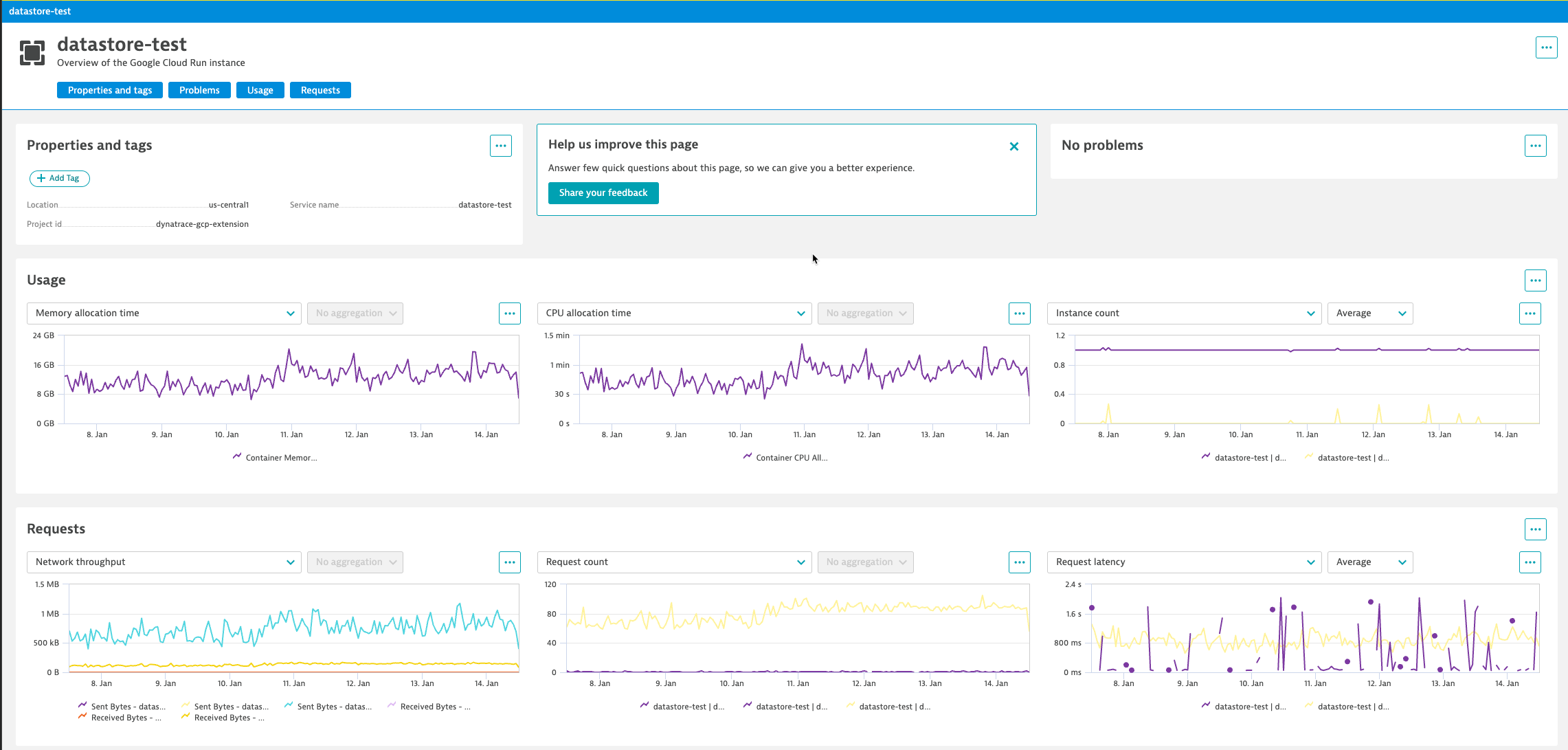
This Dynatrace extension leverages data collected from the Google Operations API to constantly monitor health and performance of Google Cloud Run services. This extension combines all relevant data into pre-configured dashboards, providing alerting and event tracking.

This is intended for users, who want to:

  • enrich their monitoring data with metrics and logs from Google Operations API

This enables you to:

  • View and analyze 11 metrics that are specific to Google Cloud Run, like Billable Instance Time, Container CPU Allocation, Container CPU Utilization, and more.

  • Build custom dashboards for your cloud infrastructure.

  • Analyze Google Cloud Run logs.

  • Set custom alerts that trigger remediation workflows.

Google Cloud Run metric and log ingestion requires advanced GCP integration.

Compatibility requirements

  • Dynatrace GCP integration version 1.0.0+. To enable metric and log ingestion, see Dynatrace Documentation.
  • Dynatrace version 1.256+

Details

Details

This extension package contains:

  • Configuration for Google Cloud Run metric ingest based on your selected feature set (see the full list of feature sets and metrics)
  • Topology mapping and service instance analysis view
  • Google Cloud Run predefined alerts for: Google Cloud Run Revision Container CPU utilization [GCP], Google Cloud Run Revision Container memory utilization [GCP]

To provide correlation and causation analysis all ingested metrics and logs are analyzed by the Dynatrace Davis AI engine, which consumes DDUs.

Get started

To add this extension to your environment:**

  • Follow the instructions detailed in Dynatrace Documentation. (Ignore the “Add to environment” button below.)
  • Ensure that you have GCP integration running in your environment and that Google Cloud Run service is configured.

Following GCP integration and Google Cloud Run configuration:**

  • The first data points will be ingested by Dynatrace Davis within ~5 minutes.
  • Explore Google Cloud Run metrics in Data Explorer and create custom charts.
  • Activate predefined alerting or set custom events for alerting
Dynatrace
Documentation
By Dynatrace
Dynatrace support center
Subscribe to new releases
Copy to clipboard

Extension content

Content typeNumber of items included
alerts
2
screen injections
1
generic relationship
2
screen actions
1
metric metadata
16
screen layout
1
generic type
4
screen entities lists
1

Feature sets

Below is a complete list of the feature sets provided in this version. To ensure a good fit for your needs, individual feature sets can be activated and deactivated by your administrator during configuration.

Feature setsNumber of metrics included
Metric nameMetric keyDescriptionUnit
Billable Instance Timecloud.gcp.run_googleapis_com.container.billable_instance_time.count-Second
Container CPU Allocationcloud.gcp.run_googleapis_com.container.cpu.allocation_time.count-Second
Container CPU Utilizationcloud.gcp.run_googleapis_com.container.cpu.utilizations-Percent
Instance Countcloud.gcp.run_googleapis_com.container.instance_count.gauge-Count
Max Concurrent Requestscloud.gcp.run_googleapis_com.container.max_request_concurrencies-Count
Container Memory Allocationcloud.gcp.run_googleapis_com.container.memory.allocation_time.count-GibiByte
Container Memory Utilizationcloud.gcp.run_googleapis_com.container.memory.utilizations-Percent
Received Bytescloud.gcp.run_googleapis_com.container.network.received_bytes_count-Byte
Sent Bytescloud.gcp.run_googleapis_com.container.network.sent_bytes_count-Byte
Startup Latencycloud.gcp.run_googleapis_com.container.startup_latencies-MilliSecond
Request Countcloud.gcp.run_googleapis_com.request_count-Count
Request Latencycloud.gcp.run_googleapis_com.request_latencies-MilliSecond
Job Completed Execution Countcloud.gcp.run_googleapis_com.job.completed_execution_count-Count
Job Completed Task Attempt Countcloud.gcp.run_googleapis_com.job.completed_task_attempt_count-Count
Job Running Executionscloud.gcp.run_googleapis_com.job.running_executions-Count
Job Running Task Attemptscloud.gcp.run_googleapis_com.job.running_task_attempts-Count

Related to Google Cloud Run

Google Cloud Run logo

Google Cloud Run

Dynatrace provides AI-powered observability into serverless containerized apps running on Google Cloud Run.

Full version history

To have more information on how to install the downloaded package, please follow the instructions on this page.
ReleaseDate

Full version history

Version 1.1.6

Added

  • Service for Cloud Run Job
  • Metrics for Cloud Run Jon

Full version history

Version 1.1.4

Fixed

  • Added relationship type RUNS_ON between cloud_function and cloud_run_revision for the cloud_function gen2

Full version history

Version 1.1.2

Added

  • Rule for linking cloud run logs to cloud run monitored entity.
  • Cloud Function Gen 2 is built on top of Cloud Run. When Cloud Function Gen 2 is created, an instance of Cloud Run is created automatically and linked to Cloud Function Gen 2 instance. Logs coming from Cloud Function Gen 2 are actually logs of the underlying Cloud Run. So, log resource type is cloud_run_revision. Now, it is not possible to link Logs of Cloud Function Gen 2 to corresponding monitored entity Cloud Function Gen 2 instance in Dynatrace. Because, rule for linking logs to Cloud Function entity requires log to have an attribute gcp.resource.type = “cloud_function”, while this attribute is gcp.resource.type=“cloud_run_revision” in the Cloud Function Gen 2 logs. Therefore logs are linked to underlying Cloud Run instance.

Full version history

Version 1.1.2

Updated

  • Feature sets & metrics section in HUB Product Information page

Full version history

Version 1.1.1

Fixed

  • GCP project details page doesn't crash anymore when cloud:gcp:cloud_run_revision type is not declared in environment

Full version history

Version 1.1.0

Added

  • Metrics now support management-zone filtering (main entity type specified for metrics)

Full version history

Version 1.0.3

Added

  • Release notes to published extension
  • Auto publishing extensions to Hub

Full version history

Support for GCP overview

Full version history

No release notes

Dynatrace Hub
Hub HomeGet data into DynatraceBuild your own app
Log Management and AnalyticsKubernetesAI and LLM ObservabilityInfrastructure ObservabilitySoftware DeliveryApplication ObservabilityApplication SecurityDigital ExperienceBusiness Observability
Filter
Type
Built and maintained by
Deployment model
SaaS
  • SaaS
  • Managed
Partner FinderBecome a partnerDynatrace Developer

All

0 Results filtered by:

Default empty state

We couldn't find any results

You can search all listings, or try a different spelling or keyword. Still nothing? Dynatrace makes it easy to create custom apps.
Find a partnerLearn to build apps