Workflows
Workflows
Automate tasks in your IT landscape and move towards autonomous operations.
App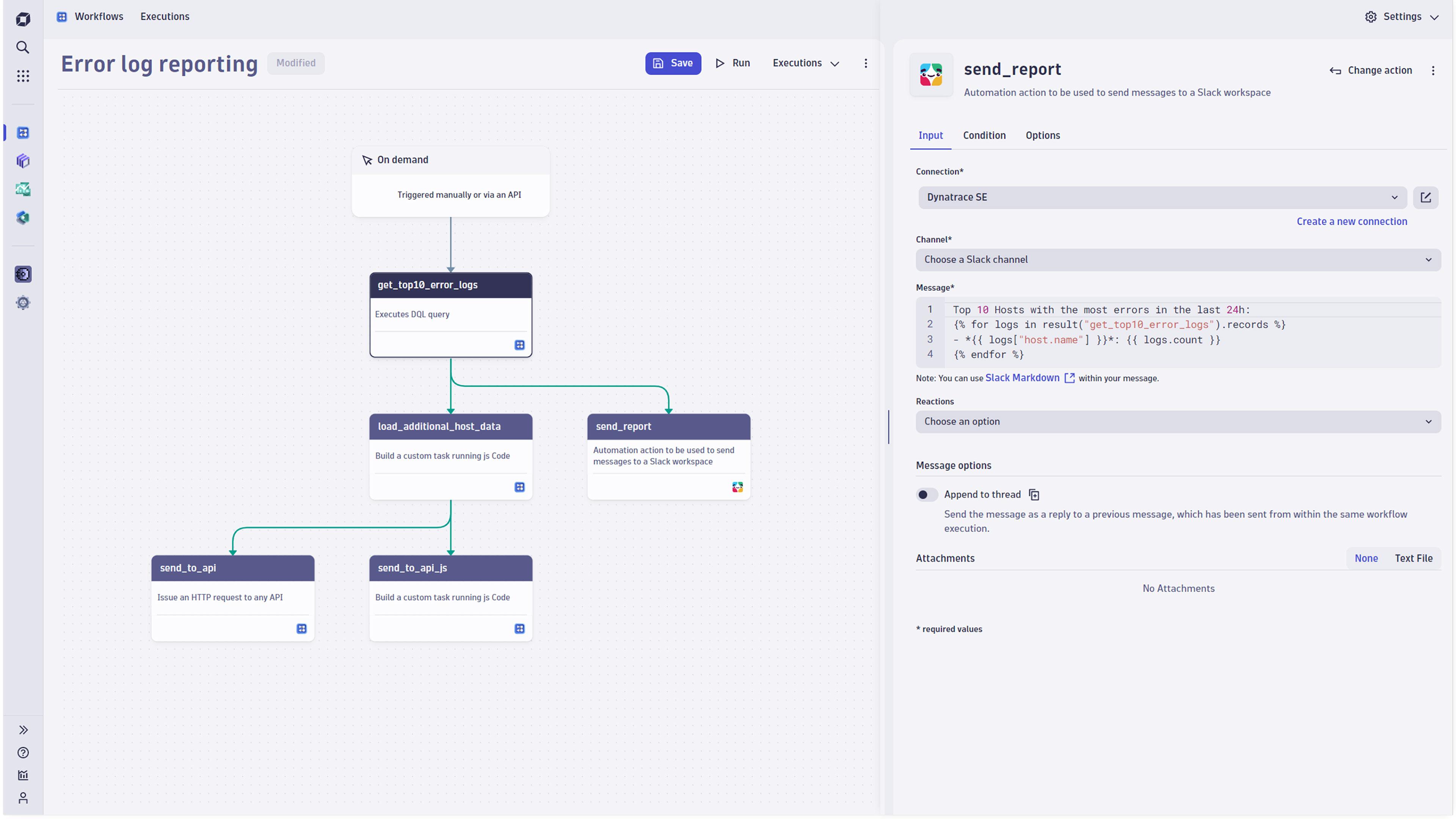
- Product information
- Release notes
Overview
Workflows is one of the built-in apps shipped with Dynatrace. Users can assemble a series of actions to build processes in a graphical representation. Those workflows can be automatically triggered by Dynatrace events, either on a schedule or manually.
This is intended for users who:
- Want to act on the data gathered and the answers provided by Dynatrace automatically.
- Want to orchestrate processes and connect various applications.
- Design and implement IT processes.
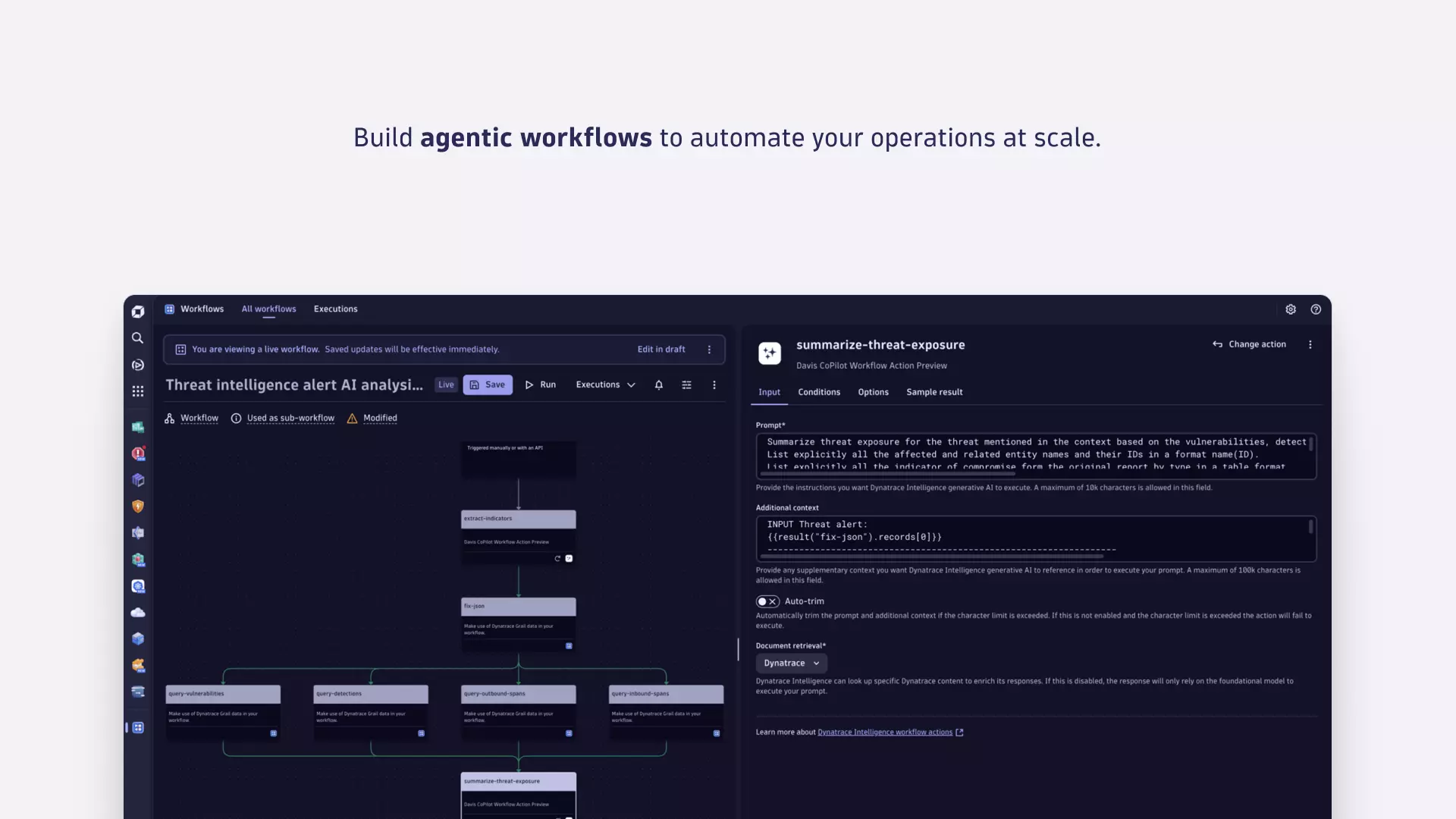
New: You can also use the Workflows app to create agentic workflows.
Use cases
Workflows allows you to:
- Create agentic workflows
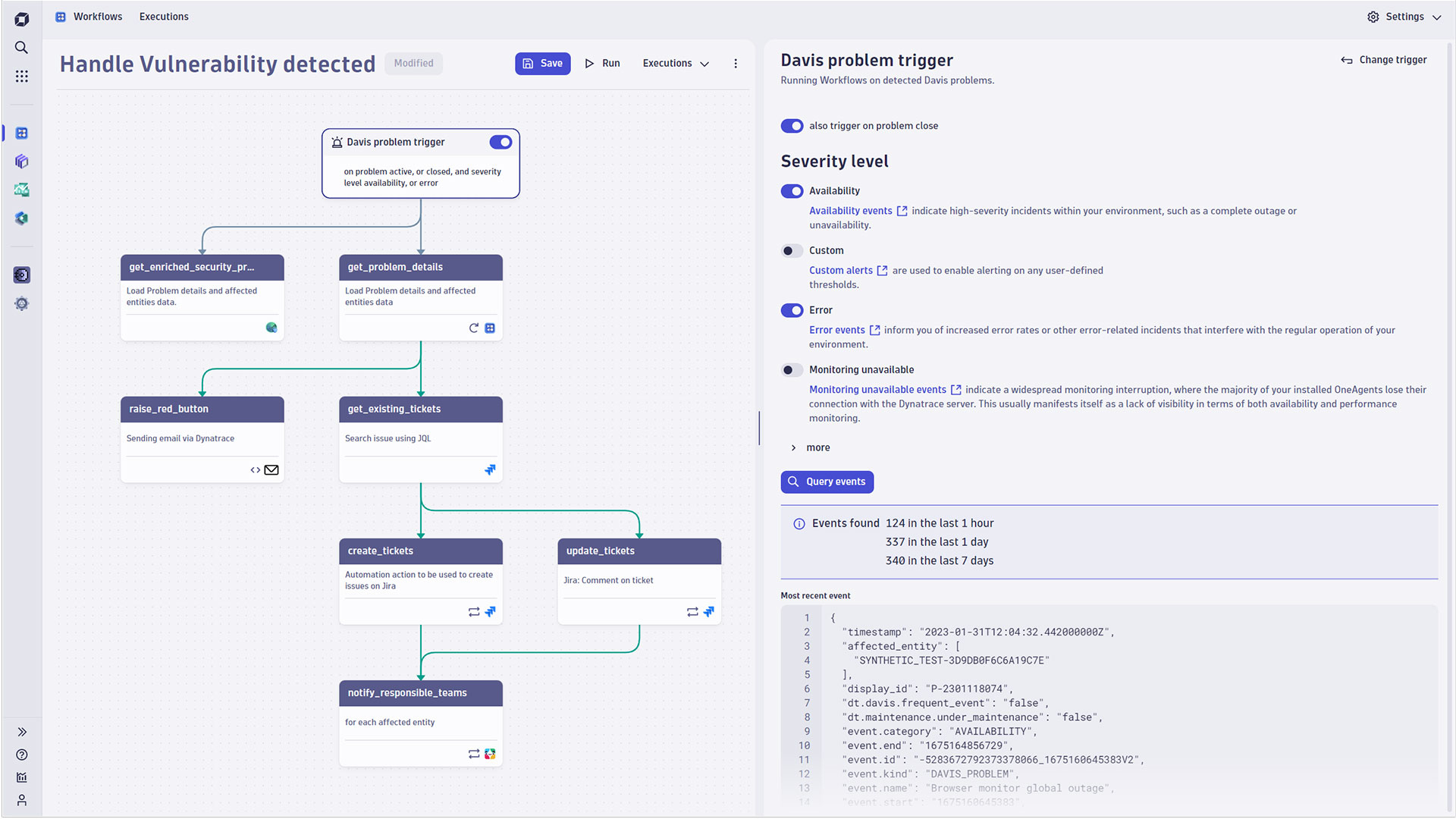
- Automatically react to Dynatrace Intelligence events or security problems.
- Schedule reports in line with holidays and work hours.
- Orchestrate IT processes across your entire IT landscape.
- Connect to both cloud and locally-gated services.
- Combine out-of-the-box integrations with custom code.
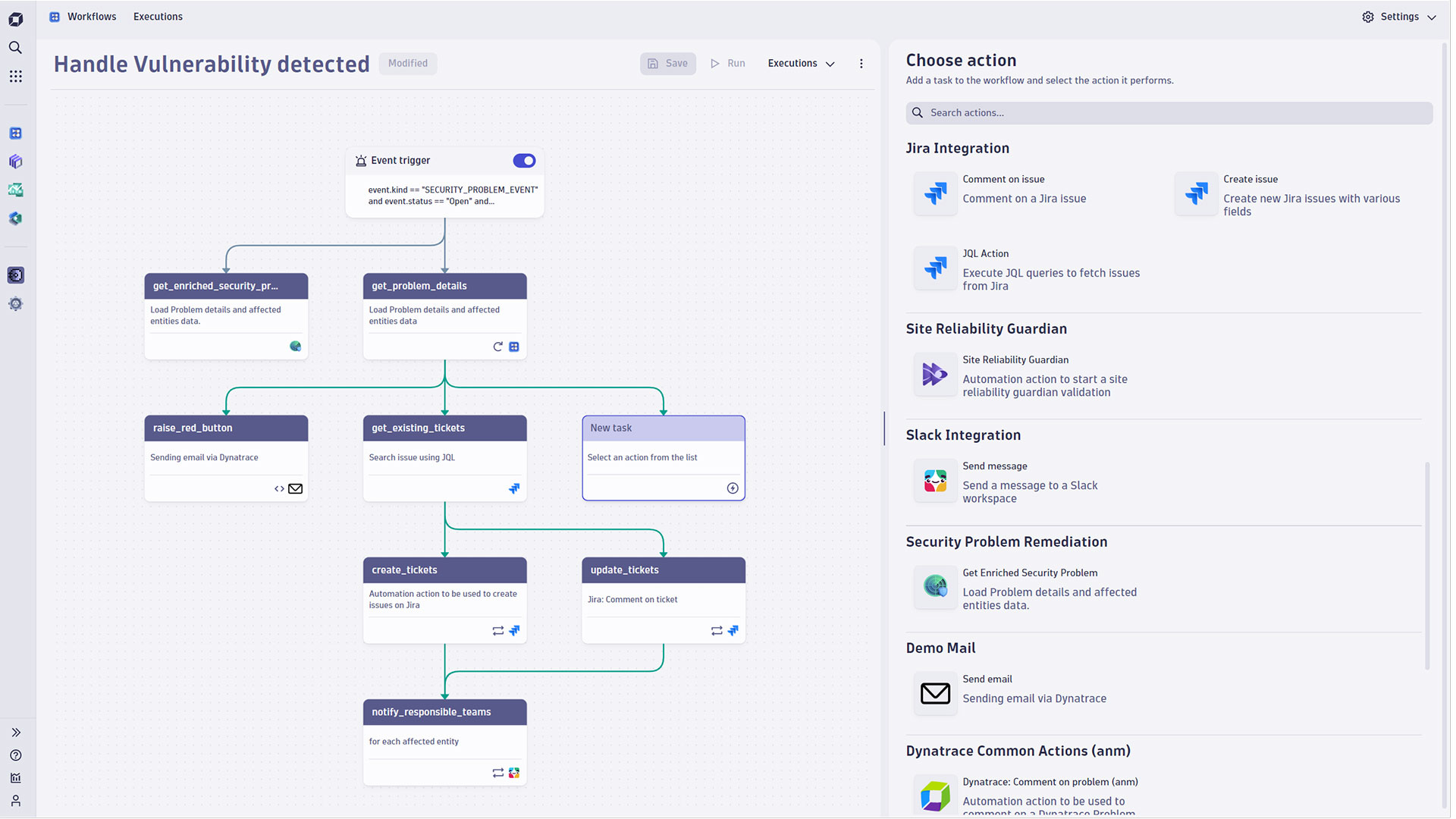
- Visualize automated processes in a graphical workflow interface.
- Get live monitoring and a full audit trail for all automation executions.
- Define flow logic with custom conditions, automatic retries, loops, and parallel processing.
Get started
The Workflows app comes preinstalled with all Dynatrace SaaS environments. Launching the app will provide you with an overview of your existing workflows and options to create new ones from scratch or using templates.
Either way will land you in the workflow editor. Feel free to change the workflow title at the top (Untitled Workflow).
We suggest sticking with the on-demand trigger to start and add a JavaScript action for the first task. It already includes sample code that retrieves your user information and logs it.
The first time you press the Run button, you'll be prompted to authorize the automation service to run functions on your behalf. Permissions can be limited in the settings.
The execution monitor opens, presenting you with a live view of the running workflow execution.
Congratulations, you successfully ran your very first workflow!
Details
In our daily work, we touch many applications. Connecting these systems allows you to automate your processes and break up silos. Orchestrate the old, the new, on-premises, and in the cloud.
Graphical workflows - Compile and configure your workflows in an intuitive graphical user interface, drag-and-drop tasks, and draw dependencies. A list of out-of-the-box actions for everyday tasks like sending notifications or creating tickets gets you going quickly. At the same time, custom scripts allow you to handle any eventuality and meet individual requirements.
Event triggers - Run workflows whenever Dynatrace Intelligence identifies problems, notify on-call operators, and create tickets for the appropriate teams. Extend disks in your cloud environment when the storage for your services runs out of space, or roll back a feature flag when error rates increase. Event triggers allow you to run workflows in response to any kind of event in Dynatrace.
Schedules - Need to poll an API every few minutes or send a report on Monday morning, but only on working days? Timezone-aware schedules, combined with dynamic recurrence rules, are designed to accommodate the complexities of globally operating enterprises.
Live monitoring and audit ready - Who, what, when, where, and why. See what’s happening, while it’s happening. Get a full audit trail of each task and every third-party system interaction. No magic, complete transparency!
Connecting cloud and on-premises applications - Deploy the optional EdgeConnect in your data center or cloud infrastructure. This allows Workflows to span across your cloud and on-premises applications.
Related to Workflows

Agentic Workflows
Build agentic workflows to automate, orchestrate and govern operations at scale.

Dynatrace Intelligence for Workflows
Automate smarter with intelligent detection, forecasting, and custom analysis.

Jira
Open, update, and close Jira tickets automatically from Dynatrace Workflows.

Notebooks
Create powerful, data-driven documents for custom analytics and collaboration.

Slack
Automate Slack messaging for security incidents, attacks, remediation, and more.

Snowflake for Workflows
Access, query, and store Snowflake data to analyze further within Dynatrace.
Full version history
ReleaseDate
Full version history
- Request Approval action markdown support - The message field in Request Approval actions now supports markdown formatting, matching the capabilities of the Send Email action.
- Create a workflow from a template results in a draft - Workflows created via the template wizard now consistently start as a draft, matching the intended creation flow.
Full version history
Fixes and improvement:
- Import workflow template with connection filter metadata
Full version history
- Run JavaScript action SDK version selection - Run JavaScript actions now support selecting the major version of the Dynatrace SDK. New tasks default to the current major version and can be upgraded or rolled back at any time.
- Request Approval action Markdown in messages - The message field in Request Approval actions now supports markdown formatting, matching the capabilities of the Send Email action.
- Scheduling Rules and Calendars managed in Settings app - From now on, Scheduling Rules and Calendars are managed in the Settings app and can be found in the General > Automation section.
Full version history
- Problem event trigger severity filter - Problem triggers can now be filtered by minimum severity. Workflows trigger only for problems at or above the configured severity level (Critical, Major, or Minor), reducing noise from low-priority problems.
- Improved list navigation experience - Page index and page size are now preserved in the URL for workflows, executions, rules, and calendars. Navigating away and back returns you to the same page and page size.
Full version history
- Problem event trigger severity filter - Problem triggers can now be filtered by minimum severity. Workflows trigger only for problems at or above the configured severity level (Critical, Major, or Minor), reducing noise from low-priority problems.
- Improved list navigation experience - Page index and page size are now preserved in the URL for workflows, executions, rules, and calendars. Navigating away and back returns you to the same page and page size.
Full version history
Fix:
- Allow "query past events" feature for users with conditional workflows:write permission
Full version history
- Expression parity for simple workflows - Simple workflows now support the same expressions as standard workflows, including
now(),timedelta(), andproblem_link(). - Simplified default filter behavior - The default expression filter to safeguard property access in expression sets the default value, no matter where an access error occurs in the property hierarchy, now. Before, it only covered the right-most property access in the expression. For example, {{ result("task_1")["foo"][0]["bar"] | default("n/a") }} before only safeguarded the access to ["bar"], now it safeguards the full access hierarchy ["foo"][0]["bar"].
Full version history
- Davis® problem trigger renaming - Due to a brand update, the "Davis® problem trigger" was renamed to "Problem trigger" and refers to problems inferred by Dynatrace Intelligence.
- Better link support in guide editor - The guide editor automatically converts platform URLs from the same environment into relative URLs when pasting them into a markdown link in a guide. This eases the editing of workflow template guides.
Full version history
- various improvements and bugfixes
Full version history
Fixes:
- Create workflow from template by id intent wizard cannot be closed
- Toast error for approval setting widget
Full version history
- Relate workflow execution system events for event triggers to triggering events - The workflow execution system events for event-triggered executions now include a property with the timestamp of the triggering event for easier correlation. See the semantic dictionary for details.
Full version history
- Davis® problem trigger after initial root cause analysis - Any new workflow triggered by a Davis® AI problem trigger created in the Workflows app will trigger only after completion of the initial root cause analysis completed by Davis® AI. Previously created workflows, or those that don't specify the behavior, remain unchanged (triggered independently of root cause analysis). Feel free to adjust the behavior on your workflow as required.
Full version history
- Davis® problem trigger after initial root cause analysis - Any new workflow triggered by a Davis® AI problem trigger created in the Workflows app will trigger only after completion of the initial root cause analysis completed by Davis® AI. Previously created workflows, or those that don't specify the behavior, remain unchanged (triggered independently of root cause analysis). Feel free to adjust the behavior on your workflow as required.
Full version history
- Davis® AI event trigger behavior during maintenance window - Configure workflows trigger behavior for Davis® AI events during maintenance window. Workflows can be triggered always (default), only during, or only outside of maintenance windows.
- Expression filter to create markdown tables from DQL query results - If you want to include a DQL query result, for example, in a send email task, the "md_table" filter renders a markdown table of the result. Feel free to use the filter on any nested array. Refer to the workflow automation expression reference in the documentation for details.
- Expression to render a link to a Davis® AI problem - The "problem_link()" expression renders a link to the Problems app for any workflow triggered by a Davis® AI problem.
- View execution intent supports simple workflows - The view execution intent now supports any type (simple and standard) of workflows. Use the intent in your app to open an arbitrary execution in the Workflows app.
Full version history
fix importing workflow template with existent workflow id
Full version history
- Request approval action - Request manual user approvals before a workflow runs sensitive tasks. Send approval requests as emails to selected users and groups. By default, anyone with access to the Workflows app may answer approval requests. If necessary, you can restrict it to users with permission to run the workflow. Detailed approval status information is accessible in the workflow monitor.
- Deeplink support in workflow editor and execution monitor - Share the link to your current view with anyone. The URL now includes the selection of the trigger, tasks, workflow options, as well as the selected tab in the details section.
Full version history
- Request approval action - Request manual user approvals before a workflow runs sensitive tasks. Send approval requests as emails to selected users and groups. By default, anyone with access to the Workflows app may answer approval requests. If necessary, you can restrict it to users with permission to run the workflow. Detailed approval status information is accessible in the workflow monitor.
- Deeplink support in workflow editor and execution monitor - Share the link to your current view with anyone. The URL now includes the selection of the trigger, tasks, workflow options, as well as the selected tab in the details section.
Full version history
- Request approval action - Request manual user approvals before a workflow runs sensitive tasks. Send approval requests as emails to selected users and groups. By default, anyone with access to the Workflows app may answer approval requests. If necessary, you can restrict it to users with permission to run the workflow. Detailed approval status information is accessible in the workflow monitor.
- Deeplink support in workflow editor and execution monitor - Share the link to your current view with anyone. The URL now includes the selection of the trigger, tasks, workflow options, as well as the selected tab in the details section.
Full version history
- various improvements and bugfixes
Full version history
- Event trigger DQL matcher char limit increased - Event trigger DQL matcher expression increased its character limit to 1000 (was 800 before). The increase of the limit allows for even more expressive event trigger configurations.
- Task sample result size restricted to 10,000 chars - Sample results serve to validate expression at definition time. Loading sample results from past executions might retrieve sizable results and unnecessarily bloat the workflow definition. The Workflow app now implies a limit of 10,000 characters for a task sample result and hints at the current size of your sample result, so you can easily strip redundant parts to fit the limit.
- HTTP request action retries failed vault access requests - Using a credential from the vault to issue an HTTP request sometimes exceeded request timeouts and thus failed the action. The HTTP request action now implicitly retries vault access requests, so it's very unlikely the action fails due to failing the credential in time.
Full version history
- Event trigger DQL matcher char limit increased - Event trigger DQL matcher expression increased its character limit to 1000 (was 800 before). The increase of the limit allows for even more expressive event trigger configurations.
- Task sample result size restricted to 10,000 chars - Sample results serve to validate expression at definition time. Loading sample results from past executions might retrieve sizable results and unnecessarily bloat the workflow definition. The Workflow app now implies a limit of 10,000 characters for a task sample result and hints at the current size of your sample result, so you can easily strip redundant parts to fit the limit.
- HTTP request action retries failed vault access requests - Using a credential from the vault to issue an HTTP request sometimes exceeded request timeouts and thus failed the action. The HTTP request action now implicitly retries vault access requests, so it's very unlikely the action fails due to failing the credential in time.
Full version history
- Event trigger DQL matcher char limit increased - Event trigger DQL matcher expression increased its character limit to 1000 (was 800 before). The increase of the limit allows for even more expressive event trigger configurations.
- Task sample result size restricted to 10,000 chars - Sample results serve to validate expression at definition time. Loading sample results from past executions might retrieve sizable results and unnecessarily bloat the workflow definition. The Workflow app now implies a limit of 10,000 characters for a task sample result and hints at the current size of your sample result, so you can easily strip redundant parts to fit the limit.
- HTTP request action retries failed vault access requests - Using a credential from the vault to issue an HTTP request sometimes exceeded request timeouts and thus failed the action. The HTTP request action now implicitly retries vault access requests, so it's very unlikely the action fails due to failing the credential in time.
Full version history
- Event trigger DQL matcher char limit increased - Event trigger DQL matcher expression increased its character limit to 1000 (was 800 before). The increase of the limit allows for even more expressive event trigger configurations.
- Task sample result size restricted to 10,000 chars - Sample results serve to validate expression at definition time. Loading sample results from past executions might retrieve sizable results and unnecessarily bloat the workflow definition. The Workflow app now implies a limit of 10,000 characters for a task sample result and hints at the current size of your sample result, so you can easily strip redundant parts to fit the limit.
- HTTP request action retries failed vault access requests - Using a credential from the vault to issue an HTTP request sometimes exceeded request timeouts and thus failed the action. The HTTP request action now implicitly retries vault access requests, so it's very unlikely the action fails due to failing the credential in time.
Full version history
- Event trigger DQL matcher char limit increased - Event trigger DQL matcher expression increased its character limit to 1000 (was 800 before). The increase of the limit allows for even more expressive event trigger configurations.
- Task sample result size restricted to 10,000 chars - Sample results serve to validate expression at definition time. Loading sample results from past executions might retrieve sizable results and unnecessarily bloat the workflow definition. The Workflow app now implies a limit of 10,000 characters for a task sample result and hints at the current size of your sample result, so you can easily strip redundant parts to fit the limit.
- HTTP request action retries failed vault access requests - Using a credential from the vault to issue an HTTP request sometimes exceeded request timeouts and thus failed the action. The HTTP request action now implicitly retries vault access requests, so it's very unlikely the action fails due to failing the credential in time.
Full version history
- various improvements and bugfixes
Full version history
- various improvements and bugfixes
Full version history
- various improvements and bugfixes
Full version history
- Notifications for workflows - Receive notifications when a workflow is updated, deleted, starts to fail, or hits the hourly execution limit. Anyone can register themselves with the bell button in the workflow editor.
- Event trigger - query past events - For a workflow with an event trigger to actually trigger, the actor requires access to the events. To better support the authoring of an event trigger, the query past events happens in the context of the workflow actor now. Thus, this is only possible for workflows where the actor is either a service user the current user is allowed to use, or the current user herself.
- Execute DQL Query action - timezone support - The execute DQL Query action allows you to select a timezone for the query evaluation now. So far, all queries by this action have occurred in UTC, which remains the default.
Full version history
- various improvements and bugfixes
Full version history
- Event trigger support for security.events - Workflows event triggers now support the "security.events" type. This allows workflows to be triggered on events generated by Dynatrace Application Security.
- Workflow execution filter excludes simple workflows - The workflow execution filter no longer includes workflows of type simple, as one restriction of simple workflows is that there is no execution history, but workflow execution system events only.
- HTTP request action logs headers on task failure - The HTTP request action now includes the response HTTP headers to increase the debugability of HTTP requests with error codes that cause the task to error out.
Full version history
- various improvements and bugfixes
Full version history
- Root workflow context on all execution system events - From now on, the task and action execution events carry the attributes for root workflow and execution ID (not only the workflow execution event) for easier querying of related execution events.
- Workflow execution system events indicate state flip - The workflow execution events now indicate if the execution state flipped compared to the preceding execution (last_execution_state_flip). For example, if a workflow execution is completed in state error and the previous was successful, the attribute will be true.
Full version history
- Environment alias support for expressions—The environment expression now features an environment alias property, and the URL considers any defined alias. Similar links in the execution() expression will also respect the alias.
- Workflow execution limit hit events - The AutomationEngine produces a system event each time a workflow reaches its execution limit.
Full version history
- Workflow drafts- This release greatly improves workflow editing. Every new workflow or workflow change is created as a draft first, allowing for safe changes to existing and new workflows without cost impact. Workflow drafts don't trigger automatically but can be run manually. To apply draft changes to a live workflow, you deploy the changes and thus create a new version of the live workflow.
- to_datetime target timezone - The to_datetime expression filter now supports an optional parameter of a target timezone. If the provided string reassembles a date without timezone information, UTC is assumed.
Full version history
various improvements and bugfixes
Full version history
various improvements and bugfixes
Full version history
- Run JavaScript action - workflow execution context - The run JavaScript action gives you direct access to workflow execution context information via the global dtRuntime.callerServiceMetadata object now.
- Action execution system events for simple workflows - Simple workflow executions now also produce action execution events, which eases the analysis of action execution events of all types of workflows.
- Workflow lifecycle events include user information - The workflow lifecycle events now also include the user to associate the lifecycle event to the user who triggered it.
Full version history
Create workflow intent support for workflow id and isPrivate - The intent to create a workflow allows you to define the workflow id. This can be helpful in case you would like to drive your users towards a single workflow for your use case within a tenant. Additionally, you can also control access to the workflow with the isPrivate parameter. Workflow expressions - namespace() support - The expressions you use to configure workflow inputs, task options, or conditions, support the namespace() function again. namespace() has its application in the context of for loops.
Full version history
Create workflow intent support for workflow id and isPrivate - The intent to create a workflow allows you to define the workflow id. This can be helpful in case you would like to drive your users towards a single workflow for your use case within a tenant. Additionally, you can also control access to the workflow with the isPrivate parameter.
Workflow expressions - namespace() support - The expressions you use to configure workflow inputs, task options, or conditions, support the namespace() function again. namespace() has its application in the context of for loops.
Full version history
- Run workflow action - This release ships a new action that allows you to run another workflow from a task in a workflow. Combined with the recently added workflow default input and result, you can provide input to the "sub" workflow and retrieve its result. This functionality allows you to modularize workflows and reuse built workflows as part of other workflows.
- Workflow input limit - The workflow input was limited to 6MB. This is valid for the input you provide via API or task input on the run workflow action and the resulting input at runtime (merge of default and provided input).
Full version history
- Workflow monitor: provided input - A workflow allows definition of a default input, and you can provide input on run via API request. The execution merges default and provided input to the final workflow execution input. While the workflow execution input was already visible in the workflow execution details, the provided input is now available on the trigger.
- HTTP request action: explicit timeout - The HTTP request action so far was terminated when a request exceeded the runtime of the Dynatrace runtime (120s). The HTTP request action now has an explicit timeout of 115s and will show an error message.
Full version history
- Workflow monitor: provided input - A workflow allows definition of a default input, and you can provide input on run via API request. The execution merges default and provided input to the final workflow execution input. While the workflow execution input was already visible in the workflow execution details, the provided input is now available on the trigger.
- HTTP request action: explicit timeout - The HTTP request action so far was terminated when a request exceeded the runtime of the Dynatrace runtime (120s). The HTTP request action now has an explicit timeout of 115s and will show an error message.
Full version history
- Default task timeout 60 mins - The default task timeout has been changed to 60 minutes (was 15 minutes before). This affects any task that hasn't been given a custom timeout.
- Workflow execution limit - You can define a limit of workflow executions per hour in the workflow options. The default limit is 1000 executions per hour. Once executions reach the limit, further ones are muted until the end of the timeframe. Manually triggered executions from the Workflows app are exempt from this limit.
- Workflow monitor status banner - The workflow monitor now has a workflow execution status banner that shows the current state of the workflow execution, including start and runtime. The workflow execution details have moved from the trigger node to a dedicated detail panel and are available from the "show details" button in the status banner. The details include general information, input, params, and results of the workflow execution.
Full version history
- Default task timeout 60 mins - The default task timeout has been changed to 60 minutes (was 15 minutes before). This affects any task that hasn't been given a custom timeout.
- Workflow execution limit - You can define a limit of workflow executions per hour in the workflow options. The default limit is 1000 executions per hour. Once executions reach the limit, further ones are muted until the end of the timeframe. Manually triggered executions from the Workflows app are exempt from this limit.
- Workflow monitor status banner - The workflow monitor now has a workflow execution status banner that shows the current state of the workflow execution, including start and runtime. The workflow execution details have moved from the trigger node to a dedicated detail panel and are available from the "show details" button in the status banner. The details include general information, input, params, and results of the workflow execution.
Full version history
- Action result size - The AutomationEngine now supports action execution result sizes up to 6 MB (minus the action log, which is truncated at 1 MB). Please note that actions themselves might impose a lower limit.
Full version history
- Action result size - The AutomationEngine now supports action execution result sizes up to 6 MB (minus the action log, which is truncated at 1 MB). Please note that actions themselves might impose a lower limit.
Full version history
- Scheduling recurrence rule support for arbitrary index - Scheduling recurrence rules support selection of any arbitrary index for any applicable advanced option. (e.g. 5 for fifth, or -5 for fifth to last).
- Workflow input - You may define a default input as JSON for any workflow. The default input is merged with input provided when running a workflow execution (e.g. via Workflows app or API). Workflow execution input is available via the input() expression.
- Workflow result - A workflow can return a result now. The result can be compiled from e.g. selected task result properties using expressions. The evaluated result must be a valid JSON object. Evaluation failure of the workflow result makes the workflow fail.
Full version history
- Workflow monitor and editor: bigger task nodes - The workflow editor and monitor task nodes grew slightly to offer more space for task names.
- Create workflow intent: simple workflow support - The create workflow intent supports the type property to define if the created workflow is of type simple or not.
Full version history
- Workflow monitor and editor: bigger task nodes - The workflow editor and monitor task nodes grew slightly to offer more space for task names.
- Create workflow intent: simple workflow support - The create workflow intent supports the type property to define if the created workflow is of type simple or not.
Full version history
- Frequently used actions - In the workflow editor, you can select an action from the most frequently used workflow actions by all users in the current tenant. Browsing available actions is presented by apps, and you can expand any app of interest to take a closer look at the actions available.
- Intent to automate a DQL query - The intent to automate a DQL query also supports the definition of a segment as available in the Run DQL action widget.
Full version history
- The Simple Workflows Feature is now available - Users can now create zero-rated simple workflows, with a reduced feature set.
- The log Viewer was improved - The log viewer now has better support for very large log outputs
Full version history
No release notes
Full version history
- event trigger for system events - The event trigger for workflows now supports dt.system.events. However, beware of the restriction that only system events featuring the
dt. open pipeline.pipelinesproperty will trigger a workflow. - intent to view execution - For app developers, Workflows supports a new intent to open the monitor and view an execution.
Full version history
- event trigger for system events - The event trigger for workflows now supports dt.system.events. However, beware of the restriction that only system events featuring the
dt. open pipeline.pipelinesproperty will trigger a workflow. - intent to view execution - For app developers, Workflows supports a new intent to open the monitor and view an execution.
Full version history
- Workflow editor requires permission to use system users - From now on, in order to use a service user as an actor for a workflow, the person editing the workflow requires the iam:service-users:use permission. This is valid for editing existing workflows and creating new ones using a service user as an actor. Any workflow already having a service user assigned will continue to run.
- connection() expression - The connection() expression resolves a connection by settings schema ID and connection name for all actions supporting the latest version of the connection picker featuring expression mode.
Full version history
- Workflow editor requires permission to use system users - From now on, in order to use a service user as an actor for a workflow, the person editing the workflow requires the iam:service-users:use permission. This is valid for editing existing workflows and creating new ones using a service user as an actor. Any workflow already having a service user assigned will continue to run.
- connection() expression - The connection() expression resolves a connection by settings schema ID and connection name for all actions supporting the latest version of the connection picker featuring expression mode.
Full version history
fix app crashing when the schedule definition has the faulty filterParameters
Full version history
- ternary() expression filter - The ternary() filter returns custom values depending on a given boolean.
Full version history
Fixed timezone-related issue that could make the calendar page unusable
Full version history
Revert execution log changes.
Full version history
Fix execution monitor log formatting.
Full version history
Fixed a case where calendar schedules could show incorrect dates
Full version history
Fixed a case where scheduling rule details could crash
Full version history
Fixed a case where scheduling rule details could crash
Full version history
- more expression filters — The filters available to apply in workflow expressions were extended by bool, to_datetime, regex_search, regex_findall, regex_replace, validate_regex, and format_number. For details, please see the expression reference.
Full version history
- New task option: wait before—The wait before task option defines a waiting time in seconds before a task starts. You can also use expressions to define the wait time. The task timeout starts when the task goes into the running state, meaning after any wait before configuration.
- New expression: timedelta()—This expression allows you to provide a timedelta for calculations with timestamps (add or substract a timedelta from a timestamp by the now() expression).
Full version history
- Workflow version in monitor - The Workflows monitor now includes the workflow version number. This allows for easier execution failure analysis.
Full version history
- environment expression - The new environment() expression provides access to environment id and url. Also the execution expression now includes a link to the workflow monitor and editor. For details please check the expression reference.
Full version history
fix dev-helper crashes when widget live reloads
Full version history
- various improvements and bugfixes
Full version history
- Scheduling rules and calendar versions - View historical versions of scheduling rules and calendars.
- Additional filters for workflow expressions - The filters for workflow expressions were extended to support JSON, YAML, and list-to-object conversions, as well as base64 decoding and encoding.
Full version history
- Scheduling rules and calendar versions - Compare different versions of scheduling rules and calendars.
Full version history
Problem whereby platform requests were broken inside dev-helper should be fixed.
Full version history
Test release
Full version history
- Workflow versions - Access historic workflow versions in Workflows editor to review, restore, export, or create a copy from.
- Authorization settings -
app-settings:objects:readis now highlighted as primary permission, as it is mandatory for any Workflow action referencing a connection (all actions connecting to a third party system).
Full version history
- Workflow versions - Compare view now supports showing the diff as JSON or YAML for improved readability.
Full version history
- Workflow versions - The AutomationEngine preserves the last 50 versions of your workflows. You can find the version history of a workflow from the edit view. Compare historical versions to analyze changes. Export versions as workflow or template, create a copy, or restore them.
- Bugfix: Stop cursor from randomly re-positioning in expanded task inputs - In expanded input fields of actions it could occure that the cursor position was randomly updated, making editing impossible.
Full version history
- Bugfix: Stop cursor from randomly re-positioning in expanded task inputs - In expanded input fields of actions it could occure that the cursor position was randomly updated, making editing impossible.
Full version history
- various improvements and bugfixes
Full version history
Bugfix: Workflow list context menu actions - Context menu actions on the workflow list acknowledge workflow admin mode once again.
Full version history
- Bugfix: Workflow list context menu actions - Context menu actions on the workflow list acknowledge workflow admin mode once again.
Full version history
- HTTP request action - failure configuration - The HTTP request action can be configured to fail on specific response codes. HTTP response codes to fail the action can be defined individually (for example, 500,503) and in ranges (for example, 400-404).
- Davis event and problem trigger - multiple values per key - The affected entities tag filter criteria for Davis event and problem triggers now support multiple values for the same key. Just add the same tag multiple times and provide the value you want to filter for.
- Event trigger throttle limit and trigger deactivation - The AutomationEngine applies a limit of 1000/h executions due to an event trigger. Once the limit is hit, the trigger is not processed for the rest of the hour. This information was not been exposed in the Workflows app for the user so far. Now, workflows that have reached a trigger limit will be indicated in the workflows list and card view, and you can filter for them. In the editor view a workflow will show details about the limit being reached and executions being suppressed for up to an hour. An event trigger reaching the limit three times within seven days will be automatically deactivated.
Full version history
No release notes
Full version history
No release notes
Full version history
No release notes
Full version history
- Various bugfixes
Full version history
- DQL action always returns result, never a request token - So far, the DQL action either returned the actual query result or a request token in case the query took longer. The AutomationEngine now supports stateful actions. These are re-triggered and allow context between executions till the action reaches a final state unless the task timeout is hit. For workflow users, this means that the DQL action will always return the query result unless the task timeout is hit.
Full version history
- Documentation and link to samples - Access documentation, expression reference, and workflow samples directly from the help button in the upper right corner of the app.
- Execution features actor information - The actor information is now available for each execution. The information is displayed on the details tab of the trigger.
- Create workflow from workflow template intent - The recently added feature to create a workflow from a workflow template is also available as an intent of Workflows. For details, please see the Dynatrace Developer portal.
Full version history
- Export/import workflow templates - Workflows now supports workflow templates as an additional export format. Workflow templates are smoothly transportable between environments. On import of a workflow template, a wizard guides users to verify all required apps are available in their environment and select connections as needed for actions used in workflow tasks.
Full version history
No release notes
Full version history
- Immediate effect of authorization settings - Changing authorization settings takes effect on save and will affect all subsequent task executions.
- Expandable inputs for task loop list, custom condition, and HTTP request action inputs - The inputs allowing expressions, for example, task loop list option, custom conditions, and the HTTP request action inputs, are expandable now, so there is more space for expression editing.
- Bugfix: Exported workflows contain invalid parameters - Fixed the problem when an exported workflow couldn't be imported due to invalid parameters.
- Bugfix: Support communication for deprecated widget autosuggestions - Fixed the communication problem between the app and widgets.
Full version history
- Group ownership - To better support collaboration on workflows, you can now select either a user or a group as the owner. Thus a private workflow with a group owner is accessible to all group members. Of course, any group member must have read/write/execute permissions to gain access as desired.
- Authorization settings guidance - A workflow always runs in the user context of the actor. By default, the actor is the user who creates the workflow. To define which permission the AutomationEngine is allowed to leverage to run a workflow in your name, the authorization settings come into play. Suppose a workflow task fails with 403; your user is the defined workflow actor. In that case, this is either caused by your user lacking permission or you missing the grant to the AutomationEngine in the authorization settings. The authorization settings now provide feedback when you grant permission you don't possess as a user. While you can still authorize the AutomationEngine with such permission, the execution will still fail. Permission and authorization are obligatory to make it work successfully.
- Keyboard navigation support - To increase a11y compliance and as a convenience feature, workflow, and execution tasks can now be tabbed through and selected via keyboard interaction.
- Bugfix: Ensure compatibility with future AppEngine API versions - Upcoming versions of AppEngine API will reject requests using trailing /
- Bugfix: Exported workflows contain invalid parameters - Fixed the problem when an exported workflow couldn't be imported due to invalid parameters.
Full version history
Bugfix: Exported workflows contain invalid parameters - Fixed the problem when an exported workflow couldn't be imported due to invalid parameters.
Full version history
- a11y improvements - Various a11y improvements.
Full version history
- Upload workflow - You can create a new or update an existing workflow by uploading a workflow you obtained as JSON file.
Full version history
- Expression auto-completion - The expression auto-completion is now context-aware and helps to enter a syntactically correct expression. It will suggest block expressions only where applicable. Suggestions for result expressions include the entire object structure. Suggestions include helpful filters available for expressions as well.
- Admin mode - Users with permission automation:workflows:admin can activate admin mode. In admin mode, no restrictions on private workflows apply. Manage and edit any workflow as required.
The admin permission also allows one to create or update workflows without interfering with actor and owner configurations.
- Download workflow - You can download any workflow you can access as JSON file.
Full version history
No release notes
Full version history
- Bugfix: URL in http request action is not applied on copy/paste - The URL parameter of the run http request action is updated after a paste of a value by the user
Full version history
- Bugfix: Execute DQL Query action does not respect limit command - The Execute DQL Query action honors the limit specified by a user.
Full version history
- Bug fix - disable page layout responsiveness - Removed breakpoint at which page layout will render the workflow editor view unusable by the overlapping details panel.
Full version history
- Bugfix: "Execute DQL Query" action does not respect limit command - The "Execute DQL Query" action honors the limit specified by a user.
Full version history
- Adopt AutomationServer API - Replace AutomationServer API v0.2 by v1
Full version history
- Bug fixes - App is crashed after saving invalid workflow; Saving authorization settings fails because of too many permissions.
Full version history
- Execution List Fix - This release fixes the issue when viewing Execution List after a workflow is deleted.
Full version history
- Workflow editor and monitor UI updates - Further user interface updates to the editor and monitor, with a streamlined styling of the content and side panel appearance.
- Overhauled workflows and executions list appearance - The workflows and executions list got a style update, more clearly separating individual lines and columns.
- Event trigger - manual run event context sample - A manual run of a workflow with an event trigger will contain event property always, even if the app can not retrieve a sample event.
- Intent to search and open workflow - The Workflows app supports two new intents. The search-workflows intent opens the workflows list with a given search term, and the open-workflow opens the editor for the given workflow identified by its ID.
- Auto completion support for event properties - While editing workflows with event triggers, the auto-completion for expressions in task inputs will allow you to select from all properties of the selected event.
- Bug: business schedule breaks schedule configuration - Fixes a bug where the usage of business calendar configuration disallows the creation or update of a scheduling rule.
- Signed by new certificate - The app is secured with latest app-signing certificate.
Full version history
- Re-release signed by new certificate - No functional changes.
Full version history
- Schedule trigger forms - We reworked the schedule trigger forms to make the editing more intuitive.
- Workflows owner filter - The list of available workflows allows you to filter by owner.
- Executions trigger type filter - The list of executions allows you to filter by trigger type (manual, schedule, or event)
- Workflow editor UI update - The workflow editor got a significant styling update. The task nodes have a more ergonomic styling. The tasks and the details panel show the app icon to let you determine the app context of the action.
- Execution monitor UI update - The execution monitor got a significant styling update similar to the workflow editor. Tasks in the monitor now show their description too. The task details provide access to the execution ID.
- HTTP action - HTTP headers - The HTTP headers now provide a convenient input to add, edit and remove individual headers.
Full version history
- Bug: failure during verification of action availability - Due to an issue, while verifying the availability of an app for an action, an error view was shown, despite the app being available.
Full version history
- Workflows App - The app and its concepts were renamed from Automations to Workflows . There is no whatsoever impact on the behavior of your workflows, formerly known as automations.
- advanced scheduling rules - Use fixed-, conditional offset-, and grouping rules on top of the already available recurring scheduling rule to configure schedules to solve your advanced scheduling scenario.
- Run DQL action - The new action allows you to run DQL queries without any coding required.
Full version history
- DAVIS event triggers - Additionally to DAVIS problems, DAVIS events can now be used as trigger type for automations.
- search and browse actions - When adding tasks, you can choose which action to select. Search for actions and browse them grouped by app.
- Save is the new publish - We updated the terminology. Publish is replaced by save. Saving an automation will do what it says, and any trigger configuration will take immediate effect.
Full version history
- Intent to create automation - The create automation intent now supports available event trigger types. To learn about the payload, take a look at existing automations and the API requests containing event trigger definitions.
- Unsaved changes warning - You will see a notice if you try to navigate away from an automation where pending changes.
- Readable owner names - The list of automations shows the owner with their name and email address as a tooltip. If a user is not associated with the current tenant anymore, it will say unknown and show the user's UUID.
- Open in new tab - Menu entries allow opening in a new tab using mouse middle click.
- Change private/public access to automation - Changing the availability of an automation from private to public or the other way round was available only on the context menu in the automations list. You can now perform this action from within the automation editor and the automation context menu.
Full version history
- Updated app icon and id - New Icon for the Automations app and change of id to dynatrace.automations