

Bring Your Own Key (BYOK) for AWS is generally available for all Dynatrace SaaS customers running on AWS.
Dynatrace continues to strengthen data security use cases for customers operating in highly regulated industries. Building on the dedicated storage and unique encryption keys per tenant introduced earlier, Dynatrace now allows you to manage your own encryption keys for Dynatrace platform data at rest on AWS. (Data at rest refers to data stored within the Dynatrace platform rather than data moving across networks.) With Bring Your Own Key (BYOK), you hold the key to your data.
Why encryption key management matters: What is Bring Your Own Key (BYOK)?
Organizations in banking, financial services, healthcare, government, and other regulated sectors face increasingly stringent requirements around data protection and sovereignty. Many regulatory frameworks and industry-specific compliance standards require organizations to maintain control over how their data is encrypted and who has access to it.
For many organizations evaluating or adopting SaaS platforms, a critical question is: “Who controls the encryption keys for my data?” When a SaaS provider manages encryption keys, customers must entirely trust the provider’s internal controls. This can be a significant barrier for security-conscious organizations that need to demonstrate to auditors and regulators that they retain ultimate control over access to their data.
Customers transitioning from Dynatrace Managed (self-hosted) to Dynatrace SaaS have historically had control over their encryption and infrastructure, and may have policies in place that makes this control a prerequisite to transitioning to SaaS.
Bring Your Own Key: How does BYOK work on AWS?
With Bring Your Own Key (BYOK), Dynatrace puts encryption key management directly into your hands. You create and manage an encryption key in your own AWS Key Management Service (KMS) account, and Dynatrace uses that key to encrypt and decrypt data stored in the Dynatrace platform — including data stored in Grail, and documents such as Notebooks, Dashboards, and Workflows. While the data is hosted on Dynatrace SaaS infrastructure, you control the encryption.
| Capability | Dynatrace-managed key | Customer-managed key (BYOK) |
| Key ownership | Dynatrace | Customer |
| Key rotation | Dynatrace | Customer/AWS |
| Key revocation | Via Dynatrace | Customer/AWS KMS |
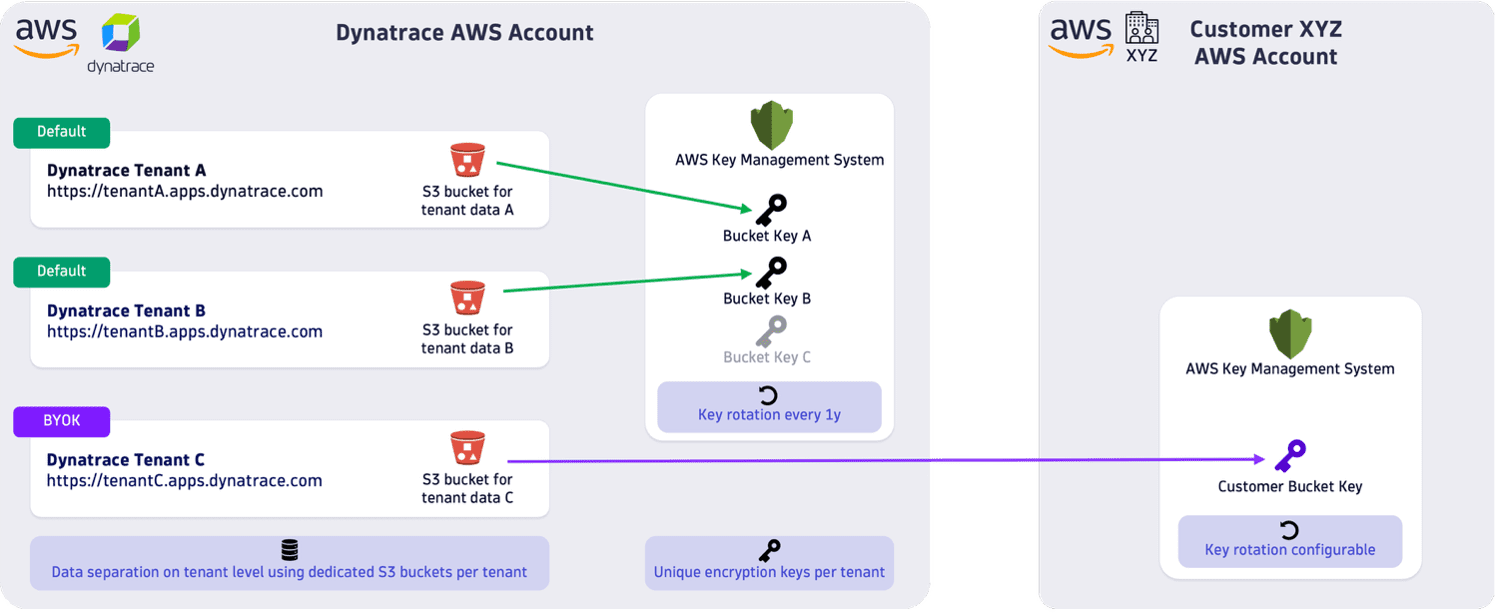
BYOK builds on the foundation of tenant data separation that Dynatrace introduced in 2024. Each Dynatrace SaaS tenant on AWS and Azure already has a dedicated storage with a unique encryption key. BYOK on AWS allows you to replace the Dynatrace-managed key with a key you own and control in your AWS Key Management Service (KMS).
Key capabilities
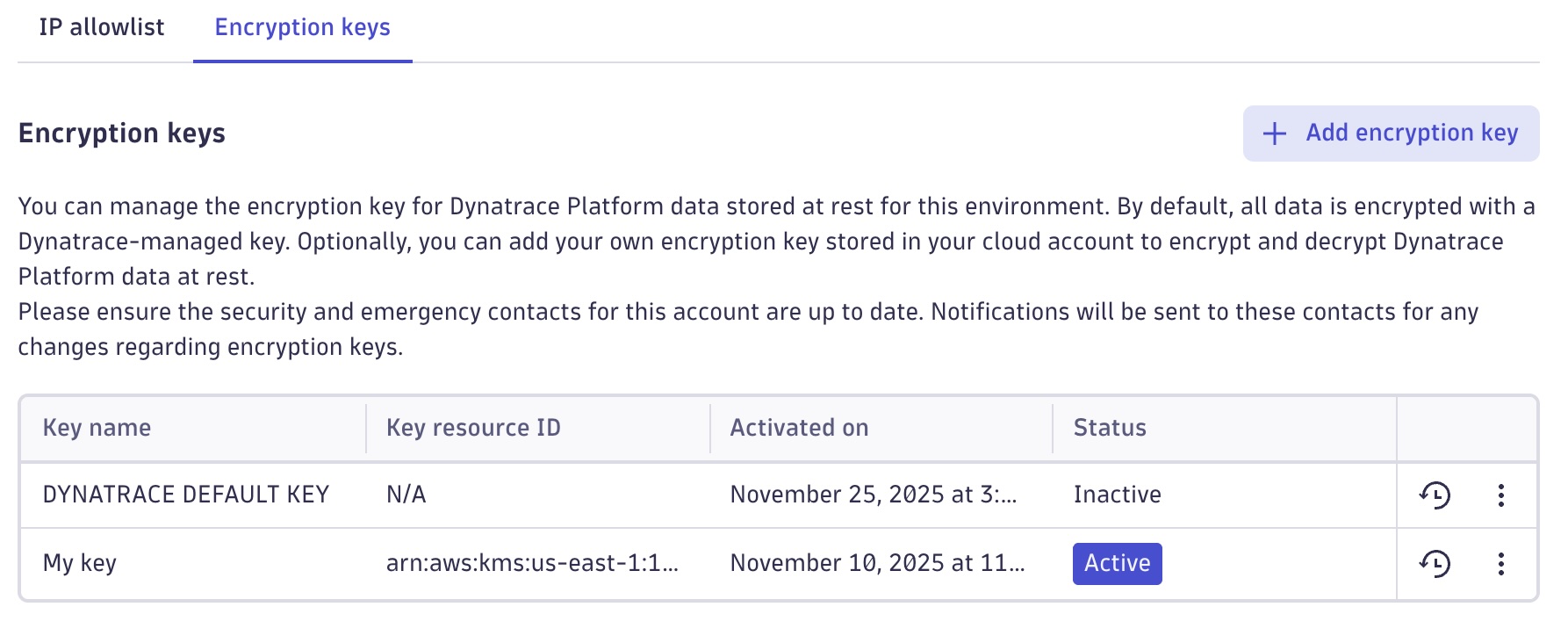
Activate your own encryption key Create an encryption key in your AWS KMS, configure it according to the Dynatrace documentation, and activate it in Dynatrace Account Management. From that point on, all new data stored in the Dynatrace platform is encrypted with your key.
Rotate your encryption key You can switch from one customer-managed key to another at any time. AWS built-in automatic key rotation is also supported.
Revoke access to your data By disabling your encryption key in your AWS KMS, you prevent Dynatrace from reading or writing any data encrypted with that key. This gives you an independent control mechanism for data access that is entirely in your hands — no need to contact Dynatrace or rely on any Dynatrace-managed process.
Switch back to a Dynatrace-managed key If you prefer to return to a Dynatrace-managed encryption key, you can reactivate the default Dynatrace key at any time through Dynatrace Account Management.
How it works
The setup process is simple and straightforward. In Dynatrace Account Management, go to Settings > Environments, select your environment, open the Encryption keys tab, and follow the guided setup process. Dynatrace walks you through creating a key in your AWS KMS, configuring the necessary permissions, and activating the key — all within a few minutes.
Automatic protection on key revocation
If a configured customer-managed key becomes inaccessible — whether intentionally disabled or due to a misconfiguration — Dynatrace automatically:
- Detects the inaccessible key
- Sends an email notification to your designated security contact and emergency contacts
- Displays a clear status indicator in the Account Management UI
If the key was unintentionally disabled, you can restore access by re-enabling the key in your AWS KMS and reactivating it in Dynatrace Account Management.
Limitations
When you switch to a new encryption key, existing data is not automatically re-encrypted with the new key. New data will be encrypted with the newly activated key, while previously stored data remains encrypted with the key that was active at the time of storage. This means you must retain access to all previously used keys for as long as data encrypted with them exists.
Get started
BYOK for Dynatrace platform data at rest on AWS is now generally available for all Dynatrace SaaS customers on AWS.
To get started:
- Read the documentation: Visit the Manage AWS encryption keys documentation for step-by-step setup instructions.
- Configure BYOK: Log in to Dynatrace Account Management, go to Settings > Environments, select your environment, and open the encryption keys.
- Talk to your account team: Contact your Dynatrace account manager to learn how BYOK and other enterprise-grade security features can help you meet your organization’s compliance requirements.
With BYOK, Dynatrace gives you even stronger level of control over your data encryption — so you can adopt Dynatrace SaaS with confidence, even in the most regulated environments.
Frequently asked questions
What is Bring Your Own Key (BYOK)?
Bring Your Own Key (BYOK) allows you to use an encryption key that you own and manage in a cloud key management service, such as AWS Key Management Service (AWS KMS), Microsoft Azure Key Vault, or Google Cloud Key Management Service (Cloud KMS), to encrypt platform data at rest. Rather than relying solely on platform-managed encryption keys, you maintain control over the keys used to protect your data.
What data does BYOK protect?
BYOK protects Dynatrace platform data at rest stored in your Dynatrace SaaS environment on AWS. This includes data stored in Grail as well as platform content such as Notebooks, Dashboards, and Workflows.
Why would I use BYOK?
Organizations in highly regulated industries often need to demonstrate control over encryption keys to meet compliance, security, and data sovereignty requirements. BYOK gives you independent control over key management, key rotation, and the ability to revoke access to encrypted data when needed.
How does BYOK work with AWS KMS?
You create and manage an encryption key in your own AWS KMS account. After granting the required permissions and activating the key in Dynatrace Account Management, Dynatrace uses your AWS KMS key to encrypt and decrypt supported platform data stored in your environment.
Can I rotate my encryption key?
Yes. You can switch to a different customer-managed key at any time. BYOK also supports AWS KMS automatic key rotation capabilities.
Can I revoke Dynatrace’s access to my data?
BYOK gives you direct control over the encryption keys that protect your data at rest. If you disable or revoke access to your customer-managed key, encrypted data can no longer be decrypted using that key. However, BYOK doesn’t control Dynatrace access to your tenant. Tenant access is governed through separate access management, approval, and auditing mechanisms.
What happens if my encryption key becomes unavailable?
If Dynatrace detects that a configured customer-managed key is inaccessible, it automatically:
- Detects the key issue
- Notifies designated security and emergency contacts by email
- Displays the key status in Dynatrace Account Management
If the key was disabled unintentionally, you can restore access by re-enabling the key and reactivating it in Dynatrace Account Management.
Does BYOK encrypt existing data when I activate a new key?
No. Existing data is not automatically re-encrypted when you activate a different key. New data is encrypted with the newly activated key, while previously stored data remains encrypted with the key that was active when the data was written.
Do I need to keep old encryption keys?
Yes. Because previously stored data remains encrypted with the key that was active at the time it was written, you must retain access to all previously used keys for as long as that data remains in your environment.
Can I switch back to a Dynatrace-managed key?
Yes. You can deactivate BYOK and reactivate the default Dynatrace-managed encryption key at any time through Dynatrace Account Management.
Is BYOK available for all Dynatrace deployments?
BYOK is generally available for Dynatrace SaaS customers running on AWS. It is not available for Dynatrace Managed deployments because customers already manage their own infrastructure and encryption controls in those environments.




Looking for answers?
Start a new discussion or ask for help in our Q&A forum.
Go to forum